
ChatGPT Prompts for Ecommerce Ads: 7 to Copy
Priya Raghunathan
E-commerce Performance Manager
Generic prompt lists are written for every business at once, which is why they produce generic ads. These ChatGPT prompts for ecommerce ads are built for online stores: they start from a product page, a real price, a feed and your own reviews, and each one tells you what to paste in and what a good answer looks like. Copy them, fill in the brackets and keep the ones that earn their place in your workflow.
Quick answer: Good ecommerce prompts give ChatGPT the facts a shopper would check: the product page, the exact price and offer, the claims you can prove and real customer language. Ask for a fixed output format, a set number of variants and a reason for each one. Then check every price, claim and character count against the landing page and the platform rules before anything goes live.
If you also run TikTok or Google Search, our ChatGPT prompts for TikTok and Google Ads cover hooks, scripts and responsive search ads. This guide does not repeat them. It covers the jobs that only an online store has: products, prices, catalogues, reviews and seasonal sales.
What makes an ecommerce prompt different?
An ecommerce prompt is different because the ad will sit next to a price, a product image and a landing page that a shopper can check in one tap. A brand awareness line can be vague. A product ad cannot, because any gap between the ad and the product page costs you clicks, trust and sometimes an approval.
Three habits make the prompts below work:
- Paste facts, not descriptions of facts. "Our serum is great for dry skin" gives the model nothing. The ingredient list, the size, the price and three real reviews give it everything.
- List the claims you can prove, and forbid the rest. Models fill gaps with confident sentences. Write "use only these claims" and "do not invent numbers, awards or reviews" every time.
- Ask for a reason next to each variant. A column that says which angle a line uses makes it easy to see when ten drafts are really the same idea.
What not to paste: customer names, emails, phone numbers, order IDs or anything from a CRM export. Aggregated numbers and anonymous review text are enough for every prompt here.
Prompt 1: Product page to ad copy
Use this when a new product goes live and you need a first set of ads quickly.
ROLE: You are a direct-response copywriter for an online store.

CONTEXT:
Product page text: [paste the full page: title, description, specs]
Price and offer: [exact price, any discount, shipping, returns]
Approved claims: [only claims you can prove]
Audience: [who buys it and why]
Brand voice: [3 words, plus words we never use]

CONSTRAINTS:
- Write 10 ad variants for Meta feed placements.
- Each variant: primary text (max 3 short sentences), headline
  (max 6 words), description (max 6 words).
- Use 5 angles, 2 variants each: problem, outcome, product detail,
  social proof (only from reviews pasted), offer.
- Use the exact price and offer. Do not invent numbers or claims.

OUTPUT FORMAT:
Table: Angle | Primary text | Headline | Description | Claim used
What good output looks like: every line names something specific to this product (a material, a size, a use), the "Claim used" column points to a claim from your list, and the two variants within each angle say different things. If you could swap the product name for a competitor's and the copy still works, ask again with more facts.
Prompt 2: Offer and discount angles
Discounts are where ad copy and the landing page drift apart most often. This prompt keeps them tied together.
ROLE: You are a promotions strategist for an ecommerce brand.

CONTEXT:
Offer: [e.g. 20% off the full range, code SAVE20, ends 30 November]
Regular prices: [paste 3 to 5 products with price and sale price]
Margin note: [products we must not lead with because margin is thin]

CONSTRAINTS:
- Propose 8 ways to frame this offer (percentage, amount saved,
  bundle, free gift, threshold, deadline, first order, reason why).
- For each, write one headline and one line of primary text.
- Use only prices and dates given. No "lowest price ever",
  no countdowns we have not set.
- Flag any framing that only works if the landing page shows
  the same wording.

OUTPUT FORMAT:
Table: Framing | Headline | Primary text | Landing page must show
What good output looks like: the savings figures match your sale prices exactly (20% off €60 is €12 saved, €48 to pay), and the last column gives you a checklist for the landing page. Google Merchant Center, for example, requires the price in your product data to match the price on the landing page and at checkout (Google Merchant Center: price), so an ad promising a price the page does not show is a problem on more than one platform.
Prompt 3: Catalogue ad primary text
Catalogue ads show a different product to each person, so the primary text has to work for every item in the product set. Template fields such as {{product.name}} and {{product.price}} can fill in details from the feed, as our Meta catalogue ads guide explains.
ROLE: You write primary text for Meta catalogue ads.

CONTEXT:
Product set: [e.g. women's running shoes, 140 products, €70 to €160]
What all products share: [free returns, materials, brand promise]
Audience stage: [prospecting / viewed product / added to basket]

CONSTRAINTS:
- 8 primary text options that are true for EVERY product in the set.
- Never mention a colour, size, feature or price that only some
  products have, unless it comes from a template field.
- 2 options may use {{product.name}}; mark where it goes.
- Match the audience stage: no "still thinking about it?"
  for prospecting.

OUTPUT FORMAT:
Numbered list, each with a note on which audience stage it suits.
What good output looks like: nothing in the text could be false for one of the 140 products. Read each option next to your cheapest and your most expensive item. If either makes the line untrue, cut it. When the feed itself is the problem, start with product feed optimisation and our catalogue ads troubleshooting checklist.
Prompt 4: Mining your own reviews
Your reviews hold the words customers actually use. This prompt turns them into angles without putting words in anyone's mouth.
ROLE: You are a customer research analyst.

CONTEXT: Here are [number] customer reviews for [product],
exported without names or order details:
[paste review text and star rating]

CONSTRAINTS:
- Group the reviews into themes: reasons to buy, results noticed,
  objections before buying, complaints.
- For each theme, quote 2 to 3 short phrases exactly as written.
- Count how many reviews mention each theme.
- Do not paraphrase quotes. Do not create new reviews.

OUTPUT FORMAT:
Table: Theme | Count | Verbatim phrases | Ad angle it suggests
What good output looks like: counts that add up to roughly your number of reviews, phrases you can find with a text search in the export, and angles grounded in what people said. Use the phrases as research, and quote a review in an ad only when you have the right to use it. The US Federal Trade Commission's 2024 rule bans fake reviews and testimonials, explicitly including AI-generated ones (FTC announcement).
Prompt 5: Black Friday and Cyber Monday angles
Seasonal prompts fail when they produce "Black Friday deals you won't want to miss" for the hundredth time. Give the model your calendar and your stock instead.
ROLE: You are a seasonal campaign planner for an online store.

CONTEXT:
Dates: Black Friday 27 November 2026, Cyber Monday 30 November 2026.
Our offer by phase: [early access, main sale, last chance, extension]
Hero products and stock: [paste products, units available]
Last order date for delivery before [holiday]: [date]

CONSTRAINTS:
- One angle per phase, with 3 headlines and 2 primary texts each.
- Each phase must give a different reason to buy now.
- Mention a deadline only if it is in the context.
- Add a "pause when" note for products likely to sell out.

OUTPUT FORMAT:
Table: Phase | Dates | Angle | Headlines | Primary texts | Pause when
What good output looks like: four phases that each answer "why now?" differently (first access, best price, last delivery date, final hours), and pause notes tied to your stock numbers. For the media buying side of the season, pair this with our BFCM 2026 paid social checklist.
Prompt 6: Google Shopping title rewrites
Shopping ads have no headline you write freely. The product title in your feed does that job, and Google sets clear rules for it: up to 150 characters, the most important details first because shoppers often see only the first 70 or fewer, no promotional text such as price, sale dates or shipping, and no capital letters for emphasis (Google Merchant Center: title).
ROLE: You are a Google Shopping feed specialist.

CONTEXT: Current titles with product attributes:
[paste: id, title, brand, product type, colour, size, material, gender]
Search terms that convert for us: [paste from the search terms report]

CONSTRAINTS:
- Rewrite each title to 150 characters or fewer.
- Order: brand, product type, key attribute, colour, size,
  material, unless the search terms suggest a better order.
- Put the words a shopper searches for in the first 70 characters.
- No prices, discounts, shipping, "best", "sale" or all-caps words.
- Use only attributes given. Do not invent features.

OUTPUT FORMAT:
Table: id | Old title | New title | Character count | First 70 chars
What good output looks like: titles that read like a precise product name ("Brand Women's Trail Running Shoes, Waterproof, Black, Size 39"), with the search words visible in the "First 70 chars" column. Check the counts with =LEN() in a spreadsheet, since language models count characters badly. Our Google Shopping ads guide explains how titles feed into which searches you appear on.
Prompt 7: Objections into ad angles
Customer service inboxes are full of the questions that stop people buying. Each one is an ad waiting to be written.
ROLE: You are a conversion copywriter.

CONTEXT: The 10 most common pre-purchase questions we receive:
[paste questions, anonymised, with how often each comes up]
Our true answers: [paste the answer to each]

CONSTRAINTS:
- For the 5 most frequent questions, write 2 ad variants each
  that answer the objection before it is asked.
- Use only the answers given.
- Keep the tone calm: no fear, no pressure.

OUTPUT FORMAT:
Table: Objection | Frequency | Headline | Primary text
What good output looks like: ads that answer real doubts (sizing, delivery time, returns, how long a pack lasts) with your actual policies, ranked by how often the question comes up.
How do you check and test the output?
Checking and testing the output matters more than the prompt, because a draft only becomes an ad after it survives a review against the product page and a fair test with real spend. The full sequence fits on one line: paste facts, run the prompt, check, test.
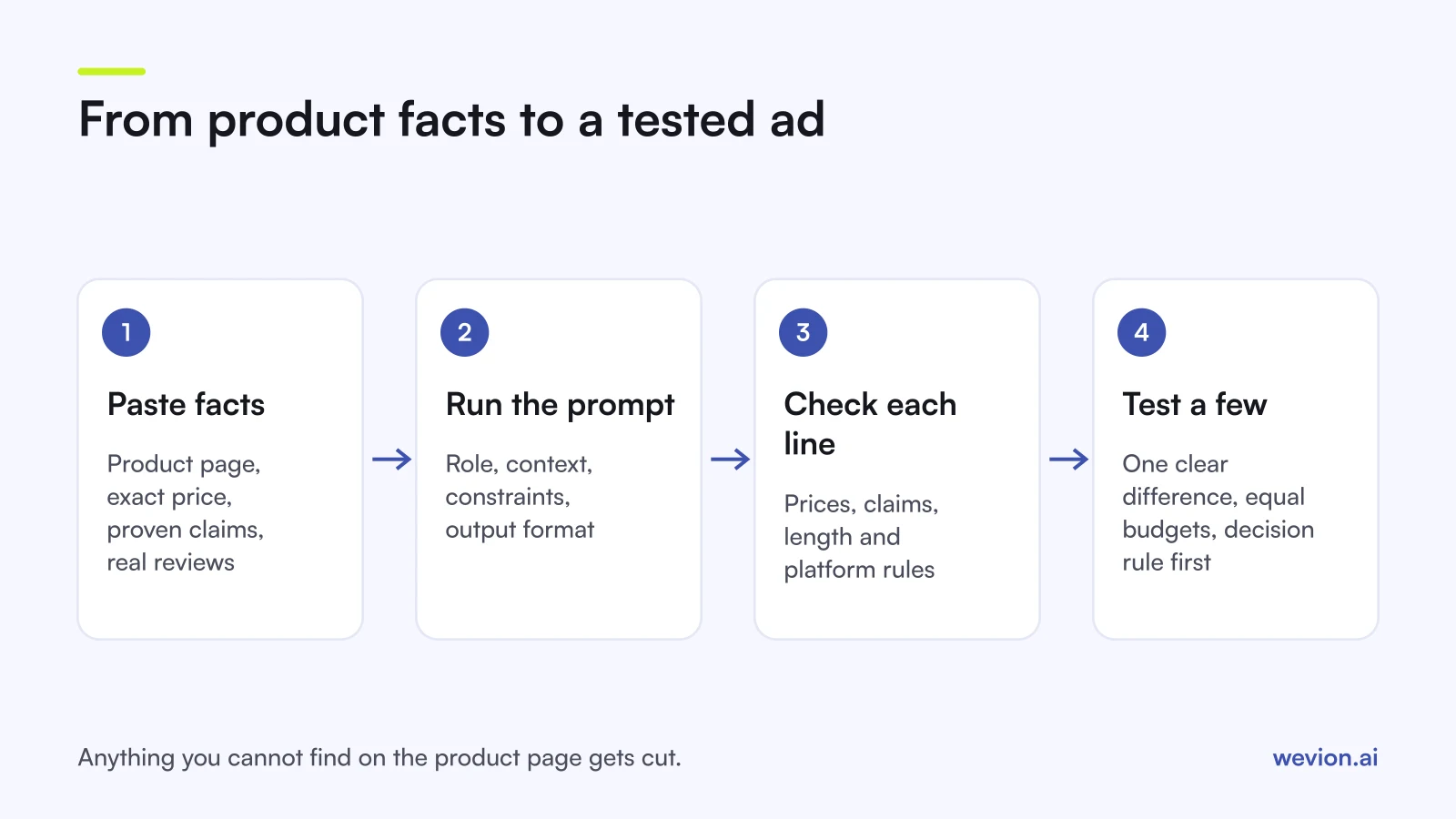
For the check, highlight every number, price, date and claim in each draft and find it on the landing page or in your approved list. Anything you cannot find, cut. Read the platform rules for your category too: Meta's personal attributes standard rejects ads that assert or imply things about the person reading them, so "Struggling with your acne?" fails where "Gentle on acne-prone skin" may pass. Health, weight and beauty products carry extra rules on both Meta and Google.
For the test, launch two or three variants that differ in one clear way, give them the same budget and set your decision rule before launch. Our AI ad copy testing framework covers splits and stopping rules. When you want this to run across a whole catalogue rather than one product at a time, read our workflow guide to AI ad copy for ecommerce.
Where Wevion fits
ChatGPT is a good drafting partner, but it only sees what you paste in. It cannot tell you which of last week's variants is still converting, and it cannot launch or pause anything.
Wevion connects Meta, Google, TikTok, Snapchat, Taboola and Outbrain ad accounts through each platform's official API, syncs data about every 15 minutes, and shows every account in one view, so the variants you draft with these prompts can be launched, compared and managed from the same place.
You can launch the variants that pass review across platforms with Bulk Launch, then set automated rules that pause ads, change budgets by a percentage or just send an alert when results drop below your target. Rules act on their own, within a cooldown and a daily cap on runs. If you prefer to ask questions about your accounts in plain language, Wavo, the AI copilot, reads your synced data and proposes changes that go ahead only after you approve them.
You can try it on your own ad accounts with a 14-day trial on the Pro plan. No card to start. We ask for one on day 7, or earlier if you use up the trial credits, and billing starts on day 14 only if you add it.
Key takeaways
- Paste facts: the product page, exact prices, approved claims and real review text.
- Forbid invented numbers, awards and reviews in every prompt.
- Catalogue ad text must be true for every product in the set.
- Shopping titles: up to 150 characters, search words in the first 70, no promotional text.
- Check every price and claim against the landing page before launch.
- Test a few clearly different variants with equal budgets, not every draft.