
Lead Ads vs Landing Page: Which Converts Better for Your Campaign?
Marta Kowalczyk
Agency Operations Lead
Lead ads vs landing page comes down to one trade: lead ads usually bring more leads at a lower cost per lead, because the form opens inside Facebook, Instagram or Google and arrives pre-filled, while landing pages usually bring fewer leads that know more about the offer. Neither route "converts better" until you count qualified leads and sales from the client's CRM, so the honest answer for an agency is to pick by offer and then test both on the same budget.
Quick answer: Start with lead ads (Meta instant forms or Google lead form assets) for simple, low-commitment offers where the client calls fast. Start with a landing page for complex or high-ticket offers, or when the client needs rich tracking. Then judge both on cost per qualified lead and cost per sale, never on cost per lead alone.
How do lead ads and landing pages work today?
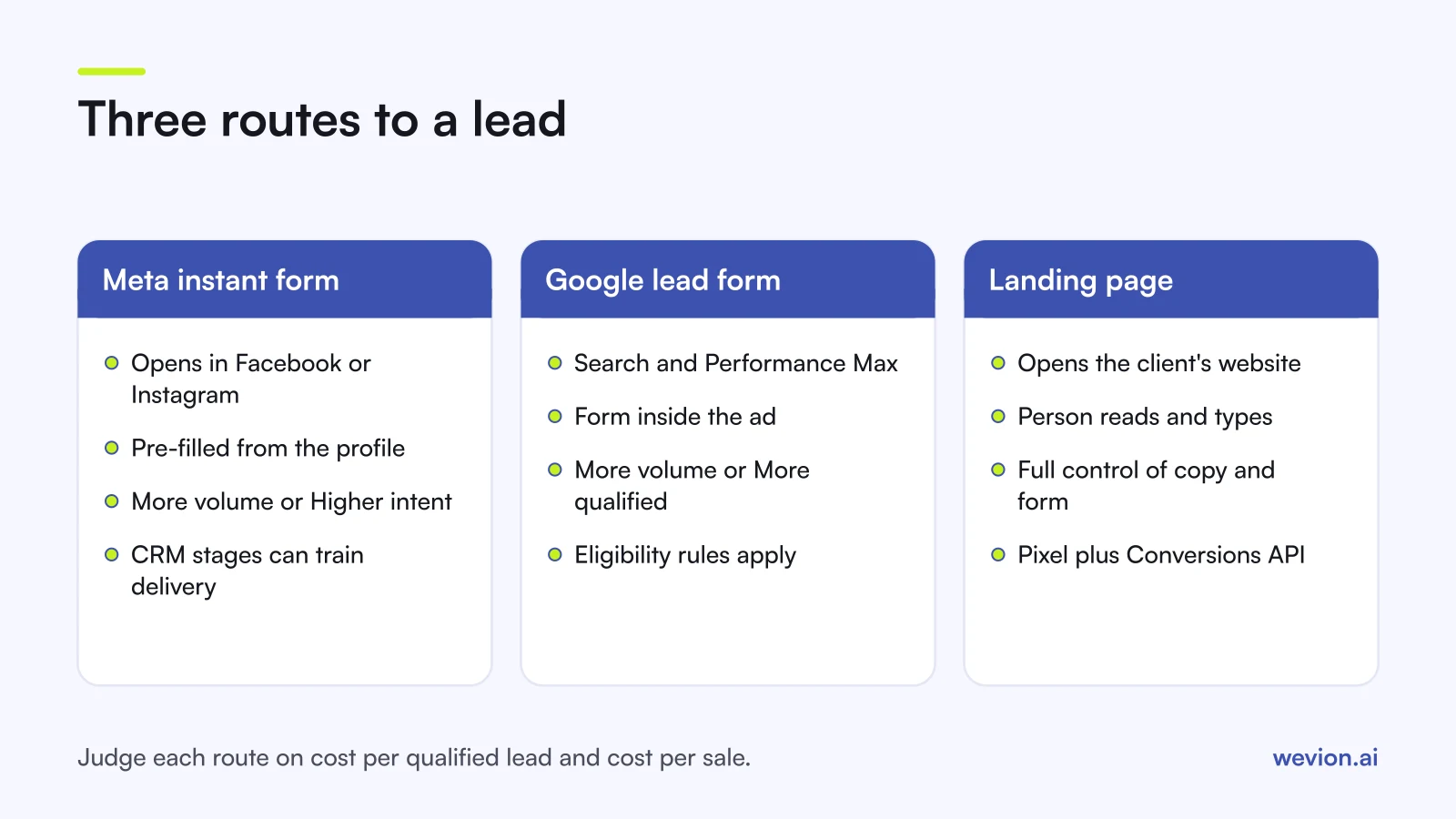
Lead ads and landing pages differ in where the form lives: a lead ad keeps the person inside the ad platform and pre-fills their details, while a landing page sends them to the client's website, where the page, the form and the tracking are under the client's control.
Meta instant forms
Instant forms open inside Facebook or Instagram when someone taps the ad. Name, email and phone come pre-filled from the profile, so a person can submit in a few taps.
The form type is the main quality lever. Meta's developer guide to creating lead forms says lead ads are optimised for the volume of leads by default, and that the higher intent setting "adds a step to the form submission flow where a person reviews and confirms their answers" before submitting. In Ads Manager the two appear as More volume and Higher intent. Our guide to Higher intent instant forms works through when the extra step pays.
Two newer features push instant forms closer to what a landing page can do:
- Conditional logic. Meta's April 2024 post on instant forms describes it as a way to "qualify leads by creating an instant form containing multiple questions within a question flow." See conditional logic in lead ads for the setup.
- CRM sync and conversion leads. Leads can flow straight into the client's CRM, and the CRM can send stages such as "qualified" back to Meta, so delivery optimises for leads that progress. Our guides to Meta lead ads CRM integration and conversion leads optimisation cover both.
Google lead form assets
Google's version is a form attached to a Search or Performance Max campaign. Google's lead form assets page says the form lets people submit their information directly in your ad, and lists the conditions: a good policy compliance history, an eligible vertical (sensitive verticals are excluded), a privacy policy link, conversion-focused bidding and a Google lead form conversion goal.
Google also has two form types. Its guide to lead forms in responsive search ads describes More volume, "a lead form design with fewer steps to submit", and More qualified, a design "that contains more steps", which usually brings fewer leads with stronger interest. You can switch between them during the campaign.
One detail matters for this comparison: if submitting the lead form is the only conversion goal, the ad headline opens the form; if the campaign has other goals too, the headline opens the website and the form shows as an asset. Lead form assets get the full setup in our Google Ads lead form assets guide.
Landing pages
A landing page is a page on the client's site with the offer, proof, a form and the client's own tracking. The Meta pixel records visits and submissions in the browser, and the Conversions API sends the same events from the server. Meta's Conversions API overview says server events "are processed like events sent using the Meta Pixel", which is why most setups send both and deduplicate. On Google, the equivalent is a conversion action measured on the site, covered in our Google Ads conversion tracking setup.
The landing page costs more effort per lead: the page has to load, the person has to read and type, and some leave. In exchange, the client controls the message, the questions, the follow-up booking and the data.
What is the real trade-off between the two?
The real trade-off between lead ads and landing pages has three parts: volume against intent, how fast the lead reaches someone who can call, and how much the client can track after the click. Cost per lead only shows the first part, which is why it so often picks the wrong winner.
Volume against intent
Pre-filled fields make submitting easy, and that cuts both ways. More people finish the form, including some who were only curious or did not realise a salesperson would call. A landing page asks for more effort, so fewer people finish and the ones who do have usually read the offer.
The gap is no longer fixed. Higher intent or More qualified forms, two or three multiple choice questions the profile cannot pre-fill, and conditional logic all filter instant form leads before they reach the client. A landing page can also be made too easy, with a single email field and nothing about what happens next.
Speed to lead
An instant form lead is often the warmest a few minutes after it submits and cools quickly, because the person was mid-scroll and may not remember the ad an hour later. If the client works leads from a CSV once a day, the form's volume advantage turns into a pile of cold numbers.
Landing page leads usually have more context, but they cool too. Either way, the route has to deliver each lead to the CRM or the phone as it arrives. Google, for example, stores lead form leads for 60 days and its CSV download covers the last 30, according to its lead form assets page, so a manual export habit is a risk. Our speed to lead guide covers the routing options per platform.
Tracking and optimisation
On a landing page the client can measure scroll depth, attach UTMs, record the source on the CRM record and feed both pixel and server events back to the platform. With an instant form, the lead and its answers stay on the platform until a CRM integration picks them up.
That gap has narrowed on Meta. Meta's conversion leads integration guide says the conversion leads goal is "only compatible with Facebook/Instagram's Lead Ads (Instant Forms)", and sets requirements: at least 200 leads a month, the stage you optimise for reached within 28 days, a stage conversion rate between 1% and 40%, and CRM data uploaded at least once a day. If a client meets those, instant forms can learn from the CRM directly.
Meta has also published a direct comparison. In its April 2024 post, Meta reported that 15 A/B tests run between November 2022 and February 2023 found instant form campaigns using the conversion leads goal delivered a 20% lower cost per qualified lead than website form campaigns optimised for website conversions, at an 86% confidence level. That is Meta's own study of its own product, so treat it as a reason to test, not as a forecast for a given client.
Which route fits which offer?
The route that fits best depends mostly on how much explaining the offer needs and how fast the client can call. The table below is a starting point by type of client, not a rule; the test in the next section decides.
| Client or offer | Start with | Why | Watch out for |
|---|---|---|---|
| Free quote for home services | Instant form, Higher intent | Simple ask, buyers expect a call | Leads go cold if nobody calls the same day |
| Insurance quote | Instant form with qualifying questions, or Google lead form if eligible | Short forms suit comparison shoppers | Sensitive categories and Google eligibility rules |
| Real estate valuation or viewing | Instant form, then booking | Local, fast-moving intent | Curiosity leads asking for a price only |
| Solar or home improvement | Landing page with calculator, or form with conditional logic | Buyers need to see savings and fit | Unqualified roofs or renters if no filter |
| B2B demo or consultation | Landing page | Needs proof and context before a call | Long sales cycle hides results for weeks |
| Webinar, guide or checklist | Instant form, More volume | Nurture is automated, volume is the goal | Low reply rate is normal, judge on later stages |
| High-ticket course or service | Landing page or video page | Trust and price need explaining | High cost per lead early in testing |
| Warm retargeting audience | Instant form | People already know the offer | Small audiences tire quickly |
For vertical detail, see our guides to home services, insurance, real estate and solar lead generation.
How do you test lead ads against a landing page fairly?
A fair test of lead ads against a landing page keeps everything the same except the route: same budget, same audience, same creative and offer, the same follow-up process, and the same CRM definition of a qualified lead. Then you judge on cost per qualified lead and cost per sale.
Set up the test
- Split one campaign's budget evenly between two ad sets, one optimised for instant form leads and one for website leads or conversions, or set the two up as an A/B test in Ads Manager so they share the audience fairly.
- Use the same creative and offer in both, with the landing page saying what the form says.
- Tag every lead with its route in the CRM, through the form name and through UTMs on the landing page, so qualification and sales can be split later.
- Agree what "qualified" means with the client before launch. Our lead scoring guide for paid ads has a simple model.
- Keep follow-up identical. If form leads get a call in five minutes and landing page leads get one tomorrow, you are testing the sales team, not the route.
Read the results down the funnel
Here is a worked example with hypothetical numbers, a client spending €3,000 on each route:
| Instant form | Landing page | |
|---|---|---|
| Ad spend | €3,000 | €3,000 |
| Cost per lead | €15 | €30 |
| Leads | 200 | 100 |
| Qualified rate | 20% | 36% |
| Qualified leads | 40 | 36 |
| Cost per qualified lead | €75.00 | €83.33 |
| Close rate on qualified leads | 20% | 25% |
| Sales | 8 | 9 |
| Cost per sale | €375.00 | €333.33 |
In this example the instant form wins on cost per lead by half and still wins on cost per qualified lead, yet the landing page wins on cost per sale, because its qualified leads close a little more often. Every stage tells a different story, which is why the decision belongs at the last stage you can measure in time.
Two practical points. First, sales lag: a B2B client may need two months to close, so agree a stage, such as "meeting held", as the decision point. Second, sales time is a cost: 200 leads take longer to call than 100, and a client with one rep may prefer the route with fewer, better leads even at equal cost per sale.
For ways to bring the numbers down once you have a winner, see our guide to reducing cost per lead on Facebook ads.
What hybrid options sit between the two?
Hybrid options let an agency keep the low effort of a lead form while adding some of a landing page's context or tracking. Most accounts that run lead generation for a while end up with at least one of them.
- Form first, page after. Use an instant form for contact details, then send the thank-you screen to a booking page or a short video on the client's site. Volume stays high and the next step happens where the client tracks it.
- Page for cold, form for warm. Send cold audiences to a landing page that explains the offer, and retarget visitors who did not convert with an instant form.
- Split by funnel stage. Use instant forms for guides and events that feed automated nurture, and a landing page for demos, quotes and consultations.
- Qualify inside the form. Higher intent plus conditional logic plus a CRM loop can give a form most of what a page filters for, without the load time.
- Google: form as an asset. Keep website conversions as goals alongside the lead form, so the headline opens the site and the form appears as an extra option.
Whichever mix you choose, keep each route as its own ad set or campaign so the numbers stay separable. For the instant form side, our Facebook lead ads best practices cover the details.
Where Wevion fits
Wevion helps with the reporting side of this comparison, not with the forms or the pages. It does not host instant forms or landing pages, it is not a CRM, and it does not receive or route leads.
Wevion connects Meta, Google, TikTok, Snapchat, Taboola and Outbrain ad accounts through each platform's official API, syncs data about every 15 minutes, and shows platform-reported leads, cost per lead and spend for every client in one view. That makes a form-versus-page test quicker to watch across clients and platforms.
Automated rules can pause an ad set, change a budget or just send an alert when cost per lead crosses a threshold you set, with a cooldown and a daily cap on runs. Qualified leads and sales still come from the client's CRM.
You can try it on your own ad accounts with a 14-day trial on the Pro plan. No card to start. We ask for one on day 7, or earlier if you use up the trial credits, and billing starts on day 14 only if you add it.
Key takeaways
- Lead ads usually win on cost per lead; landing pages often win on lead intent. Judge both on cost per qualified lead and cost per sale.
- Meta's Higher intent forms and Google's More qualified forms add steps that trade volume for interest. Test them before switching to a page.
- Conditional logic, CRM sync and conversion leads optimisation have narrowed the quality gap on Meta, but conversion leads needs at least 200 leads a month.
- Landing pages win when the offer needs explaining, the price is high, or the client needs full tracking with pixel and Conversions API.
- Speed to lead decides how much an instant form's volume is worth: route leads to the CRM as they arrive.
- Test fairly: same budget, creative, audience and follow-up, tagged by route, read at the last stage the client can measure.