
How to Reduce Cost Per Lead on Facebook Ads
Priya Raghunathan
E-commerce Performance Manager
To reduce cost per lead on Facebook ads without increasing ad spend, you need more leads from the same impressions: more people who see the ad should open the form, and more of those who open it should submit. Cost per lead is spend divided by leads, so every step between the impression and the submitted form is a lever, and most of them cost nothing to pull.
Quick answer: Cost per lead is set by three numbers: what you pay for 1,000 impressions, the share of people who open the form, and the share who submit it. Lower it by cutting form questions that decide nothing, testing the offer before the visuals, excluding existing leads and customers, and letting ad sets exit learning. Then check cost per qualified lead, because the cheapest lead is not always the best.
This guide covers the levers in order of where they sit in the funnel. For the full instant form setup, see our Facebook lead ads best practices. For the campaign structure around it, see the Meta lead generation campaign playbook.
What drives cost per lead on Facebook ads?
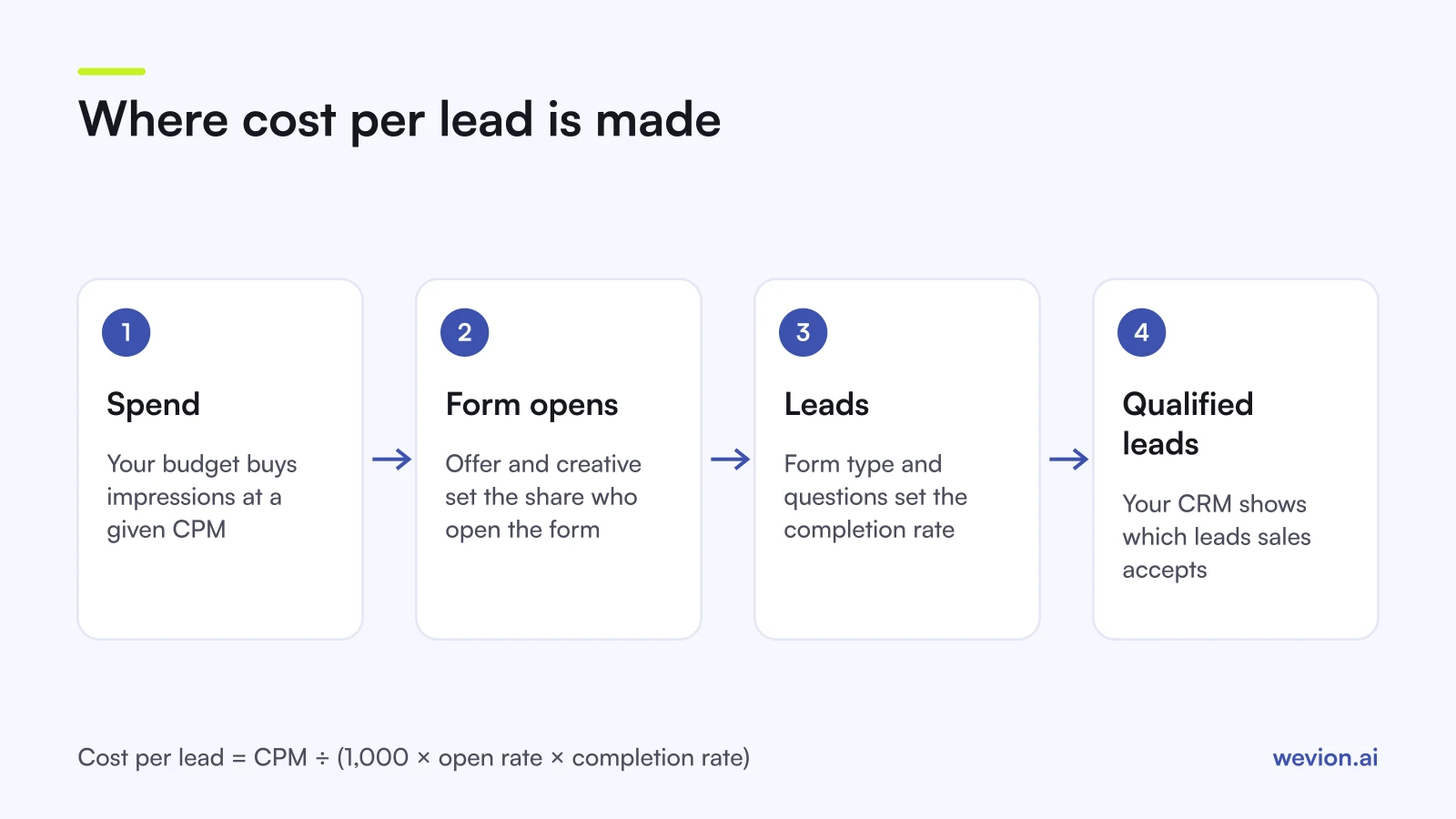
Cost per lead on Facebook ads is your spend divided by the leads it produced, and it breaks down into three rates you can work on separately. Written out, the formula is:
Cost per lead = CPM ÷ (1,000 × form open rate × completion rate)
CPM is what you pay for 1,000 impressions. The form open rate is the share of impressions that lead to someone opening your instant form or landing page. The completion rate is the share of those people who submit.
Here is a worked example with hypothetical numbers for one ad set spending €3,000 in a month:
| Before | After a form change | |
|---|---|---|
| Spend | €3,000 | €3,000 |
| CPM | €12 | €12 |
| Impressions | 250,000 | 250,000 |
| Form open rate | 1.2% | 1.2% |
| Form opens | 3,000 | 3,000 |
| Completion rate | 10% | 13% |
| Leads | 300 | 390 |
| Cost per lead | €10.00 | €7.69 |
The same budget, the same audience and the same ad produced 90 more leads because three more people in every hundred finished the form. A cost per lead drop of 23% came from one rate moving by three points, without touching the budget.
Because the three rates multiply, small gains in each compound: a 10% gain in all three cuts cost per lead by about 25%.
How do you reduce cost per lead with your lead form?
The lead form is where most cost per lead is won or lost, because it sits closest to the lead and every change affects every person who opens it. Start with the form type, then the questions.
Pick the form type deliberately. Meta's instant form types page lists three types: More volume, Higher intent and Rich creative. Meta's developer guide to lead forms says forms are optimised for volume by default, and that the higher intent setting adds a step where a person reviews and confirms their answers before submitting. More volume gives the lower cost per lead. Higher intent adds friction on purpose, so it usually costs more per lead and can still cost less per qualified lead. Our Higher intent instant form guide works through that trade-off.
Remove questions that decide nothing. Every question should change what happens to the lead: who calls, how fast, or whether they get a call at all. If a question only fills a CRM field nobody uses, cut it. Remove one question at a time and judge each version on cost per qualified lead, not cost per lead alone.
Use answer options instead of free text. The developer guide lists custom questions with a set of answer options in a dropdown. A tap is easier than typing, and fixed answers give your CRM clean values to route on, such as a budget band or a timeframe.
Keep contact questions short. Instant forms can pre-fill standard contact questions such as name and email from the person's profile, so the friction sits in what you add on top.
Branch instead of adding questions. Meta describes conditional logic as an instant form with multiple questions in a question flow, so people see only the questions that apply to them. Our conditional logic guide shows how to build one.
Write the completion screen. Say what happens next and when, such as "We will call you within one working day".
How does audience targeting affect cost per lead?
Audience targeting affects cost per lead through two numbers: the CPM you pay and the share of people who care enough to open the form. The goal is to stop paying for impressions that cannot turn into a new lead.
Understand what Advantage+ audience does. Meta's Advantage+ audience page separates audience controls from suggestions. Controls such as location, minimum age, language and custom audience exclusions are hard limits. Suggestions such as custom audiences, lookalikes, age, gender and detailed targeting are hints, and Meta can deliver beyond them when it expects better results. If cheaper leads are coming from outside your intended buyer, tighten the controls rather than adding more suggestions. Our guide to broad targeting on Meta covers the set-up.
Exclude people who are already leads or customers. Upload recent leads and current customers as custom audiences and exclude them. Paying to reach someone already in your CRM produces a duplicate lead at best.
Let the ad filter. A broad audience works when the ad names the price range, the area served or who the offer is for. If it appeals to everyone, cheap leads hide an expensive problem.
Do not split budget too thinly. Several small ad sets aimed at similar people each gather fewer results, which slows learning. Fewer, larger ad sets usually learn faster, as our CBO vs ABO guide explains.
Which creative tests lower cost per lead?
Creative tests lower cost per lead mainly through the form open rate: the more clearly the ad promises something worth a few taps, the more people open the form. Test in this order, because the earlier items usually move results more.
- The offer. "Free quote in 24 hours", "Price list" and "15-minute call" attract different people, so watch quality as well as cost.
- The opening line. The first line of primary text and the first seconds of a video decide whether someone stops scrolling.
- The format. Video, static image or carousel: there is no universal winner.
- The visual. A clearer image of the outcome often beats a polished brand shot.
- The call-to-action button. Match it to the offer, such as Get quote or Sign up.
Change one element per test and keep the audience and budget fixed, so a change in cost per lead can be traced to the element. Our A/B testing guide for Facebook ads covers how many leads you need before calling a winner.
Which bid strategy keeps cost per lead down?
The bid strategy that keeps cost per lead down depends on whether you need volume or a firm cost target, and the default is the right starting point for most accounts. Meta's bid strategy documentation describes four options:
| Bid strategy | What Meta does | When to use it for leads |
|---|---|---|
| Highest volume (formerly lowest cost) | Bids to get the most results for the budget, with no cost ceiling | Starting point, until results are stable |
| Cost per result goal (cost cap) | Aims to keep the average cost per result near the goal you set; Meta says adherence is not guaranteed | When cost per lead must stay near a target |
| Bid cap | Never bids above the limit you set in each auction | Only when you know your conversion rates well |
| ROAS goal | Sets a minimum return for value optimisation | Rarely, since lead campaigns seldom pass a value |
A common approach is to run highest volume until cost per lead settles, then set a cost per result goal close to the cost per lead you have seen. A goal set far below it can stop the ad set spending, which cuts leads rather than costs. Our Meta ads bid strategies guide explains how to set the first goal.
The learning phase matters as much as the bid. Meta's learning limited help page says an ad set is marked learning limited when it is unlikely to get about 50 optimisation events in the week after its last significant edit. Meta's significant edits page lists bid strategy changes among the edits that can restart learning. Frequent edits keep an ad set learning, and learning usually means a less stable cost per lead.
How do you improve cost per lead without increasing ad spend?
You improve cost per lead without increasing ad spend by getting more leads from the impressions you already buy. These changes each take a day or less to set up:
- Delete one form question that does not change who calls the lead or how fast.
- Exclude existing leads and customers with custom audiences.
- Test a new offer line while keeping the visual and audience the same.
- Align the ad and the form headline so they promise the same thing.
- Merge small ad sets that target similar people, so each one gathers more results.
- Stop editing ad sets in learning unless something is broken.
- Refresh ads whose frequency keeps climbing while form opens fall.
- Check landing page speed if you send traffic to a website form.
- Add a cost per result goal close to your recent cost per lead once delivery is stable.
- Call leads quickly. It does not lower cost per lead, but it turns more leads into customers, as our speed to lead guide explains.
Why does cost per qualified lead matter more than cost per lead?
Cost per qualified lead matters more because a lead nobody can sell to is wasted spend, however cheap it was. Cost per qualified lead is spend divided by the leads your sales team accepts, which you can only measure by joining ad data with your CRM.
Here is a worked example with hypothetical numbers for two ways of running the same €3,000 budget:
| Leads goal | Conversion leads goal | |
|---|---|---|
| Spend | €3,000 | €3,000 |
| Cost per lead | €10.00 | €12.00 |
| Leads | 300 | 250 |
| Qualified rate | 15% | 24% |
| Qualified leads | 45 | 60 |
| Cost per qualified lead | €66.67 | €50.00 |
Cost per lead rose by 20%, but cost per qualified lead fell by 25%, because the share of good leads rose faster than the price of each lead.
Conversion leads is how you tell Meta what qualified means. With the conversion leads performance goal, you send lead stages from your CRM back to Meta through the Conversions API, and Meta looks for people likely to reach the stage you choose. Meta's Conversions API for CRM documentation says the goal works with Facebook and Instagram lead ads using instant forms, and lists its criteria: at least 200 leads a month, a target stage reached by 1% to 40% of leads within 28 days of the lead, and data uploads at least once a day. In an April 2024 post, Meta said instant form campaigns using this set-up cut cost per quality lead by 15% on average, adding that performance may vary. Our conversion leads optimisation guide covers the set-up step by step.
Measure quality before you optimise for it. Agree with sales what counts as qualified, then track lead quality through your CRM by campaign and ad. A simple lead scoring model helps sales work the best leads first.
Where Wevion fits
Lowering cost per lead is a weekly job of comparing ad sets, forms and offers, and the numbers often sit across several ad accounts or several platforms.
Wevion connects Meta, Google, TikTok, Snapchat, Taboola and Outbrain ad accounts through each platform's official API, syncs data about every 15 minutes, and shows spend, leads and cost per lead for every account in one view, so two versions of a form test or offer test sit side by side.
Each client gets its own workspace, and team roles such as manager, media buyer, finance and viewer decide who can change what. Automation rules can pause an ad set whose cost per lead runs too high, change budgets or just send an alert. If you move budget between platforms, cross-platform rules are in beta. Wevion does not send CRM stages to Meta, so conversion leads stays a connection between your CRM and Meta.
You can try it on your own ad accounts with a 14-day trial on the Pro plan. No card to start. We ask for one on day 7, or earlier if you use up the trial credits, and billing starts on day 14 only if you add it.
Key takeaways
- Cost per lead equals CPM divided by 1,000 times the form open rate times the completion rate, so fixes to each rate multiply.
- The form is the biggest lever: pick the form type on purpose, cut questions that decide nothing and use answer options.
- Use audience controls for hard limits, exclude existing leads and customers, and let the ad filter who responds.
- Test the offer first, then the opening line, format and visual, one element at a time.
- Start with highest volume, add a cost per result goal near your observed cost per lead, and avoid edits during learning.
- Judge every change on cost per qualified lead; conversion leads optimisation needs about 200 leads a month and a stage reached by 1% to 40% of leads within 28 days.