
Insurance Lead Generation Ads on Meta, Google and TikTok
Lena Brandt
Ad Policy & Compliance Analyst
Insurance lead generation ads are paid campaigns that collect contact details from people shopping for cover, such as car, home, life, health or pet insurance, through an instant form or a landing page. Meta, Google and TikTok all treat insurance as a regulated financial product, so the rules reach three places: who you can target, whether the advertiser needs a licence or verification, and which questions a lead form may ask. The third one catches agencies out most often.
Quick answer: As of November 2026, declare Meta's financial products and services category for US audiences and expect no age, gender, postcode or lookalike targeting. Make sure the insurer or broker holds the licence the market requires, and complete Google's financial services verification where it applies. On every platform, keep lead forms free of health, income, date of birth and current policy questions.
This guide follows the structure of our guide to real estate lead generation ads, which covers the housing rules that also apply to home and mortgage insurance. For the general form setup on each platform, see Facebook lead ads best practices, Google Ads lead form assets and TikTok lead generation ads. Nothing here is legal advice: read each platform's policy and check local law with the client's counsel.
Why are insurance ads treated differently?
Insurance ads are treated differently because insurance is a regulated financial product: the seller usually needs a licence, the ads may need legal disclosures, and targeting by age or gender could shut people out of financial services. Each platform answers with a mix of advertiser checks, targeting limits and limits on the data a form collects.
Two details change which rules apply to a given client:
- The product. TikTok's housing, employment and credit ad policy lists homeowners insurance and mortgage insurance as housing ads. A home insurance broker can therefore fall under the housing rules as well as the financial ones.
- The market. The strictest targeting limits are tied to the United States and Canada, while advertiser verification on Google covers a long list of other countries.
What does Meta restrict for insurance ads?
Meta restricts insurance ads through its financial products and services Special Ad Category and through its advertising standards on financial and insurance products. The category is declared when you create the campaign.
Meta's Special Ad Category documentation says the financial products and services category replaced the older credit category in January 2025, and is required for advertisers based in the United States or showing ads to audiences in the United States. The page gives both 14 and 21 January 2025 as the start date. It does not list insurance by name, but Meta's advertising standards file insurance under financial and insurance products and services, so plan on declaring the category for any insurance offer shown in the US.
Once the category is declared, the documentation applies the same limits as for housing:
- Age is generally fixed at 18 to 65+.
- Gender cannot be selected.
- Location must cover at least a 15 mile or 25 km radius in the US and Canada; postcodes and location exclusions are not supported.
- Detailed targeting excludes demographics and behaviours, and interests must come from an approved list.
- Lookalike audiences are not available.
Meta's advertising standards add rules for the ad itself. As summarised in Meta's Transparency Centre, insurance ads may need a licence in the country you target, must be shown only to people aged 18 or over and must include legally required disclosures. Meta's advertising policies also say ads must not request insurance information, including current policy numbers, without Meta's prior permission. Plain brand ads for an insurer that do not offer a product are treated differently, so check how the client's ads are framed.
What does Google restrict for insurance ads?
Google restricts insurance ads mainly through advertiser verification and its financial services policy, while its US and Canada targeting limits are written around credit and banking. The difference from Meta is worth knowing before you plan audiences.
Google's personalised advertising policy limits targeting by gender, age, parental status, marital status and ZIP code for housing, employment and consumer finance ads in the United States and Canada only. Google's February 2024 policy update defines consumer finance around credit, lending, banking and certain financial planning services, and does not name insurance. If an insurance offer is bundled with credit, such as premium finance, treat it as consumer finance.
Verification is the bigger requirement. Google's page on financial services verification by country lists 42 countries as of November 2026, including the United Kingdom, Germany, France, Italy, India and Australia, and most entries name insurers or insurance regulators. The US and Canada are not on the list today; PPC Land reported in October 2026 that Google plans to extend verification there in 2027. Google's financial services policy also asks for the business's physical address and all associated fees to be clearly visible.
Lead form assets need an eligible vertical and a good policy history, and Google's lead form assets page says sensitive verticals are not eligible, so confirm eligibility in the client's account before planning around them. Search is usually the strongest Google channel for insurance anyway, because a search for "van insurance quote" already states the intent.
What does TikTok restrict for insurance ads?
TikTok restricts insurance ads through its financial services policy, its lead ads data rules and, for home and mortgage insurance, its Special Ad Category toggle.
TikTok's financial services ad policy, last updated September 2026, requires advertisers to comply with local law, hold a licence from local and regional authorities, include proper disclaimers and restrict ads to people aged 18 and over. Requirements vary by market, and insurance is named explicitly only in some market sections, so read the section for each country you target.
For lead forms, TikTok's ad format and functionality policy, last updated April 2026, lists data you may not collect through lead ads without written consent from a TikTok sales representative. For insurance, the relevant items are:
- insurance information, such as policy numbers or insurance coverage;
- health information, such as medical history or conditions;
- financial information, such as income or net worth;
- date of birth, year of birth or exact age.
For homeowners and mortgage insurance, the housing rules also apply: TikTok's toggle is required for US-based advertisers and anyone targeting the US or Canada, with no age, gender, ZIP code or lookalike targeting. Our real estate guide lists those limits in full.
How do the insurance rules compare across platforms?
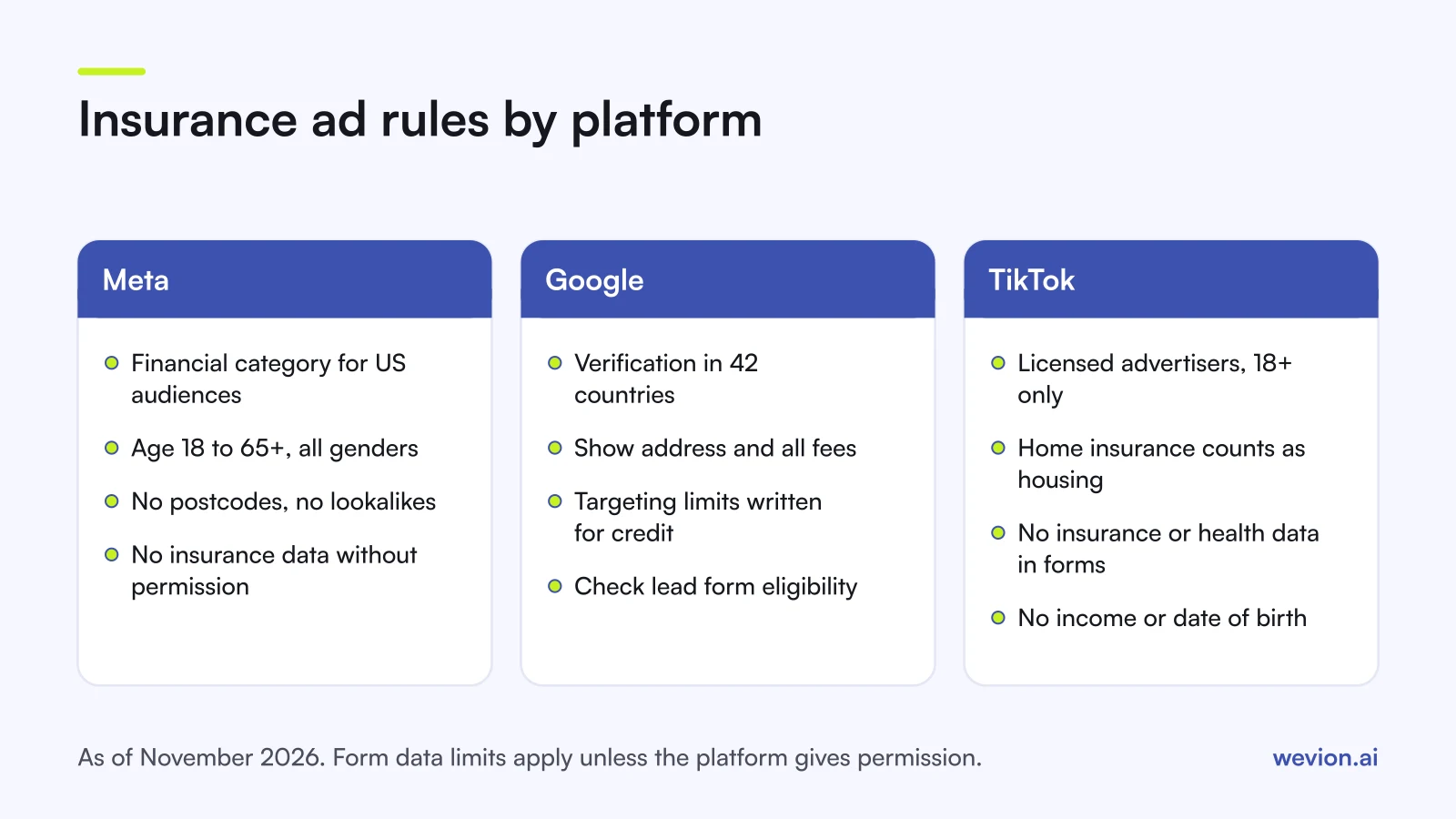
The insurance rules share a core across the three platforms: adults only, an advertiser with the right licence and lead forms that stay away from sensitive data. The differences are in where targeting limits apply and how the advertiser is checked. The summary reflects each platform's pages as of November 2026:
| Meta | TikTok | ||
|---|---|---|---|
| Targeting limits | Financial products and services category for US audiences | US and Canada limits written for credit and banking; insurance not named | Housing toggle for home and mortgage insurance in the US and Canada |
| Age | 18 to 65+ in the category; ads 18+ | Under-18s get no personalised ads | 18+ required |
| Advertiser checks | Licence may be required by country | Financial services verification in 42 countries | Licence from local authorities |
| Lead form limits | No insurance information without permission | Sensitive verticals not eligible for lead forms | No insurance, health, income or date of birth data without consent |
How should you design a compliant insurance lead form?
A compliant insurance lead form qualifies on what the person wants to buy and when, not on who they are, because the data that would price a policy is the data the platforms restrict. Keep contact details pre-filled and add three or four multiple choice questions.
Questions that sort insurance leads without restricted data:
- What would you like to insure? Car, home, pet, travel, business.
- When do you need cover to start? This month, in 1 to 3 months, just comparing.
- What level of cover are you looking for? Basic, standard, comprehensive.
- How would you like us to contact you? Phone, email, WhatsApp, and a preferred time.
Leave out questions about health, income, exact age or date of birth, current insurer, policy number or claims history. The adviser can ask those on the call, with the disclosures the regulator requires. If the client sells several products, conditional logic in lead ads can send each product to its own short set of questions, and close the form for products the client does not sell.
Use the form type to trade volume for intent. Meta's Higher intent instant form adds a review screen before submission, which helps when an adviser calls every lead.
How should you follow up and qualify insurance leads?
Insurance leads need follow-up within minutes, because people comparing quotes often fill in several forms in one sitting, and the first adviser to call has the best chance of quoting. Route each lead by product to an adviser authorised to sell it, and record the consent the person gave in the form.
A worked example with hypothetical numbers shows why follow-up decides the result. A broker spends $4,000 a month and gets 160 leads at $25 each. If 64 are reached and quoted, that is $62.50 per quoted lead. If slow follow-up means only 40 are reached, the same campaign costs $100 per quoted lead, without a setting changing in any ad platform.
Our guide to speed to lead covers routing, alerts and a call cadence, and our guide to lead scoring for paid ads shows how to turn form answers and call outcomes into a score you can send back to the platforms. With age and lookalike targeting gone, broad delivery and strong creative do most of the targeting, as our guide to broad targeting on Meta explains.
Where Wevion fits
Wevion is not part of the compliance or lead path: it does not set special ad categories, check policy, store leads or send conversions to the platforms. The category is declared in each platform's own campaign setup, and leads live in the client's CRM.
Wevion connects Meta, Google, TikTok, Taboola, Snapchat and Outbrain ad accounts through each platform's official API, syncs data about every 15 minutes, and shows platform-reported leads, cost per lead and spend for every client in one view, so you can compare an insurer's Meta, Google and TikTok campaigns side by side.
Each insurance client gets its own workspace, and team roles such as manager, media buyer, finance and viewer decide who can change what. Automation rules can pause ad sets, change budgets or just send an alert when cost per lead crosses a threshold you set.
You can try it on your own ad accounts with a 14-day trial on the Pro plan. No card to start. We ask for one on day 7, or earlier if you use up the trial credits, and billing starts on day 14 only if you add it.
Key takeaways
- Insurance lead generation ads are regulated financial ads on Meta, Google and TikTok, and home or mortgage insurance can also fall under housing rules.
- On Meta, declare the financial products and services category for US audiences and expect no age, gender, postcode or lookalike targeting.
- On Google, check financial services verification in the 42 countries where it applies, and lead form eligibility in the account.
- On TikTok, the advertiser must hold a licence, ads are 18+ only, and lead forms cannot collect insurance, health, income or date of birth data without consent.
- Qualify on product, start date and level of cover, and follow up within minutes with an authorised adviser.