
Dayparting in Google Ads: Ad Schedules That Pay
Rafael Moreira
Senior Performance Marketer
Dayparting in Google Ads means deciding which hours and days your ads can run, and, on manual bidding, how much more or less to bid in each window. The tool for it is the ad schedule. It is simple to set up and easy to get wrong, because two things change how it works: the account time zone and your bid strategy.
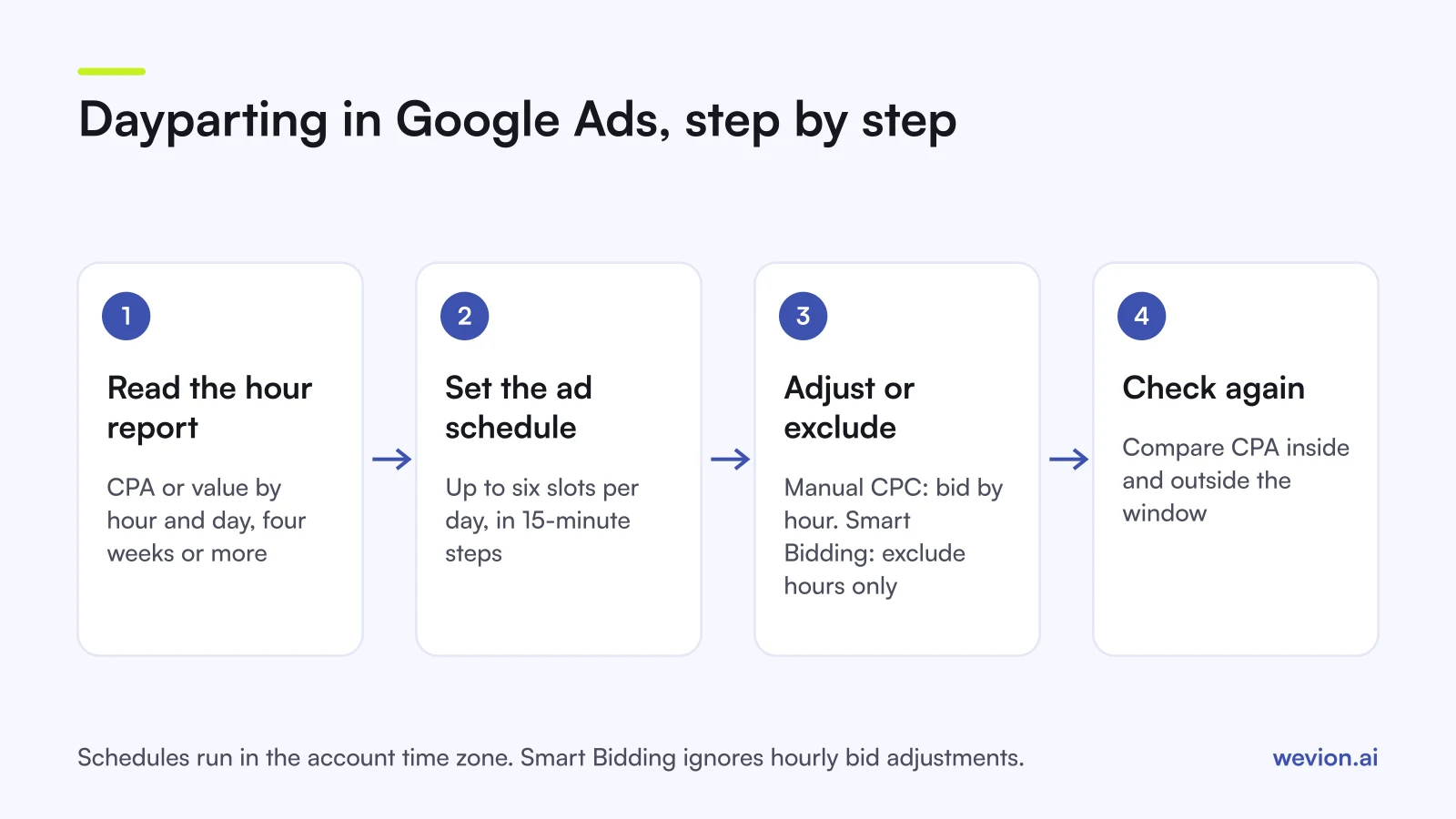
Quick answer: Set an ad schedule on the campaign (up to six slots per day, in the account's time zone). On Manual CPC you can raise or lower bids by hour, from -90% to +900%. On Smart Bidding those bid adjustments are ignored, but the schedule itself is respected, so only exclude hours that clearly lose money. Performance Max takes a schedule but no hourly bid adjustments.
If you run Meta too, our Meta ads scheduling guide covers the same idea on that platform, where the rules are quite different. This article is the Google side.
What is dayparting in Google Ads?
Dayparting is limiting or reweighting ad delivery by time of day and day of week. Google calls the feature ad scheduling: you can limit ads to specific hours or days, or raise and lower bids for them. By default a campaign runs all day, every day.
There are two separate levers:
- The schedule: when ads are allowed to show at all. Outside the schedule the campaign does not enter auctions.
- Bid adjustments by schedule: a percentage added to or taken from your bids inside a time slot. Google's bid adjustments page gives the range for ad scheduling as -90% to +900%.
Which lever you can use depends on your bid strategy, which is why the setup order matters.
How do you set up an ad schedule?
The ad schedule sits in the Campaigns menu. Google's setup article describes three steps:
- Open Ad schedule, select the pencil icon and choose the campaign.
- Pick the days and the start and end times.
- Select Save.
Three details catch people out:
- Six slots per day. Google allows a maximum of six ad schedules per day for each campaign.
- 15-minute steps. Start and end times use quarter hours: the Google Ads API only accepts :00, :15, :30 and :45.
- Midnight splits a slot. A window from 22:00 to 02:00 needs two entries: one ending at 24:00 and one starting at 00:00 on the next day.
The same page shows a chart of when your ads ran, with Day and hour, Day and Hour views. That is where you read performance before changing anything.
Why does the account time zone matter?
Every ad schedule runs in the account's time zone, not your customers'. Google states that ad schedules are set based on your account's time zone, and you should adjust them if your customers are elsewhere.
This bites agencies and cross-border sellers. If the account is on London time and the campaign targets New York, a "9:00 to 18:00" schedule actually runs from 4:00 to 13:00 New York time in winter.
You cannot fix it in settings. Google's time zone page says time zone changes are no longer supported in standard serving accounts. The workaround is a new account in the right zone, and campaigns copied over start without their history. If one account serves several regions, a practical setup is one campaign per time zone, each with its own shifted schedule.
Two related facts: your reports use the account time zone too, while billing pages always show Pacific Time, per the same page.
How do you read the hour and day reports?
Read at least four weeks of data before deciding anything, and judge each window on cost per conversion or conversion value, not on clicks.
Here is a worked example. A Search campaign spent €3,000 last month and brought 60 conversions, a €50 CPA. The hour view shows:
| Window | Spend | Conversions | CPA |
|---|---|---|---|
| 00:00 to 06:00 | €450 | 3 | €150 |
| 06:00 to 24:00 | €2,550 | 57 | €44.74 |
| Whole day | €3,000 | 60 | €50 |
The night window costs three times the average per conversion. That looks like an easy cut, but check two things first.
Conversion delay. The standard Conversions column dates a conversion to the day of the ad click, not the day of the sale, per Google's conversions by time article. Someone who clicks at 23:00 and buys at 10:00 the next morning counts in the night. For hourly decisions that is what you want, because you are judging the click, but it means the last few days of data are always incomplete.
Sample size. Three conversions are not a pattern. Google gives no minimum for hourly decisions. Our rule of thumb: if a window has fewer than about 15 conversions over the period, widen the date range before you act.
Bid adjustments vs Smart Bidding: what actually applies?
This is the part most dayparting advice skips. Google's bid adjustments page says Smart Bidding strategies do not use manual bid adjustments, giving "+20% on Saturdays" as its example, but they do respect your ad schedule settings. Smart Bidding already uses weekday and time of day as auction signals, according to Google's About Smart Bidding page.
| Manual CPC | Smart Bidding (Target CPA, Target ROAS, Maximise conversions, Maximise conversion value) | |
|---|---|---|
| Ad schedule (on/off by hour) | Respected | Respected |
| Bid adjustment by hour | Applied, -90% to +900% | Ignored |
| Who weights the hours | You | Google, in every auction |
| What dayparting is for | Shift bids to strong hours | Exclude hours that never convert |
On Manual CPC, a +20% adjustment from 18:00 to 22:00 turns a €1.00 bid into €1.20 in that window. Google caps the combined effect of all adjustments at +900%, and the lowest combined result is -90%.
On Smart Bidding, the only lever is the schedule itself. Our Google Ads Smart Bidding guide explains why: the bid is set per auction, so a fixed percentage on top would fight it. That also means cutting hours is a blunt tool. Smart Bidding may already be bidding low at 3:00 and winning cheap conversions there. Exclude an hour only when it keeps losing after the algorithm has had time to adapt.
When does dayparting help, and when does it hurt?
Dayparting helps when the business itself has hours, and the data shows it:
- Lead gen with a call centre. A call asset at 2:00 reaches nobody. Schedule calls for opening hours.
- Clear dead windows on Manual CPC. If the night window converts at three times your CPA for months, lower its bid or cut it.
- Limited budgets. A small budget that runs out by noon can be pushed into the hours that convert best.
- Promotions with a fixed end. A flash sale that ends at midnight should not spend at 00:30.
It hurts when:
- You cut hours with thin data. Two weeks and a handful of conversions per window is noise.
- You fight Smart Bidding. Removing hours gives the algorithm fewer auctions and less data, which can raise CPA elsewhere.
- Research happens at night and buying in the day. A night click that converts the next morning is counted in the night, so check the report before you cut it.
Budget behaves differently with a schedule too. Google's ad scheduling page says a scheduled campaign still paces towards a monthly limit of 30.4 times the average daily budget, however many days or hours it runs.
How does dayparting work in Performance Max?
Performance Max does have an ad schedule. Google's Performance Max setup article lists ad scheduling under More settings, so you can stop the campaign serving in set hours.
What you cannot do is bid by hour. Google's Performance Max compatibility table lists ad schedule bid adjustments as not available, along with device bid adjustments. As with Smart Bidding, the schedule is the only lever, so use it sparingly. Our Performance Max campaign structure guide covers the controls that do matter more there.
Can automated rules do the dayparting for you?
Sometimes. A rule that raises a budget on weekday mornings or pauses a campaign over a weekend works like a coarse schedule. Our Google Ads automated rules guide explains their timing limits, which make them a poor fit for anything finer than a few hours. For hourly control, the ad schedule is the right tool.
Where Wevion fits
Dayparting decisions get harder when the same budget also runs on Meta and TikTok, because each platform reports in its own time zone and its own columns. Our Google vs Meta budget split framework covers how to weigh the channels.
Wevion connects Google, Meta, TikTok, Snapchat, Taboola and Outbrain ad accounts through each platform's official API, syncs data about every 15 minutes, and shows spend and results for every account in one view, so you can see whether a weak hour on Google is a weak hour everywhere.
You can set automation rules on a single platform to pause or activate campaigns, change budgets by a percentage or just send an alert, with a cooldown and a daily cap on runs. Cross-platform rules are in beta. The ad schedule itself stays in Google Ads.
You can try it on your own ad accounts with a 14-day trial on the Pro plan. No card to start. We ask for one on day 7, or earlier if you use up the trial credits, and billing starts on day 14 only if you add it.
Key takeaways
- Dayparting in Google Ads uses the ad schedule: up to six slots per day per campaign, in 15-minute steps.
- Schedules run in the account time zone, which standard accounts can no longer change.
- On Manual CPC, bid adjustments by hour range from -90% to +900%.
- Smart Bidding ignores hourly bid adjustments but respects the schedule, so exclude hours only when the data is clear.
- Performance Max takes an ad schedule but no hourly bid adjustments.
- Judge windows on CPA or conversion value over at least four weeks, not on clicks.