
Meta Ads Scheduling Best Practices: Dayparting Done Right
Lena Brandt
Ad Policy & Compliance Analyst
Meta ads scheduling, or dayparting, means running an ad set only in the hours and days when your audience converts, and holding delivery back when they don't. In Ads Manager it looks like one setting, but it depends on your budget type, your time zone and the learning phase, and a careless schedule can cost more than the hours it saves. This guide shows how to schedule an ad set today, which budget setups allow it, what the #1487675 pacing error means, and how to handle nights, weekends and holidays with automated rules.
Quick answer: Meta's built-in ad schedule works only with a lifetime budget. You pick hours on a weekly grid, and Meta delivers them in your audience's time zone. With a daily budget, use automated rules to turn ad sets off and on, or budget scheduling to raise spend in set windows. Build the schedule on when people convert, not when they click, and keep pauses under 7 days so they don't count as a significant edit.
For the wider automation framework these rules fit into, see our Facebook ads automation complete guide. On Google Ads? Scheduling works differently there: see our guide to Google Ads dayparting.
How do you schedule an ad set in Meta Ads Manager?
Meta calls this ad scheduling. It applies to the whole ad set, so every ad inside follows the same hours.
- Set a lifetime budget. If the campaign uses Advantage+ campaign budget (formerly CBO), the budget sits on the campaign, so the lifetime budget goes there. Otherwise set it on the ad set.
- Set a start and end date in the ad set's budget and schedule section. A lifetime budget always needs an end date.
- Turn on the ad schedule (shown as "Run ads on a schedule" in many accounts) and select the hours on the weekly grid.
- Check the time zone. Meta delivers a schedule in the time zone of the people who see the ad, not your ad account's. In Meta's own example, an account set to Eastern Time with a 6 PM to 9 PM schedule reaches people in California from 6 PM to 9 PM Pacific Time.
- Publish. Each block starts on the hour and lasts at least one hour.
If you only need an ad set to start or stop on a given day, you don't need a schedule at all: the start and end dates in the same section do that.
Which budget and bid setups allow ad scheduling?
Meta's Marketing API documentation on pacing and scheduling is direct: use ad scheduling only with lifetime budgets. If the hour grid is missing, the ad set almost always has a daily budget. The docs set no extra restriction by bid strategy; the budget type is what decides it.
| Budget setup | Built-in ad schedule | What to use instead |
|---|---|---|
| Lifetime budget | Yes | Not needed |
| Daily budget | No | Automated rules to turn off and on at set times |
| Daily budget, peak dates | No | Budget scheduling to raise the budget in set windows |
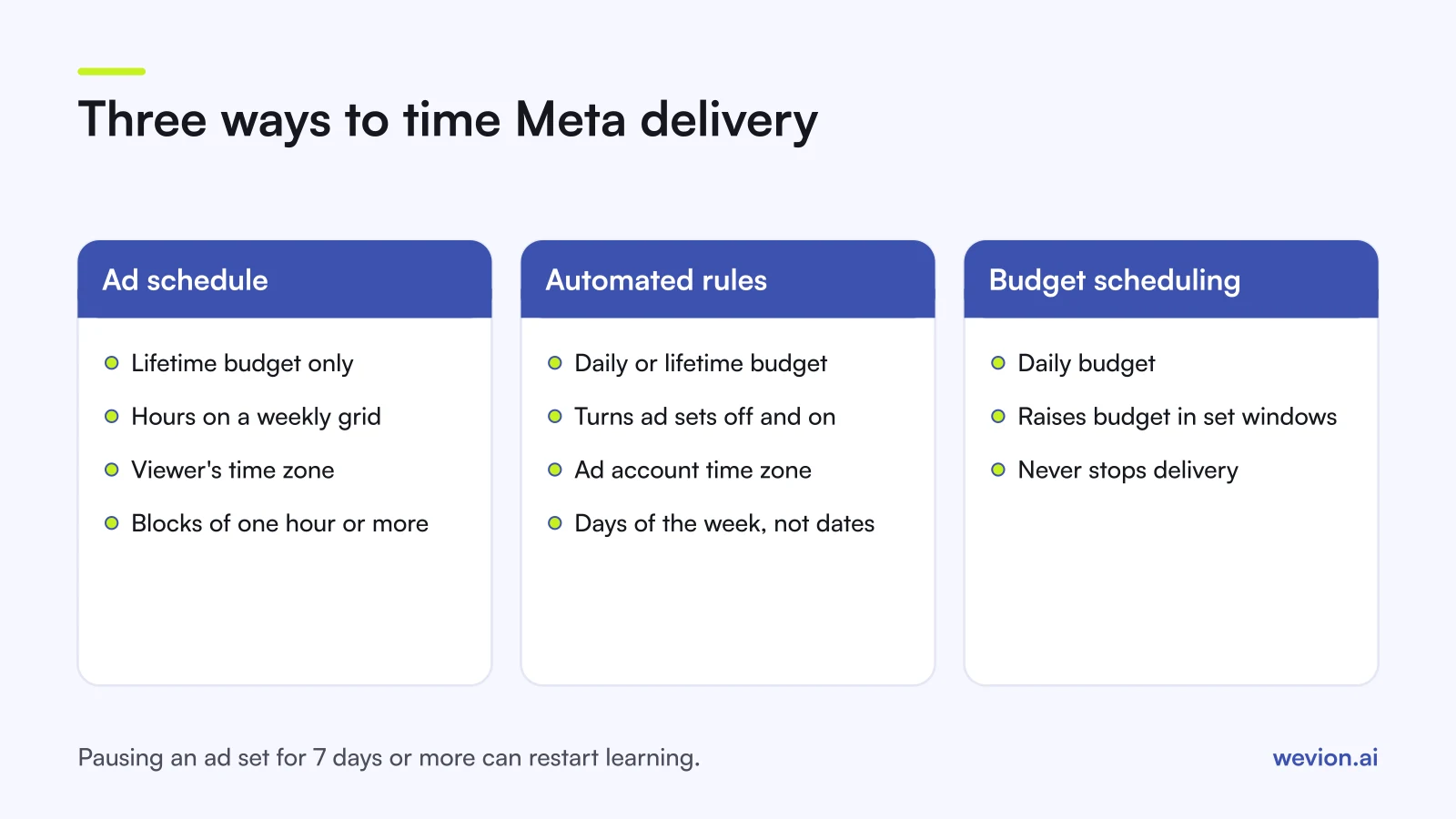
Budget scheduling is a separate feature for daily budgets: it raises the budget, by an amount or a percentage, for the dates and hours you choose. Useful before a sale, but it never stops delivery, so it is not dayparting.
What does error #1487675 mean?
The full message reads: "Pacing type incompatible with day parting: this pacing requires a campaign with not day parting". Meta doesn't publish an explanation for this code. In its documentation, day parting is itself a pacing type, alongside standard and accelerated delivery, and it needs a lifetime budget and an hour schedule. The error says the ad set's pacing or budget setup can't run with a schedule.
Two fixes match Meta's docs:
- Keep the schedule: give the ad set a lifetime budget and an end date.
- Keep the setup: remove the schedule. Through the API, that means setting the pacing back to standard with an empty schedule.
Before you schedule: find your converting hours
Never set a schedule on intuition or industry averages. In Ads Manager, open Breakdown → By time → Time of day (offered in the ad account's time zone or the viewer's), set the last 30 to 60 days and export spend, impressions and clicks by hour.
There is a catch. Since April 2021, Meta's delivery breakdowns no longer cover conversions that happen off Meta, such as purchases on your website. The hourly view shows where your spend goes, not when your website conversions happen. Take conversion timestamps from your analytics, store or CRM, line them up with Meta's hourly spend, then answer three questions:
- What share of conversions happens between midnight and 6 AM?
- Which 6 hours convert best?
- How far apart is CPA in your best and worst hours?
If midnight to 6 AM brings less than 5% of conversions, those hours are candidates for a pause or a lower budget. If your top 6 hours bring 60% or more, concentrating budget there is worth testing.
Use conversions, not clicks. A cheap 4 AM CPM is worth nothing if nobody buys at 4 AM.
Native schedule or automated rules?
Meta's automated rules can't use the hour as a condition. Instead, a rule's Custom schedule sets the days of the week and the times, in 30-minute steps, when the rule checks its conditions. The ad rules documentation also shows that a daily rule runs at midnight in the ad account's time zone, so rule times follow your account, not your audience.
| Native ad schedule | Automated rules | |
|---|---|---|
| Budget type | Lifetime only | Daily or lifetime |
| Time zone | Viewer's | Ad account's |
| Performance conditions | No | Yes (for example CPA above target) |
| Notification when it acts | No | Yes |
| Delivery disruption | Low, Meta paces around the schedule | Higher, each stop and restart is a change |
Use the native schedule for lifetime-budget campaigns with a fixed end date and a stable pattern. Use rules for daily budgets, conditional pauses and many accounts at once. Our step-by-step guide to automated rules for Meta ads covers the setup.
How do you pause Meta ads for a holiday with rules?
Holiday pauses are where rules help most, with one trap: custom schedules use days of the week, not calendar dates.
- Rule 1, turn off: apply it to the ad sets (or campaigns) you want to stop. Action: turn off. Schedule: Custom, the holiday's weekday at the time you stop shipping. Condition: one every active ad set meets, such as lifetime impressions above 0.
- Rule 2, turn on: same ad sets, action turn on, scheduled for the morning you reopen.
- Turn both rules off after the holiday. Otherwise they fire again on the same weekdays the following week.
If you use Advantage+ campaign budget, pause at campaign level. Turning off one ad set moves its budget to the others, even if they also do badly that day (see our CBO vs ABO comparison). And if the holiday is a peak rather than a closure, raise the budget with budget scheduling instead: our Black Friday and Cyber Monday checklist covers that side.
Pausing or lowering the budget for a few days?
Both change delivery, but they affect learning differently. Meta expects an ad set to exit the learning phase after about 50 optimisation events in the 7 days after its last significant edit, and Meta lists both larger budget changes and pauses of 7 days or more as significant edits.
| Option | Learning phase | Best for |
|---|---|---|
| Pause under 7 days | Not a significant edit | Dead windows: nights, a closed weekend, a 1-3 day holiday |
| Pause of 7 days or more | Significant edit, learning restarts | Avoid; rebuild or duplicate instead |
| Lower the budget | A large change can be a significant edit | Slow but converting windows |
Meta's pacing guidance adds a practical limit: after a budget change, its system has to learn the new optimal bid, so don't change bids and budgets often, and if you must, do it 2 to 3 times a day at most, early in the day.
Example: an ad set spends $200 a day and the client closes from Friday night to Monday morning. A pause lasts 2.5 days, well under 7. Cutting to $50 and back is the kind of large change that can trigger learning, so the pause is cleaner. For a slow week that still converts, one cut for the whole week beats daily cuts and restores.
Remember too that a daily budget can spend up to 75% more than the daily amount on a strong day, while weekly spend stays within seven times the daily budget. Fewer active hours can mean heavier spend in the hours you keep. More on this in our Meta learning phase guide.
Dayparting starting points by vertical
Treat these as hypotheses to test against your own data, not rules:
| Vertical | Typical strong windows | Typical weak windows |
|---|---|---|
| B2B and lead generation | Weekdays, business hours | Nights and weekends |
| E-commerce | Evenings and weekends | 1 AM to 6 AM |
| Consumer apps | Evenings, weekend mornings | Weekday mornings (lower, don't pause) |
If weekends still bring, say, 8% of your B2B leads, lower the budget rather than pause.
A performance condition makes the pause smarter. A rule scheduled daily at 21:00 with two conditions, CPA (today) above 1.5x target AND spend (today) above 2x target CPA, turns ad sets off only on evenings that are actually going badly, and leaves good evenings running.
Common Meta ads scheduling mistakes
- Scheduling on click data. Base the schedule on the conversions you optimise for.
- Scheduling new campaigns. Let an ad set run close to full days until it is out of learning, then narrow its hours.
- One schedule for every campaign. Prospecting and retargeting convert at different times.
- Ignoring time zones. If your account runs on Pacific Time and your audience is on Eastern Time, a rule at 21:00 fires at midnight for your audience. The native schedule follows the viewer's time zone, while rules follow the account's.
- Pausing one ad set inside Advantage+ campaign budget. The budget moves to the other ad sets. Pause the campaign, or use ad set budgets where dayparting matters.
- One schedule for several time zones. Run one campaign per region, each with its own schedule. Our Facebook ads budget optimisation rules cover how to split the budget.
Measuring whether scheduling works
Run the schedule for 30 days, then compare with the 30 days before:
| Metric | What you want to see |
|---|---|
| CPA | Lower |
| Total conversions | Stable or higher |
| CPM | May rise, since you drop cheap but weak hours |
| Spend per active hour | Higher, budget sits in your strongest hours |
If total conversions fall noticeably, you cut hours that were converting. Widen the schedule again.
Where Wevion fits
Scheduling pauses across many accounts means many rules to build, check and switch off after each holiday.
Wevion connects Meta, Google, TikTok, Taboola, Snapchat and Outbrain ad accounts through each platform's official API, syncs data about every 15 minutes, and shows spend and results for every account in one view, so you can see what each schedule is doing.
Wevion's automation rules can pause, activate ad sets or change budgets, with a cooldown and a daily cap on runs so a rule can't fire again and again. If you'd rather decide yourself, a rule can just send an alert. If you also move budget between Meta, Google and TikTok, cross-platform rules are in beta.
You can try it on your own ad accounts with a 14-day trial on the Pro plan. No card to start. We ask for one on day 7, or earlier if you use up the trial credits, and billing starts on day 14 only if you add it.
Key takeaways
- Native scheduling needs a lifetime budget. With a daily budget, use automated rules to pause, or budget scheduling to raise spend.
- Error #1487675 means pacing and schedule clash. Switch to a lifetime budget or remove the schedule.
- Build the schedule on conversion timestamps, since Meta's hourly breakdown doesn't show off-Meta conversions.
- Keep pauses under 7 days and turn holiday rules off afterwards.
- Pause dead windows, lower the budget in slow ones, and change budgets as rarely as you can.