
When to Start Google Ads for an Ecommerce Brand
Priya Raghunathan
مدير أداء التجارة الإلكترونية
Knowing when to start Google Ads matters because Google mostly captures demand that already exists. If people search for your brand or your product category, Google Search and Shopping put you in front of them at the moment they want to buy. If nobody searches yet, the same budget usually does more on a channel that creates demand, such as Meta.
Quick answer: Start Google Ads when four things are true: people search for your brand or category, your Merchant Center feed is approved, purchases are tracked with order values, and your margin leaves room to pay for clicks. Launch a small brand search campaign first, then Shopping or Performance Max for product searches, with a budget sized to reach at least 15 to 30 conversions a month.
If you are still choosing between channels, start with our guide to the best ad platforms for ecommerce. This article assumes Meta is already working and you are deciding whether Google is next.
What signals say you are ready for Google Ads?
Five signals tell an ecommerce brand that Google Ads is likely to pay, and each one can be checked before you spend anything. The table lists them with what to do if a signal is missing.
| Signal | How to check | If it is missing |
|---|---|---|
| People search for your brand | Search Console queries, Keyword Planner | Keep building demand on Meta or TikTok |
| People search for your category | Keyword Planner search volume estimates | Focus on brand search and Shopping only |
| Merchant Center feed approved | Merchant Center diagnostics | Fix the feed before launching Shopping |
| Purchases tracked with values | Google Ads conversion status | Set up the Google tag with order values |
| Margin covers the clicks | Break-even ROAS from contribution margin | Raise order value or margin first |
Search demand. Google's Keyword Planner lets you "view estimates on the number of searches a keyword gets each month", and Search Console shows the queries people already use to find your site. Branded searches growing month on month are often the first sign that Meta is creating demand Google can capture.
A clean feed. Shopping ads, Google says, "use your existing Merchant Center product data (not keywords) to decide how and where to show your ads". Disapproved products do not serve. Our product feed optimisation checklist covers titles, images and GTINs.
Conversion tracking with values. Value-based bidding can only optimise for what you send it. Track purchases with the Google tag or Google Tag Manager, pass the order value and use the same currency as your feed.
Margin. Your break-even ROAS is 1 divided by your contribution margin as a share of revenue. At a 50% margin it is 2.0. Our contribution margin guide shows how to work it out.
What if nobody searches for your category yet?
A brand with a new kind of product often has almost no search volume to buy, and Google Ads will struggle to spend usefully. In that case the work is creating demand on Meta, TikTok or Snapchat first, then watching branded and category searches in Search Console.
You can still run a small brand search campaign from the start if competitors or resellers bid on your name. Everything else on Google can wait until searches show up.
What should you launch first on Google?
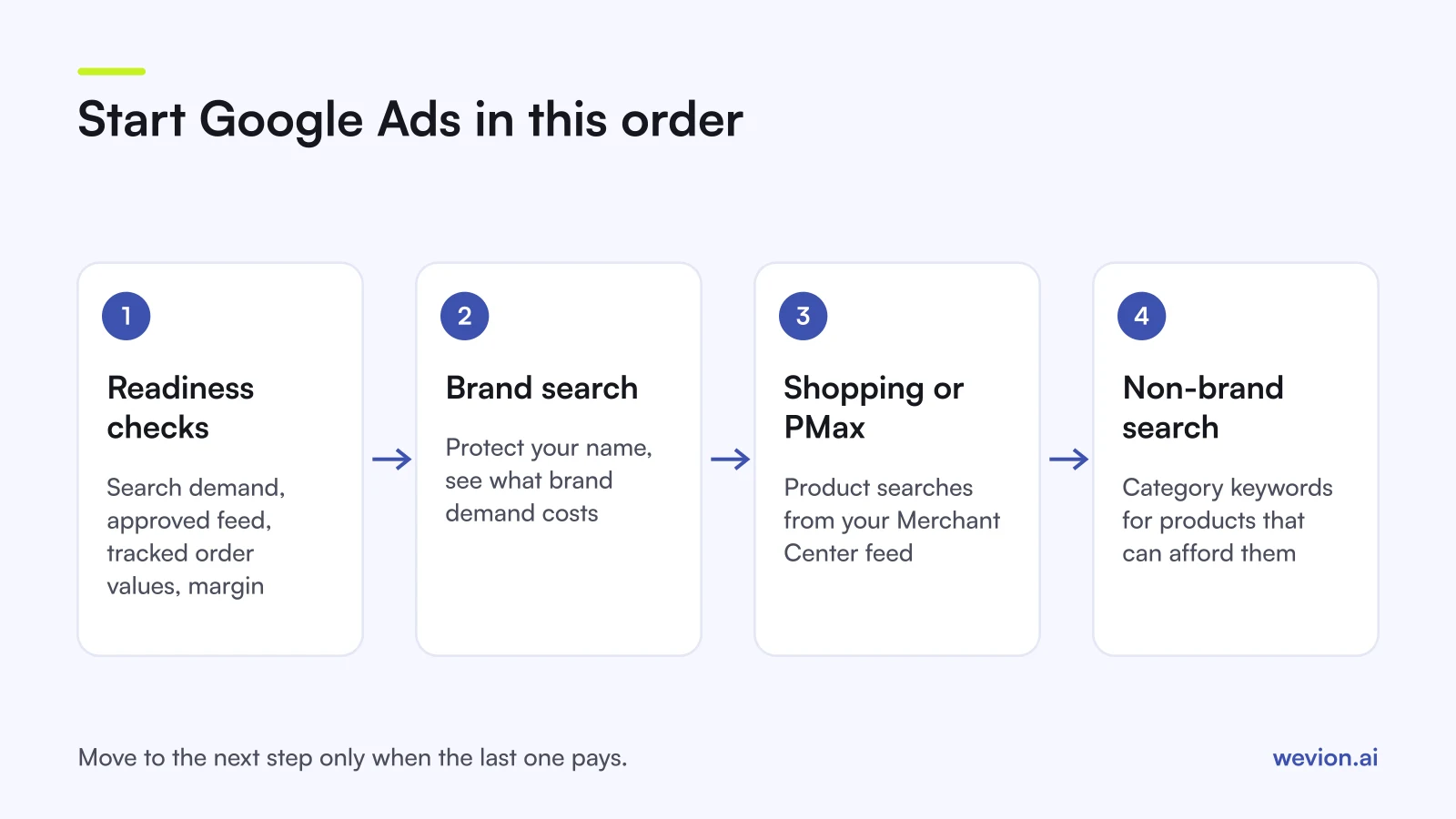
The usual order is brand search, then Shopping or Performance Max, then non-brand search, because each step adds less certain demand than the one before.
- Brand search. A Search campaign on your brand name, with exact and phrase match. Google's trademark policy lists "using trademarks as keywords" among the things it will not restrict, so competitors can bid on your name. A brand campaign keeps you at the top of your own results and shows what brand demand really costs.
- Shopping or Performance Max. This is where most ecommerce revenue on Google comes from. Standard Shopping gives you product groups and more control over bids. Performance Max reaches YouTube, Display, Search, Discover, Gmail and Maps from one campaign, with less detail in reports. Our guides on Google Shopping ads and Performance Max campaign structure explain the trade-off.
- Non-brand search. Category keywords such as "linen bedding" come last, once you know which products and margins can afford them.
If you run Performance Max, add your own brand as a brand exclusion so it does not take credit for branded searches your brand campaign already covers. Google's About Performance Max page says a Search campaign is prioritised when a query is identical to one of its exact match keywords.
How much budget do you need to start Google Ads?
A starting Google Ads budget should be sized from the conversions your bidding strategy needs, so the account collects enough data to learn. Google's Target ROAS for Shopping page says Shopping campaigns "must have at least 15 conversions per Merchant Center ID in the last 30 days" before you can use Target ROAS.
Here is a hypothetical example for a store with an average order value of €60 and a 50% contribution margin.
| Input | Value |
|---|---|
| Average order value | €60 |
| Contribution margin | 50%, so €30 per order |
| Break-even ROAS | €60 ÷ €30 = 2.0 |
| Expected cost per purchase | €25 |
| Target purchases per month | 30, double the 15 minimum |
| Monthly budget | 30 × €25 = €750 |
| Daily budget | €750 ÷ 30 = €25 |
| Split | Brand search €5 a day, Shopping €20 a day |
If the expected €25 cost per purchase holds, 30 orders bring €1,800 in revenue on €750 of spend, a ROAS of 2.4, above the 2.0 break-even. If the cost per purchase turns out to be €35, the same budget buys about 21 orders, €1,260 of revenue and a ROAS of 1.7, below break-even. That is the number to watch in the first month.
Which bidding strategy should you start with?
The right first bidding strategy depends on how much conversion data the account already has. A new account usually starts with Maximise conversion value, or manual bids on Standard Shopping, and moves to Target ROAS once it has enough conversions.
Since June 2026, Google labels "Maximise conversion value with a Target ROAS" simply as Target ROAS. Our Smart Bidding guide explains each option and how long to leave a target before changing it.
Set the first Target ROAS close to what the campaign already achieves, not at your dream number. Google's Target ROAS page says the target should use your historical ROAS as a reference, and that "setting a target that's too high may limit the amount of traffic your ads may get".
How do you know Google Ads is working?
Google Ads is working when your store's total revenue and new customers grow with the extra spend, not only when Google reports a good ROAS. Brand search and Shopping often show high ROAS because they reach people who were already on their way to buy, including people Meta brought to you.
After 30 to 60 days, compare:
- MER, total revenue divided by total marketing spend, before and after Google. Our MER vs ROAS guide explains how to read it.
- New customers. If Google mostly reaches returning buyers, your new customer acquisition cost will show it.
- Branded searches when Meta spend drops. If branded clicks fall with it, part of Google's result is demand Meta created.
Common mistakes when starting Google Ads
Most first Google Ads accounts lose money for a handful of avoidable reasons:
- Launching Shopping with feed errors, so the best products never serve. Our catalogue ads troubleshooting guide shows the order to check.
- No order values, so value-based bidding has nothing to optimise.
- Performance Max without a brand exclusion, which makes it look better than it is.
- Starting with broad category keywords before brand and Shopping are profitable.
- Changing budgets and targets weekly before the account has 30 days of data.
Where Wevion fits
Adding Google to a Meta-first brand means two dashboards with two attribution models, and both will claim some of the same orders.
Wevion connects Meta, Google, TikTok, Taboola, Snapchat and Outbrain ad accounts through each platform's official API, syncs data about every 15 minutes, and shows spend and results for every account in one view, so Google brand search and Shopping sit next to your Meta campaigns.
You can set automated rules on Google Ads that pause or activate campaigns, change budgets by a percentage or just send an alert when a metric crosses a threshold, with a cooldown and a daily cap on runs. Your Shopping feed stays in Google Merchant Center: Wevion's catalogue tools work with Meta catalogues, not with Google feeds.
You can try it on your own ad accounts with a 14-day trial on the Pro plan. No card to start. We ask for one on day 7, or earlier if you use up the trial credits, and billing starts on day 14 only if you add it.
Key takeaways
- Start Google Ads when people search for your brand or category, your feed is approved, purchases are tracked with values and your margin leaves room for clicks.
- Launch brand search first, then Shopping or Performance Max, then non-brand search.
- Exclude your brand from Performance Max so brand demand is measured in one place.
- Size the budget from conversions needed: at least 15 a month for Target ROAS on Shopping, ideally more.
- Judge Google with MER and new customers, not only with Google's own ROAS.