
Catalog Ads Troubleshooting: Diagnose and Fix Delivery
Priya Raghunathan
مدير أداء التجارة الإلكترونية
Catalog ads troubleshooting starts upstream: when a catalogue campaign on Meta, Google or TikTok stops delivering, the cause is usually in the product data or the pixel events, not in the campaign settings. Changing bids or budgets first wastes days. Checking the catalogue, the event match and the item status in a fixed order finds the cause faster.
Quick answer: Work from the data down. First confirm the catalogue has enough approved, in stock products. Then check that pixel event IDs match catalogue IDs. Then read rejected items and price or availability mismatches. Only then look at the product set, the budget and the learning phase.
This guide is about diagnosis. For the setup of each platform, see our guides to Meta catalog ads, TikTok catalog ads and Google Shopping ads.
In what order should you check a catalogue campaign?
The order to check a catalogue campaign follows the path data takes: from your store into the catalogue, from your site into the events, then into the campaign. A problem higher up hides everything below it, so fixing the campaign first rarely helps.
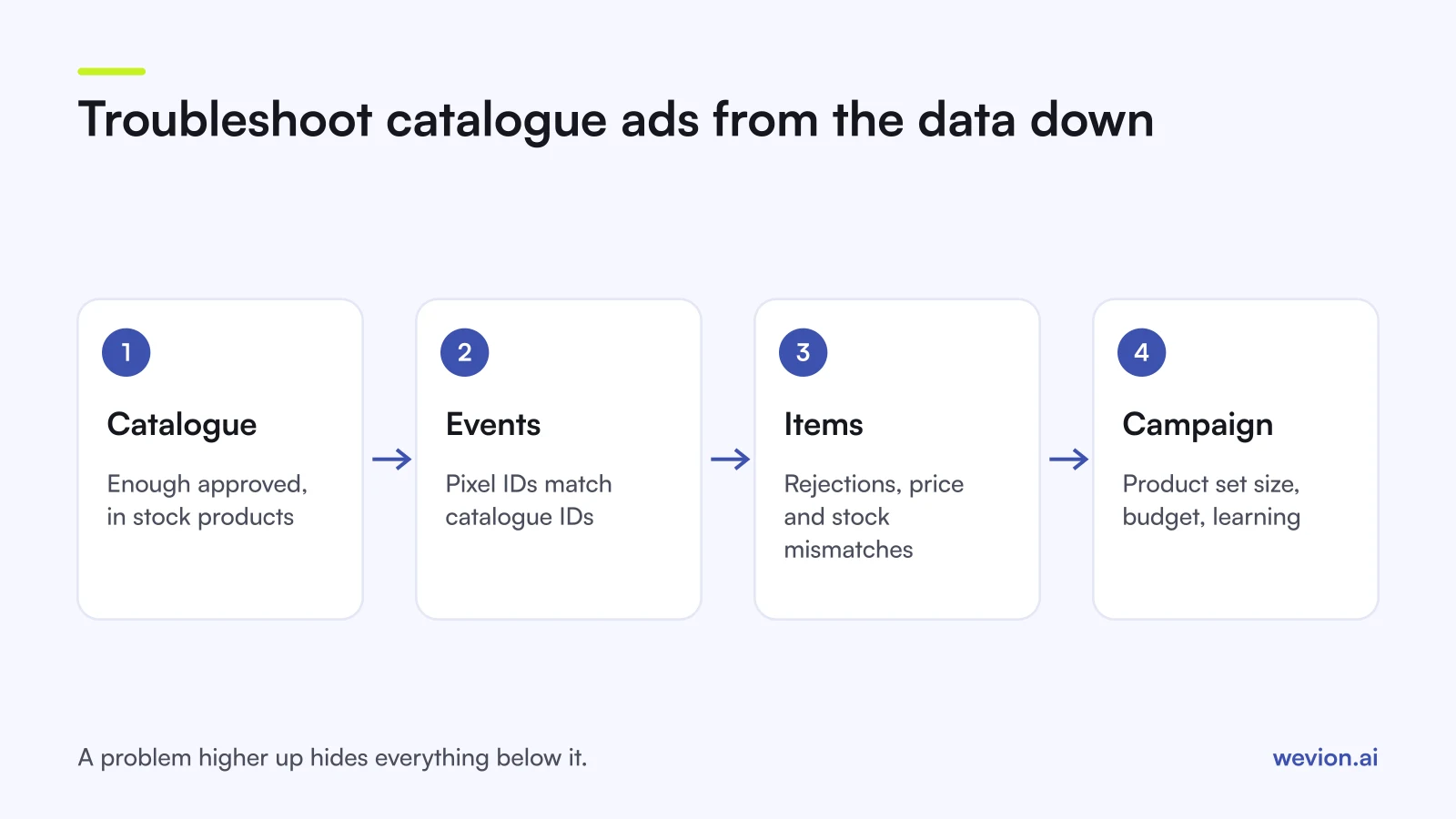
Use this table to go from the symptom you see to where to look.
| Symptom | Likely cause | Where to check |
|---|---|---|
| Campaign does not spend at all | Too few eligible products, empty product set | Catalogue item status, product set preview |
| Retargeting audiences are tiny | Pixel IDs do not match catalogue IDs | Meta catalogue diagnostics, TikTok Event Sources |
| Some products never show | Rejected or out of stock items | Item status and rejection reasons |
| Google items disapproved overnight | Price or availability mismatch with the site | Merchant Center, "Needs attention" |
| Spend falls after a feed change | New ID format, replaced catalogue | Match rate trend over 7 days |
| Spend concentrates on a few products | Narrow set, learning, budget | Product set size, delivery status |
How do you fix pixel and catalogue match problems?
Pixel and catalogue match problems happen when the product IDs in your events differ from the IDs in your catalogue, so the platform cannot link a view or a purchase to a product. Every platform needs the same rule: the ID the pixel sends must be the ID the feed uses.
On Meta, catalogue diagnostics list event source issues by name. Meta's Diagnostics API guide gives each a severity of "must fix" or "warning":
| Meta diagnostic | What it means | Fix |
|---|---|---|
CATALOG_NOT_CONNECTED_TO_EVENT_SOURCE | No pixel or app SDK linked to the catalogue | Connect the pixel in the catalogue settings |
INVALID_CONTENT_ID | Content IDs have extra numbers or symbols | Send the plain catalogue id |
NO_CONTENT_ID | Events arrive without content IDs | Add content_ids to every product event |
MISSING_EVENT | No purchase events in the last 7 days | Check the Purchase event fires |
DELETED_ITEM | Deleted products still get site traffic | Restore the item or update the site |
Meta's dynamic product audiences guide adds a second rule: content_type must match the type of ID you send, and AddToCart and Purchase should always use product, never product_group.
On TikTok, the match rate guide says Catalog Manager matches ViewContent, AddToCart and CompletePayment events, and that event content IDs must follow the same format as the catalogue's SKU IDs. Check the rate under Event Sources. A new connection can take several days to settle, and a swing of 20% up or down over a 7-day window can point to a misconfiguration.
On Google, the same rule applies to measurement: item IDs in conversions with cart data must exactly match the id attribute in your Merchant Center feed.
Why are catalogue items rejected, and how do you get them back?
Catalogue items are rejected when a product or its data breaks a platform's policy or format rules, and each platform shows a reason next to the item. Read the reason before anything else: a request for review without a fix is usually rejected again.
- Meta. Rejected items do not serve in ads. If you think a decision is wrong, Meta's additional reviews reference says you can request an additional review "only after the product is rejected, and only once per product", so make the case count.
- TikTok. Open the catalogue in Catalog Manager, select the unavailable products and choose Appeal. TikTok's appeal guide allows 50 products a month and says the review can take up to a day.
- Google. Fix the product in your feed or in Merchant Center, then request a review. Google says a website review can take up to 12 hours. Common item issues include invalid GTINs, missing identifiers and images with promotional text, all covered in our product feed optimisation guide.
TikTok adds one more threshold: its catalogue checklist needs at least 4 products that are in stock, approved and activated. A small catalogue with a few rejections can drop below it and stop the campaign.
What happens to out of stock products?
Out of stock products drop out of catalogue ads on Meta and TikTok, and on Google a stale stock value can get the item disapproved. The fix in every case is a feed that updates as often as your stock does.
- Meta's catalogue fields reference says out of stock items "don't display at all in your ads". A feed that refreshes once a week can hide products you have restocked, or keep advertising ones you sold out.
- TikTok's ad status list shows "Product unavailable" when a product is no longer available, and points you to Catalog Manager.
- Google compares the feed with the landing page. A product the feed calls in stock but the page shows as sold out can be disapproved. Automatic item updates, on by default, can correct availability from your page markup.
Fashion stores feel this most, because one sold-out size can affect a whole product group. Our guide to catalog ads for fashion brands covers core-size rules.
How do you fix price mismatches?
Price mismatches happen when the price in the feed differs from the price a crawler or shopper sees on the product page, and Google treats them most strictly. Its price mismatch page lists the usual causes:
- The feed updates less often than the site. Schedule uploads more often, or use the Merchant API.
- Structured data shows a different price. Test the page's markup.
- The price loads with JavaScript. Googlebot reads the HTML the server returns, so a price added later may not be seen.
- Sale dates or time zones are wrong. A sale that ended on the site may still be live in the feed.
- Minimum order quantities. The submitted price must cover the minimum quantity sold.
Google warns that persistent mismatches "may lead to an account suspension", so do not leave them for the next feed run. On Meta, sale_price must be lower than price, and Meta asks you to remove it once the sale ends or set an effective date.
A quick check on numbers: if the feed says €49 and the page shows €54 because VAT is added later, the gap is €5, or about 10%. Match the price the shopper pays in the target country, tax included where that country expects it.
Why is delivery low when the catalogue is healthy?
Low delivery with a clean catalogue usually comes from how the campaign reads that catalogue: a product set or product group that holds too few items, or a campaign still in learning. These checks come last because they only matter once the data is right.
- Product set too narrow. Preview the set. A filter on an old custom label can leave it with a handful of products.
- Excluded Google products. In Standard Shopping, products not in any active product group show as "Excluded" and do not serve, according to Google's product groups page.
- Competing campaigns. When the same products sit in several Google campaigns, campaign priority or Ad Rank decides which one serves.
- Learning. On Meta, an ad set that will not reach about 50 optimisation events a week stays in learning. Our learning phase guide covers the fixes.
- Reporting, not delivery. If spend looks fine but sales do not match, the gap may be attribution. See why ad platforms double count conversions.
Where Wevion fits
Catalogue problems tend to build up quietly: a feed stops refreshing, a site update changes the ID format, and spend drifts to fewer products before anyone notices.
Wevion connects Meta, Google, TikTok, Taboola, Snapchat and Outbrain ad accounts through each platform's official API, syncs data about every 15 minutes, and shows every catalogue campaign's spend and results in one view, so a sudden drop in catalogue spend is easy to spot by account and campaign.
For Meta, Wevion's Product Catalogs feature shows Meta's own catalogue diagnostics and upload errors, sorted into issues to fix and opportunities, and the pixel event match rate across desktop, mobile and tablet. It lists products Meta rejected with the reasons Meta gave, lets you request a re-review, and logs each scheduled feed upload. TikTok catalogues stay in TikTok's Catalog Manager and Google feeds in Merchant Center. When you launch many catalogue campaigns at once, see how one store did it in our 1,000-row catalogue launch story.
You can try it on your own catalogue with a 14-day trial on the Pro plan. No card to start. We ask for one on day 7, or earlier if you use up the trial credits, and billing starts on day 14 only if you add it.
Key takeaways
- Troubleshoot from the data down: catalogue, events, items, then campaign.
- Pixel IDs must match catalogue IDs on every platform; Meta names the issue, such as
INVALID_CONTENT_IDorMISSING_EVENT. - Read rejection reasons before you appeal: Meta allows one additional review per product, TikTok 50 appeals a month.
- Out of stock items do not display in Meta ads, and TikTok needs at least 4 in stock, approved products.
- Google price mismatches have five common causes, and persistent ones can lead to suspension.
- Check product sets, product groups and learning only once the data is clean.