
Lead Scoring for Paid Ads: A Simple Model That Teaches Bidding

Stefano De Cubellis
合作伙伴负责人
Lead scoring for paid ads is a points system that ranks each lead from your campaigns by how likely it is to become a customer, built from the person's form answers and their progress in the CRM. It does two jobs: it tells sales who to call first, and it gives Meta and Google a better signal than "a form was submitted", so their bidding learns to find leads who buy.
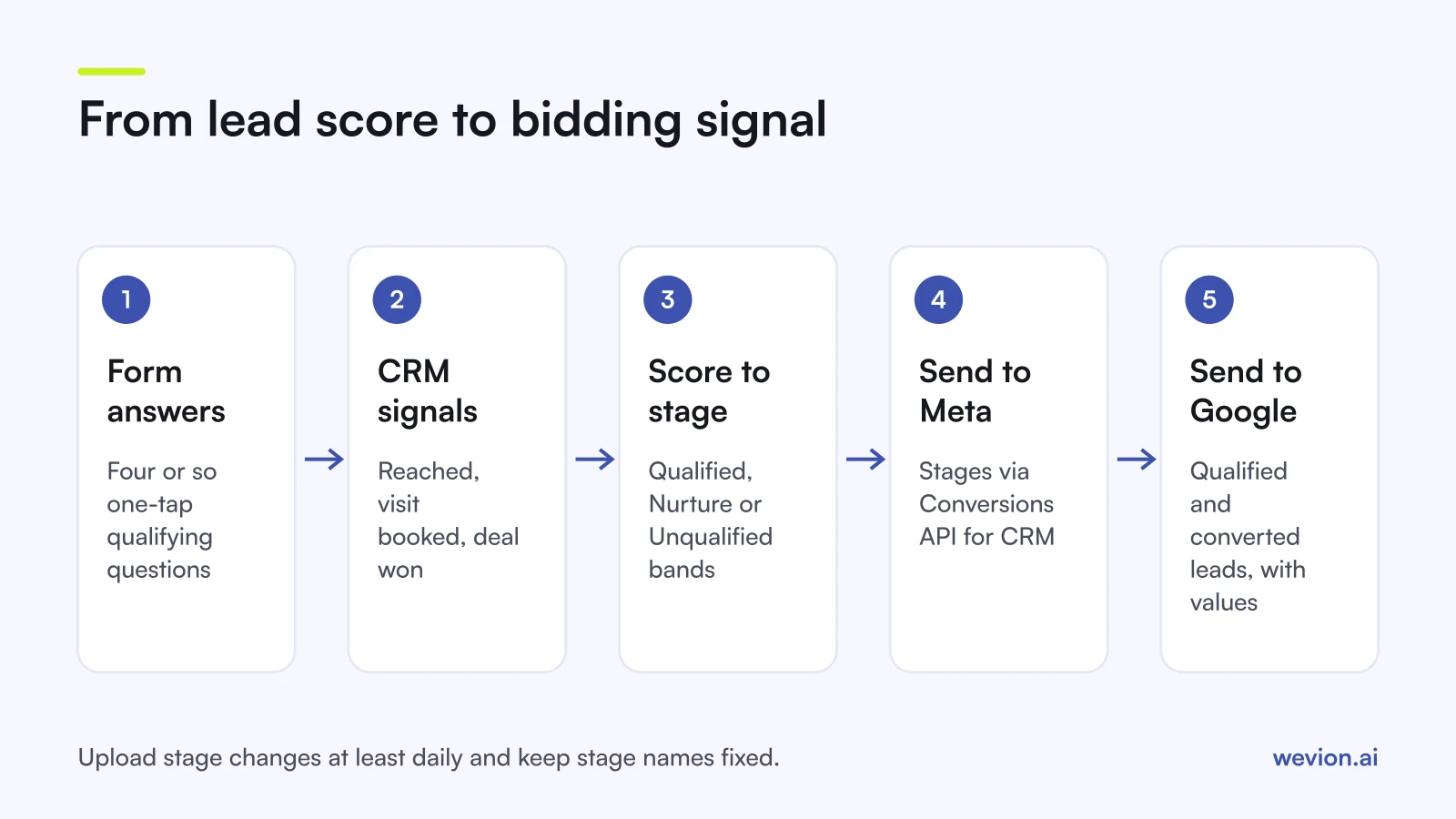
Quick answer: Score each lead on four to six inputs: a few qualifying form answers plus early CRM signals such as reached and meeting booked. Turn score bands into CRM stages. Send those stages to Meta through the Conversions API for CRM for the conversion leads goal, and to Google as qualified and converted leads, with values when each stage has a real value. Upload at least daily.
This guide is about building the score and choosing what to send. For the reporting side, see tracking lead quality through your CRM. For Meta's setup steps, see our guide to conversion leads optimization.
Why do paid ad leads need their own scoring model?
Paid ad leads need their own scoring model because the ad platform is optimising towards whatever you report as a conversion, and by default that is any form submission. A classic marketing score built on email opens and page visits does not fit: an instant form lead has no browsing history, only a handful of answers and whatever happens after the first call.
Without a score, two things go wrong. Sales calls leads in the order they arrived, not in order of value, so the best leads wait behind the worst. And the platform keeps finding more people like the ones who fill in forms easily, which is not the same as people who buy. A score fixes the first problem on its own. The second needs the score translated into signals the platform can read.
What goes into a simple lead score?
A simple lead score combines a small number of qualifying answers from the form with early CRM signals, each worth a fixed number of points. Five or six inputs are enough: more makes the model hard to explain and harder to check.
Here is a worked model for a hypothetical home solar installer. The points come from looking at which answers showed up most often in the installer's won deals over the previous six months.
| Input | Source | Answer | Points |
|---|---|---|---|
| Owns the home | Form | Yes | 25 |
| Monthly energy bill | Form | Above €150 | 20 |
| Timeline | Form | Within 3 months | 20 |
| Postcode in service area | Form, checked in CRM | Yes | 15 |
| Answered the first call | CRM | Yes | 10 |
| Site visit booked | CRM | Yes | 10 |
| Maximum | 100 |
Form answers score the lead the moment it arrives, which helps routing. CRM signals update the score over the next days, which is what you send back to the platforms.
Two rules keep the model honest. First, ask only questions the person can answer in one tap, using multiple choice rather than free text. Meta's instant forms support custom questions with answer options, as our Higher intent instant form guide shows, and Google's qualifying responses, covered in our lead form assets guide, are multiple choice by design. Second, score negative answers at zero instead of subtracting points, so a single wrong click does not bury a good lead.
How do you turn scores into stages?
Scores become useful for ad platforms when you group them into a few named CRM stages, because platforms learn from stages and values, not from a 0 to 100 number. Three bands are enough for most clients:
| Score | Stage | What sales does |
|---|---|---|
| 70 to 100 | Qualified | Call first, book a visit |
| 40 to 69 | Nurture | Call the same day, send information |
| 0 to 39 | Unqualified | Email only, review weekly |
A lead can move up as CRM signals arrive. A lead scoring 55 from the form who answers the call and books a site visit reaches 75 and moves to Qualified. That move is the event you send to the platforms.
Check the bands against reality every quarter. If Qualified leads close no more often than Nurture leads, the weights are wrong, and the platforms are learning from noise.
How do you send the signal back to Meta?
Meta learns lead quality from CRM stages, sent through the Conversions API for CRM and used by the conversion leads performance goal. Meta's conversion leads integration guide says the goal currently works with Facebook and Instagram lead ads using instant forms, and lists its fit criteria as of November 2026:
- at least 200 leads a month;
- a target stage reached by between 1% and 40% of leads;
- that stage reached within 28 days of the lead;
- data uploaded at least once a day.
This is where your score bands matter. If your Qualified band catches 70% of leads, it is too wide to teach Meta anything, and it falls outside the 1% to 40% range. Tighten the threshold until the share fits. In the solar example, with 400 leads a month and 60 reaching Qualified, the share is 15%, which works.
Send every stage as it changes, not only the top one, and keep the stage names fixed. The step-by-step setup, the payload and how to judge the campaign are in our guide to conversion leads optimization.
How do you send the signal back to Google?
Google learns lead quality from imported conversions tied to lead stages, and it can also use a value for each one. Google's help page on qualified and converted leads describes the two goal types: a qualified lead is a Google-generated lead that was further qualified offline, and a converted lead is one that completed a chosen later step. Google says to associate business metrics such as conversion delays and values with each stage.
There are two ways to match the stage back to the click, both described on Google's offline conversion imports page:
- GCLID. Store the Google click ID with the lead and upload it with the conversion later.
- Enhanced conversions for leads. Match on user-provided data such as a hashed email address. Google calls this the recommended option.
Google's offline conversion imports FAQ sets the time limits: up to 90 days after the click for a GCLID upload, and up to 63 days for conversions matched on personal data. The same page says you need to assign values to use Target CPA, Target ROAS or Maximize conversion value bidding.
Developers should note one change. Google's offline conversion page says that from 15 June 2026, offline conversion import and enhanced conversions for leads uploads move to the Data Manager API and are blocked in the Google Ads API. Check which route the client's CRM connector uses.
What values should each stage carry?
Stage values should reflect what a lead at that stage is worth to the client on average, calculated from their own close rates and deal sizes. A worked example for the solar installer, with hypothetical numbers:
| Stage | Close rate from this stage | Average deal | Value to send |
|---|---|---|---|
| Qualified | 20% | €9,000 | €1,800 |
| Site visit done | 40% | €9,000 | €3,600 |
| Won | 100% | €9,000 | €9,000 |
Each value is the close rate multiplied by the average deal, so the numbers stay tied to revenue. With values in place, a campaign that brings 10 qualified leads at €1,800 each reports €18,000 in conversion value, which Google can compare with the spend that produced it.
If the client cannot agree values, skip them. Optimise for qualified leads with Target CPA, as covered in our Google Ads smart bidding guide, and add values later. Wrong values teach bidding the wrong lesson faster than no values at all.
TikTok has a similar mechanism called lead quality optimisation, fed by CRM events mapped to funnel stages. Using the same stage names on every platform keeps the reporting comparable; see our guide to TikTok lead generation ads.
What are the common lead scoring mistakes?
Most lead scoring problems come from scores that nobody trusts or stages the platforms cannot use. Watch for these:
- Copying a template's weights instead of deriving them from the client's own won deals.
- Too many inputs, so nobody can explain why a lead scored 63.
- Sending only the top stage, which leaves Meta with too few events and Google with a gap in the funnel.
- Uploading weekly. Meta asks for daily uploads, and Google's windows close.
- Changing stage names mid-campaign, which looks like a brand new conversion to the platform.
- Scoring slowly. A score is only useful if the lead is called fast too; our guide to speed to lead covers that side.
Where Wevion fits
Lead scoring lives between the client's forms, CRM and the ad platforms, and Wevion is not part of that loop: it does not store or score leads, has no CRM and does not send offline conversions.
Wevion connects Meta, Google, TikTok, Taboola, Snapchat and Outbrain ad accounts through each platform's official API, syncs data about every 15 minutes, and shows platform-reported leads, cost per lead and spend for every client in one view, so a campaign optimised for qualified leads and one optimised for volume sit side by side.
Each client gets its own workspace, and automation rules can pause ad sets, change budgets or just send an alert when cost per lead crosses a threshold you set. For the cost side of quality, see our breakdown of cost per qualified lead across six platforms.
You can try it on your own ad accounts with a 14-day trial on the Pro plan. No card to start. We ask for one on day 7, or earlier if you use up the trial credits, and billing starts on day 14 only if you add it.
Key takeaways
- Lead scoring for paid ads ranks leads from form answers and CRM signals, with weights taken from the client's own won deals.
- Keep it to five or six inputs and group scores into three stages: Qualified, Nurture, Unqualified.
- Meta learns from stages through the Conversions API for CRM; the target stage should be reached by 1% to 40% of leads within 28 days.
- Google learns from qualified and converted lead goals, matched by GCLID or enhanced conversions for leads, with values if each stage has a real one.
- Values should equal close rate times average deal; without agreed values, use Target CPA on qualified leads.
- Upload stage changes at least daily, and keep stage names fixed.