
Google Ads MCP Server: What It Does and How to Set It Up
Yuki Tanabe
创意 AI 策略师
The Google Ads MCP server is Google's own open-source bridge between the Google Ads API and AI assistants that speak the Model Context Protocol. Once it runs, you can ask an assistant such as Claude or Gemini about campaigns, spend and search terms in plain language, and it writes and runs the Google Ads queries for you. It reads almost everything, changes very little, and you host it yourself.
Quick answer: Google's Google Ads MCP server is published on GitHub by the Google Ads API team. It started read-only in October 2025. Version 0.0.6, released on 2 November 2026, reads account data through GAQL and can create assets, upload videos and manage labels, each behind a propose-and-confirm step. It cannot change bids, budgets or campaign status. You need a Google Cloud project with Google Ads API access and OAuth or a service account; developer tokens were sunset in September 2026.
For MCP in general, how ads MCP servers work across platforms and the guardrails to insist on, read our ads MCP server guide. This article goes deep on Google's server only: what it is today, how to set it up, how media buyers use it and where it stops. Facts come from Google's developer documentation, the GitHub repository and the Google Ads developer blog, checked on 13 November 2026.
What is the Google Ads MCP server?
The Google Ads MCP server is an open-source program from the Google Ads API team that exposes the Google Ads API as tools an AI assistant can call. Google's developer documentation describes it as a standard bridge to the Google Ads API that lets agents retrieve and analyse account data, create assets, upload videos and manage labels in natural language.
Its history explains the confusion in older articles. The launch post on the Google Ads developer blog, dated 7 October 2025, said: "This initial release is read-only, meaning it can be used for reporting and diagnostics." The GitHub repository has shipped regular releases since, with v0.0.6 published on 2 November 2026. Google's documentation now lists the mode as "read and partial mutate". Our own ads MCP server guide, written in October 2026, describes the earlier read-only version.
Which tools does it expose?
The server exposes three read tools, four write tools and four reference resources, and the list is short on purpose. From Google's documentation and the GitHub README:
| Tool | Type | What it does |
|---|---|---|
list_accessible_customers | Read | Lists the accounts your credentials can reach |
search | Read | Runs a GAQL query and returns the rows |
get_resource_metadata | Read | Describes the fields of a resource |
create_asset | Write | Creates an asset |
upload_video_asset | Write | Uploads a video asset (local mode only) |
manage_labels | Write | Creates and edits labels |
manage_label_associations | Write | Attaches labels to entities |
Reference resources cover the API discovery document, metrics, segments and release notes, which help the assistant write valid queries. From v0.0.6, tool names carry a namespace prefix, such as search_search.
Every write tool uses a two-step propose-and-confirm workflow. Google says it "prevents accidental parameter drift or local file swaps across turns, but does not replace access control". For a reporting-only setup, Google documents a strictly read-only mode: set labels: false and assets: false in tools_config.yaml.
What do you need to set it up?
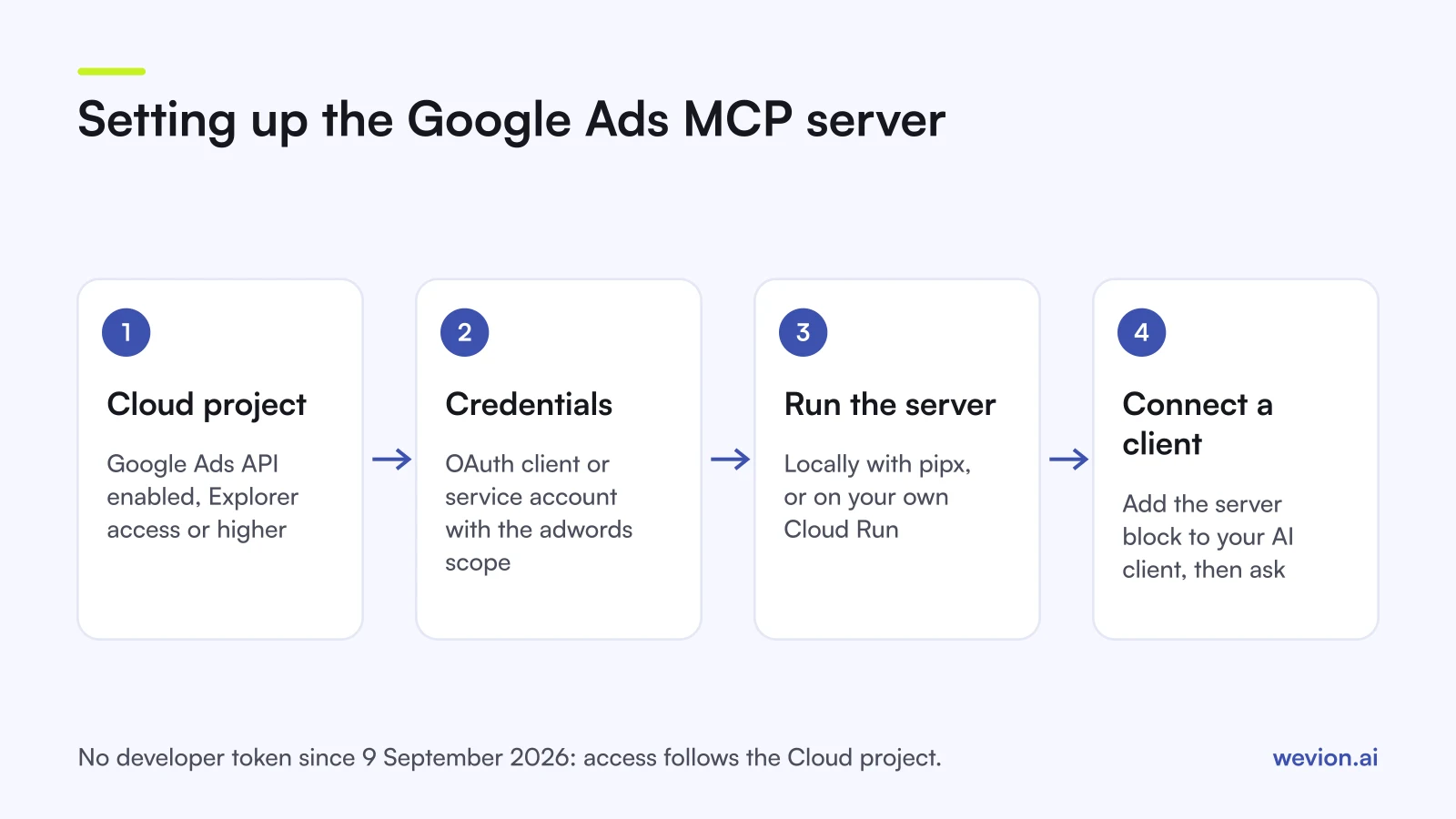
Setup needs a Google Cloud project with API access, credentials and a few local tools, and the rules changed in September 2026. Google's onboarding post of 10 September 2026 says "we are sunsetting developer tokens": sending one is now "optional and ignored by the API servers", and your access level is "determined by the Google Cloud project you used to generate your OAuth credentials".
- Create or pick a Google Cloud project and enable the Google Ads API. New projects get Test access. To read real accounts you need Explorer, Basic or Standard access; otherwise calls fail with
CLOUD_PROJECT_NOT_APPROVED_FOR_PRODUCTION. - Set up credentials. Local mode uses Application Default Credentials from an OAuth client file or a service account, with the
adwordsscope. - Install the local tools. Python 3.10 or later,
pipxand thegcloudcommand-line tool. The server runs withpipx run, pinned to a version. - Point it at your accounts. If you work through a manager account, set
GOOGLE_ADS_LOGIN_CUSTOMER_IDto its 10-digit ID without hyphens. Our guide to managing several accounts under one manager account explains why this matters. - Add it to your AI client using the client's MCP configuration block.
There is no Google-hosted version. For a shared team setup, Google documents deploying the server to your own Cloud Run service over Streamable HTTP, with an OAuth web client so each user signs in. Google's warning is direct: never deploy with --allow-unauthenticated without the OAuth client ID and secret, or the server falls back to the container's own credentials.
Which AI clients does it work with?
The server works with any MCP-compatible client, and Google documents several by name. Google's docs show configuration for Gemini CLI, Google Antigravity and Claude Code, and mention Claude connectors and ChatGPT for remote deployments. The GitHub README adds Codex CLI and says the mcpServers block "is the same across all MCP clients", naming Claude Code, Cursor and VS Code.
Google also publishes companion tools: agent skills such as google-ads-api-mcp-setup and google-ads-api-account-diagnostics, and a Developer Assistant plugin for Antigravity and Claude Code that validates GAQL. They are useful if a developer maintains the setup. If you mainly want Claude for ad work, our guide to Claude for Facebook ads covers prompting habits that carry over to Google.
How do media buyers use it day to day?
Media buyers use the Google Ads MCP server mostly as a faster way to ask questions they would otherwise build a report or a GAQL query for. Because the main tool is search, almost any read question the Google Ads API can answer is in scope.
Typical prompts:
- "List every campaign that spent over $500 last week with a CPA above $40." The assistant writes the GAQL query, runs it and tables the result.
- "Which search terms in account 123-456-7890 spent money without a conversion in the last 30 days?" A starting point for negatives, which you still add yourself in Google Ads.
- "Compare impression share lost to budget and to rank for my top five campaigns." Useful before a budget conversation.
- "Label every ad group in the Brand campaign as Q4-review." A write action: the assistant proposes, you confirm.
A worked check (hypothetical numbers). An assistant reports that campaign A spent $2,400 for 48 conversions, a CPA of $50, and campaign B spent $1,800 for 60, a CPA of $30. Before acting, open Google Ads and confirm the same date range and conversion column. Assistants sometimes pick a different date segment or the "all conversions" column, and a $50 CPA can become $42 under another definition. Our Google Ads audit checklist lists what to cross-check.
What are the limits and safety points?
The limits of the Google Ads MCP server are mostly about scope and data handling, and they are easy to manage if you plan for them. Five matter most:
- No bid, budget or status changes. Bulk optimisation still happens in Google Ads, Editor or scripts.
- Your data goes to the model. The README warns: "The MCP Server will expose your data to the Agent or LLM that you connect to it." Check your AI provider's data terms before connecting client accounts.
- Access control is yours. Propose-and-confirm prevents accidental writes; it is not a permission system. Use the read-only configuration for anyone who only needs reports, and a service account limited to the accounts it should see.
- Google Ads only. Meta, TikTok and other platforms need their own connections, and you still compare them by hand.
- Community support and fast change. Support runs through GitHub issues and the
#ads-api-ai-toolsDiscord channel, and tool names changed as recently as v0.0.6. Pin a version and read the release notes before upgrading.
Google's README also notes that it adds an extra header to API calls to collect usage data. For a wider view of how connection methods compare on risk, see our ranking of ways to connect AI to ad accounts.
Where does a cross-platform MCP fit?
A cross-platform MCP server fits when Google Ads is one channel among several and the question you ask spans all of them. Google's server answers "how is Search doing?" well. It cannot answer "should this week's extra budget go to Google or TikTok?", because it sees only Google. Meta has its own route, covered in our article on Meta's AI connectors and MCP.
Wevion connects Meta, Google, TikTok, Taboola, Snapchat and Outbrain through each platform's official API and syncs data about every 15 minutes, and its MCP server gives your AI client one connection to all six, so one question can compare Google Ads with every other channel you run.
According to the Wevion MCP and CLI page, the server exposes campaigns, ad accounts and insights as tools over Streamable HTTP, with an API key sent in the x-api-key header. Each key is scoped to specific areas and actions, can be read-only or read plus write, and can be revoked at any time, and your MCP client asks before every action. Wevion is not Google's server and does not replace it: teams that need GAQL-level depth on Google can run both. Our guide to Taboola and Outbrain MCP options covers the native side.
You can try it on your own ad accounts with a 14-day trial on the Pro plan. No card to start. We ask for one on day 7, or earlier if you use up the trial credits, and billing starts on day 14 only if you add it.
Key takeaways
- The Google Ads MCP server is Google's open-source MCP bridge to the Google Ads API, launched read-only in October 2025.
- Since v0.0.6 (2 November 2026) it can create assets, upload videos and manage labels, behind propose-and-confirm; a strictly read-only mode is documented.
- It cannot change bids, budgets or campaign status.
- Developer tokens were sunset on 9 September 2026; access now follows your Google Cloud project's level.
- It works with Claude Code, Gemini CLI, Antigravity, Cursor, VS Code, Codex and, deployed remotely, Claude and ChatGPT connectors.
- Your account data reaches the model you connect, so check data terms and use least-privilege credentials.
- For questions across Google, Meta, TikTok and native, a cross-platform MCP server covers what a single-platform one cannot.