
How to Remove Agency Access From Your Ad Accounts
Marta Kowalczyk
Agency Operations Lead
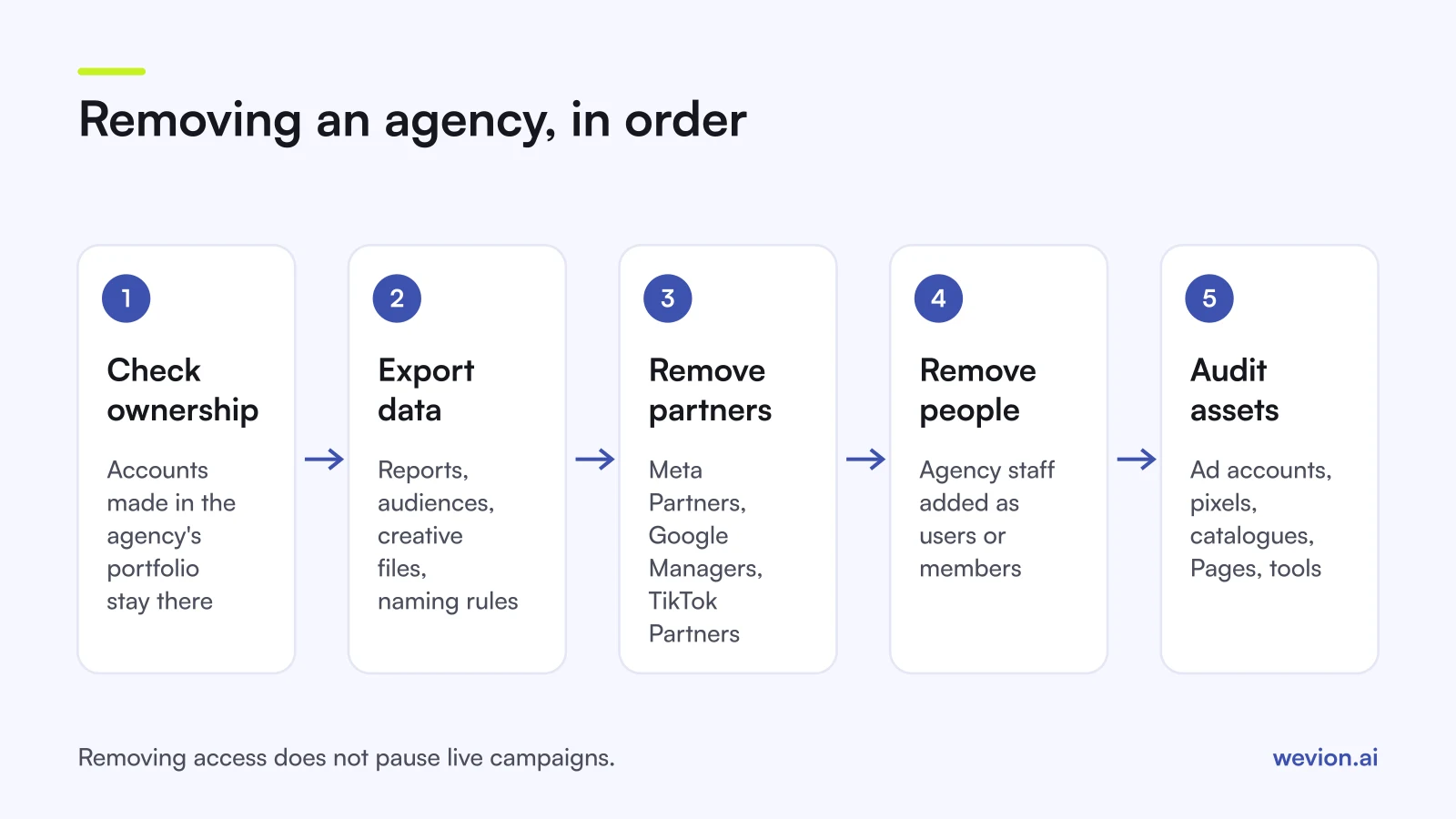
To remove agency access cleanly, a brand has to do more than click "remove partner". It has to check who owns each asset, save the data it wants to keep, then take the agency out of its Meta business portfolio, its Google Ads account and its TikTok Business Center, and finally confirm that no agency staff are left behind as individual users. This guide is the brand's side of that exit.
Quick answer: First confirm that your business owns the ad accounts, pixel or dataset, catalogue and Pages. Export reports, audience definitions and creative files. Then remove the agency as a partner in your Meta business portfolio, unlink its manager account in Google Ads, delete it as a partner in TikTok Business Center, and remove any agency staff listed as people or users. Finish with an asset-by-asset check.
This article is for brands and in-house teams. If you run an agency and want to know who should own what from day one, read our guide to agency ad account ownership. If you are offboarding one of your own employees rather than an outside agency, our story about how an agency offboarded a media buyer covers the internal side.
What should you do before you remove agency access?
The order matters more than the clicks, because once an agency loses access it can no longer export anything for you, and some assets cannot be moved at all. Work through these five checks first.
- Confirm who owns each asset. In Meta business settings, open each ad account, dataset, catalogue and Page and check which business portfolio is listed as its owner. In Google Ads, check whether the agency's manager account has administrative ownership or only standard access.
- Agree the end date in writing, including who pauses or keeps running which campaigns. Removing access does not pause ads.
- Export what you want to keep: performance reports by month, audience definitions, campaign naming rules, UTM conventions and the source files for creative the agency made for you.
- Settle billing. If the agency paid the platforms with its own card or credit line and invoiced you, close that out before anything changes. Our guide to Meta ads agency billing explains the common setups.
- Make sure your own admins exist. At least two people at your company should have full control in Meta, admin access in Google Ads and Admin rights in TikTok Business Center before the agency leaves.
Ownership is the step that decides how hard the rest will be. Meta's page on giving partners access says an ad account created in one business portfolio cannot be transferred to another business's portfolio, and TikTok's account creation guide says the Business Center owns the ad accounts created in it. If the agency created your accounts in its own portfolio or Business Center, you cannot take them with you, only the data you export.
How do you remove an agency from Meta?
On Meta, an agency usually reaches your assets in two ways at once: as a partner business, and through individual staff who were added to your business portfolio as people. You need to remove both. Only someone with full control of your business portfolio can do it.
Remove the partner. In business settings, open Partners, select the agency's business and remove it from your business portfolio, then confirm. Meta's page on removing partners says this also cancels the permissions the partner was granted on your business assets. Menu labels change from time to time, so follow Meta's help page if your screen looks different.
Remove people. Removing a partner business does not remove agency employees you added directly to your portfolio. Open People, look for agency email addresses or names you do not recognise, and remove them.
Check every asset. Open each asset type in business settings, such as ad accounts, Pages, Instagram accounts, datasets and catalogues, and look at who still has access. An agency that was shared a single asset rather than the whole portfolio may still appear there.
Review connected tools. Agencies often connect reporting or scheduling tools to your accounts. Check the apps and integrations listed in your business settings and remove any you no longer use.
How do you remove an agency from Google Ads?
Google Ads links agencies through a manager account, often called an MCC, so the main step is to unlink that manager account from your account. Google's unlinking guide says you need to be signed in with an email that has admin access to your Google Ads account.
- Open Admin, then Access and security.
- Go to the Managers tab.
- Find the agency's manager account and select Remove access in the Actions column.
- Review the preview of how unlinking affects your account, then select Unlink.
Google also requires every account to keep either a user with administrative access or a manager account with administrative ownership. If the agency created your account from its MCC and nobody at your company has admin access, ask the agency to invite your admin first. Our Google Ads MCC guide covers the agency side of the same process.
Next, remove individual users. On the same Access and security page, find agency emails under users and select Remove access, as described in Google's page on managing account access. Google's security best practices warn that users who are not removed can still sign in and make changes.
Two linked Google tools usually need the same treatment:
- Google Analytics 4. In Admin, open Access Management at account or property level, select the agency users and remove them. Google's GA4 user management page says you need the Administrator role at account level to delete users.
- Merchant Center. Remove agency people and partners from People and access, following Google's Merchant Center access page. Check first that your website verification does not depend on an agency user.
How do you remove an agency from TikTok?
TikTok Business Center works much like Meta: the agency is usually a partner, and sometimes its staff are also members of your Business Center. Only a Business Center Admin can remove either.
Remove the partner. TikTok's partner removal steps are short: open Partners, open the agency, select Delete and confirm. TikTok says removed partners lose access to the assets and accounts that were assigned to them.
Remove members. Then follow TikTok's guide to removing members for any agency staff who were invited as people. Check the ad account, pixel and catalogue assignments afterwards. For the agency's view of the same setup, see our guide to TikTok Business Center for agencies.
What should you keep when an agency leaves?
The assets worth protecting are the ones that hold history, because history is what ad delivery and your reporting depend on. A new ad account can be opened in an afternoon; months of conversion data cannot be recreated.
| Asset | Why it matters | How to keep it |
|---|---|---|
| Meta pixel or dataset | Holds the conversion history Meta's delivery learns from | Owned by your portfolio; if the agency owns it, ask it to share it with you before the end date |
| Product catalogue | Feeds catalogue and shopping ads | Owned by your portfolio, connected to your store |
| Custom audiences | Customer lists, site visitors, engagers | Export definitions and source lists; see our guide to rebuilding an audience library |
| Google Ads conversion actions | Bidding depends on them | Created in your own account, not only at MCC level |
| GA4 property | Site and campaign history | Owned by your organisation's Google account |
| Reports | Your before and after baseline | Monthly exports by platform, campaign and creative |
| Creative files | Source files, not only exported ads | Listed as a deliverable in the contract |
| Naming and UTM rules | Keeps reports comparable after the switch | A written document handed over at exit |
Two rules sit behind this table. First, assets created under the agency's ownership stay with the agency, so the time to fix ownership is at onboarding, not at the exit. Second, data you do not export before access ends is very hard to get back, because the agency no longer has the access needed to export it for you.
What are the common mistakes when removing agency access?
Most problems after an agency exit come from steps done in the wrong order or skipped altogether. These are the ones we see most often:
- Removing access before exporting. The agency can no longer send the reports you forgot to ask for.
- Removing the partner but not the people. Agency staff added as individuals keep their access.
- Leaving one admin. If your only admin leaves your company too, you are locked out of your own accounts.
- Forgetting campaigns are still live. Removing access does not pause ads, so spend continues with nobody watching.
- Ignoring connected tools. Reporting and automation tools the agency connected can keep reading your data.
- Starting the new agency with full control. Give the next agency partner access with the tasks it needs, as our list of agency permission mistakes explains.
Where Wevion fits
Changing agency is easier when your own team already sees every account in one place, because you are not relying on the agency's dashboards to know what is live.
Wevion connects Meta, Google, TikTok, Snapchat, Taboola and Outbrain ad accounts through each platform's official API, syncs data about every 15 minutes, and shows spend and results for every account in one dashboard, so a brand keeps the same view whichever agency or team runs the campaigns.
Access in Wevion is separate from access on the platforms. Team roles such as manager, media buyer, finance and viewer decide who can see and edit what inside a workspace, and removing someone from a workspace ends their access there. It does not replace the steps above: you still remove partners and users on Meta, Google and TikTok.
Start a 14-day trial with no card. We ask for one on day 7, or earlier if you use up the trial credits, and billing starts on day 14 only if you add it.
Key takeaways
- Check ownership first: ad accounts created in an agency's portfolio or Business Center stay with the agency.
- Export reports, audiences, creative files and naming rules before any access is removed.
- On Meta, remove the agency under Partners, then remove agency staff under People.
- On Google Ads, unlink the manager account from Access and security, then remove users, GA4 and Merchant Center access.
- On TikTok, delete the agency under Partners, then remove members.
- Keep at least two admins of your own on every platform, and decide who pauses live campaigns.