
Meta Ad Library Search: How to Research Competitor Ads
Yuki Tanabe
Stratège Creative AI
Meta ad library search is the free way to see the ads any business is running on Facebook, Instagram, Messenger, Threads and Meta's other apps. You search by keyword or by advertiser, filter by country, category, platform, media type, status and date, and see each ad's creative, start date and placements. You do not need an ad account, and you do not need to pay for a tool to start.
Quick answer: Go to facebook.com/ads/library, pick a country and the All ads category, then search by advertiser name for a known competitor or by keyword to find new ones. Filter to active ads, sort through the creatives, and note which ones have been running longest. Ads delivered in the EU or UK show extra data, including estimated reach and demographics.
Paid spy tools build on top of this data. If you are choosing one, our Facebook ads spy tools comparison covers the options. This guide is about getting the most out of Meta's own library first.
What is the Meta Ad Library?
The Meta Ad Library is Meta's public archive of ads running across its technologies. According to Meta's Ad Library page, it lets anyone search all ads currently running across Meta technologies, ads about social issues, elections or politics from the past seven years, and ads that ran anywhere in the EU in the past year.
That gives three levels of coverage, and the level decides what you can see:
| Type of ad | How long it stays in the library | Extra data shown |
|---|---|---|
| Any active ad, any country | While active | Creative, start date, platforms, Library ID |
| Delivered in the EU or associated territories | While active, then one year after the last impression | Estimated reach, age, gender and location breakdowns, advertiser and payer |
| Social issues, elections or politics | Seven years | Spend and impression ranges, and the "Paid for by" disclaimer |
For most commercial competitors outside the EU, the library is a live view: once an ad stops, it drops out of the results. That is why a weekly habit beats an occasional look.
How does a Meta Ad Library search work?
A Meta Ad Library search starts with two choices, a country and an ad category, then a search term. The category is usually All ads for competitor research; the other options are ads about social issues, elections or politics, and Meta's special ad categories.
Search by advertiser when you know the competitor. Start typing the brand and pick its Page from the suggestions. You get every ad that Page is running, including ads whose copy never mentions the brand. This is the right default for competitor research.
Search by keyword to find advertisers you do not know yet. Use phrases buyers would see in the ad, such as a product type or an offer like "free shipping". Meta's Ad Library API documentation notes that keyword searches are not translated, so search in the language of the ads, and use quotation marks when you need the exact phrase.
The country matters more than it looks. A brand selling in Germany and the US may run different creatives in each, and searching All countries mixes them.
Which Ad Library filters are available?
The Ad Library offers filters for narrowing results once you have searched. The labels in the web library change from time to time, but they match the parameters Meta documents for the API as of November 2026:
| Filter | Options documented by Meta | Use it to |
|---|---|---|
| Ad category | All ads, issues, elections or politics, employment, housing, financial products and services | Keep competitor research on All ads |
| Country | All, or a single country | Separate markets |
| Language | Any language code | Find ads aimed at one language group |
| Platform | Facebook, Instagram, Audience Network, Messenger, WhatsApp, Threads and others | See where a brand places its ads |
| Media type | Images, memes, videos, none | Separate video from static |
| Active status | Active, inactive, all | Inactive only returns EU, UK or political ads |
| Dates | A delivery date range | Spot launches in a given week |
Two limits are worth knowing. Inactive ordinary commercial ads outside the EU and UK do not come back. And there is no filter for performance: the library shows what runs, not what works.
What extra data do EU and UK ads show?
Ads delivered in the EU or UK carry more transparency data than ads elsewhere, because of the EU's Digital Services Act. Meta's Ad Library tools page says it offers more information for ads that deliver an impression in the EU or associated territories, and keeps them for one year after their last impression.
According to the API documentation, these ads include:
- Estimated total impressions in the UK and EU.
- Estimated targeting and reach breakdowns by age, gender and location for the UK and EU.
- Advertiser and payer information, for EU ads only.
Meta's 2023 announcement on the Digital Services Act describes this as archiving all ads that target people in the EU, with the dates the ad ran, the targeting parameters and who was served the ad.
For competitor research, this is the most useful data Meta gives away. Searching a competitor with an EU country selected shows which creatives reached the most people and which age groups saw them. Treat the numbers as estimates, as Meta does: they show scale, not sales.
One change to note: Meta stopped delivering political, electoral and social issue ads in the EU from October 2025, citing new EU rules. Commercial ads are not affected.
What does the Ad Library API cover?
The Ad Library API gives programmatic access to part of the library, not all of it. Meta's API page says it covers ads about social issues, elections or politics delivered anywhere in the past seven years, and ads of any type delivered to the UK or EU in the past year. The developer documentation adds that ads which did not reach any location in the EU only return if they are about social issues, elections or politics.
So the API is useful for EU and UK competitor monitoring at scale, and of little use for a US-only competitor's commercial ads. To use it, Meta asks you to:
- Have a Facebook account and complete the identity and location confirmation used for ads about social issues, elections or politics.
- Register as a Meta developer and agree to the Platform Policy.
- Create an app and query the ads archive endpoint.
The API accepts up to 10 Page IDs per search, keyword searches of up to 100 characters, and filters for country, status, dates, media type, platform and language.
What is a practical competitor research workflow?
A good competitor workflow turns the Ad Library into test ideas for your own account, on a fixed weekly rhythm. Here is a routine for a media buyer working on one brand.
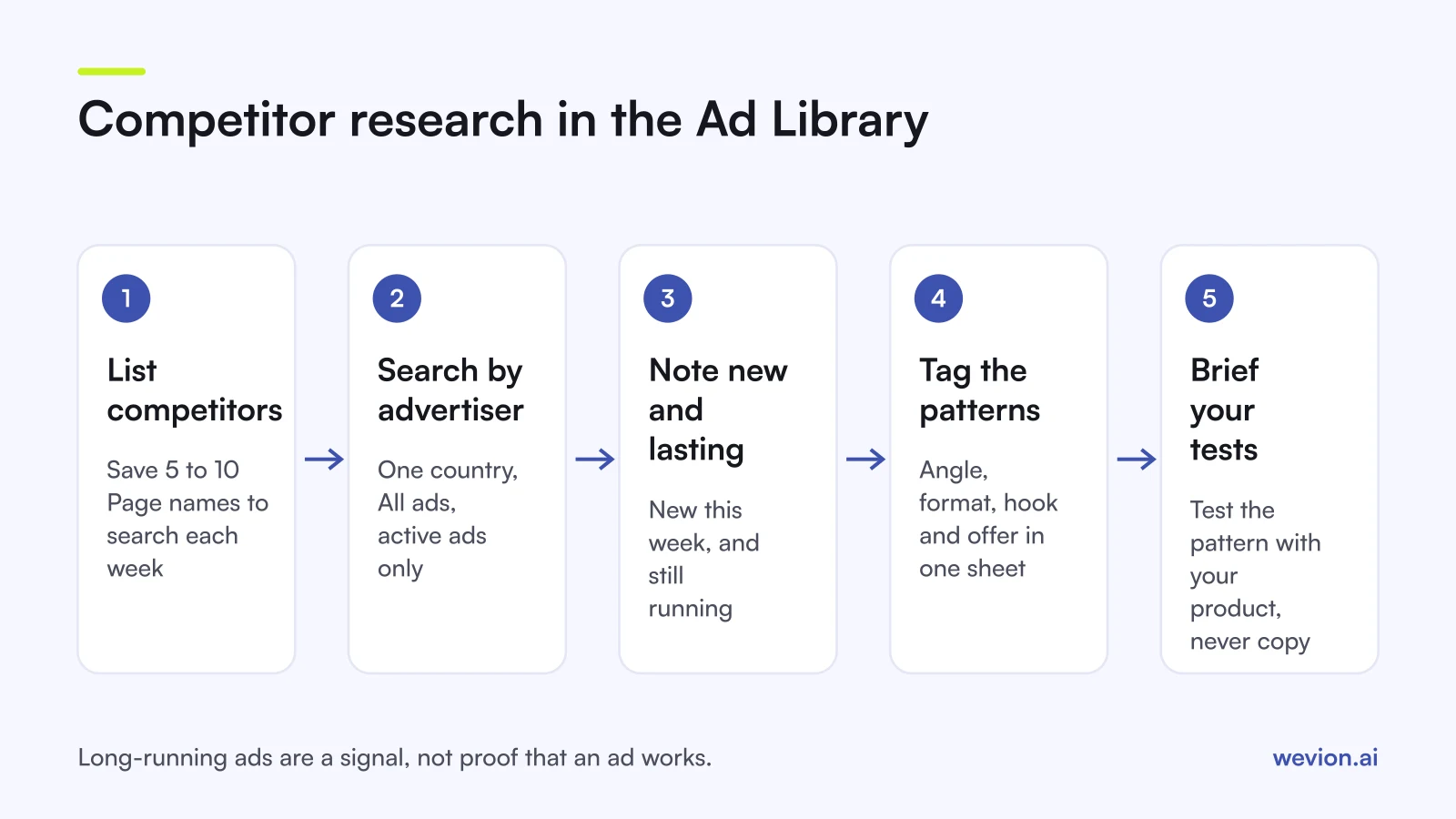
- List 5 to 10 competitors and save their Page names, so you search by advertiser every time.
- Search each one weekly in your main market, with active ads only.
- Note what is new and what has lasted. An ad that has run for weeks is a signal that it may be working, though not proof: brands also leave ads running by habit.
- Tag each ad by angle, format, hook and offer in a shared sheet or creative library.
- Check the EU view for competitors that sell there, to see estimated reach by creative.
- Brief two or three tests from patterns, not copies, and run them through your own testing framework.
A hypothetical week: you track 8 competitors running 64 active ads in total. Twelve are new this week, and 9 have been live for more than six weeks. Four of those 9 use a founder-to-camera video hook. That is one pattern worth testing with your own product, not a creative to copy.
Our creative testing framework covers how to run those tests, and the creative library guide covers how to store what you find. Once your own tests are live, judge them on your data, using hook and hold rate and the signals for refreshing creatives.
What is the TikTok equivalent?
TikTok offers two tools that cover what the Meta Ad Library does, with different scopes.
The Commercial Content Library at library.tiktok.com is TikTok's public ad archive. You can search by keyword or advertiser and filter by country, ad type and date, and no TikTok account is needed. TikTok's support page says it currently covers ads shown to users in the EEA, Switzerland and the UK, so it is closest to the EU side of Meta's library. Researchers can apply for the Commercial Content API.
Top Ads, in TikTok Creative Center, is a curated collection, not an archive. TikTok's Top Ads help page describes it as a collection of high-performing creatives that can be filtered by region, industry, campaign objective and more, and says every ad in it was authorised by its advertiser in TikTok Ads Manager. It is good for format ideas, not for tracking a specific competitor. For structuring the tests you build from it, see our TikTok campaign structure guide.
Where Wevion fits
The Ad Library gives you ideas; the work that follows is launching, testing and reading results across your own accounts, and that is where Wevion helps.
Wevion connects Meta ad accounts through the official API with OAuth, plus Google, TikTok, Snapchat, Taboola and Outbrain through each platform's official API, and syncs results about every 15 minutes in one view. You can launch test variants in bulk with Bulk Launch, and produce new images and videos from a brief in Creative Hub, with your Brand Kit attached.
Automated rules can then pause losing ads, activate winners, change budgets or just send an alert, with a cooldown and a daily cap on runs.
You can try it on your own ad accounts with a 14-day trial on the Pro plan. No card to start. We ask for one on day 7, or earlier if you use up the trial credits, and billing starts on day 14 only if you add it.
Key takeaways
- The Meta Ad Library shows every active ad on Meta's apps for free; inactive commercial ads stay only if they reached the EU or UK.
- Search by advertiser for known competitors and by keyword to find new ones, in the language of the ads.
- EU and UK ads add estimated impressions, reach breakdowns and, for the EU, advertiser and payer details.
- The Ad Library API covers political and issue ads plus EU and UK ads, not all commercial ads.
- Run a weekly routine: track competitors, tag patterns, and turn them into tests rather than copies.
- On TikTok, use the Commercial Content Library for the archive and Top Ads for curated ideas.