
Performance Max Campaign Structure: An Ecommerce Guide
Priya Raghunathan
E-Commerce Performance Manager
A good performance max campaign structure decides which products share a budget and a target, which creatives go with which products, and which searches the campaign may chase. Performance Max makes most delivery decisions for you, so structure is one of the few levers you still own. Get it right and Google's bidding works with clean signals; get it wrong and your bestsellers eat the budget while the rest of the catalogue never shows.
Quick answer: Run as few Performance Max campaigns as your budgets and targets allow. Use separate campaigns for different ROAS targets, margins or countries. Inside each campaign, use one asset group per product theme, with listing groups that point it at those products, up to 50 search themes, and an audience signal. Add brand exclusions and negative keywords at campaign level, and decide on the new customer goal before launch.
If you are deciding between Performance Max and Meta's equivalent, start with our Performance Max vs Advantage+ comparison. This guide assumes you have picked Performance Max and need to build it.
What are the layers of a Performance Max campaign?
A Performance Max setup has four layers, and each one controls different things.
| Layer | What you control there | Limit (Google) |
|---|---|---|
| Account | Number of campaigns | 100 Performance Max campaigns per account |
| Campaign | Budget, bid strategy, goals, locations, ad schedule, brand exclusions, negative keywords, customer acquisition | 10,000 negative keywords per campaign |
| Asset group | Creatives, final URL, audience signal, search themes | 100 asset groups per campaign; 50 search themes per asset group |
| Listing group | Which products from the feed this asset group can show | 1,000 listing groups per asset group |
Sources: Google's account limits page for campaigns, listing groups and negative keywords; the Google Ads API asset groups guide for asset groups; the search themes help page for search themes.
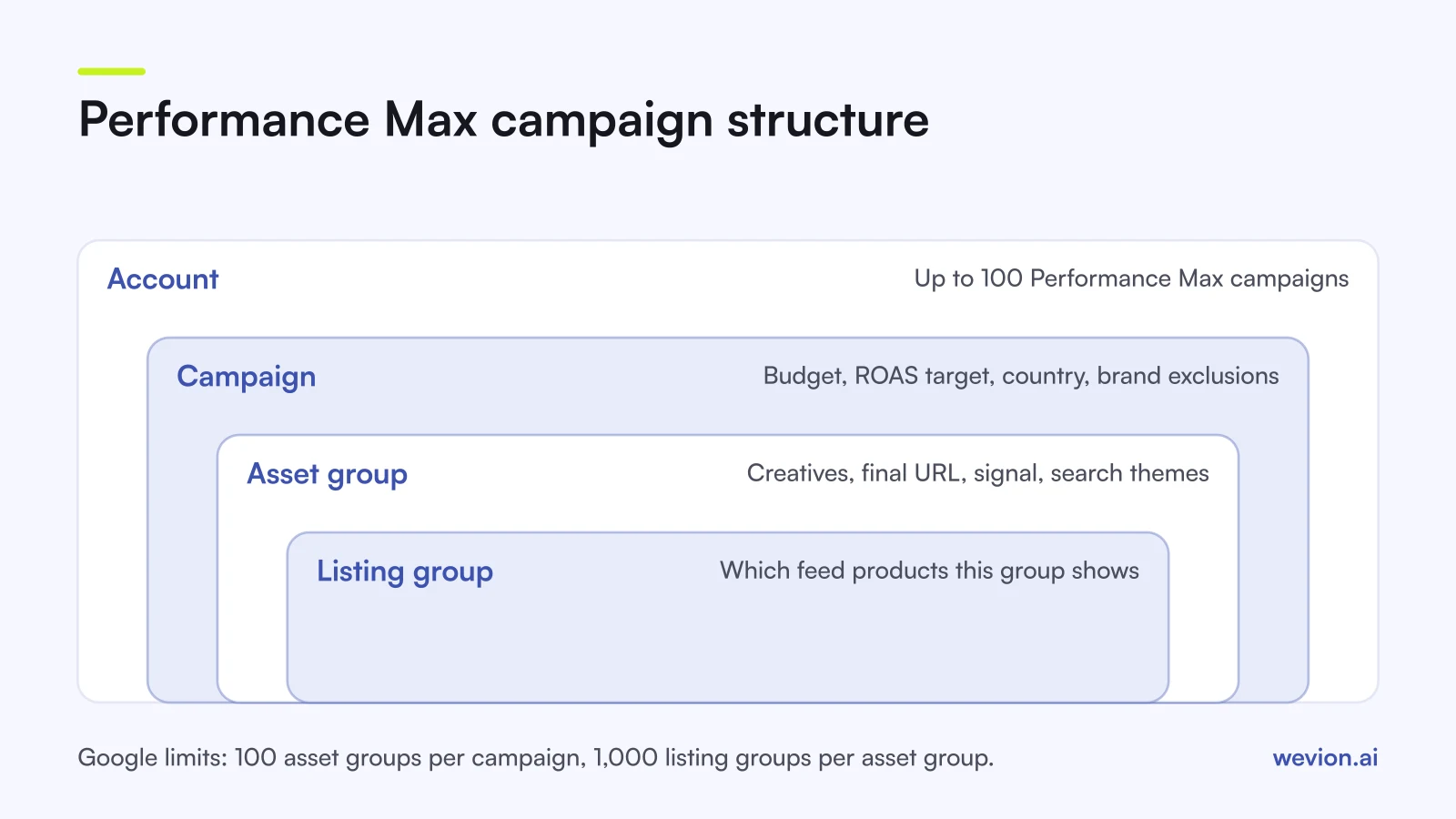
The rule that follows: anything about money (budget, target) lives at campaign level, and anything about message and products lives at asset group level.
How many Performance Max campaigns should you run?
Fewer than you think. Every extra campaign splits conversion data, and Performance Max cannot share data through a portfolio: Google's compatibility table lists portfolio bid strategies and shared budgets as not available.
Split into a new campaign only when part of the catalogue needs:
- A different ROAS target. A 50% margin product breaks even at a ROAS of 200% (1 ÷ 0.50); a 25% margin product at 400% (1 ÷ 0.25). One target cannot serve both. Our break-even ROAS calculator does the maths.
- A fixed budget. A new collection the business wants to fund no matter what, or a clearance line that must not take more than a set amount.
- A different country or language with its own budget.
- A different goal, such as store visits alongside online sales.
Product categories, seasons and audiences do not need their own campaigns. Asset groups and listing groups handle them.
How should you split asset groups?
An asset group is a set of creatives (text, images, videos, logos) plus a final URL, an audience signal and search themes. Google uses it to build ads across its inventory. The Google Ads API retail guide recommends that each asset group target different products, for example splitting a catalogue into two groups by product set.
A practical split for ecommerce is one asset group per product theme a shopper would recognise: "running shoes", "trail shoes", "socks". Each gets images of those products, copy about them, and a final URL on the matching collection page.
Do not create five asset groups for the same products with different audience signals. Audience signals are hints, not targeting, so the groups compete for the same people and the reports become hard to read.
How do listing groups work?
Listing groups decide which products from your Google product feed an asset group can show. Google's retail guide notes that at least one listing group is required, and you can filter it to a subset of products. You can subdivide by attributes in the feed, such as category, brand, item ID or custom labels.
Custom labels are the most useful. Fill them in the feed with things the feed does not hold by default, such as margin band, bestseller status or season, and you can build listing groups around them. A "margin: high" label is how you send high-margin products to the campaign with the lower ROAS target.
Keep listing groups across asset groups from overlapping. If two asset groups in one campaign both include the same product, you lose a clean read on which creative sold it.
What do search themes do?
Search themes tell Google which searches an asset group is relevant for, beyond what it learns from your site and feed. Google's search themes page gives the rules:
- up to 50 search themes per asset group, each up to 80 characters
- they act like phrase or broad match keywords
- they respect brand exclusions
They do not override your Search campaigns. Google's About Performance Max page says a Search campaign is prioritised when the query is identical to one of its exact match keywords, and search themes have the same priority as phrase and broad match keywords.
Use search themes for gaps: new products with no history, or queries you know convert but the campaign is not reaching. Read the search terms report before you add more.
How do brand exclusions and negative keywords fit?
Both are campaign-level filters on the searches Performance Max can serve on, and both exist because Performance Max likes cheap branded clicks that would often have come anyway.
Brand exclusions stop the campaign serving on searches for specific brands, including misspellings, through a brand list. Google's Performance Max setup article covers them under campaign settings. A common setup is to exclude your own brand from Performance Max and cover it with a separate brand Search campaign, so you can see what brand demand really costs.
Negative keywords are now supported at campaign level. Google's April 2025 announcement raised the limit from 100 to 10,000 per Performance Max campaign, and Google advises monitoring how negatives affect reach. Use them for irrelevant queries from the search terms report, such as "free", "jobs" or a competitor's product you do not stock.
Should you use the new customer acquisition goal?
The customer acquisition setting tells Performance Max how to treat people who have not bought from you before. Google's customer lifecycle goals page lists three options for Performance Max:
| Mode | What it does | Bidding |
|---|---|---|
| New customer value | Bids higher for new customers than existing ones | Target ROAS or Maximise conversion value, with a purchase goal |
| High-value new customer | Bids higher again for high-value new prospects | Target ROAS or Maximise conversion value, with a purchase goal |
| New customer only | Only bids for new customers | Also works with Maximise conversions or Target CPA |
Google identifies existing customers from your first-party data, such as a customer list and your website tag, so upload a recent list first. New customer value is the safer start for most stores. New customer only cuts returning buyers completely, which suits strict acquisition budgets but can lower total revenue. Since April 2025 Google also reports customer acquisition cost in a campaign column for the new customer only and new customer value modes.
Can you run a feed-only Performance Max campaign?
Some stores run Performance Max with only a product feed and no custom creatives, so the campaign behaves much like Shopping. Google's retail guide confirms the option: with a linked merchant account and its feed, assets can be generated automatically, but reach and performance will be limited.
Treat feed-only as a deliberate choice for catalogues where product images do the selling, not as a shortcut. If you add your own assets later, the same guide notes that the asset group must then meet the full minimum asset requirements.
What can you see in Performance Max reports?
More than at launch. On 30 April 2025 Google announced a Channel performance page covering Search, YouTube, Discover, Gmail, Display, Search partners and Maps, plus a full search terms report and asset-level impressions, clicks, cost and conversions. Read these before you change structure, because they show whether a weak asset group is a creative problem or a channel problem.
Two ecommerce examples
Example 1: one country, mixed margins. A store with 400 products and two margin bands:
- Campaign A, high margin (50%): Target ROAS 250%, a cushion above the 200% break-even. Three asset groups (running shoes, trail shoes, accessories), each with listing groups filtered to custom label "margin: high" and its own category.
- Campaign B, low margin (25%): Target ROAS 450%, above the 400% break-even. One asset group for the whole low-margin range.
- Brand: own brand excluded in both, covered by a brand Search campaign.
Example 2: two countries. A store selling in Germany and France with fixed country budgets runs one campaign per country, each with the same asset group layout and copy in the local language. Splitting by country keeps budgets and targets separate.
Common Performance Max structure mistakes
- One campaign per product category, which splits data with no change in budget or target.
- Overlapping listing groups across asset groups in the same campaign.
- Audience signals used as targeting, with copies of the same asset group for each audience.
- No brand exclusion, so reported ROAS is inflated by brand searches.
- One ROAS target for every margin, which buys low-margin revenue at a loss. Our POAS vs ROAS guide shows why profit is the better yardstick.
- Hourly scheduling to fix a structure problem. Performance Max takes an ad schedule but no hourly bid adjustments; see our Google Ads dayparting guide.
For the bid strategy itself, our Google Ads Smart Bidding guide covers targets, learning and seasonality adjustments.
Where Wevion fits
Performance Max reports inside Google, and most stores running it also run Meta and TikTok. Comparing them means three interfaces and three sets of columns.
Wevion connects Google, Meta, TikTok, Snapchat, Taboola and Outbrain ad accounts through each platform's official API, syncs data about every 15 minutes, and shows spend, revenue and ROAS for every account in one view, so you can compare Performance Max with Advantage+ and TikTok on the same numbers.
Profitability tracking, which brings product costs into the picture, is in beta. You can also set automation rules on a single platform that pause, activate, change budgets by a percentage or send an alert, and cross-platform rules are in beta. If you build Meta campaigns too, our Meta ads campaign structure guide covers that side.
You can try it on your own ad accounts with a 14-day trial on the Pro plan. No card to start. We ask for one on day 7, or earlier if you use up the trial credits, and billing starts on day 14 only if you add it.
Key takeaways
- Put money decisions (budget, ROAS target, country) at campaign level and message and products at asset group level.
- Split campaigns only for different targets, budgets, countries or goals; Performance Max cannot use portfolios.
- Use one asset group per product theme, with non-overlapping listing groups.
- Use custom labels in the feed to route products by margin.
- Add up to 50 search themes per asset group for gaps; exact match Search keywords still take priority.
- Exclude your brand and add negative keywords (up to 10,000 per campaign).
- Pick the new customer mode before launch and upload a customer list first.