
Meta Account Quality: What It Shows and a Weekly Check
Lena Brandt
Analyst für Werberichtlinien & Compliance
Meta account quality is checked in Account Quality, the area of Meta Business Suite where Meta lists rejected ads and advertising restrictions on your business portfolio, ad accounts, Pages and people, and where you request a review if you think a decision is wrong. It is the first place to look when delivery stops, and the best place to catch problems before they do.
Quick answer: Open Account Quality from Meta Business Suite or Ads Manager; some newer Meta pages call it Business Support Home. Check every asset for rejected ads and restrictions, read the reason Meta gives, fix the cause, then request a review. Meta says restricted account reviews typically take 48 hours, though some take longer. Media buyers should check it weekly.
This guide is about using Account Quality as a routine. If an account is already disabled and you need to act now, read what to do in the first 48 hours and what evidence to gather after a ban first.
What is Meta Account Quality?
Account Quality is Meta's view of the enforcement status of the business assets you have access to. Meta's Advertising Standards say that if you think an ad was rejected by mistake, or that your Business Account or its assets, such as ad accounts, Pages and user accounts, were restricted by mistake, you can request a review of either decision in Account Quality.
Meta has also introduced Business Support Home, which it describes as a central place to monitor and improve compliance with its Advertising Standards, Commerce Policies and other policies and terms. Some help pages send you to Account Quality and others to Business Support Home for the same kind of review. Treat them as the same job: the screen where Meta shows what it has flagged and lets you respond.
Where do you find Account Quality?
Account Quality is reachable from the places media buyers already work, so it costs little to check. Use any of these routes:
- Meta Business Suite: open the menu and select Account Quality, or Business Support Home where your account shows that name.
- Ads Manager: rejected ads and restricted accounts link to the review option from their status.
- Commerce Manager: Meta's commerce review guide sends you from Account Health to Go to Account Quality, then Request Review.
You only see assets you have a role on. An agency media buyer with access to one client's ad account sees that account, not the client's whole portfolio. For a full picture of a client, someone with admin access to the portfolio should run the check, which is one reason our Business Manager tips recommend at least two admins.
What does Account Quality show?
Account Quality groups its findings by asset, and the asset decides how much is affected. Here is what each type covers.
| Asset | What a problem looks like | What it affects |
|---|---|---|
| Business portfolio | Restricted from advertising | Every ad account and asset that advertises through it |
| Ad account | Restricted or disabled | All campaigns in that account |
| Page | Restricted from advertising | Ads that run from that Page, in any ad account |
| Person (user account) | Restricted from advertising | What that person can do across every portfolio they belong to |
| Ad | Rejected | That ad only |
Meta's help centre describes three levels of advertising restriction: a limit on how much you can spend, a limit on the advertising features you can use, or a loss of access to all advertising on Meta technologies. The exact wording on screen changes with Meta's interface, so read the reason Meta gives for each asset rather than relying on the label alone.
The person row matters more than many buyers expect. If one team member's own Facebook account is restricted from advertising, that can follow them into every client portfolio. Meta's Account Integrity policy also says it may restrict accounts and business assets in several situations, including those linked to previously disabled accounts.
What does each finding mean, and what should you do?
Each finding in Account Quality calls for a different response, and the right response depends on whether one ad or a whole asset is affected.
Rejected ad. One ad did not pass review. Meta's ads review policy says you can edit the ad, create a new one, or request another review if you think it was rejected by mistake. A single rejection is routine; a cluster of them in one account is a warning sign worth acting on.
Asset restricted from advertising. An ad account, Page, person or portfolio has a spend limit, a feature limit or no access to advertising. Read the stated reason, fix what you can, and then request a review.
Asset disabled. The asset can no longer advertise. This is the case covered in our disabled ad account guide. Do not create new assets to get round it: Meta treats evading enforcement as a reason to restrict further.
Review in progress or decided. Once you request a review, the asset shows that a review is under way, and Meta emails the decision. Meta's review policy says restricted account reviews are typically completed within 48 hours, although some take longer.
How do you request a review in Account Quality?
A review request asks Meta to look again at a rejected ad or a restricted asset, and it works best when the cause is already fixed. Follow these steps.
- Select the asset in Account Quality and read the reason Meta gives.
- Fix the cause first. Edit or remove the ad, update the landing page, settle a payment problem or complete a requested check such as identity confirmation.
- Select Request review and complete the steps Meta shows. Some reviews ask you to confirm your identity.
- Wait for the email. Do not send the same request again while one is open.
- Log the outcome with the date, asset ID and reason, so you have a record if the problem returns.
You generally need an admin role on the asset to request a review. If a review is declined, read the decision before doing anything else; the evidence guide explains what to keep on file.
What is a weekly Account Quality check for media buyers?
A weekly check is a fixed slot where you scan every asset you manage, so rejections and restrictions are caught while they are small. It takes about as long as the number of assets you manage, and it saves the much longer job of rebuilding a client's account.
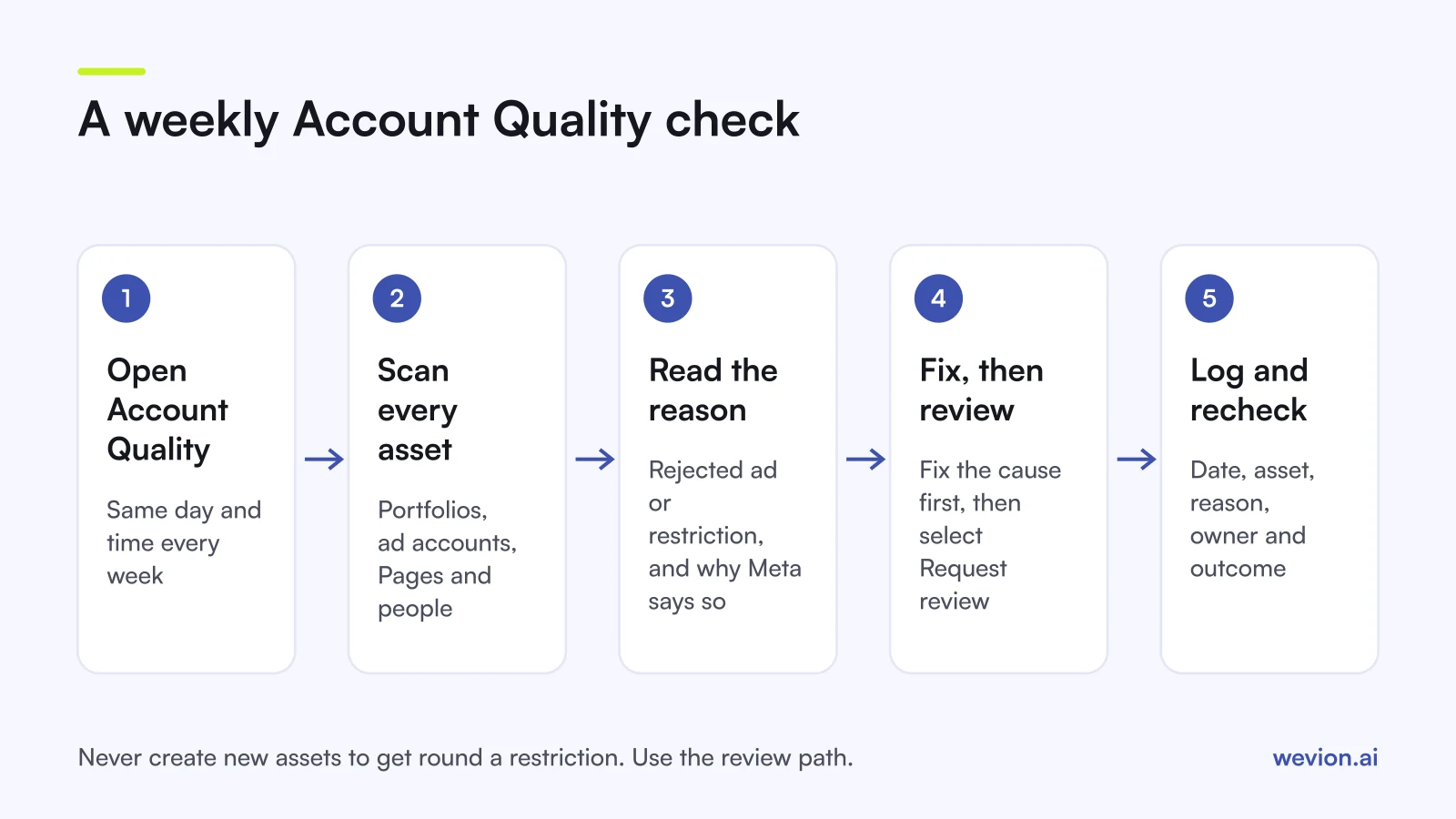
Here is a routine that works for an agency team:
- Same day, same time. Monday morning, before budgets change for the week.
- Every portfolio, every asset. Ad accounts, Pages and people, not just the account that looks slow.
- Count rejections per account. Note any account with more rejected ads than last week.
- Read every new restriction. Copy the reason and the date into your log.
- Assign an owner. One person fixes the cause and requests the review.
- Recheck mid-week anything with an open review.
A worked example with hypothetical numbers: an agency manages 4 client portfolios, 12 ad accounts, 6 Pages and 5 team members, so 27 assets in total. At 30 seconds per asset with no issue, the scan takes about 14 minutes. This week, 3 ad accounts show 1 rejected ad each and 1 Page has a new advertising restriction. That is 4 findings to log, and 1 restriction to fix and review before the client's Thursday launch.
Keep the log in a shared sheet with one row per finding: date, client, asset, finding, reason, owner, review requested, outcome. Over a quarter, the log shows which clients, offers or creative styles cause repeated rejections, which is the input for the ad account safety habits that reduce them.
How does Account Quality relate to disabled ad accounts?
Account Quality is where a disabled ad account first shows up, and where the official appeal starts. Most disabled accounts do not appear without warning: rejected ads, payment problems or restrictions on a Page or person often come first.
That is the value of a weekly check. If one account shows three rejections for the same claim on a landing page, fixing the page now is cheaper than appealing a restriction later. If a team member's profile is restricted, removing them from client portfolios while you resolve it protects the clients.
Verification also helps the full picture. A verified business portfolio unlocks certain advertising and billing features, although it does not prevent enforcement on ads that break the rules. For a review of every client account at once, our cross-platform ad account audit covers the wider checklist.
Where Wevion fits
Account Quality tells you what Meta has flagged; spotting the effect on delivery across many accounts is a separate job, and that is where one view helps.
Wevion connects Meta ad accounts through the official API with OAuth, plus Google, TikTok, Snapchat, Taboola and Outbrain through each platform's official API, and syncs data about every 15 minutes. Each client gets its own workspace, so a drop in spend or results in one account stands out against the others.
Automated rules can pause, activate, change budgets or just send an alert when a metric crosses your threshold, with a cooldown and a daily cap on runs. An alert when an account's spend falls well below its usual level is a simple prompt to open Account Quality and check.
You can try it on your own ad accounts with a 14-day trial on the Pro plan. No card to start. We ask for one on day 7, or earlier if you use up the trial credits, and billing starts on day 14 only if you add it.
Key takeaways
- Account Quality shows rejected ads and advertising restrictions on your business portfolio, ad accounts, Pages and people; some Meta pages call it Business Support Home.
- A rejected ad affects one ad; a restriction can limit spend, limit features or stop all advertising for an asset.
- Fix the cause first, then request a review; Meta says restricted account reviews typically take 48 hours, sometimes longer.
- Check every asset weekly, log each finding with its date and reason, and give it an owner.
- Never create new assets to get round a restriction; use the official review path.