
Snapchat Ads Campaign Structure: Campaigns, Ad Sets and Ads
Priya Raghunathan
电商效果投放负责人
A clear Snapchat ads campaign structure makes two jobs easier: reading tests cleanly and scaling what works without breaking it. Snapchat Ads Manager has three levels, campaign, ad set and ad, and each one controls different settings. Put each decision at the right level and your account stays easy to read as it grows.
Quick answer: Use one objective per campaign, usually Sales for an online store. Put audience, placement, performance goal, bid and budget on the ad set, and keep creative on the ad. Run tests in a campaign with equal ad set budgets and one variable per ad set. Move proven ad sets into a scaling campaign with Smart Budget, Snap's campaign-level budget, and keep retargeting in its own campaign.
This guide focuses on structure. For pixel setup, catalogues and creative, see our Snapchat Ads Manager guide for ecommerce. If you also run TikTok, our TikTok ads campaign structure guide follows the same layout so you can compare the two.
What are the three levels of a Snapchat campaign?
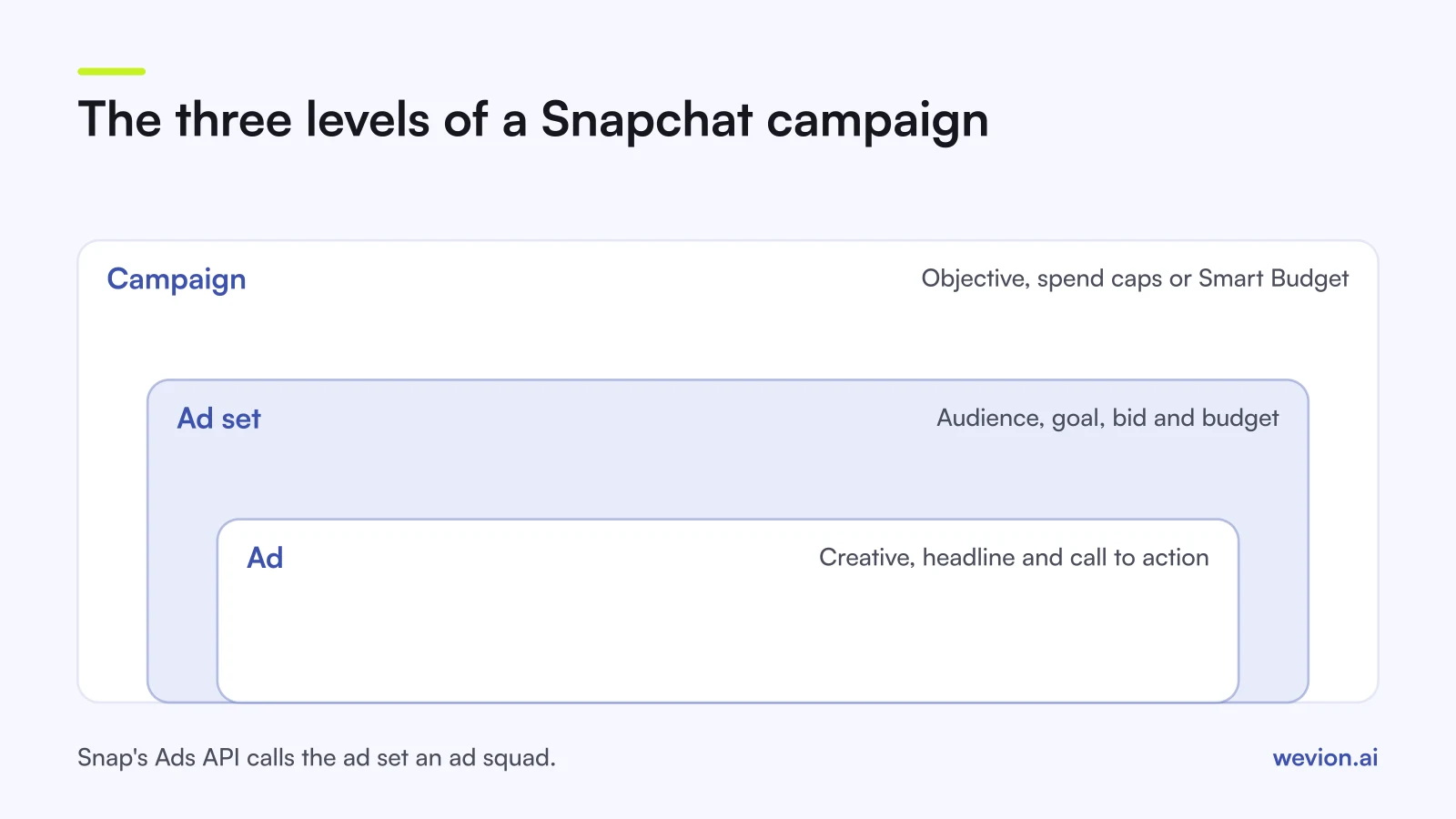
Snapchat campaigns have three levels, and each holds a different set of decisions: what you want, who sees it and how much you pay, and what people see. Snap's Business Help Center calls the middle level an ad set in articles such as Build Your Ad Sets. Snap's Ads API reference still calls it an ad squad and says an ad squad is owned by a campaign and contains one or more ads. Older guides, including some of ours, use ad squad too.
| Level | What you set there | Structural role |
|---|---|---|
| Campaign | Objective, schedule, optional daily and lifetime spend caps, or Smart Budget | One business goal |
| Ad set | Audience, placements, performance goal, bid strategy, daily or lifetime budget, dates | One audience or test cell |
| Ad | Creative, headline, call to action, destination | One creative idea |
According to Snap's ad set guide, you choose the performance goal, then the bid strategy, then a daily or lifetime budget with optional start and end dates. It also notes an ad set must be able to reach at least 1,000 people.
Which objectives and goals does Snap offer now?
Snap consolidated its objectives into five, and the performance goal you pick at ad set level decides what the system optimises for. Snap's objectives update article describes the move from 12 objectives to five, and the Ads API campaigns reference lists the same five types: Awareness and Engagement, Traffic, Leads, App Promotion and Sales.
| Objective | Typical performance goals | Use it for |
|---|---|---|
| Awareness and Engagement | Impressions, video views, engagement | Reach and brand recall |
| Traffic | Clicks to website or app, landing page views | Sending visitors, testing pages |
| Leads | Lead form submissions, website conversions, landing page views | Collecting contact details |
| App Promotion | App installs, installs plus in-app action, re-engagement | Growing and reactivating app users |
| Sales | Web or app conversions such as purchase or add to cart, catalogue sales | Revenue |
Snap's Sales objective article says a Sales campaign chooses a conversion location, web or app, and that web conversion goals use pixel events such as page view, add to cart, sign up and purchase. Exact goal names in your account can vary as Snap rolls out changes, so check the list in Ads Manager when you build.
Keep one objective per campaign. A store optimising for purchase should not share a campaign with a Traffic test, because spend and results become hard to compare.
Where do budgets sit on Snapchat?
Budgets on Snapchat can sit at two levels, and the choice decides whether you or Snap split the money between ad sets. Spend caps add a third control above them.
Ad set budgets. By default, each ad set has its own daily or lifetime budget. Snap's ad set budget article describes the daily budget as the average you are willing to spend on that ad set per day. The Ads API sets a minimum ad set daily budget of 5,000,000 micro-currency units, which is 5 units of the account currency.
Smart Budget. Snap's Smart Budget Optimization article describes one overarching budget at campaign level that Snap distributes across ad sets. You can set optional minimum or maximum spend per ad set, but Snap says it cannot guarantee full delivery of minimums and that limits can keep budget away from the best ad set. When we checked in November 2026, the article described Smart Budget as in beta, so it may not appear in every account.
Spend caps. A campaign can carry a daily and a lifetime spend cap. Snap's help centre says an account-level spend cap overrides a campaign cap, and a campaign cap overrides an ad set cap. The Ads API adds that a campaign daily budget must be at least 0.25 times the sum of its ad set budgets.
The Ads API also lists two Smart Budget limits worth knowing before you build: it cannot be combined with Dynamic Ads, and ad sets under it cannot use accelerated pacing.
Which bid strategies fit each structure?
Snapchat offers three bid strategies at ad set level, and the one you pick should match the job of the campaign. Snap's bidding strategies overview and the Ads API describe them like this:
- Auto-Bid: aims for the most efficient cost per action while spending your budget.
- Target Cost: aims for the most volume while keeping your average cost per action below a target. Snap says it is available only for some performance goals.
- Max Bid: bids at or below a ceiling you set; a ceiling set too low can leave budget unspent.
The Ads API notes that a separate minimum ROAS strategy was deprecated on 10 February 2025, so older guides that mention it are out of date.
For test campaigns, Auto-Bid keeps variants comparable and lets each one spend. For scaling campaigns, start on Auto-Bid and move a proven ad set to Target Cost once you know its stable cost per purchase. Our CBO vs ABO comparison explains the same trade-off on Meta.
What is a good structure for testing?
A testing structure on Snapchat should give every variant a fair, known share of spend and change only one thing at a time. That points to ad set budgets rather than Smart Budget, because a campaign-level budget can favour one ad set early and starve the rest.
A simple test campaign:
- One campaign, Sales objective, purchase as the performance goal.
- Three ad sets, one variable each. For a creative test: same audience, same placements, a different creative concept in each ad set. For an audience test: same creatives, a different audience in each.
- Equal daily budgets and the same bid strategy, Auto-Bid.
- A decision rule set before launch, for example a cost per purchase threshold after a set amount of spend.
- No edits in the first days. Snap's objectives page says the first 1 to 4 days are the most important and advises against adjusting your ad then, so the exploration phase does not start over.
Worked example (hypothetical numbers). A store tests three creative concepts at $50 a day each, $150 a day in total. After seven days each ad set has spent $350. Concept A has 14 purchases at $25 each, B has 9 at about $39, C has 5 at $70. With a target of $30, A graduates, B gets new creative and C stops. Our creative testing framework covers how to design the tests themselves.
What is a good structure for scaling?
A scaling structure on Snapchat should let spend follow results across a few proven ad sets, while keeping retargeting and tests out of the way. This is where Smart Budget fits.
| Campaign | Budget setup | Ad sets | Purpose |
|---|---|---|---|
| Sales: scale | Smart Budget | 2 to 4 proven ad sets | Spend follows results |
| Sales: test | Ad set budgets, equal | 3 cells, one variable each | Find new winners |
| Sales: retargeting | Ad set budgets | Site visitors, add to cart | Close warm demand |
| Sales: catalogue | Ad set budgets | One per product set | Dynamic product ads |
The catalogue campaign keeps ad set budgets because the Ads API says Smart Budget cannot be used with Dynamic Ads.
How the parts connect:
- Winners from the test campaign are duplicated into the scale campaign.
- The scale campaign uses Smart Budget, with a maximum on any ad set you need to cap and no minimums unless the business requires them.
- Retargeting stays separate so warm conversions do not inflate prospecting results.
- Budget rises in steps on the scale campaign, and new creative goes back through testing first.
Snap's Smart Budget article also suggests aiming for a "Good" signal quality score and, as a guide, at least 5 conversions per ad set per day. If your scale campaign cannot reach that, use fewer ad sets.
Common Snapchat structure mistakes
Most structure problems on Snapchat come from splitting a small budget too many ways or testing inside a setup built for scaling. Watch for these:
- Too many ad sets with thin budgets, so none collects enough results to judge.
- Testing under Smart Budget, then judging variants that never got spend.
- Minimum spend on every ad set, which removes the point of a campaign budget.
- Mixing objectives in one account view without naming that shows which is which. Our naming convention system carries over to Snapchat.
- Editing in the first days, which Snap warns can restart the exploration phase.
- Relying on old guides that still list 12 objectives or the minimum ROAS bid strategy.
Where Wevion fits
Keeping a test-and-scale structure tidy on Snapchat is harder when the same team also runs TikTok and Meta, each with its own names for the same levels.
Wevion connects Snapchat, Meta, Google, TikTok, Taboola and Outbrain ad accounts through each platform's official API, syncs data about every 15 minutes, and shows spend and results for every account in one view, so you can compare Snapchat test and scale campaigns with the rest of your channels.
The bulk launcher publishes many Snapchat ads from one grid, using templates so every ad set in a test gets the same settings. Automated rules act on the conditions you set: they can pause or activate ad sets, change budgets or bids by a percentage, or just notify you, with a cooldown and a daily cap on runs. For a wider view of tools, see our list of Snapchat Ads Manager alternatives.
You can try it on your own ad accounts with a 14-day trial on the Pro plan. No card to start. We ask for one on day 7, or earlier if you use up the trial credits, and billing starts on day 14 only if you add it.
Key takeaways
- Snapchat has three levels: campaign (objective, caps or Smart Budget), ad set (audience, goal, bid, budget) and ad (creative). The API calls ad sets ad squads.
- Snap now has five objectives: Awareness and Engagement, Traffic, Leads, App Promotion and Sales.
- Use ad set budgets and one variable per ad set for tests.
- Use Smart Budget to scale a few proven ad sets, with maximums rather than minimums.
- Keep retargeting and catalogue campaigns separate; Smart Budget does not support Dynamic Ads.
- Avoid edits in the first 1 to 4 days, as Snap advises.
Sources: Snap Business Help Center articles on building ad sets, objectives, the Sales objective, ad set budgets, Smart Budget Optimization and bidding strategies; Snap's Ads API reference for campaigns and ad squads; Snap's objectives page. Checked November 2026.