
Click to WhatsApp Ads: Setup, Measurement and Lead Quality
Priya Raghunathan
电商效果投放负责人
Click to WhatsApp ads are Meta ads on Facebook and Instagram whose button opens a WhatsApp chat with the business instead of a website or an instant form. The lead arrives as a conversation, not a row of fields, so the setup, the measurement and the way you qualify leads all change compared with form-based lead generation.
Quick answer: Link the client's WhatsApp number to their Facebook Page, choose an objective that supports WhatsApp (Engagement, Leads, Sales or Traffic), set messaging apps as the conversion location and pick WhatsApp. Agree who answers chats and how fast before launch. Ads Manager counts conversations, not leads, so tag qualified chats yourself and, on the Business Platform, send lead events back to Meta.
Our Facebook lead ads best practices include a short section comparing WhatsApp with instant forms. This guide goes further into setup, the two WhatsApp products, measurement and qualification.
What are click to WhatsApp ads?
Click to WhatsApp ads are a destination, not a separate campaign type: any eligible Meta ad can send people to a WhatsApp chat. Meta's Marketing API guide lists image, video, carousel and slideshow formats, and Meta bills these ads on impressions.
When someone taps the button, WhatsApp opens with a chat to the business, often with a prefilled message the advertiser wrote. The person still has to send it. That single step is the main difference from an instant form: a lead has started a conversation and expects a reply, often within minutes.
What do you need before launch?
There are three prerequisites, according to Meta's Marketing API guide:
- A Meta ad account.
- A Facebook Page with a WhatsApp number linked to it. Meta explains the steps in its help page on connecting a Page and WhatsApp.
- Someone who can advertise for that Page, with the right Page permissions.
For agencies, the number and the Page should belong to the client. Our guide to agency ad account ownership explains why: if the chats run through a number the agency owns, the client's conversation history leaves with the agency.
Then agree the operating side before any spend:
- Who answers, in which hours and in which languages.
- A target response time. A chat that waits until tomorrow is a lead you paid for and lost.
- What counts as a qualified lead, written down with the client, so the report counts the same thing every week.
Which objectives and optimisation goals work?
Meta's Marketing API guide lists four objectives for ads that click to WhatsApp, each with its own optimisation goals:
| Objective | Optimisation goals for WhatsApp ads |
|---|---|
| Engagement | Conversations, link clicks |
| Leads | Conversations |
| Sales | Conversations, offsite conversions, link clicks, impressions, reach |
| Traffic | Conversations, landing page views, link clicks, impressions, reach, post engagement |
In Ads Manager, the flow is: choose the objective, set the conversion location to messaging apps, and select WhatsApp.
Beyond conversations, Meta offers two down-funnel goals for eligible advertisers. WhatsApp's optimisation guide describes leads optimisation, which aims at people likely to share their details, and purchase optimisation, which aims at people likely to buy in the chat. The option appears in Ads Manager once the account meets Meta's eligibility criteria. WhatsApp's own guides place the leads goal under the Leads objective in one guide and under Engagement in another, so check what the client's Ads Manager shows.
WhatsApp's lead generation guide reports that ads optimised for leads had a 24% lower cost per lead on average than ads optimised for conversations, in an experiment across 116,000 campaigns from 43,000 businesses between 4 and 10 November 2024. The same guide says leads optimisation is not available in the EU, UK, Japan or South Korea. For a client in Germany or Italy, plan on conversation optimisation and your own qualification.
WhatsApp Business app or Business Platform?
Both products can receive chats from ads, but they suit different team sizes and different measurement needs. WhatsApp's own comparison of WhatsApp and WhatsApp Business and Meta's Business Platform documentation set out the split:
| WhatsApp Business app | WhatsApp Business Platform | |
|---|---|---|
| Who it is for | Small businesses | Medium and large businesses |
| How you use it | A free app on the phone | No app of its own: built by developers or a Business Messaging Partner |
| Cost | Free | Charged per delivered message since 1 July 2025 |
| Qualification tools | Greeting messages, quick replies, labels | Automated replies and CRM inboxes, usually through a partner |
| Ad data per chat | Not exposed to your systems | Click ID in the message webhook |
Meta's pricing documentation also describes a free entry point window: messages in a chat that starts from an ad that clicks to WhatsApp are not charged while that window is open.
A practical rule for agencies: start on the Business app for a single location or a small sales team. Move to the Platform, through the client's chosen partner, once chat volume is too high for one phone or the client wants chats and ad data inside the CRM.
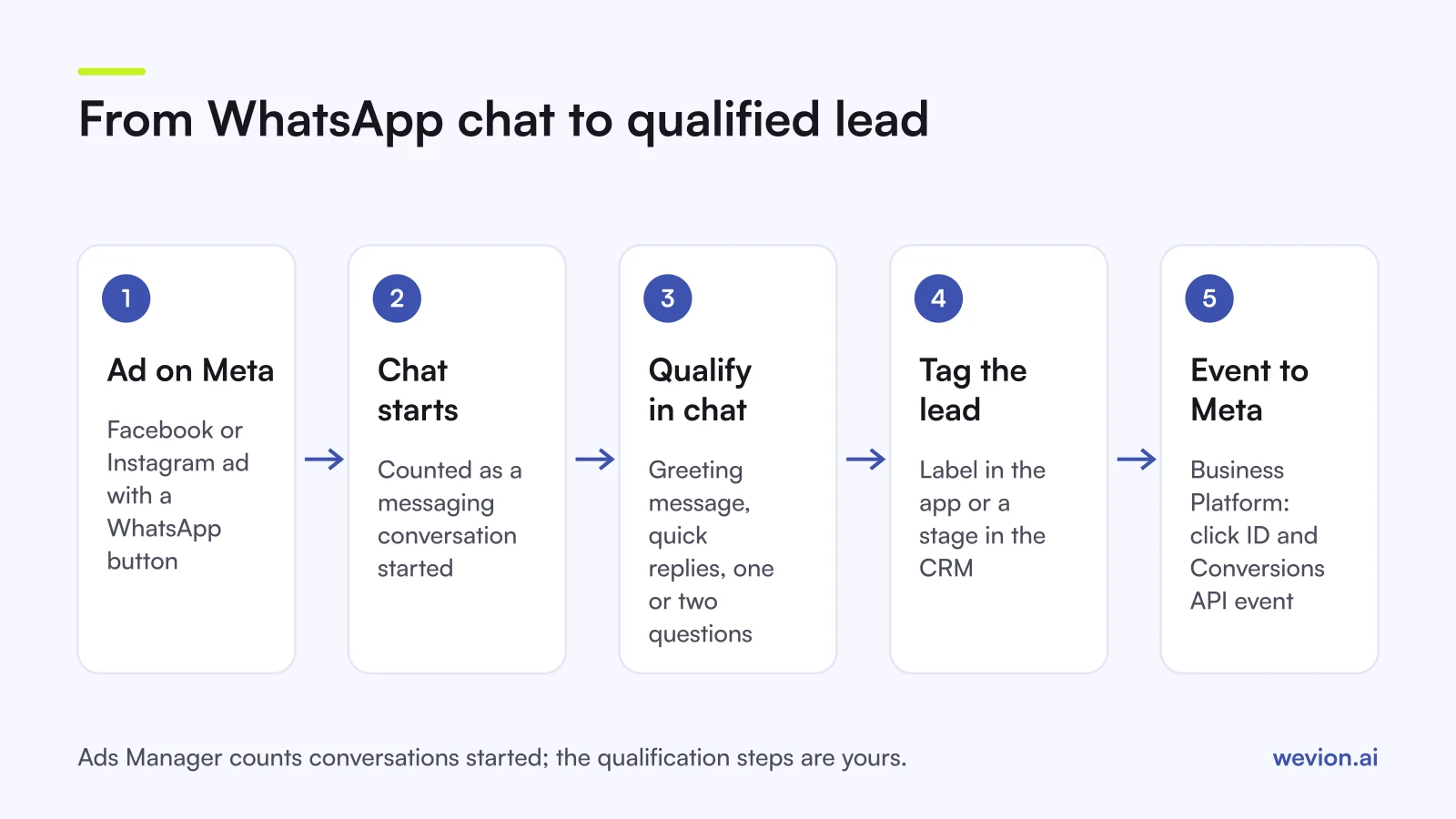
What can you measure, and what can't you?
This is where WhatsApp ads differ most from forms. A form produces a lead record with fields. A chat produces a conversation, and Ads Manager only sees that it started.
What Ads Manager reports. The main metric is messaging conversations started: people who start messaging the business after at least seven days without a message, attributed to the ad. Its cost metric is cost per messaging conversation started, which is spend divided by that count. Meta also notes that some messaging metrics may not be logged for ads delivered to and from Europe and Japan because of privacy rules.
What it does not report. Whether the chat became a qualified lead, a booked call or a sale. Without extra work, you will report "conversations" while the client cares about customers.
How to close the gap on the Business Platform. Two Meta tools connect chats back to ads:
- Click ID. Messages from ads carry a click ID (
ctwa_clid) in the webhook's referral data. It is not present for messages from WhatsApp Status ads. Store it with the lead in the CRM. - Conversions API for messaging events. You can send events such as a lead or a purchase back to Meta with the click ID and
business_messagingas the action source, per Meta's Conversions API parameters. Meta also offers automatic events, an opt-in that detects lead and purchase events in chats from these ads; it is not available in the EU, UK, Japan or South Korea.
On the Business app, the honest option is manual: tag each qualified chat with a label (WhatsApp is renaming labels to lists) and count them at the end of the week. It is crude but better than reporting chats as leads.
How do you qualify leads inside the chat?
Qualification moves from the form to the first two minutes of the conversation. A simple script works for most service clients:
- Greeting message that confirms the offer and asks the first qualifying question, for example the postcode or the budget range.
- Quick replies for the answers the team types every day: prices, opening hours, next steps.
- One or two qualifying questions agreed with the client, the same ones every time.
- A tag on every chat: qualified, not qualified, no reply.
- A handover to a call or a booking link for qualified leads.
WhatsApp's lead generation guide recommends greeting messages and quick replies so every new conversation is acknowledged straight away. Our guide to tracking lead quality through your CRM covers the stages that turn those tags into a report.
When does a chat beat a form?
A chat beats a form when people want to ask something before they commit, and when the client's market already messages businesses on WhatsApp. It loses when nobody can answer quickly or when the client needs structured data at scale.
| Situation | Usually better |
|---|---|
| Services with questions before purchase (clinics, courses, home services) | |
| Markets where customers already message brands on WhatsApp | |
| High volume with a small sales team | Instant form |
| B2B with several qualifying fields | Instant form or landing page |
| Client cannot answer within the working day | Instant form |
Judge it on the client's own numbers. A hypothetical test with €2,000 on each side:
| Instant form | Click to WhatsApp | |
|---|---|---|
| Spend | €2,000 | €2,000 |
| Leads or conversations | 250 at €8 | 160 at €12.50 |
| Qualified | 40 (16%) | 48 (30%) |
| Cost per qualified lead | €50 | €41.67 |
In this example the chat costs more per conversation and less per qualified lead. Run the same test in the client's market before deciding, and see our Meta ads guide for India for a market where WhatsApp is the default channel.
Where Wevion fits
WhatsApp campaigns sit next to forms, Google lead form assets and TikTok Instant Forms in most lead generation accounts, and comparing them means joining several reports.
Wevion connects Meta with OAuth through the official API, and Google, TikTok, Snapchat, Taboola and Outbrain through each platform's official API, syncs data about every 15 minutes, and shows spend and platform-reported results for every account in one view.
Each client has its own workspace, with team roles such as manager, media buyer, finance and viewer. Automation rules on Meta can pause ad sets, change budgets or only send an alert, and cross-platform rules are in beta. Chat content and lead status stay in WhatsApp or the CRM. For the other platforms, see our guides to TikTok lead generation ads and Google Ads lead form assets.
You can try it on your own ad accounts with a 14-day trial on the Pro plan. No card to start. We ask for one on day 7, or earlier if you use up the trial credits, and billing starts on day 14 only if you add it.
Key takeaways
- Click to WhatsApp ads send people from Facebook and Instagram to a WhatsApp chat; you need a Page with a WhatsApp number linked.
- Engagement, Leads, Sales and Traffic objectives support them; all four can optimise for conversations.
- Leads optimisation is not available in the EU, UK, Japan or South Korea.
- Ads Manager counts conversations started, not qualified leads, so tag chats and report on qualified ones.
- The Business Platform adds the click ID and Conversions API events that link chats to ads.
- Chats beat forms for question-heavy offers in WhatsApp-first markets, only if someone answers fast.