
Google Ads Image Sizes 2026: Specs for Every Campaign Type
Yuki Tanabe
Creative AI Strategist
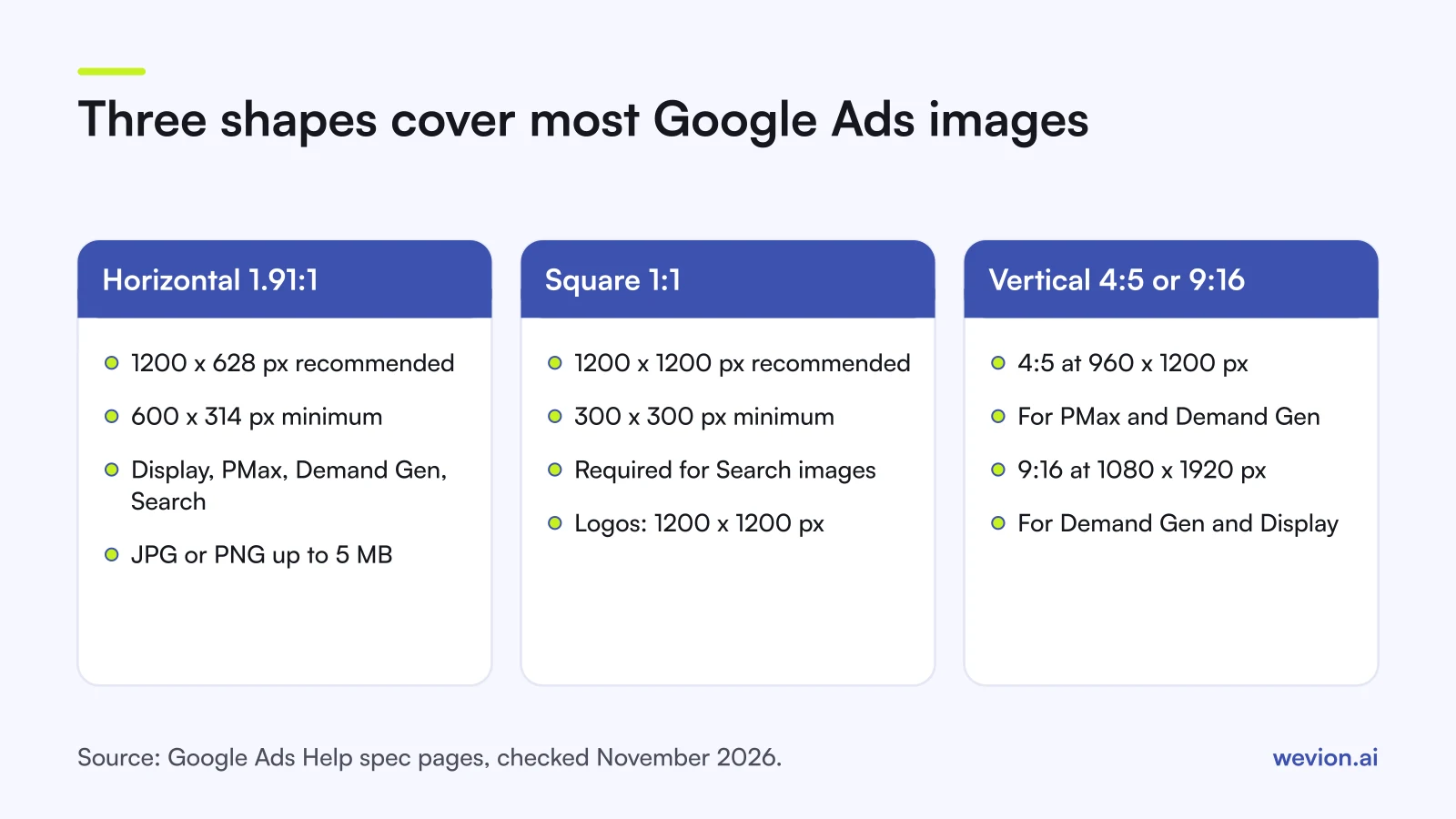
Google Ads image sizes come down to three shapes: horizontal 1.91:1 at 1200 x 628 pixels, square 1:1 at 1200 x 1200 pixels, and a vertical 4:5 or 9:16 that some campaign types accept. What changes between Responsive Display, Performance Max, Demand Gen and Search is the minimum size, the number of images allowed and how strict Google is about text and logos on the image. This reference lists the specs as of November 2026, each taken from the Google Ads specs hub and the campaign pages it links to.
Quick answer: Export every image in 1.91:1 at 1200 x 628 px and 1:1 at 1200 x 1200 px, as JPG or PNG under 5 MB. Add 4:5 at 960 x 1200 px for Performance Max and Demand Gen, and 9:16 at 1080 x 1920 px for Demand Gen on YouTube Shorts. Logos are 1:1 at 1200 x 1200 px, plus an optional 4:1 at 1200 x 300 px.
Google's hub itself calls 1200 x 628 and 1200 x 1200 the most common Google Ads image sizes. The tables below add the rest. If you also run Meta and TikTok, our guides to Facebook ad sizes and TikTok ad specs use the same format, so you can plan one shoot for all three.
How does Google organise image specs?
Google organises image specs by campaign type, and each campaign type has its own help page with a table of ratios, recommended sizes, minimum sizes and quantities. The hub page links to six of them (App, Demand Gen, Responsive Display, Performance Max, Search and Video) and to a cheat sheet for each. This guide covers the four that use image assets in ecommerce accounts, plus logos.
Three kinds of number appear on each page:
- Recommended size. The resolution Google designs its layouts around. A larger file in the same ratio is fine.
- Minimum size. The smallest image the system accepts in that ratio. Anything smaller is rejected at upload.
- Quantity. How many images of each ratio an ad or asset group needs, and how many it can hold.
File size and format sit on separate pages for some campaign types, so the tables below combine both and name the page each figure comes from. Google shows only the current version of each page, so treat every number as correct for November 2026.
What are the Google Ads image sizes by campaign type?
Image specs across the four campaign types share the same recommended sizes for horizontal and square images, and differ mainly in vertical options and quantities. The table collects the image specs from each campaign page:
| Campaign type | Ratio | Recommended | Minimum | Images allowed | Source |
|---|---|---|---|---|---|
| Responsive Display | 1.91:1 | 1200 x 628 px | 600 x 314 px | Up to 15 in total | RDA specs |
| Responsive Display | 1:1 | 1200 x 1200 px | 300 x 300 px | Up to 15 in total | RDA best practices |
| Responsive Display | 9:16 | 900 x 1600 px | 600 x 1067 px | Optional | RDA best practices |
| Performance Max | 1.91:1 | 1200 x 628 px | 600 x 314 px | 4 or more, up to 20 images | PMax specs |
| Performance Max | 1:1 | 1200 x 1200 px | 300 x 300 px | 4 or more | PMax specs |
| Performance Max | 4:5 | 960 x 1200 px | 480 x 600 px | 2 or more, optional | PMax specs |
| Demand Gen | 1.91:1 | 1200 x 628 px | 600 x 314 px | 1 to 20 (3 recommended) | Demand Gen specs |
| Demand Gen | 1:1 | 1200 x 1200 px | 300 x 300 px | 1 to 20 (3 recommended) | Demand Gen specs |
| Demand Gen | 4:5 | 960 x 1200 px | 480 x 600 px | 1 to 20, optional | Demand Gen specs |
| Demand Gen | 9:16 | 1080 x 1920 px | 600 x 1067 px | Recommended for YouTube Shorts | Demand Gen creative |
| Search image assets | 1:1 | 1200 x 1200 px | 300 x 300 px | Required, up to 20 per campaign | Search image assets |
| Search image assets | 1.91:1 | 1200 x 628 px | 600 x 314 px | Optional but recommended | Search image assets |
One detail differs between Google's own pages. The responsive display ads specs page lists 600 x 600 px as the recommended square size, while the responsive display best practices guide recommends 1200 x 1200 px. Exporting at 1200 x 1200 px meets both, so there is no reason to produce a smaller file.
What are the file size and format limits?
Google's file limits for image assets are the same across the four campaign types: JPG or PNG, up to 5120 KB, which is 5 MB. The responsive display best practices guide states that "all images have a maximum file size of 5120 KB", the Performance Max page asks for JPG or PNG with a 5 MB maximum, the Demand Gen creative page gives 5 MB in .jpg or .png, and the Search image assets page lists PNG or JPG up to 5120 KB.
Two smaller limits catch teams out:
- Demand Gen logo: 150 KB. The Demand Gen creative page caps the square logo at 150 KB, against 5 MB for its images. Export the logo separately and compress it.
- Uploaded display ads: 150 KB. These are the fixed-size banners you design yourself, not responsive assets. The same page lists .jpg, .png or non-animated .gif up to 150 KB, with common sizes such as 300 x 250, 336 x 280, 728 x 90, 970 x 90, 160 x 600, 300 x 600 and 320 x 50.
The 5 MB limit is generous for a 1200 x 1200 px photo, so in practice the file size only matters for logos and banners.
What are the logo specs for Google Ads?
Logo specs in Google Ads use two ratios, square 1:1 and horizontal 4:1, and the minimum size is what differs most between campaign types. Square is the one Google asks for first.
| Campaign type | Ratio | Recommended | Minimum | Logos allowed | Required |
|---|---|---|---|---|---|
| Responsive Display | 1:1 | 1200 x 1200 px | 128 x 128 px | 1 to 5 | No |
| Responsive Display | 4:1 | 1200 x 300 px | 512 x 128 px | 1 to 5 | No |
| Performance Max | 1:1 | 1200 x 1200 px | 128 x 128 px | Up to 5 logos | Yes |
| Performance Max | 4:1 | 1200 x 300 px | 512 x 128 px | Up to 5 logos | No |
| Demand Gen | 1:1 | 1200 x 1200 px | 144 x 144 px | 1 to 5 | Yes |
| Search (business logo) | 1:1 | 1200 x 1200 px | 128 x 128 px | 1 | Yes |
Sources: the responsive display, Performance Max, Demand Gen and Search spec pages.
Google's Performance Max image assets page adds a practical warning: logos with a transparent background may be shown on a white background in most ads. A mostly white logo on a transparent background can disappear, so upload a version that reads on white.
Which rules get Google Ads images rejected?
Google's rules on text, logos and overlays are where image assets most often fail, and the rules are not the same in every campaign type. Search is the strictest:
- Search image assets. The Search image assets page says images with digitally added text, logos or graphic overlays will be disapproved immediately. Use clean product or lifestyle photos only.
- Performance Max. Overlays are allowed, but Google recommends at least one image without overlays for each ratio. Keep important content in the centre 80% of the image.
- Responsive display ads. The best practices guide advises against text on top of an image, because it can be unreadable at small sizes. Logos should not be overlaid on images, though a logo that is part of the photo is fine. Blank space should not take up more than 80% of the image.
Search image assets also have an eligibility gate. Google's page lists an account open for at least 60 days, a good history of policy compliance, active campaigns with active text ads, Search spend above zero in the last 30 days, and an eligible vertical. Up to 20 images can be added per campaign, and important content should sit in the centre 80% of the image, as with Performance Max.
Every image also goes through quality and policy checks before it can serve, so a file that meets the size rules can still be held back for blur or content.
Which sizes should you produce for one product?
Producing a fixed set of cuts per product saves rework, because the same files cover every campaign type in this guide. For a typical ecommerce account:
- 1.91:1 at 1200 x 628 px. Used by all four campaign types.
- 1:1 at 1200 x 1200 px. Used by all four; required for Search image assets.
- 4:5 at 960 x 1200 px. For Performance Max and Demand Gen, which both accept it as an optional ratio.
- 9:16 at 1080 x 1920 px. For Demand Gen on YouTube Shorts; responsive display ads also accept 9:16.
- Logos. A 1:1 at 1200 x 1200 px under 150 KB, which fits every campaign type including Demand Gen, plus a 4:1 at 1200 x 300 px.
A hypothetical example shows the count. A Performance Max asset group with five horizontal, five square and three vertical images uses 13 of its 20 image slots, which leaves room to test new visuals without removing the ones that work. Our Performance Max campaign structure guide shows how to split asset groups by product theme.
Then check these before you upload:
- Keep one clean version of each shot. A version with no text and no logo works in Search image assets and counts as the overlay-free image Performance Max recommends.
- Frame for the crop. Google resizes images to fit many ad slots, so keep the product in the centre 80%.
- Write the brief per ratio. A shot framed for 1.91:1 often cuts the product when cropped to 1:1. Our ad creative brief template has a slot for each ratio.
- Product photos for Shopping come from the feed. Product images in Shopping ads are pulled from Merchant Center, not uploaded as assets. Our Google Shopping ads guide covers the feed side.
If you generate product images rather than shoot them, our guide to AI product photos for ads lists the ratios each platform expects. For where Demand Gen images actually show, see our Demand Gen campaigns guide.
Where do you check the current specs?
Google updates its spec pages without a changelog on the page itself, so check the source before a large production run rather than relying on any list, this one included. Three places cover it:
- The specs hub. The Google Ads specs page links to the current spec page and cheat sheet for each campaign type.
- The cheat sheets. Each campaign page on the hub links to a one-page cheat sheet with the same table, which is easy to pin next to a design brief.
- Review status. Google says images go through quality and policy checks before they are eligible to serve, so check each new image's status after upload rather than assuming it is live.
Where Wevion fits
Image specs differ by platform, so the same product usually needs Google, Meta and TikTok versions of every visual, and launching all of them is the slow part.
Wevion connects Google, Meta, TikTok, Snapchat, Taboola and Outbrain ad accounts through each platform's official API, supports bulk launch across platforms, and syncs data about every 15 minutes, so prepared cuts go live in batches and results sit side by side in one dashboard.
Wevion's Creative Hub can generate images in square, 4:5, 3:4, 9:16 and 16:9 from one brief. Google's horizontal 1.91:1 is not on that list, so export it from your design tool. Google's own specs and policy review still apply to everything you launch.
You can try it on your own ad accounts with a 14-day trial on the Pro plan. No card to start. We ask for one on day 7, or earlier if you use up the trial credits, and billing starts on day 14 only if you add it.
Key takeaways
- The two core Google Ads image sizes are 1.91:1 at 1200 x 628 px and 1:1 at 1200 x 1200 px.
- Performance Max needs at least four of each, takes up to 20 images and 5 logos, and accepts optional 4:5 at 960 x 1200 px.
- Demand Gen adds 9:16 at 1080 x 1920 px for YouTube Shorts; its logo is capped at 150 KB.
- Image assets are JPG or PNG up to 5120 KB (5 MB) across Responsive Display, Performance Max, Demand Gen and Search.
- Search image assets with added text, logos or overlays are disapproved; keep a clean version of every shot.
- Specs change: check Google's specs hub and the upload screen before each large production run.