
Facebook Ad Sizes 2026: Specs for Every Meta Placement
Yuki Tanabe
Creative AI Strategist
Facebook ad sizes change by placement: the same campaign can show a 4:5 image in Feed, a 9:16 video in Stories and Reels, and a square card in Marketplace or the right column. This reference lists the specs for Facebook and Instagram ads as of November 2026, taken from Meta's Ads Guide, with each number linked to its source page. Where Meta does not publish a figure, it is left out rather than guessed.
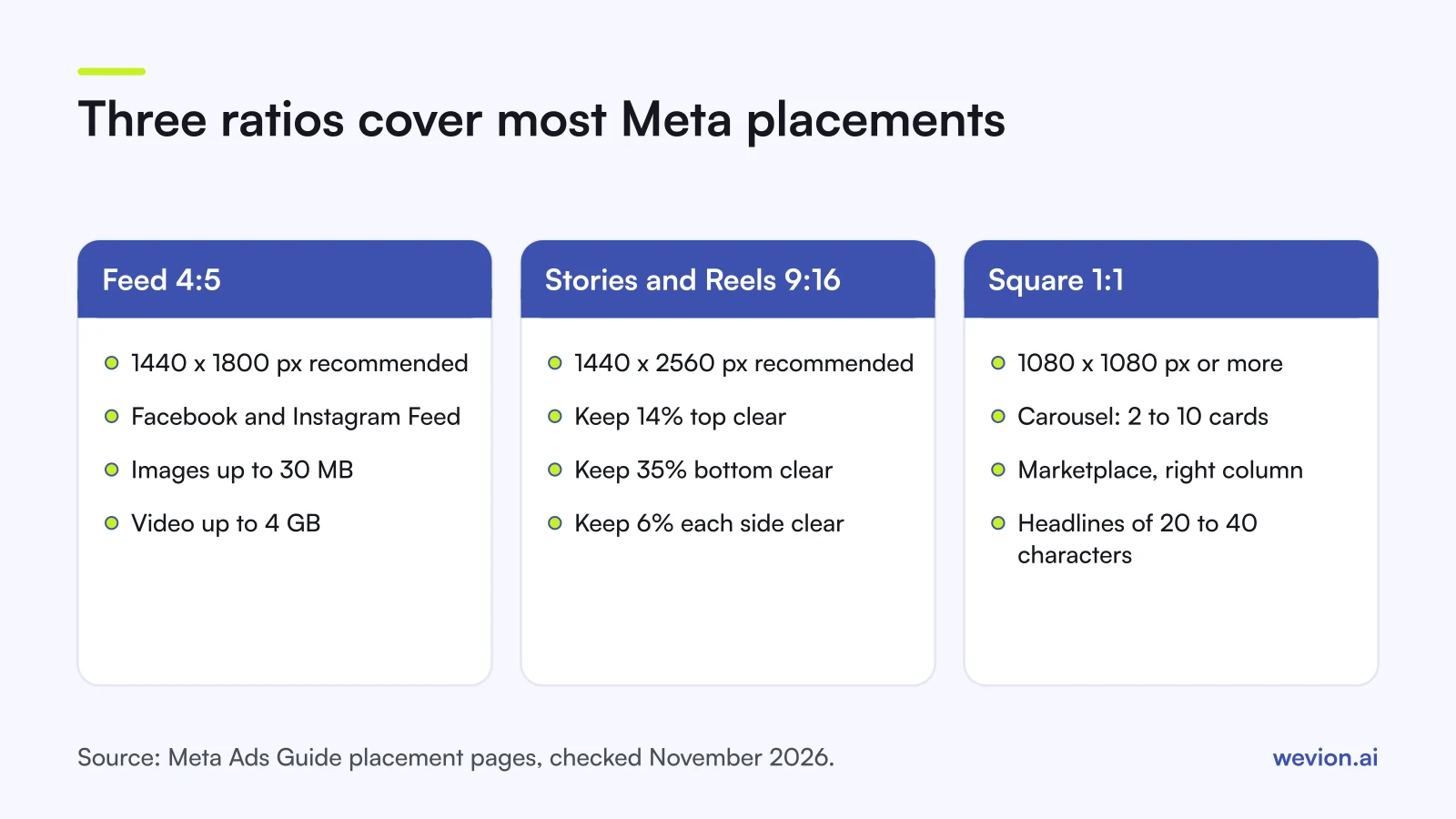
Quick answer: For Feed, use 4:5 at 1440 x 1800 pixels (JPG or PNG up to 30 MB; video up to 4 GB). For Stories and Reels, use 9:16 at 1440 x 2560 pixels and keep 14% at the top, 35% at the bottom and 6% on each side free of text. For carousels, Marketplace and the right column, use 1:1 at 1080 x 1080 pixels or more.
If you also run TikTok, our guide to TikTok ad specs uses the same format for its placements. Deciding between images and video at all? See static vs video ads for ecommerce.
How are Meta ad specs organised?
Meta's Ads Guide sorts specs first by format (image, video, carousel, collection) and then by placement, and each placement page has its own recommendations, text limits and technical minimums. Three kinds of number appear on each page:
- Recommendations. File type, aspect ratio and resolution. A file can differ and still run, but these are the sizes Meta designs each placement around.
- Text recommendations. Character counts for primary text, headline and description. Meta lists them as recommendations, so treat them as the length that displays well rather than a hard limit.
- Technical requirements. Maximum file size, minimum width and height, video length and the aspect ratio tolerance. These are the limits a file has to meet.
Meta updates these pages over time and shows only the current version. Treat every figure below as correct for November 2026 and check the linked page before a large production run.
What are the Facebook and Instagram ad sizes by placement?
The table collects the main recommendations from each placement page in Meta's Ads Guide, checked in November 2026. Video duration and file size limits follow in the next section.
| Placement | Ratio | Recommended resolution | Primary text | Headline | Source |
|---|---|---|---|---|---|
| Facebook Feed (image) | 4:5 | 1440 x 1800 px | 50-150 characters | 27 characters | Ads Guide |
| Facebook Feed (video) | 4:5 | 1440 x 1800 px | 50-150 characters | 27 characters | Ads Guide |
| Instagram Feed (image) | 4:5 | 1440 x 1800 px | 125 characters | 40 characters | Ads Guide |
| Facebook Stories | 9:16 | 1440 x 2560 px | 125 characters | 40 characters | Ads Guide |
| Instagram Stories (video) | 9:16 | 1440 x 2560 px | 125 characters | Not listed | Ads Guide |
| Instagram Reels (video) | 9:16 | 1440 x 2560 px | 44 characters | Not listed | Ads Guide |
| Facebook Marketplace (image) | 1:1 | 1080 x 1080 px or more | 125 characters | 40 characters | Ads Guide |
| Facebook right column (image) | 1:1 | 1080 x 1080 px or more | Not listed | 40 characters | Ads Guide |
A few details sit outside the table. Marketplace images also have a 30-character description. The right column page sets a minimum of 254 x 133 pixels and advises against putting text in the image, because the ad shows small. The Instagram Feed image page allows up to 30 hashtags and sets a 1 percent ratio tolerance, against 3 percent for the Facebook Feed image.
Facebook Reels has its own entries in the Ads Guide's placement menu. The numbers above come from the Instagram Reels page; check the Facebook Reels entry before you export a Reels-only cut.
What are the file size and video length limits?
Meta's technical limits are generous, so in practice they rarely block an upload, but the minimum widths and the Stories split rules do affect how an ad plays. All figures below are from the placement pages linked in the table.
| Placement | File types | Max file size | Video length | Minimum width |
|---|---|---|---|---|
| Facebook Feed image | JPG, PNG | 30 MB | n/a | 600 px (750 px height at 4:5) |
| Facebook Feed video | MP4, MOV, GIF | 4 GB | 1 second to 241 minutes | 120 px (120 px height) |
| Facebook Stories image | JPG, PNG | 30 MB | Shown for 8 seconds | 500 px |
| Facebook Stories video | MP4, MOV, GIF | 4 GB | 1 second to 3 minutes | 250 px |
| Instagram Stories video | MP4, MOV, GIF | 4 GB | 1 second to 60 minutes | 250 px |
| Instagram Reels video | MP4, MOV | 4 GB | 0 seconds to 15 minutes | 250 px under 30 seconds, 500 px from 30 seconds |
| Marketplace image | JPG, PNG | 30 MB | n/a | Not listed |
Stories cut long videos into pieces. On Facebook Stories, Meta's guide says videos up to 15 seconds play in full and longer ones are split across Story units. On Instagram Stories, videos under 16 seconds play in full; from 16 seconds they are split across one, two or three cards, depending on the viewer. If your hook and offer are in the first 15 seconds, the split matters less.
For video, the guide also recommends H.264 compression, square pixels, a fixed frame rate, progressive scan and AAC stereo audio at 128 kbps or more. Captions and sound are optional but recommended on every video page. The Instagram Reels page adds that ads should not use music under licence, face or camera effects, GIFs or product tags, and suggests original audio or tracks from Meta's own audio library.
How do carousel and collection specs differ?
Carousel and collection ads hold several products in one unit, so their limits are about the number of cards and the shorter text that fits beside each one. For the Facebook Feed:
| Spec | Carousel | Collection |
|---|---|---|
| Ratio | 1:1 | 1.91:1 to 1:1 |
| Resolution | 1080 x 1080 px or more | 1080 x 1080 px or more |
| Cards or items | 2 to 10 cards | Cover image or video plus 3 product images |
| Image files | JPG or PNG, up to 30 MB | JPG or PNG, up to 30 MB |
| Video files | MP4, MOV or GIF, up to 4 GB, 1 second to 240 minutes | MP4, MOV or GIF, up to 4 GB |
| Primary text | 80 characters | 125 characters |
| Headline | 20 characters | 40 characters |
| Description | 18 characters | Not listed |
| Also required | Destination URL | Destination URL and an Instant Experience |
Sources: Meta's carousel and collection pages for the Facebook Feed, with a 3 percent ratio tolerance on the carousel page.
The collection cover is the first media in the Instant Experience, with three product images shown below it. If you want the products to be chosen automatically from a feed instead of picked by hand, Meta catalogue ads are the format to look at.
How does the Stories and Reels safe zone work?
The safe zone is the part of a vertical ad the interface does not cover. On Stories and Reels, the profile name sits at the top and the call to action, caption and buttons sit at the bottom, so text or a logo placed there gets hidden.
Meta gives the same proportions on its Facebook Stories, Instagram Stories and Instagram Reels pages: keep about 14 percent at the top, 35 percent at the bottom and 6 percent on each side free of text, logos and other key elements. On a 1440 x 2560 file, that works out to:
- Top: about 358 px (14% of 2560)
- Bottom: about 896 px (35% of 2560)
- Each side: about 86 px (6% of 1440)
That leaves a central area of roughly 1268 x 1306 px for anything the viewer must read. The bottom band is the largest, so a price or offer placed low in the frame is the most common thing to get covered.
Which sizes should you produce for one campaign?
With Advantage+ placements, one ad can appear in Feed, Stories and Reels. Producing two cuts covers the main ones:
- A 4:5 cut at 1440 x 1800 px for Facebook and Instagram Feed.
- A 9:16 cut at 1440 x 2560 px for Stories and Reels, with text inside the safe zone.
- A 1:1 cut at 1080 x 1080 px only if you run carousels, Marketplace or the right column as a main placement.
Then check these before you upload:
- Write the brief per ratio. A shot framed for 4:5 often loses the product when cropped to 9:16. Our ad creative brief template has a slot for each ratio.
- Count characters per placement. A Feed headline has 27 characters, a carousel headline 20. Write the shortest version first.
- Front-load video. Stories may split long videos, and viewers decide early. Our guide to hook rate and hold rate shows how to read where they drop off.
- Check every placement preview in Ads Manager before publishing, as in our ad launch checklist.
If you generate product images rather than shoot them, our guide to AI product photos for ads lists the ratios each platform expects.
Where Wevion fits
Specs differ by platform, so the same offer usually needs Meta, TikTok and Google versions of every creative, and launching all of them is the slow part.
Wevion connects Meta ad accounts through the official API with OAuth, plus Google, TikTok, Snapchat, Taboola and Outbrain through each platform's official API, and supports bulk launch across platforms, so prepared 4:5 and 9:16 cuts go live in batches rather than one ad at a time. Data syncs about every 15 minutes, with each platform's results side by side in one dashboard.
Wevion's Creative Hub can also generate images in square, 4:5, 3:4, 9:16 and 16:9 from one brief. Meta's own specs and ad review still apply to everything you launch.
You can try it on your own ad accounts with a 14-day trial on the Pro plan. No card to start. We ask for one on day 7, or earlier if you use up the trial credits, and billing starts on day 14 only if you add it.
Key takeaways
- Feed: 4:5 at 1440 x 1800 px, images up to 30 MB in JPG or PNG, video up to 4 GB.
- Stories and Reels: 9:16 at 1440 x 2560 px; keep 14% top, 35% bottom and 6% each side clear.
- Carousel, Marketplace and right column: 1:1 at 1080 x 1080 px or more.
- Carousels take 2 to 10 cards with 80 characters of primary text and a 20-character headline.
- Collections need a cover, three product images and an Instant Experience.
- Produce a 4:5 and a 9:16 cut for every campaign, and check Meta's Ads Guide before large runs.