
Business Manager Two-Factor Authentication: Setup and Recovery
Lena Brandt
Ad Policy & Compliance Analyst
Business manager two-factor authentication is a setting in a Meta business portfolio, the new name for Business Manager, that makes everyone, or only admins, protect their Facebook login with a second step before they can reach the portfolio's ad accounts, Pages and pixels. The portfolio sets the rule; each person still turns 2FA on in their own account.
Quick answer: Someone with full control of the portfolio goes to Settings in Meta Business Suite, then Business portfolio info, then Business options, and sets Two-factor authentication to Admins only or Everyone. Each person then enables 2FA on their own Facebook account with an authentication app, text message codes or a security key. People who skip it lose access to the portfolio until they set it up.
This guide covers the 2FA setting itself. For the wider structure of client portfolios, see managing multiple Meta Business Manager accounts; for the agency case against shared logins, read the security audit that found zero shared passwords.
What is two-factor authentication in a business portfolio?
Two-factor authentication in a business portfolio is a rule set at business level that decides who must use a second login step before working on the portfolio. The second step is something you have, such as a code from an app or a physical key, on top of something you know, your password.
The rule and the method live in two different places, and that is where most confusion comes from:
| Layer | Where it lives | Who controls it |
|---|---|---|
| The requirement | Business portfolio settings in Meta Business Suite | A person with full control of the portfolio |
| The 2FA method | Each person's own Facebook account (Accounts Centre) | That person only |
| The status check | Security Center for the portfolio | Portfolio admins |
An admin cannot set up 2FA on a colleague's behalf. They can only require it. Meta's Security Center help page is the admin's view of the portfolio's security settings, including this requirement.
How do you require 2FA for everyone or only admins?
Requiring 2FA takes about a minute and is done once per portfolio, by a person with full control. Meta's help article on turning on the two-factor authentication requirement describes these steps, as of November 2026:
- Open Settings in Meta Business Suite for the right portfolio.
- Click Business portfolio info.
- Scroll to Business options.
- Open the dropdown next to Two-factor authentication.
- Select Admins only or Everyone. To turn the requirement off, choose No one.
Meta's menus move from time to time, so if the labels differ in your account, look for the same setting under the portfolio's security options. Meta's help also says that, for security reasons, it already requires two-factor authentication for certain portfolios, so you may find the setting switched on before you touch it.
Admins only or Everyone? Admins can add people, assign assets and change payment settings, so they are the minimum. Everyone is the safer choice for an agency, because an employee with ad account access can still change budgets and creatives. A worked example with hypothetical numbers: a portfolio has 3 admins and 9 employees with ad account access. Admins only protects 3 logins and leaves 9 open; Everyone protects all 12.
How does each person set up two-factor authentication?
Each person sets up 2FA on their own Facebook account, and they should do it before the portfolio requirement switches on. Meta's help centre places the settings in Accounts Centre, under Password and security, then Two-factor authentication.
Meta's newsroom post on security keys describes the methods: a code by text message, a code from an authentication app, or a physical security key. Here is how they compare:
| Method | How it works | Watch out for |
|---|---|---|
| Authentication app | An app on the phone generates a new code every few seconds | A lost or reset phone takes the app with it unless it is backed up |
| Text message (SMS) | Meta sends a code to a phone number | Depends on the mobile network and on keeping the number |
| Security key | A small physical key you tap or plug in to confirm the login | You need the key with you; keep a second method as backup |
Meta's help page on SMS for two-factor authentication covers the text option. The newsroom post says Meta strongly recommends that everyone considers a physical security key. For admins of client portfolios, an authentication app or a security key is a better default than SMS alone.
Meta has also added passkeys on Facebook, managed in Accounts Centre. Meta describes them as an upgrade on passwords and one-time SMS codes, and introduced them on iOS and Android first. They sit alongside 2FA rather than replacing the portfolio requirement.
What happens to people who don't turn 2FA on?
People without 2FA lose access to the portfolio once it is required. Meta's help article says that if two-factor authentication is required for your business portfolio, people must also turn it on to access the portfolio. Their Facebook account keeps working; the portfolio's ad accounts, Pages and other assets do not.
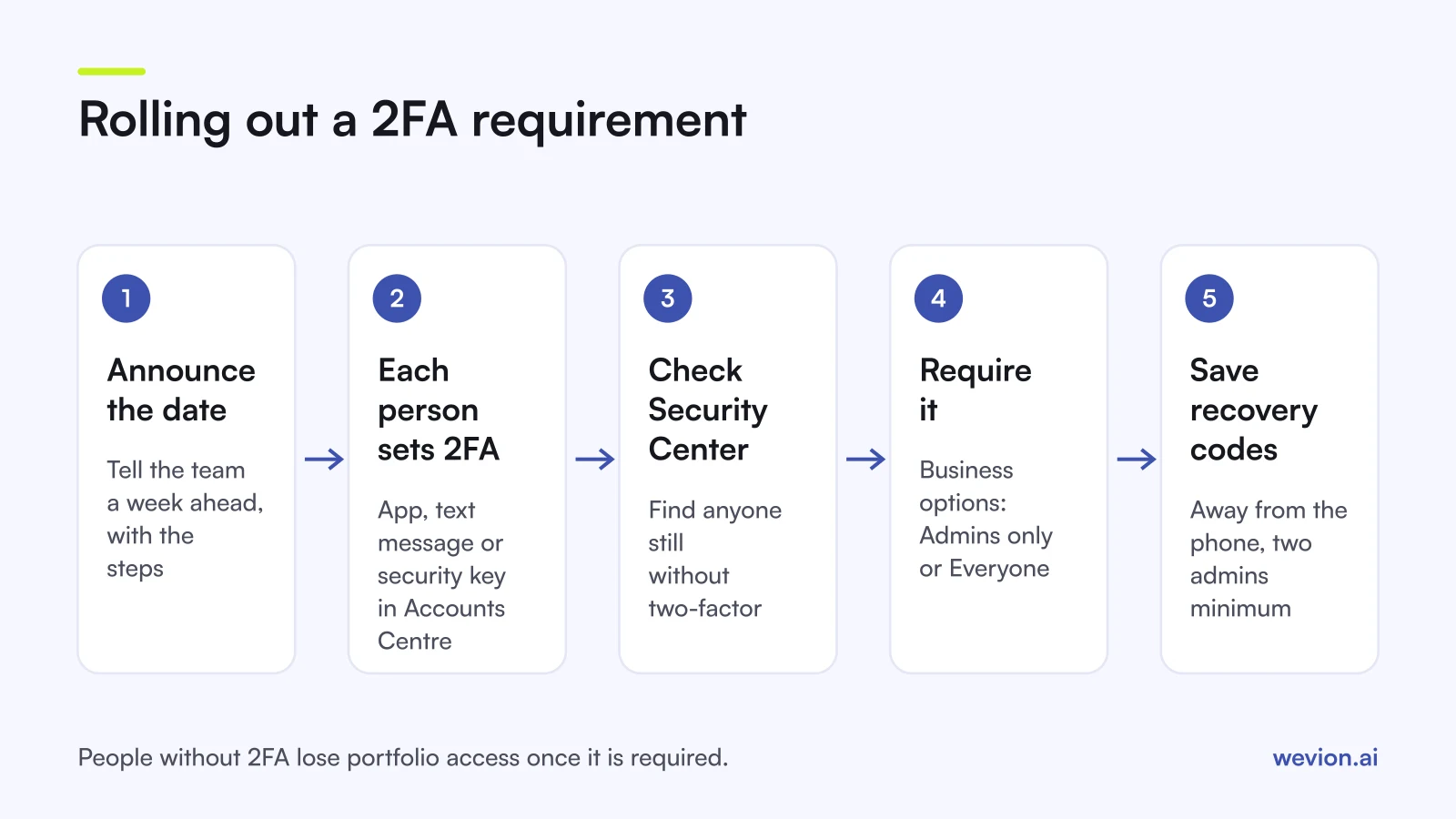
For an agency, this is where a rollout goes wrong. A media buyer opens Ads Manager on a Monday morning, finds no access, and campaigns sit untouched until they fix it. Avoid it with a short sequence:
- Tell the team a week ahead, with the date and a link to the Accounts Centre steps.
- Ask everyone to confirm they have 2FA on, ideally with an app or key.
- Check Security Center for anyone still missing.
- Switch the requirement on for Everyone.
- Review the people list and remove anyone who no longer needs access, as covered in our guide to removing agency access from an ad account.
Partners are a separate case. When an agency works through a partner relationship, its people are managed in the agency's own portfolio, so the agency should require 2FA there as well, not only rely on the client's setting. Partner access is also one reason our Business Manager tips recommend that clients add agencies as partners rather than as individual people.
How do you recover access if you lose your phone?
Recovery depends on what you set up before the phone went missing, which is why recovery codes are the first thing to save. Meta's help page on login recovery codes says that once 2FA is on you can get ten recovery codes, each usable once in place of a login code, and generate a new set when you need it.
If the phone is gone, work through these options in order:
- Use a recovery code from the set you saved. Generate a new set once you are back in.
- Use another method you added, such as a security key or a second number.
- Use the help link on the code screen. Meta's troubleshooting page for two-factor login describes asking for help from the login screen; Meta reviews the request and sends instructions, typically within 1 to 2 business days, to the email or phone number on the account.
While one admin is locked out, a second admin keeps the portfolio running. If you are the only admin and you lose access, nobody can add people, approve partners or fix billing until you are back. Keep at least two admins with 2FA on, and store recovery codes in a password manager or printed in a safe place, not on the same phone.
Why does 2FA matter for ad account security?
2FA matters because a stolen login is one of the most direct ways to lose control of ad accounts, payment methods and client data. Anyone who signs in as an admin can add people, change payment settings and launch ads in the portfolio's name, and a password alone is easy to phish or reuse.
It also affects how Meta treats your assets. Ads run from a hijacked account can break Meta's policies, and a restriction can then land on the ad account, Page or person involved. Our guide to Meta Account Quality shows where those restrictions appear, and our ad account safety best practices cover the rest of the hygiene list.
2FA is one layer, not the whole answer. Pair it with:
- Business verification, covered in our Meta business verification guide, which confirms the business behind the portfolio.
- Least privilege, so each person gets only the assets and tasks they need.
- No shared passwords and no cookie-based tools, since a tool that logs in as you inherits your access. Our guide to token and cookie security explains the difference.
Where Wevion fits
A 2FA requirement protects the logins into Meta; the next question for an agency is how many tools hold access to those accounts, and how.
Wevion connects to Meta through the official API with OAuth, and to Google, TikTok, Snapchat, Taboola and Outbrain through each platform's official API. You approve access on Meta's own page and Meta issues a scoped token, so no password or 2FA code is shared, and the token can be removed from Meta's settings at any time. Data syncs about every 15 minutes.
Inside Wevion, each client gets its own workspace, and your team works with individual seats, roles such as manager, media buyer, finance and viewer, and two-factor authentication on their own Wevion logins. That keeps the same principle as the portfolio requirement: one person, one login, a second step.
You can try it on your own ad accounts with a 14-day trial on the Pro plan. No card to start. We ask for one on day 7, or earlier if you use up the trial credits, and billing starts on day 14 only if you add it.
Key takeaways
- Business Manager is now a business portfolio; the 2FA requirement is under Business portfolio info, then Business options.
- Only someone with full control can set it to Admins only or Everyone; No one turns it off.
- Each person enables 2FA in their own Accounts Centre with an authentication app, SMS or a security key.
- People without 2FA lose access to the portfolio once it is required, so announce the change first.
- Save the ten recovery codes away from the phone, and keep at least two admins.
- 2FA works best with business verification, least privilege and no shared passwords.