
Why Meta and Shopify Numbers Don't Match (and How to Reconcile Them)
Priya Raghunathan
Responsable performance e-commerce
Meta and Shopify numbers almost never match, and in most cases neither one is wrong. Meta reports purchases it credits to your ads under its attribution setting, including people who only saw an ad. Shopify records every order and gives each one a single source. Different questions, different counts. The useful skill is knowing how big the gap should be and which number to use for which decision.
Quick answer: Meta and Shopify differ because Meta counts purchases inside its click and view windows, can date them by impression rather than order time, includes estimated conversions and ignores later refunds, while Shopify credits each order to one source and subtracts refunds. Time zones and other channels' clicks widen the gap. Reconcile with a bridge table, then judge Meta campaigns in Meta and the business on Shopify net sales.
This guide focuses on one platform against one store. If you run several platforms, our article on ad platforms double counting conversions covers the cross-channel version. For the attribution models themselves, see first-touch vs last-touch attribution; for tagging, the UTM parameter guide for Meta ads.
Why do Meta and Shopify count purchases differently?
Meta and Shopify start from different raw material. Meta sees ad impressions and clicks plus the purchase events your pixel and Conversions API send it. Shopify sees store visits, the UTMs and referrers on them, and the orders themselves. Six differences account for almost every gap.
1. Attribution windows
Meta credits a purchase to an ad only if it happens within a set time after a click or view. Meta's Ads Insights reference documents the default as 7-day click and 1-day view, and lists other windows such as 1-day click and 28-day click. The ad set's attribution setting can differ from the default, so read the Attribution setting column in Ads Manager before comparing anything. Shopify credits orders using the attribution models in its own marketing reports, based on the sessions it recorded, which is a different rule.
2. View-through conversions
A 1-day view window means Meta can credit a purchase to someone who saw an ad and did not click it. Shopify cannot see an impression at all, so that order lands under whichever channel brought the visit: organic search, email, direct. This is often the biggest single line in the gap.
3. Other channels' clicks
A shopper clicks a Meta ad on Monday, then clicks a Google ad on Wednesday and buys. Meta still credits its ad, because the click sits inside its 7-day window. Shopify, crediting the later visit, puts the order under Google. Both are behaving as designed.
4. Reporting date and time zone
Meta can date a conversion to the day of the ad impression or to the day of the conversion. The Insights API exposes this as action_report_time, with the values impression, conversion and mixed. If your view uses impression time, a purchase on 1 November after an ad seen on 30 October lands in October in Meta and November in Shopify. Time zones add a second shift: the Meta ad account has its own time zone, and Shopify uses the one set under Settings > General > Store defaults. An ad account on UTC and a store on New York time split each day at different hours.
5. Modelled and missing conversions
When a platform cannot observe a conversion directly, for example because of browser or device privacy limits, it can estimate it. AdExchanger reported in February 2022 that Meta used methods including conversion modelling to reduce under-reporting of iOS web conversions, and quoted Meta saying some under-reporting would remain. The gap runs both ways: an ad blocker or a declined consent banner means Meta never receives some purchases at all, which is why our guide to server-side tracking on Shopify matters for the lower bound.
6. Refunds and cancellations
Meta's purchase count and conversion value come from the event sent at checkout. When the order is refunded a week later, Shopify's net sales go down; the purchase Meta already received stays in its report. For a store with a high return rate, Meta's conversion value will run consistently above Shopify net sales for the same orders.
How do you reconcile Meta and Shopify with a worked example?
A bridge table walks from Meta's reported purchases to the orders Shopify attributes to Meta, one cause at a time. The figures below are hypothetical, for illustration only, for one store over one week, with an average order value of €70.
| Step | Purchases | Running total |
|---|---|---|
| Meta reports, 7-day click and 1-day view | 420 | 420 |
| Minus view-through only, Shopify credits another source | −70 | 350 |
| Minus clicked Meta, then a later click on another channel | −60 | 290 |
| Minus impression-date purchases that fall in another week in Shopify | −15 | 275 |
| Minus time-zone boundary shift | −5 | 270 |
| Minus Meta-credited orders Shopify files as direct (lost UTMs) | −20 | 250 |
| Orders Shopify attributes to Meta | 250 |
The same week in revenue:
| Line | Amount |
|---|---|
| Meta reported conversion value (420 × €70) | €29,400 |
| Shopify sales on the 250 Meta-attributed orders (250 × €70) | €17,500 |
| Minus 12 of those orders refunded (12 × €70) | −€840 |
| Shopify net sales attributed to Meta | €16,660 |
On €6,000 of weekly spend, Meta reports a ROAS of 4.9 (€29,400 ÷ €6,000). Shopify's last-touch view gives about 2.8 (€16,660 ÷ €6,000). Neither figure is the true contribution of Meta: the first includes view-through and overlapping credit, the second ignores every Meta impression that led to a purchase through another channel.
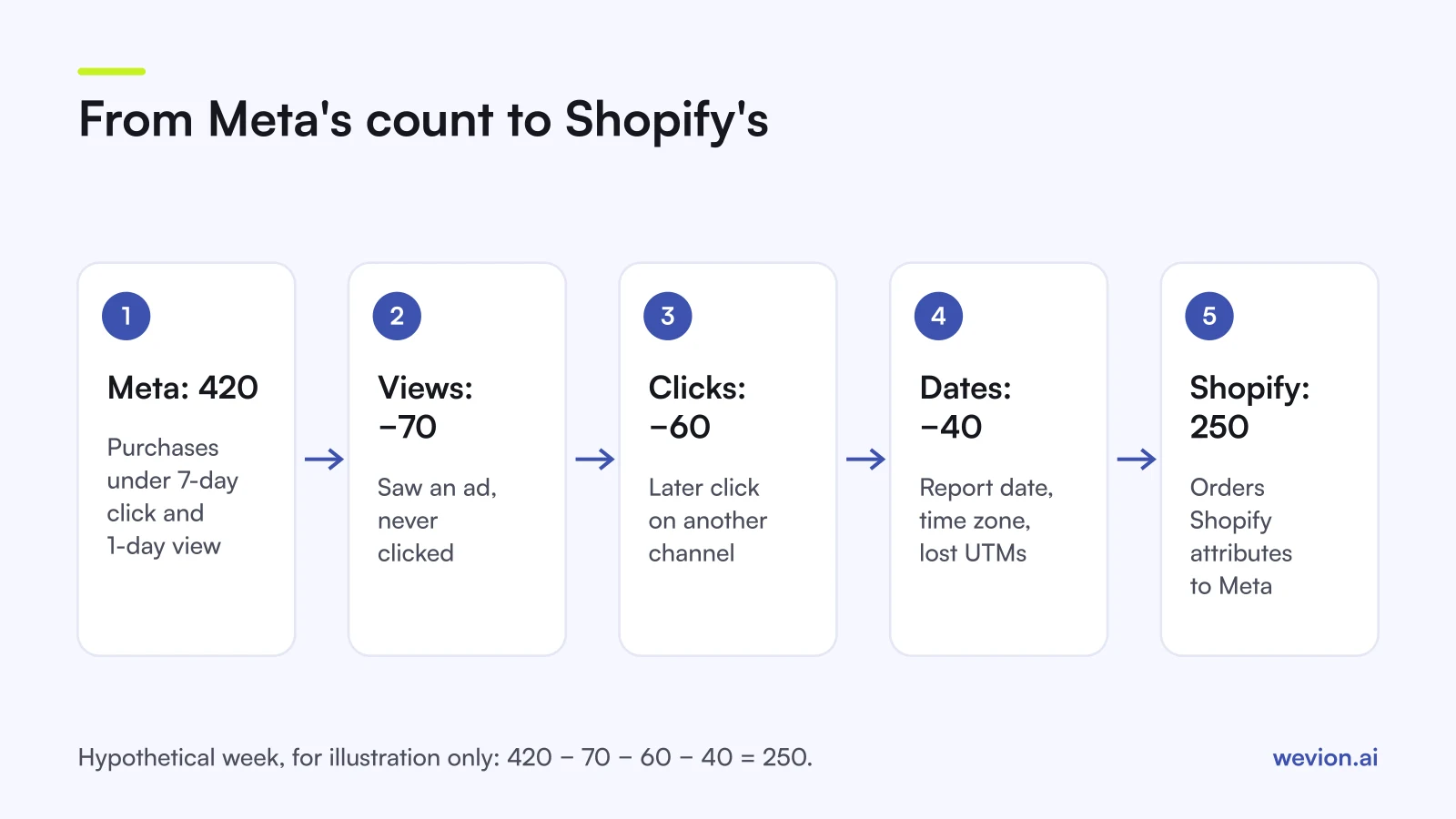
You will rarely be able to measure every line exactly. Meta's reporting can break results down by attribution window (the Insights API lists separate click and view windows), so the view-through line is measurable. The date and time-zone lines can be estimated by rerunning both reports on the same zone. The rest is what remains. If the unexplained remainder grows week after week, look for tracking problems before blaming attribution.
How should you read both reports?
The two reports answer different questions, so assign each one a job instead of picking a winner:
- Inside Meta, use Meta. Every campaign is attributed by the same rules, so ranking ad sets and creatives on Meta's figures is fair. It is also the signal Meta's delivery optimises on.
- For the business, use Shopify. Total net sales after refunds, set against total ad spend across every platform, tell you whether advertising paid off. Our MER vs ROAS guide explains that ratio.
- For Meta's share, use a range. Shopify's last-touch figure is the floor, Meta's own figure is closer to the ceiling. Where Meta's true contribution sits between them is a question for an incrementality test, not for either report.
- Track the ratio, not the gap. Divide Meta purchases by Shopify Meta-attributed orders each week. In the example it is 1.68. A stable ratio means the setup is consistent; a sudden jump usually means a tracking change.
What checks keep the gap small and stable?
A predictable gap needs consistent inputs, and five checks cover most of it:
- Align time zones between the Meta ad account and the Shopify store, or convert one report before comparing.
- Note the attribution setting and the reporting date in every Meta report you share.
- Tag every ad with UTMs using one convention, as in our DTC UTM workflow, so fewer orders fall into direct.
- Send purchases through the Conversions API as well as the pixel, with matching event IDs, and watch Event Match Quality so Meta receives and matches as many as it can.
- Compare closed periods of at least a week, after most refunds for the period have landed.
Where Wevion fits
Reconciling Meta and Shopify each week means pulling both reports onto the same dates, and adding every other platform's spend for the business view.
Wevion connects Meta ad accounts through the official API with OAuth, plus Google, TikTok, Snapchat, Taboola and Outbrain through each platform's official API, and syncs data about every 15 minutes, so what each platform reports sits side by side in one dashboard. Its Profitability Analytics, in beta, connects your Shopify store and shows orders, profit, margin and POAS next to that spend.
Wevion does not change attribution, send events to Meta or deduplicate them. It shows the numbers next to each other so you can read the gap; the reconciliation rules stay yours.
You can try it on your own ad accounts and store with a 14-day trial on the Pro plan. No card to start. We ask for one on day 7, or earlier if you use up the trial credits, and billing starts on day 14 only if you add it.
Key takeaways
- Meta counts purchases inside its click and view windows; Shopify credits each order to one source.
- View-through credit and later clicks on other channels usually explain most of the gap.
- Reporting date (impression or conversion time) and time zones move purchases between days and weeks.
- Meta can estimate conversions it cannot observe, and can also miss purchases when the pixel is blocked.
- Refunds lower Shopify net sales but not the purchase Meta already received.
- Use Meta to compare campaigns inside Meta, Shopify net sales for the business, and track the ratio between them each week.