
Server-Side Tracking on Shopify: Meta, TikTok, Google, Snapchat
Priya Raghunathan
Responsable performance e-commerce
Server-side tracking on Shopify is not one switch. Each ad platform reaches your store through its own app, and each app decides whether purchase events travel only from the shopper's browser or also from server to server. Meta and TikTok document a server connection at their higher data sharing levels. Google documents tags plus enhanced conversions. Snapchat's app documents a pixel.
Quick answer: On Shopify, Meta's Facebook & Instagram app adds the Conversions API at the Enhanced and Maximum data sharing levels, and the TikTok app adds the Events API at the same levels. The Google & YouTube app installs Google tags and can turn on enhanced conversions. The Snapchat Ads app installs the Snap Pixel; Snap's Conversions API needs a separate setup. Shopify's consent settings decide when pixels run.
This is the cross-platform overview. For the Meta setup in detail (who connects the app, catalogue sync and data sharing), read our guide to Meta ads for Shopify stores. For why server events still leave Meta and Shopify reporting different totals, see why Meta and Shopify numbers don't match.
What does server-side tracking change for a Shopify store?
Server-side tracking changes the route an event takes to the ad platform, not the event itself. A browser pixel is JavaScript that runs in the shopper's browser, so a browser ad blocker can stop it. Shopify's own help page on Meta data sharing says exactly that: "A browser-based ad blocker can prevent the Meta pixel from sharing data." A server event is sent from a server to the platform's servers, so the browser is not in the way.
Three points hold for every platform below:
- Server events supplement the pixel. TikTok and Snap tell web advertisers to run their server connection together with the pixel, and Shopify's higher Meta levels use both.
- Two routes mean two copies. When the pixel and the server both report one purchase, the platform needs a shared event ID to merge them. If the IDs do not match, the purchase is counted twice.
- Server events do not settle attribution. They help the platform receive more of your conversions. They do not change attribution windows or make platform totals equal your Shopify orders.
How does each ad platform get server events from Shopify?
Each platform publishes its own Shopify app, and the four apps work differently today. The table summarises what each official help page or listing states, as of November 2026.
| Platform | Shopify app | Server-side route | What the official page says |
|---|---|---|---|
| Meta | Facebook & Instagram | Conversions API | Enhanced and Maximum levels add it to the pixel |
| TikTok | TikTok | Events API | Enhanced and Maximum levels add it to the pixel |
| Google Ads | Google & YouTube | Not described as server-to-server | Google tags plus optional enhanced conversions |
| Snapchat | Snapchat Ads | Not mentioned in the listing | One-click Snap Pixel install |
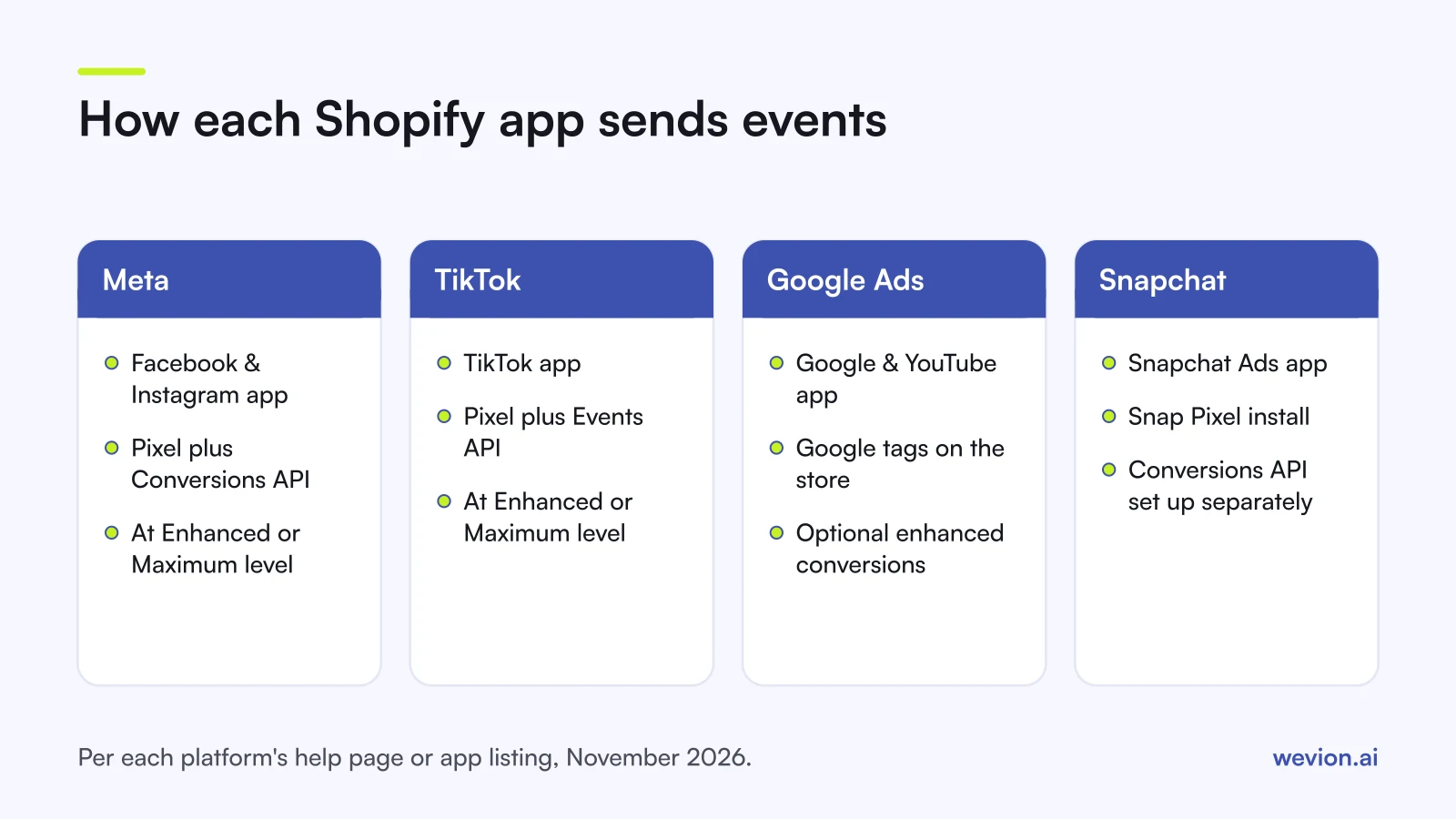
Meta: Conversions API through the Facebook & Instagram app
Meta's route is the best documented. Shopify's Meta data sharing page lists three levels. Standard uses only the Meta pixel. Enhanced adds the Conversions API, which sends purchase events between Shopify's and Meta's servers, and shares names, locations, emails and phone numbers to match users. Maximum uses the same pair and "is updated with Facebook's latest advertising technology". You set it under Sales channels > Facebook & Instagram > Settings > Data sharing settings. The Meta for Shopify guide covers the rest of the setup.
TikTok: Events API through the TikTok app
TikTok's help centre page on data sharing in the TikTok app on Shopify uses the same three names. Standard uses the TikTok Pixel only, which ad blockers can stop. Enhanced uses the TikTok Pixel, Events API and Advanced Matching. Maximum adds Shopify APIs and In-App Shopify Checkout, which TikTok marks as beta. TikTok's Events API page recommends adding the Events API to an existing pixel and using event deduplication across the two. For campaign setup on top of it, see our TikTok campaign structure guide.
Google Ads: tags and enhanced conversions through the Google & YouTube app
Google's help page on conversion tracking with the Google & YouTube app describes a tag-based setup. The app installs Google tags, maps Shopify events to Google Ads conversion actions (purchase, add to cart and checkout started are the suggested defaults), and lets you turn on enhanced conversions under Settings > Google Ads settings > Enhanced conversions. Google describes enhanced conversions as "sending hashed first party conversion data from your website to Google in a privacy safe way". The page does not call this a server-to-server connection, so we do not either. It does tell you to check for duplicate tags if conversions also come from the storefront or a custom pixel.
Snapchat: Snap Pixel through the Snapchat Ads app
The Snapchat Ads app listing, published by Snap, offers to "Install the Snap Pixel in one click" and lists conversion tracking. It does not mention the Conversions API. Snap's Conversions API documentation describes a server-to-server integration and tells web advertisers to "implement Conversions API alongside a Pixel integration", matching the pixel's client_dedup_id with the API's event_id. On Shopify, that means a developer or a third-party app, not a setting in Snap's own app. Our Snapchat Ads Manager guide covers the campaign side.
How does Shopify's customer privacy setting affect tracking?
Shopify's consent settings sit in front of every pixel on the store, so they shape how much any platform receives. According to Shopify's pixel overview, in markets that need consent, usually the EEA and the UK, "web pixels run only when visitors have provided the permissions required in the pixel configuration". New pixels require Marketing and Analytics permissions by default.
Shopify's customer privacy settings page adds three practical points:
- The opt-in banner is meant for regions such as the EEA and the UK; in regions such as the US it is not active by default, though you can turn it on.
- Shopify's banner governs Shopify's own tools and pixels. Pixels or cookies installed by hand may need a third-party banner, and that banner should use the same consent regions, or "non-essential data can be processed before a visitor provides consent".
- Pixels set up as data sale do not run for customers who opted out of data sale or sharing, unless the pixel supports limited data use.
Two consequences follow. First, a lower count on a platform after you switch on a consent banner is expected, not a broken integration. Second, the way each app handles its server events after a visitor declines is set by that app, so check its documentation. Shopify is explicit that the merchant is responsible for privacy compliance and that code snippets used to bypass consent violate its Terms of Service.
How do you check that every purchase arrives once?
Checking takes one test order and a look in each platform's events tool, and it is worth repeating after every app or theme change. A practical routine:
- List every pixel on the store. In Shopify admin, open the Customer events section and note each app pixel and custom pixel. Then check the theme for pasted pixel code from before the apps were installed.
- Confirm the data sharing level in the Meta and TikTok apps. Standard means no server events on either.
- Place one test order with a real email and phone number.
- Check Meta. In Events Manager, open the pixel's Overview, select Event Details for Purchase and look at the Event Deduplication tab, as Meta's verification guide describes. Our guide to Event Match Quality explains the match score shown on the same page.
- Check TikTok and Snapchat events tools for one purchase, not two.
- Check Google Ads conversion actions for duplicate tags, as Google's app guide advises.
If a platform shows two purchases for one order, the usual cause is a second pixel with its own event IDs. Our article on platforms double counting conversions covers the different problem of several platforms claiming the same order.
Where Wevion fits
Server-side events help each platform see more of your sales, but every platform still reports only its own share. Comparing them is a separate job.
Wevion connects Meta ad accounts through the official API with OAuth, plus Google, TikTok, Snapchat, Taboola and Outbrain through each platform's official API, and syncs data about every 15 minutes, so the results each platform reports sit side by side in one dashboard. A sudden drop in one platform's purchases after an app update stands out against the others.
Wevion does not send events to any platform, does not deduplicate them and does not fix attribution; that stays with each platform's app and pixel. Automated rules can send an alert, pause ads or change budgets when a metric crosses your threshold, with a cooldown and a daily cap on runs.
You can try it on your own ad accounts with a 14-day trial on the Pro plan. No card to start. We ask for one on day 7, or earlier if you use up the trial credits, and billing starts on day 14 only if you add it.
Key takeaways
- Server-side tracking on Shopify depends on each platform's app, not on one Shopify switch.
- Meta and TikTok add server events at the Enhanced and Maximum data sharing levels; Standard is pixel only.
- Google's app documents Google tags plus enhanced conversions, not a server-to-server route.
- Snap's Shopify app installs the Snap Pixel; Snap's Conversions API needs a separate setup.
- In opt-in regions, Shopify pixels run only with the visitor's permission, so lower counts after a consent banner are expected.
- After every change, place a test order and confirm one purchase per platform.