
TikTok Smart+ Campaigns: What They Automate and When to Use Them
Rafael Moreira
Performance Marketer senior
TikTok Smart+ campaigns are TikTok's AI-driven campaign type for performance goals: you set the objective, the KPI, the budget, the creative assets and the market, and TikTok automates targeting, delivery and much of the creative mixing. Since the upgraded experience, Smart+ is no longer a separate product you either use or avoid. It is a set of switches inside one creation flow, and you can automate as much or as little as you want.
Quick answer: Smart+ works with the Sales, Lead Generation, App Promotion and Traffic objectives. TikTok automates audience, placement, budget split and creative combinations, while you keep control of the goal, target CPA or ROAS, geography, language and assets. Use it for always-on campaigns with a proven offer and plenty of creative; stay manual for clean creative tests and small retargeting pools.
This guide goes deeper on Smart+ than our TikTok ads campaign structure guide, which covers where it sits in a full account. Bidding and learning have their own guides: TikTok ads bidding strategy and the TikTok ads learning phase.
What are TikTok Smart+ campaigns?
Smart+ campaigns are TikTok's single AI-powered setup for performance objectives, built to cut down on manual decisions about audiences, placements and creative pairing. TikTok's Smart+ overview describes the aim as letting you "create a single campaign powered by AI for all of your performance objectives", with machine learning optimising delivery towards your KPIs.
Each objective has its own version, according to the same page:
| Objective | Smart+ version |
|---|---|
| Sales on a website | Smart+ Web Campaign |
| App installs and in-app events | Smart+ App Campaign |
| Leads | Smart+ Lead Generation Campaign |
| Site visits | Smart+ Traffic Campaign |
Awareness objectives such as Reach, and consideration objectives such as Video views, are not on the list. If your plan depends on them, Smart+ is not an option there.
One caveat runs through every Smart+ help page as of November 2026: TikTok says the upgraded experience "may not be available to you yet" and points to your account manager or support. If your Ads Manager looks different from the steps below, that is the likely reason.
What changed with the upgraded Smart+ experience?
The upgraded Smart+ experience merged manual and automated campaign creation into one flow, so automation became a choice per setting rather than per campaign. TikTok's page on the Smart+ upgrades says "Manual and Smart+ experiences have been unified into a single flow", with full automation, partial automation or fully manual control.
The same page lists the modules that come with it:
- Recommended Creatives, a generative AI tool that can create new assets.
- Automatic Enhancements, which resize, raise quality, translate and dub your assets.
- CTA creation, a format with details filled in from inputs such as product information.
- Simplified Spark Ads setup, covered in our TikTok Spark Ads guide.
- Flexible Catalog Ads creation, so catalogue and non-catalogue ads can run in one campaign. Our TikTok catalogue ads guide covers the catalogue side.
- Smart+ campaign automated rules.
Creative reporting is grouped by material ID (video, image, catalogue, text), so you can still see which asset carries the results.
What does TikTok automate, and what do you control?
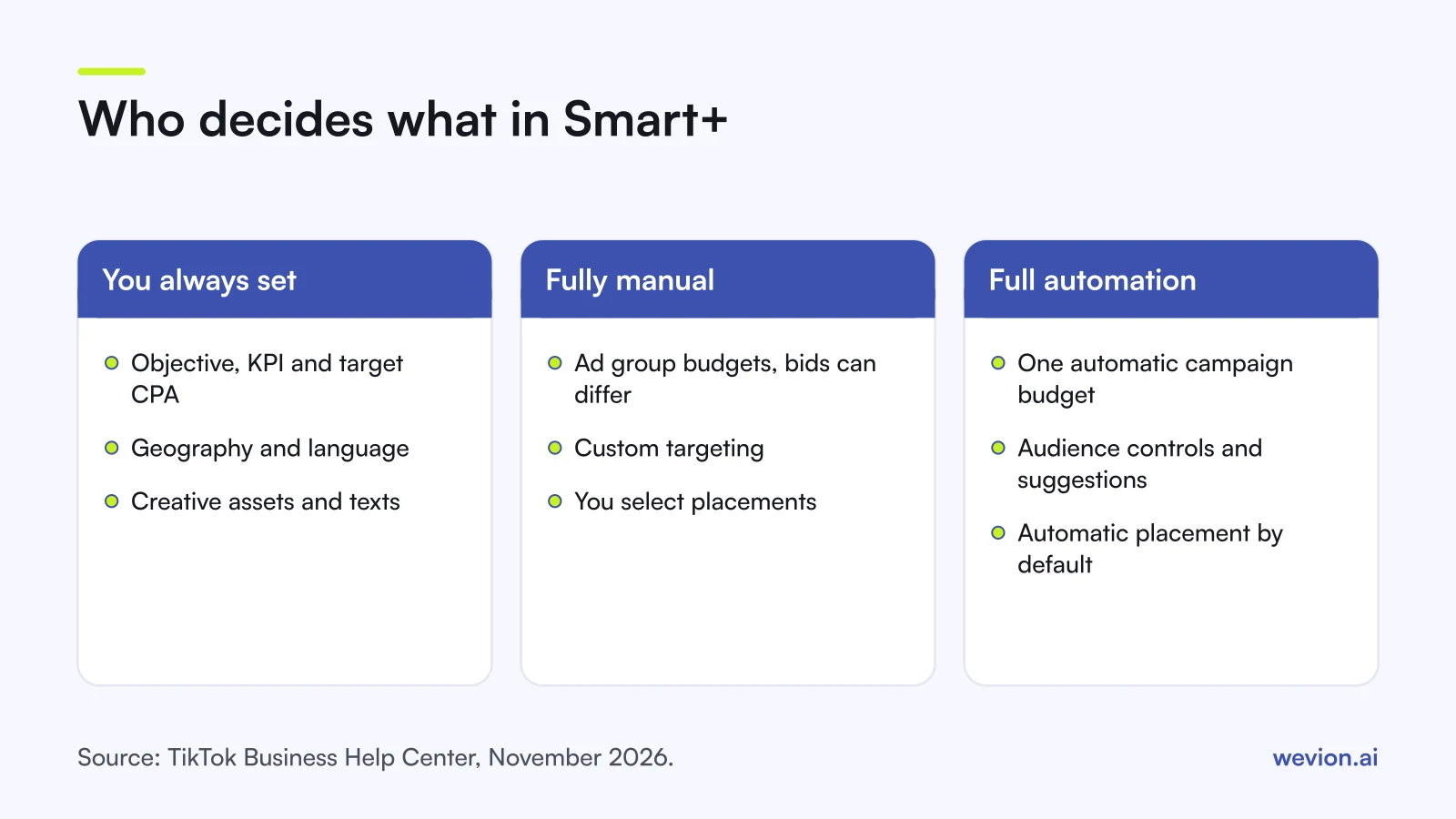
Smart+ splits the work between you and TikTok along clear lines: you decide the goal and the inputs, and TikTok decides how to deliver against them. The table sets out the switches as TikTok's upgraded Smart+ setup guide describes them.
| Setting | Fully manual | Full automation |
|---|---|---|
| Budget | Ad group budget, with its own bid per ad group | Automatic campaign budget across ad groups |
| Optimisation | Goal, event and bid can differ per ad group | Goal, event and target CPA must match across ad groups |
| Audience | Switch to custom targeting | Automatic targeting, with audience controls and suggestions |
| Placement | Select placement | Automatic placement (the default) |
| Creative | You choose assets per ad | Plus Automatic enhancements and the Recommended tab |
Whatever level you choose, some decisions stay with you. The Smart+ overview lists your KPIs, your creative assets, and your target geography and language as inputs you provide. You can also set an optional spend target per ad group in the automated setup, though TikTok says it is "not guaranteed".
On the creative side, TikTok's page on ads in Smart+ explains that each ad works as a container: "Each ad supports up to 50 creatives (video, image, carousel, etc) and 5 texts", and you can have up to 30 unique ads per ad group. The system mixes creatives and texts inside each ad and delivers the combinations that perform. The overview adds that Smart+ "will also attempt to shift budget towards the highest-performing creative and pause poor performers".
How do you set up a Smart+ campaign?
Setting up a Smart+ campaign takes the same first steps whether you automate everything or nothing; the difference shows up in the budget, audience and placement choices. Here is the full automation route, following TikTok's setup guide.
- Click Create ad in TikTok Ads Manager and pick Sales, Lead Generation, App Promotion or Traffic.
- Turn Use catalog on or off, if the objective supports it.
- Choose Automatic campaign budget and set a daily or lifetime budget. All ad groups must then share the same optimisation location, goal, event and target CPA.
- Keep automatic targeting, and add audience controls only for real limits, such as a minimum age or excluded customers.
- Leave Automatic placement on, and review the brand safety options. TikTok notes that, depending on region, automatic placement may include partner surfaces through the Pangle network.
- Build your ads. Add a destination URL or Instant Page, then creatives from your posts or creative library, and texts. Add more ads for more URLs or product sets.
- Decide on Automatic enhancements. Turn them on, or off if brand rules mean every asset must run exactly as supplied.
- Click Publish all.
For a fully manual campaign, swap step 3 for Ad group budget, click Switch to custom targeting in step 4, and choose Select placement in step 5. Partial automation is any mix of the two. TikTok's guide gives steps only for the two ends, so check each switch as you go.
If one specific video must always run with one specific caption, TikTok's guide says to add only one creative asset and one text copy to that ad. Otherwise the system pairs them freely.
What budget and bids does TikTok recommend for Smart+?
TikTok publishes concrete starting numbers for Smart+ Web campaigns, and they are higher than many media buyers expect. The best practices page for Smart+ Web Campaigns, last updated in April 2025 before the upgraded flow, recommends:
- At least six creative assets at creation.
- A daily budget of about 30 times your historical CPA, and no less than 10 times.
- A target CPA or minimum ROAS based on similar campaigns using maximum delivery.
- No edits to bid, audience or creative in the first 7 days, and at least 7 days of running time.
- After 7 days, bid changes of up to 15% every 2 days.
- If the campaign regularly spends 90% or more of its daily budget, budget increases of up to 30%.
- Pixel and Events API in place, plus split testing to check the lift.
Here is what that means with hypothetical numbers. Your comparable manual campaigns have a historical CPA of €25. TikTok's guidance points to a daily budget of €750, with €250 as the floor. If your real budget is €150 a day, you sit below the floor, and a Smart+ campaign may not collect enough conversions to learn. In that case a manual campaign with fewer, tighter ad groups can be the better use of the money until spend grows.
The same arithmetic tells you how fast to move bids. A target CPA of €25 can go to €28.75 (plus 15%) after day 7, and again two days later if delivery is still short.
When should you use Smart+ instead of a manual campaign?
Smart+ suits campaigns where you already know what works and want TikTok to find more of it; manual suits campaigns where you need to learn something specific. The choice is rarely all or nothing, because you can automate some switches and not others.
Lean on Smart+ when:
- You have an always-on Sales or Lead Generation campaign for a proven offer.
- You have six or more distinct creatives, and more coming.
- Your daily budget clears 10 times your historical CPA.
- Your pixel and Events API send a steady flow of conversions.
Stay manual when:
- You are testing creatives and need each one to get a fair, comparable share of spend.
- You are entering a new market and want to see which placements and audiences convert.
- You run retargeting on a small pool that automatic targeting might widen.
- Brand rules require every asset to run unedited, with exact caption pairs.
A common hybrid: test new creatives in a manual campaign with ad group budgets, then move the winners into a Smart+ campaign that carries most of the spend. That is the same test-then-scale logic as CBO vs ABO on Meta.
Common Smart+ mistakes
Most Smart+ problems come from giving the system too little to work with or interrupting it too early. Watch for these:
- Too few creatives, so there is little for the system to mix and fatigue sets in fast.
- A budget below 10 times CPA, then judging Smart+ on a campaign that never had the conversions to learn.
- Editing bids or audiences in the first week, which TikTok says can affect the learning phase.
- Reading near-duplicate videos as different creatives. Mixing works best on distinct hooks and formats.
- Forgetting audience controls for real exclusions, such as existing customers on an acquisition campaign.
- Skipping a split test, so you never know whether Smart+ beat your manual setup.
Where Wevion fits
Running Smart+ next to manual test campaigns means comparing two kinds of campaign every day, often across several TikTok accounts, and deciding when winners should move.
Wevion connects TikTok, Meta, Google, Snapchat, Taboola and Outbrain ad accounts through each platform's official API, syncs data about every 15 minutes, and shows spend, cost per result and ROAS for every account in one view, so Smart+ and manual campaigns can be read side by side.
You can launch manual test campaigns in bulk with Bulk Launch. Automated rules can pause or activate campaigns, change budgets or bids by a percentage, or just notify you, with a cooldown and a daily cap on runs, which helps you respect a 7-day no-edit window. Our TikTok ads automated rules guide has examples.
You can try it on your own ad accounts with a 14-day trial on the Pro plan. No card to start. We ask for one on day 7, or earlier if you use up the trial credits, and billing starts on day 14 only if you add it.
Key takeaways
- Smart+ covers Sales, Lead Generation, App Promotion and Traffic, with one Smart+ version per objective.
- The upgraded flow makes automation a set of switches: budget, audience, placement and creative can each be manual or automated.
- You always set the KPI, geography, language and assets; TikTok decides delivery and creative combinations.
- Each Smart+ ad holds up to 50 creatives and 5 texts, and an ad group up to 30 ads.
- TikTok suggests a daily budget of 30 times historical CPA, never below 10 times, and no edits in the first 7 days.
- Test creatives manually, then scale the winners in Smart+.
Sources: TikTok Business Help Center pages on Smart+ campaigns, the Smart+ upgrades, creating a campaign in the upgraded Smart+ experience, ads in Smart+ campaigns and best practices for Smart+ Web Campaigns, checked November 2026.