
Home Services Lead Generation Ads: Plumbers, HVAC, Roofing
Marta Kowalczyk
مسؤول عمليات الوكالة
Home services lead generation ads are paid campaigns that bring plumbers, HVAC engineers, roofers, cleaners and other trades enquiries from people near them, as calls, messages or form leads. The job decides the channel: an urgent repair starts with a search and a phone call, while a planned job such as a new roof or a regular cleaner can be sold with an offer on social media. What every trade shares is a small service area, a team with limited capacity and a lead that goes cold if nobody answers.
Quick answer: Put urgent jobs on Google Search and Local Services Ads, with calls as the main conversion. Put planned jobs on Meta and TikTok with a clear local offer and a short form that asks for postcode and job type. Answer within minutes, and judge every channel on cost per booked job, not cost per lead.
This guide is about the trade side of lead generation. For the general form setup on each platform, see Facebook lead ads best practices, our guide to Google Ads lead form assets and our guide to TikTok lead generation ads.
Which channel fits which home service job?
The channel that fits a home service job depends on whether the customer is already looking for help or still has to be prompted, and on how fast they need someone. Urgent jobs are search-led; planned and recurring jobs can be created with an offer.
| Job type | Examples | Customer is | Best first channel | Main conversion |
|---|---|---|---|---|
| Urgent repair | Burst pipe, no heating, blocked drain | Searching now | Local Services Ads, Search | Phone call |
| Planned replacement | New boiler, HVAC system, roof | Researching for weeks | Search, Meta, TikTok | Form with job details |
| Recurring service | Cleaning, gardening, servicing plans | Not yet looking | Meta, TikTok | Form or message |
| Seasonal | Gutter clearing, AC tune-up | Prompted by the season | Meta, TikTok, Search | Form or booking |
Most trades end up with two channels: Google for demand that already exists and Meta or TikTok to fill the calendar in quiet weeks.
How do Local Services Ads work for home services?
Local Services Ads are Google's pay-per-lead ads for local service businesses: they show on Google Search and Google Maps and charge for leads, not clicks. Google lists plumbing and HVAC among the home service categories moving first in its 2026 migration, covered below.
Google's help page on how leads work sets out what you pay for:
- Calls you answer, or return and speak to the customer.
- Missed calls during business hours, if the caller stays on the line for more than 20 seconds.
- Messages and voicemails from the customer.
- Booking requests, in the United States and Canada only.
Repeat contact from the same phone number or email within 15 days is not charged again. Google reassesses charged leads over 30 days and can credit low-quality ones automatically, though automatic credits are not available for accounts in EEA countries.
Two changes matter if you managed Local Services Ads before. In August 2025, Google announced Google Verified, a single badge that replaced Google Guaranteed, Google Screened, License Verified by Google and the Money Back Guarantee from October 2025. And Google's page on the transition to Performance Max campaigns with pay-per-lead goals says Local Services Ads are moving into Google Ads, as follows:
- August 2026: select US home and storefront service advertisers, such as plumbing and HVAC, move first.
- Late 2026: service-area businesses without storefronts and accounts with custom bidding or booking setups follow.
- 2027: non-US accounts and the remaining categories move.
Billing stays per lead and the ads stay on Search and Maps, but previous performance reports are not carried over, manual bidding and manual lead disputes are no longer supported, and vertical-level targets become one campaign-level Target CPA. Export the client's reports before the move, and split categories into separate campaigns if they need different cost targets.
How do Search ads and lead form assets fit?
Search ads and lead form assets fit alongside Local Services Ads, because they let you choose keywords, write your own ads and send people to a landing page, a call or a form. That control matters for planned jobs, such as an HVAC replacement, where people search for prices and options before they call.
For calls, add a call asset and track calls as conversions. Google's guide to call conversion tracking offers calls from ads, calls from website visits and calls imported by upload, and lets you count only calls longer than a minimum duration you set. Set that duration with the client, so a 30-second wrong number does not count as a lead.
For forms, a lead form asset collects details inside the ad on Search and Performance Max. Google's conditional answers can show job options that depend on the service picked, and a qualifying question can tag the jobs the client wants most. Check lead form eligibility in the client's account first, as our lead form assets guide explains.
How should you run Meta and TikTok for local trades?
Meta and TikTok work for local trades when the ad does three things: shows the area, shows a reason to act now and asks for a small next step. People on these platforms are not looking for a plumber, so the offer has to give them one.
Targeting. Target the service area by town or radius, and keep it to where the team will actually drive. Broad delivery inside that area usually does better than stacking interests, because homeowners are hard to pick out by interest.
Offers. Use offers that are true and specific: a fixed-price boiler service, a free roof inspection for the area, a first cleaning at a set price. Before-and-after videos and short clips of the team at work show the trade better than stock images.
Conversion. On Meta, a Leads campaign can send people to an instant form, a website, Messenger or a phone call. On TikTok, Instant Forms carry the lead, and its question types include appointment scheduling. For customers who prefer to chat, a click-to-WhatsApp ad replaces the form with a conversation.
One check before launch: housing-related services can fall under housing ad rules in the US and Canada. TikTok lists housing ads such as homeowners insurance and property appraisal under its special category, and some guides quote Meta's housing definition as including housing repairs. Plain trade services are not clearly covered by the official pages we could read, so if a client's offer touches home improvement finance, mortgages or property sales, read our real estate guide and check the category with the client.
Should you use forms or calls?
Use calls when the job is urgent and forms when the job needs details before a quote. Each has a cost on the trade's side: calls need someone to answer them, and forms need someone to call back fast.
| Calls | Forms | |
|---|---|---|
| Best for | Emergencies, same-day jobs | Planned, high-value or recurring jobs |
| Lead quality | Usually high intent | Mixed; improves with qualifying questions |
| What the trade needs | Phones answered during opening hours | Call back within minutes |
| Tracking | Call conversions with a minimum duration | Lead events plus CRM stages |
| Risk | Missed calls are lost or still charged | Slow follow-up wastes the spend |
If the client cannot answer the phone while on a job, route calls to an office or answering service, or lean on forms with a promised callback time.
How do you qualify leads by postcode and job type?
You qualify home service leads by asking where the job is and what it is, because a lead outside the service area or for a job the client does not do costs money and gives nothing back. Keep the form to three or four questions:
- Postcode as a short answer, so the office can check the area.
- Job type as multiple choice: repair, replacement, servicing, other.
- Urgency: today, this week, this month, just getting prices.
- Property: house, flat, commercial.
On Meta, conditional logic in lead ads can send each job type to its own follow-up question and close the form for jobs the client does not take on. Send the postcode and job type with the lead to the CRM, so routing to the right engineer happens without anyone reading the form.
How fast should you follow up home service leads?
Follow up within minutes, because a homeowner with a leak or a broken boiler will usually call the next business on the list if the first one does not answer. Planned jobs give a little more time, but people asking for quotes still often contact several trades.
Send an automatic text that confirms the request and gives a callback time, then call. Our guide to speed to lead covers routing, alerts and a follow-up cadence that a small team can keep.
How do you track calls and booked jobs?
You track home services lead generation by following each lead past the platform's lead count to a booked job and a job value, because cost per lead says nothing about whether the van went out. The chain has four steps: the ad, the lead or call, the qualified lead and the booked job.
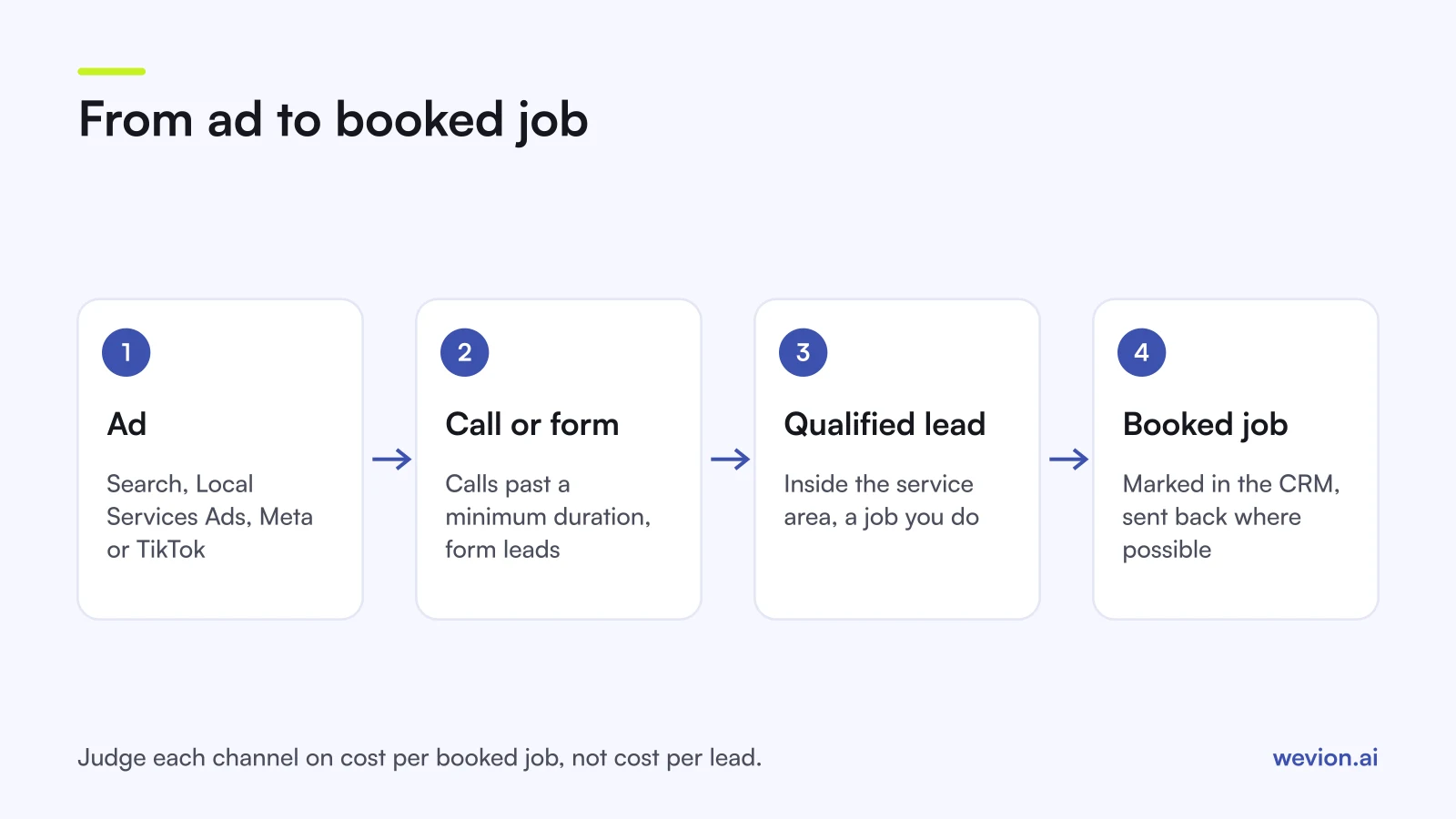
A worked example with hypothetical numbers shows why. A heating engineer spends £3,000 a month across Google and Meta and gets 150 leads at £20 each. Of those, 105 are inside the service area and for jobs the business does, and 30 become booked jobs. That is £100 per booked job. If the average job is worth £400, the 30 jobs bring in £12,000 of revenue from £3,000 of spend.
To see that number, record the lead source in the CRM or job management software, mark each lead as booked or not, and send those stages back to the platforms where you can: Google accepts calls and other conversions by upload, and Meta can optimise for leads that reach a CRM stage, as our guide to tracking lead quality through the CRM explains.
Where Wevion fits
Wevion is not part of the lead or call path: it does not track calls, store or route leads, or send conversions to the platforms. Calls and booked jobs live in the client's phone system, CRM or job management software.
Wevion connects Meta, Google, TikTok, Taboola, Snapchat and Outbrain ad accounts through each platform's official API, syncs data about every 15 minutes, and shows platform-reported leads, cost per lead and spend for every client in one view, so a trade's Google and Meta campaigns sit side by side.
Each trade client gets its own workspace, and team roles such as manager, media buyer, finance and viewer decide who can change what. Automation rules can pause ad sets, change budgets or just send an alert when cost per lead crosses a threshold you set, which helps when a client's calendar fills and spend should drop.
You can try it on your own ad accounts with a 14-day trial on the Pro plan. No card to start. We ask for one on day 7, or earlier if you use up the trial credits, and billing starts on day 14 only if you add it.
Key takeaways
- Urgent jobs belong on Google Search and Local Services Ads with calls; planned and recurring jobs can be sold with offers on Meta and TikTok.
- Local Services Ads charge per valid lead and are moving into Google Ads as Performance Max campaigns with pay-per-lead goals, from August 2026 in the US.
- Google Verified replaced Google Guaranteed and Google Screened in October 2025.
- Qualify with postcode, job type and urgency, and route leads to the right engineer automatically.
- Answer within minutes and judge every channel on cost per booked job, not cost per lead.