
Google Ads Lead Form Assets: Setup, Rules and CRM

Stefano De Cubellis
رئيس قسم الشراكات
Google Ads lead form assets let people send their name, email or phone number to an advertiser through a form inside the ad, without visiting a website. For agencies running lead generation across Google, Meta and TikTok, they are Google's answer to instant forms, with stricter eligibility rules and a short lead retention window that catch out teams used to Meta.
Quick answer: Lead form assets run on Search and Performance Max campaigns. You need a good policy history, an eligible vertical, a privacy policy, a conversion-focused bid strategy and the "Submit lead form (Google hosted)" conversion goal. Start with the More volume form type, add a qualifying response on Search, and send leads to the CRM by webhook, because Google keeps them for only 60 days.
If you are comparing forms with landing pages in general, our guide to lead ads vs landing pages covers the trade-off on Meta. This guide is about how Google's version works.
What are lead form assets in Google Ads?
A lead form asset is a form attached to a campaign, which opens when someone interacts with the ad and collects their details on Google. Google's lead form assets page describes them as letting people "submit their information in a form directly in your ad."
Each form has a headline, business name and description, the questions you ask, a link to the privacy policy, a submission message shown after the form is sent, and a call to action. Google's best practices page gives the headline 30 characters, so it has to say the offer in a few words.
Where do lead forms show today?
Google's create lead form assets guide lists two campaign types as of November 2026: Search and Performance Max. Both can show the form on desktop and mobile.
How the form opens on Search depends on your goals, according to Google's guide to lead forms in responsive search ads:
- Lead form submissions as the only conversion goal: a click on the ad's headline opens the form.
- Lead form plus other goals: the headline opens your website, and the form appears as an asset next to other assets.
Three rules shape the setup:
- Only one lead form per campaign. Plan one offer per campaign, not one form per ad group.
- Account-level forms exist. You can attach one lead form asset at account level for Search or Performance Max, but a campaign-level form takes priority.
- Responsive search ads only. Expanded text ads are not eligible.
Google's lead form policy still describes lead forms in Video or Display campaigns, and Search ads whose headline opens straight to the form, with a higher bar: more than $50,000 USD total spend, or reputable advertisers spending more than $1,000 USD per account (or more than $15,000 USD across all accounts) who complete advertiser verification. If a client is new to Google Ads, expect the asset version on Search or Performance Max rather than a headline that opens the form.
Who is eligible for lead form assets?
Eligibility is the step agencies most often skip, and it decides whether the form serves at all. Google's lead form policy and lead form assets page set four conditions:
- A good history of policy compliance on the account.
- An eligible vertical. Sexual content, alcohol, gambling, healthcare and medicines, and political content are excluded.
- A privacy policy link, which appears at the end of the form.
- A first-party relationship. Google does not allow affiliate networks or lead generation businesses, at its discretion. Third-party agencies are allowed when they have a well-established, direct relationship with the products or services offered.
The fourth point matters for agencies: run forms from the client's own account, for the client's own offer. Our guide to managing several Google Ads accounts covers the manager account setup.
The campaign also needs a conversion-focused bid strategy and the "Submit lead form (Google hosted)" conversion goal, even if it optimises for other conversions as well. The form must also target a country where lead forms are available.
How do qualifying questions work?
Qualifying responses are multiple choice questions where you mark one or more answers as the ones that make a lead qualified. Google's qualifying responses page explains what happens next:
- Leads that choose a qualifying answer are tagged as qualified, with a lead stage in the CSV, webhook and API output.
- When the question is in an active campaign, Google adds a "Lead form - Response qualified (Google-hosted)" conversion action to the Qualified lead goal.
- The question is mandatory and cannot be marked optional.
- Qualifying responses are available for Search campaigns only.
Other question rules from the create guide: you must ask at least one of name, email or phone, and people must give either an email or a phone number. Adding a new custom question can trigger a policy review, and the linked campaigns pause until the updated form is approved, so do not edit a live form on a Friday afternoon. Phone number verification with a one-time code is supported on Search only.
A good qualifying question separates buyers from browsers in one tap. For a B2B software client: "When do you plan to start?" with "This month" and "Within 3 months" marked as qualifying, and "Just researching" not.
More volume or More qualified?
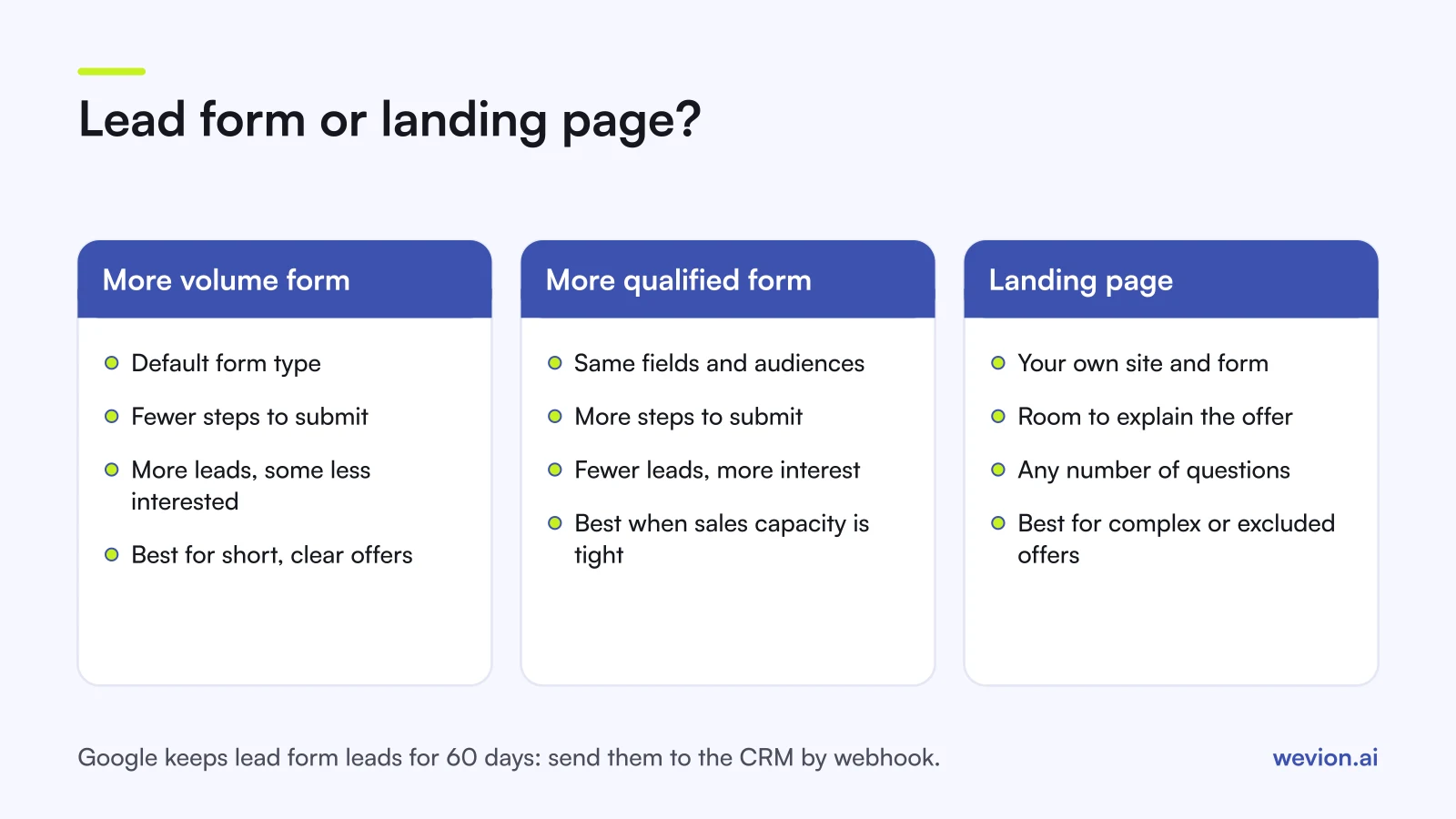
The form type is a single setting that trades lead count against lead interest. Google's responsive search ads guide describes the two:
- More volume (default): fewer steps to submit. May bring more leads, including people who are less interested.
- More qualified: more steps. May bring fewer leads, but those leads generally have greater interest.
Switching does not change your fields or audiences, and you can switch at any time during the campaign. It may change your cost per lead and the number of leads.
Judge the two on cost per qualified lead, not cost per lead. A hypothetical client with €3,000 of spend shows why:
| More volume | More qualified | |
|---|---|---|
| Spend | €3,000 | €3,000 |
| Leads | 150 | 90 |
| Cost per lead | €20 | €33.33 |
| Leads the sales team qualifies | 30 (20%) | 36 (40%) |
| Cost per qualified lead | €100 | €83.33 |
The form with the worse cost per lead is the cheaper one per qualified lead. Your numbers will differ, which is why the test needs CRM stages, not the Google Ads report alone.
How do you get leads out of Google Ads?
Getting leads out fast is non-negotiable with Google, because the lead form assets page says Google Ads stores leads for 60 days and the CSV download covers only the last 30. The options are:
| Method | Speed | Best for |
|---|---|---|
| CSV download | Manual | One-off tests |
| Email notifications | Per lead | Small clients without a CRM |
| Webhook | Automatic | Any CRM with an endpoint, or a third-party connector |
| Zapier | Automatic | CRMs without a webhook endpoint |
| Google Ads API | Automatic | Agencies with their own data pipeline, up to 60 days of data |
Google's best practices page recommends a webhook for rapid follow-up. Test it with a real submission before launch and confirm the lead lands in the right CRM pipeline with the campaign name attached.
Then close the loop. Google's best practices page points to enhanced conversions for leads for more durable reporting, so qualified and closed leads from the CRM count as conversions in Google Ads. The stages you need are the same ones in our guide to tracking lead quality through your CRM.
Lead form assets or a landing page?
A lead form asset removes the page load and the website form, which suits short, mobile-first offers. A landing page gives you room to explain, qualify and track in your own analytics. A simple rule:
- Use lead form assets for clear offers with a short form: a quote request, a callback, a consultation. Also when the client's site is slow or weak on mobile.
- Use a landing page when the offer needs explaining, when you need more than a few questions, or when the vertical is excluded from lead forms.
- Use both by keeping other conversion goals next to the lead form goal, so the headline goes to the site and the form shows as an asset. Then compare cost per qualified lead by source in the CRM.
Performance Max adds one more consideration: it optimises across Google's inventory with less control over placements. Our comparison of Performance Max vs Advantage+ explains how it decides where to spend.
Where Wevion fits
Lead generation agencies rarely run Google alone. The same client often has Meta instant forms and TikTok Instant Forms live, and comparing them means three exports and a spreadsheet.
Wevion connects Meta, Google, TikTok, Taboola, Snapchat and Outbrain ad accounts through each platform's official API, syncs data about every 15 minutes, and shows spend and platform-reported results for every account in one view, so you can compare Google lead form campaigns with Meta and TikTok side by side.
Each client has its own workspace, with team roles such as manager, media buyer, finance and viewer. Automation rules on a single platform can pause campaigns, change budgets or only send an alert, and cross-platform rules are in beta. Lead details and status still come from your CRM; for how one agency joined the two, read the story of the lead-gen agency that proved cost per qualified lead across six platforms. For TikTok's version of forms, see our guide to TikTok lead generation ads.
You can try it on your own ad accounts with a 14-day trial on the Pro plan. No card to start. We ask for one on day 7, or earlier if you use up the trial credits, and billing starts on day 14 only if you add it.
Key takeaways
- Lead form assets run on Search and Performance Max, with responsive search ads only on Search.
- You need a good policy history, an eligible vertical, a privacy policy, a conversion-focused bid strategy and the Google-hosted lead form conversion goal.
- Affiliate networks and lead generation businesses are not allowed; agencies need a direct relationship with the client's offer.
- Qualifying responses, available on Search only, tag qualified leads and add a qualified lead conversion action.
- Compare More volume and More qualified on cost per qualified lead, not cost per lead.
- Google keeps leads for 60 days and CSV covers 30, so send leads to the CRM by webhook from day one.