
Wevion and AdsPower Are Now Partners: Two Halves of Client Ad Account Access

Stefano De Cubellis
Head of Partnerships
A new buyer starts on Monday and needs to be working in 11 client accounts by Friday. They can have that access without a single client password changing hands. The Wevion AdsPower partnership exists because that takes two different things, not one.
That question, how access to client ad accounts should actually work, is why we are announcing this today: Wevion and AdsPower are now formally partnered, and the offer runs the same way in both directions. New users get 10% off their first month, then 5% off every month after that. AdsPower users get it on Wevion, and Wevion users get it on AdsPower. The details, and how to claim it, are at the end of this post.
Access to a client ad account is two questions rather than one: what a person is allowed to change, and where they are working when they change it. Answer both and onboarding takes minutes, removing someone takes seconds, and every change stays attached to a name.
The two ways ad account access goes wrong
The first is the credential, the failure mode behind most of the permission mistakes agencies make with client ad accounts. A login gets shared so somebody can do their job, then shared again when the team grows, and after a year the honest answer to "who has access to this client?" takes a morning to work out. When that person moves on, you are resetting logins across every client they touched and explaining to each one why.
The second reaches teams who already have the first one solved. A buyer with entirely legitimate access has three clients open in one browser and makes the change in the wrong account. Nothing about their permissions was wrong. They were simply in the wrong window.
Both are access problems and they have different answers.
Deciding what a buyer can change in a client account
A buyer can work inside a client's account all week without ever holding that client's login. The access lives in a role you grant, so it is yours to widen, narrow or withdraw whenever you choose.
In Wevion, Meta connects through Wevion's official Meta app. One OAuth authorisation links the Business Manager, without any password changing hands. The other platforms connect the same way through their own official APIs: Google, TikTok, Taboola, Snapchat and Outbrain. From that point access is decided by roles rather than by credentials; the full setup is in our guide to team roles on client ad accounts. Each client sits in its own workspace, and a buyer is added only to the workspaces they work on.
Because each person works under their own role, a change is attributable to whoever made it. A shared login answers the question "somebody did this". A role answers it with a name. With one connection you can manage hundreds of accounts without ever sharing a login. Plans scale up to 100 ad accounts.
Keeping a buyer in the right client account
Some work still takes place in the platform's own interface. A buyer may need to review a UI-only setting, use a feature unavailable through an API, or check an account while speaking with a client. These tasks require direct browser access and a clearly separated workspace for each client.
The AdsPower antidetect browser provides that browser layer through:
- Separate browser profiles: create a dedicated workspace for each authorised client, brand or market account.
- Independent session data: each profile keeps its own cookies, local storage, browser settings and login session.
- Profile groups: organise profiles by client, project or internal team.
- Controlled team access: give buyers access only to the profiles required for their roles.
- Flexible proxy configuration: add a proxy to a profile when the authorised workflow requires one.
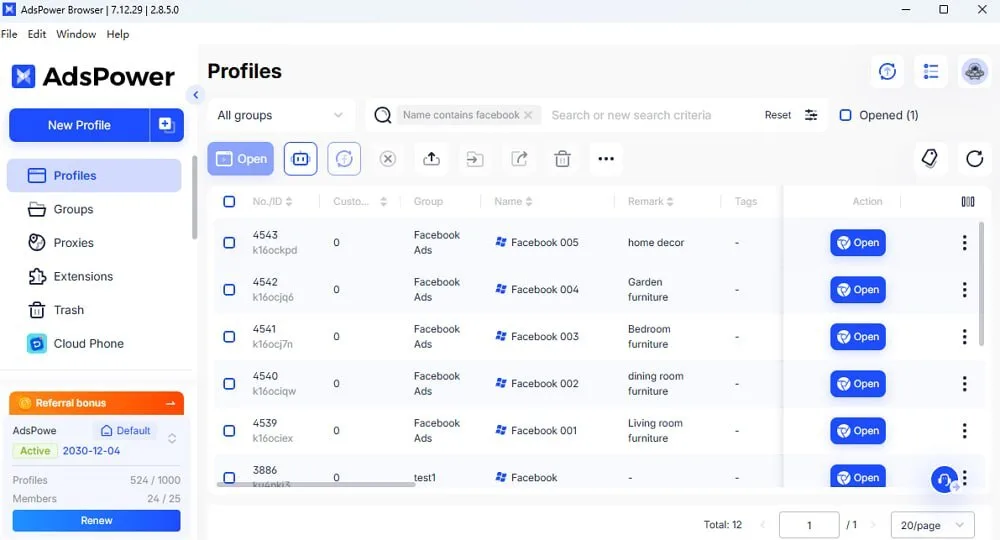
For how the browser layer and the API layer divide the work in general, see Wevion and anti-detect browsers compared. These features reduce the risk of opening one client's account in another client's workspace. AdsPower does not replace Meta Business Manager, Google Ads manager accounts or other official permission systems. Platform permissions determine what a buyer can do; AdsPower helps keep direct browser sessions organised by client. Repetitive campaign tasks supported by platform APIs can be handled through Wevion without opening each browser profile.
Starting a buyer, removing a buyer, and answering for a change
- A buyer starts. They get a role in Wevion covering the accounts they work on, and profiles in AdsPower for the clients they touch. Setup takes minutes and no password changes hands.
- A buyer leaves. You withdraw the role and the profile access. There is nothing to reset and no client to notify.
- Somebody asks who changed that budget. The action sits against a person through their role in Wevion, and browser-side task logs cover the work done in session.
Which half your team needs
Teams running client accounts, or several markets under one brand, generally need both. The credential question and the wrong-window question both show up the moment more than one person is working across more than one account. If that sounds like your agency, this is exactly the setup we built Wevion around.
Some teams only ever work in a single ad account. An in-house team running one brand is the obvious case. There is no second account to land in by accident, so the wrong-window problem never arrives, and access comes down to who is allowed to change what. Connect the account, set the roles, and you are done.
Separate browser profiles start earning their place as soon as there is a second account, which for an agency means as soon as there is a second client.
The partner offer, and how to claim it
Wevion and AdsPower are now formally partnered, and the offer runs both ways: 10% off your first month, then 5% off every month after that.
Running the two together takes no integration work. There is no plugin and no connector. AdsPower manages the profiles, Wevion connects to the accounts through the platform APIs, and each covers its own half of the access question.
Coming from AdsPower? Every Wevion plan starts with a 14-day free trial, so you can run the whole setup before the discount matters at all: connect an account, grant a role, and see how the two halves sit together.
Already on Wevion? Claim the discount on AdsPower →