
GA4 vs Meta Ads Conversions: Why They Differ and How to Reconcile
Priya Raghunathan
E-commerce Performance Manager
GA4 vs Meta Ads conversions is a comparison most ecommerce teams make every Monday, and the numbers almost never agree. Meta Ads Manager usually reports more purchases and more revenue than GA4 shows for Paid Social, sometimes far more. Neither tool is broken: each one answers a different question with different rules, and the gap is the sum of those rules.
Quick answer: Meta credits purchases within its click, engage-through and view windows and takes full credit for each. GA4 only sees tracked sessions, credits key events with data-driven or last click models across every channel, and depends on consent and correct UTMs. Dates and time zones shift purchases between days. Use Meta inside Meta, GA4 across channels.
This guide is about Meta against GA4. If your question is Meta against your store's orders, read why Meta and Shopify numbers don't match. For the theory behind the models, see first-touch vs last-touch attribution.
Why do GA4 and Meta Ads report different conversions?
GA4 and Meta Ads Manager start from different raw data. Meta knows who saw and clicked an ad, then receives purchase events from your pixel and Conversions API. GA4 knows sessions on your site, where each session came from and the events that happened in it. Eight differences explain almost every gap.
1. What earns credit
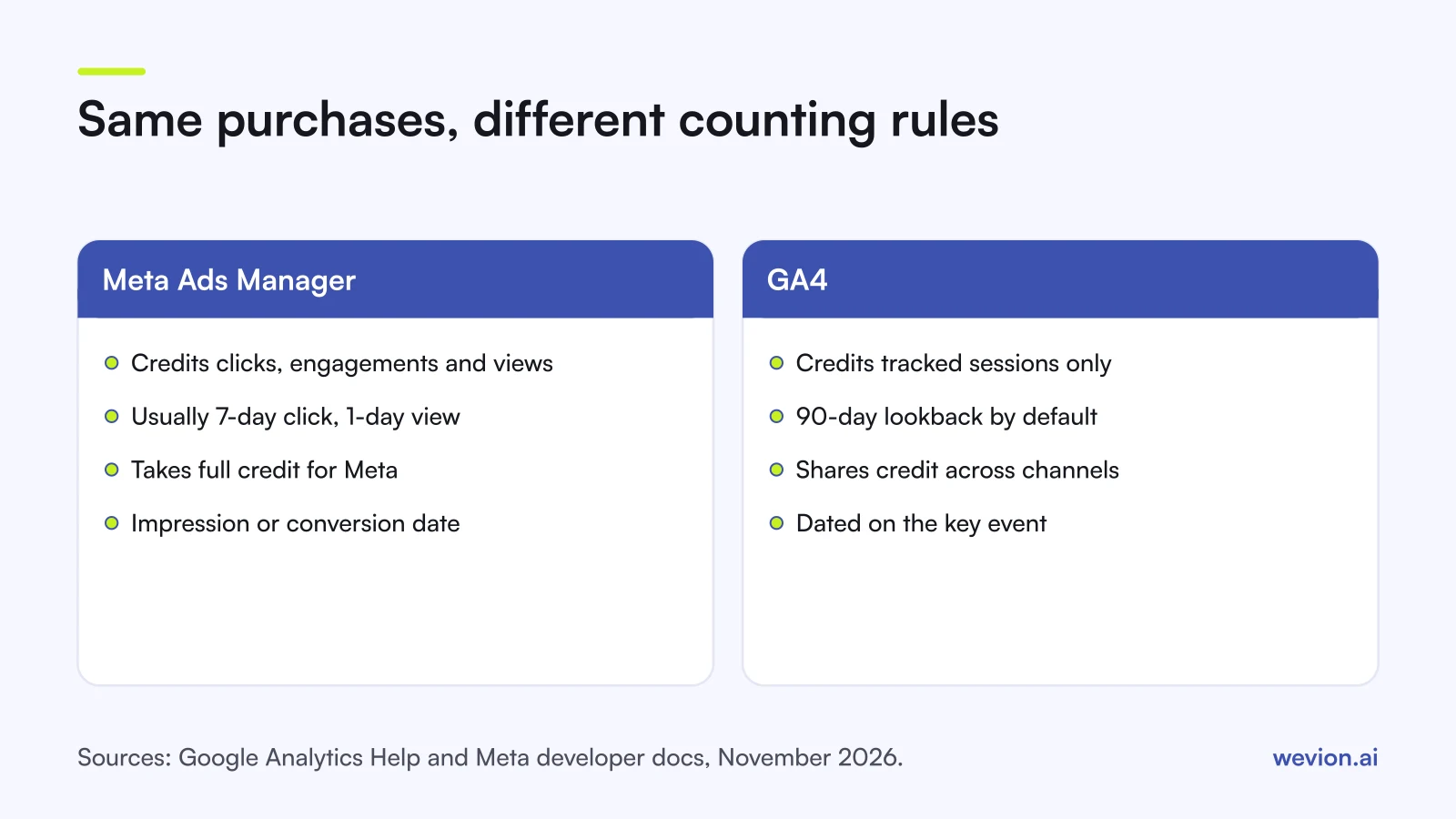
Meta credits a purchase to an ad after a link click, an engagement or a view, within the ad set's attribution setting. For website conversions the usual setting is 7-day click, 1-day engage-through and 1-day view. GA4 cannot see an impression, so a purchase after a view with no click is credited in GA4 to whatever channel brought the buying session: organic search, email, direct.
2. Who else gets credit
Meta reports only Meta. If a shopper clicks a Meta ad, later clicks a Google ad and buys, Meta still counts the purchase because its click is inside the window. GA4 spreads one purchase across every channel. Under its data-driven model, credit is shared by each account's own data; under paid and organic last click, which Google says "ignores direct traffic", the last non-direct channel takes it all. Add every platform's own count together and you get more purchases than you had, as our guide to ad platforms double counting conversions shows.
3. Windows of different lengths
Meta's click window is 1 or 7 days. GA4's lookback window for most key events defaults to 90 days, with 30 or 60 as options; for acquisition key events such as first_visit it is 30 days, or 7. A Meta click 20 days before a purchase earns nothing in Meta and can still earn credit in GA4.
4. Click versus session
Meta counts the click on the ad. GA4 needs a session: the landing page has to load and the Google tag has to fire. People who close the page before it loads and browsers or extensions that block the tag both leave Meta with a click and GA4 with nothing.
5. Consent
When a visitor declines analytics cookies, GA4 does not record them in the normal way. GA4 can fill part of the gap with behavioural modelling for consent mode, but only if consent mode runs on every page, the property collects at least 1,000 events a day with consent denied for at least 7 days, and at least 1,000 daily users with analytics consent on 7 of the previous 28 days. Google says modelling applies to metrics such as users and sessions, not to event counts in standard reports. Meta, for its part, has said it uses methods including conversion modelling to estimate some conversions it cannot observe, as AdExchanger reported in 2022.
6. UTM and source mapping
GA4 decides a session is Paid Social from its source and medium. Per Google's default channel group rules, the source must be on GA4's list of social sites (facebook is, meta is not) and the medium must match ^(.*cp.*|ppc|retargeting|paid.*)$. Tag ads with utm_source=meta and the purchases land in Paid Other; tag them utm_medium=social and they become Organic Social. Our UTM parameter guide for Meta ads has a template that avoids both.
7. Report date and time zone
GA4 credits a key event on the date it happened, looking back through the lookback window for touchpoints. Meta can report a conversion on the date of the impression or the date of the conversion: its Insights API exposes this as action_report_time. Add a Meta ad account and a GA4 property set to different time zones, and the same purchase can sit in different days or weeks.
8. Processing and changes
Google's help on data freshness says GA4 processing "can take 24-48 hours", so yesterday's figures may still move. Changing GA4's reporting attribution model "applies to historical and future data", while lookback window changes apply only going forward. A report that changed overnight may reflect a setting change, not a change in sales.
How do you reconcile GA4 and Meta conversions?
A bridge table walks from Meta's count to GA4's Paid Social count one cause at a time, so you can see which line carries the gap. The figures are hypothetical, for illustration only: one store, one week, average order value €70, both tools set to the same time zone.
| Step | Purchases | Running total |
|---|---|---|
| Meta reports, 7-day click, 1-day engage-through, 1-day view | 300 | 300 |
| Minus view-through only, credited in GA4 to the buying session's channel | −60 | 240 |
| Minus engage-through only, no link click | −15 | 225 |
| Minus credit GA4 gives to a later Google, email or organic click | −45 | 180 |
| Minus clicks that never became a recorded session (no consent, blocked tag, page not loaded) | −25 | 155 |
| Minus sessions mis-tagged into Paid Other or Unassigned | −10 | 145 |
| Minus purchases reported on another date (impression date in Meta) | −5 | 140 |
| GA4 key events credited to facebook / cpc, Paid Social | 140 |
In revenue, Meta reports €21,000 (300 × €70) and GA4 credits Paid Social with €9,800 (140 × €70). On €5,000 of weekly spend, that is a Meta ROAS of 4.2 against a GA4 ROAS of about 2.0. Under data-driven attribution GA4 can give fractional credit, so real reports rarely show whole numbers on every line.
You can measure some lines directly. Meta's reports break results down by attribution window, which gives the view-through and engage-through lines. A GA4 exploration on the same dates, filtered to facebook / cpc, gives the final line. The tagging line shows up as Meta campaign names under Paid Other or Unassigned. What is left after those is consent, blocked tags and cross-channel credit, which you can estimate but not count.
To keep the comparison fair each week:
- Set the same time zone on the Meta ad account and the GA4 property, or convert one report.
- Use conversion time in Meta reports you compare with GA4, where your view allows it.
- Compare a closed week, at least two days after it ends, so GA4 processing has finished.
- Check the tagging: every active ad carries the same UTM string, with
facebookas source. - Write down the settings: Meta's attribution setting per ad set, GA4's reporting model and lookback window.
- Track the ratio: Meta purchases divided by GA4 Paid Social key events. In the example it is about 2.1. A steady ratio means steady tracking; a jump means something changed.
Which number should you use for which decision?
Neither tool is the true figure, so give each one the job it does best instead of choosing a winner.
| Decision | Use | Why |
|---|---|---|
| Which ad set, creative or audience wins inside Meta | Meta Ads Manager | Same rules for every Meta campaign, and the signal Meta's delivery optimises on |
| How Meta compares with Google, email and organic | GA4 | One set of rules across all channels |
| What visitors did on the site, by landing page or device | GA4 | Meta receives the events you send it, not full on-site sessions |
| Whether total ad spend paid off | Store revenue against all ad spend | Store revenue is net of refunds and covers every channel; see MER vs ROAS |
| How much Meta truly adds | An incrementality test | Both tools assign credit; neither measures what would have happened without the ads |
Treat the two figures as a range. GA4's Paid Social credit is close to a floor for Meta's contribution, because it ignores every view and every earlier Meta click that ended in another channel. Meta's own figure is closer to a ceiling. Where the truth sits is a question for an incrementality test.
Do not copy one tool's number into the other's role. Cutting a Meta prospecting campaign because GA4 gives it little last click credit often removes the ads that started the journey. Scaling on Meta's figure alone can do the reverse.
What makes the gap bigger than it should be?
Some gap is normal, but a few setup problems widen it in ways no attribution rule explains:
- Purchase events firing twice in GA4, for example on a thank-you page reload, which inflates GA4 instead of Meta.
- Pixel or Conversions API sending duplicates to Meta without matching event IDs. Our guide to server-side tracking on Shopify covers deduplication.
- Redirects that strip UTMs, such as a country redirect, so sessions arrive as direct.
- Currency mismatches, where Meta reports in the ad account currency and GA4 in the property currency.
- A changed GA4 model or lookback window in the middle of the period you are comparing.
Where Wevion fits
Comparing GA4 and Meta each week means pulling both reports onto the same dates, then adding every other platform's spend for the business view, and that routine takes longer than it should.
Wevion connects Meta ad accounts through the official API with OAuth, plus Google, TikTok, Snapchat, Taboola and Outbrain through each platform's official API, and syncs data about every 15 minutes, so what each platform reports sits side by side in one dashboard. Its cross-channel analytics converts every account into one currency.
Wevion does not change attribution, send events to Meta or Google, or deduplicate conversions. It shows platform-reported numbers next to each other so you can read the gap; GA4 and your reconciliation rules stay where they are.
You can try it on your own ad accounts with a 14-day trial on the Pro plan. No card to start. We ask for one on day 7, or earlier if you use up the trial credits, and billing starts on day 14 only if you add it.
Key takeaways
- Meta credits clicks, engagements and views within its windows and takes full credit; GA4 credits only tracked sessions and shares credit across channels.
- GA4's lookback window for most key events defaults to 90 days; Meta's click window is 1 or 7 days.
- Consent, blocked tags and pages that never load remove Meta clicks from GA4.
utm_source=facebookand a paid medium put sessions in Paid Social;metaorsocialdo not.- Align time zones, report dates and closed weeks before comparing.
- Use Meta inside Meta, GA4 across channels, store revenue for the total, and a test for the truth.