
TikTok Ads Dayparting: When to Schedule Ads by Hour and Day
Rafael Moreira
Performance Marketer senior
TikTok ads dayparting means telling an ad group to run only in the hours and days you choose, instead of all day, every day. You set it per ad group in TikTok Ads Manager, in the account's time zone. It helps when results really depend on the hour, such as a live stream or a call centre, and it hurts when it starves the algorithm of conversions while it is still learning.
Quick answer: In ad group setup, open Budget and Schedule and pick specific times or ranges during the week. The schedule runs in the ad account's time zone, which cannot be changed after the account is created. Daypart only ad groups with enough conversions, decide from at least two weeks of your own hourly data, and cut only time blocks that are clearly above your target CPA.
The same idea exists on other platforms with different rules: see our guides to dayparting in Google Ads and Meta ads scheduling. Every TikTok fact below comes from TikTok's Business Help Center, opened on 17 November 2026.
Where is dayparting in TikTok Ads Manager?
Dayparting in TikTok Ads Manager is an ad group setting, so each ad group in a campaign can run on its own schedule. It sits with the budget, in the Budget and Schedule module of ad group setup, the same module TikTok's scheduled budget change page names on the Edit Ad Group page.
TikTok's scheduling options for LIVE Shopping Ads show the two ways to use it:
- Specific times every day, for example "Choose 10am to noon and 7pm to 9pm to match your LIVE session schedule."
- A range during the week, for example "Choose to run a 24-hour LIVE session Monday to Wednesday."
On that page, dayparting appears with a fixed start and end time on a daily or lifetime budget, and with a continuous schedule. For a single LIVE session, the page says "No dayparting".
TikTok's help pages do not publish one complete list of which objectives, budget types and campaign types support dayparting. If you do not see the option in an ad group's Budget and Schedule settings, it is not available for that setup. Decide your budget type before launch: TikTok's daily budget page says you cannot change the budget type at campaign or ad group level once published.
Which time zone does a TikTok schedule use?
A TikTok schedule runs in the ad account's time zone, and that time zone is fixed for the life of the account. TikTok's time zone page says the time zone is selected when you create the account, controls how data appears in reports, when ad delivery starts and ends and how billing cycles are set, and cannot be changed after registration. You can see it under Tools, then Account setup.
That creates the classic dayparting mistake. If your account runs on UTC and your customers are in New York, a schedule of 18:00 to 22:00 runs from early afternoon to early evening local time, five hours early (four in summer).
TikTok's Timezone Converter helps here. It lets you schedule in your local or target market time zone and, in TikTok's words, "the system will automatically convert it to the Business Center account timezone for delivery". It covers start times, end times and dayparting, and offers a daylight saving option. Check the converted hours before you publish.
When does dayparting help on TikTok?
Dayparting helps when the value of a click really changes with the hour, for reasons that sit outside the ad platform. Before you add one, write down why a given hour should perform worse.
Good reasons include:
- Live sessions. LIVE Shopping Ads only make sense while you are live, which is exactly the use case TikTok documents.
- Someone has to answer. Lead campaigns that rely on a call back lose value when nobody can call. Our guide to speed to lead explains why the first minutes matter.
- Time-limited offers. A flash sale or a launch window has a fixed start and end.
- Clear, repeated waste. Your own data shows the same hours missing your target CPA over several weeks, on enough conversions to trust.
Weak reasons include "people scroll more in the evening" with no data from your account, or a few bad nights in one week.
When does dayparting hurt the algorithm?
Dayparting hurts when it cuts the conversions an ad group needs to learn, which is the main risk on TikTok. TikTok's learning phase page, last updated June 2026, says: "Typically, volatility starts to decline after about 25 campaign results or 7 days from when the campaign enters the learning phase." Fewer delivery hours mean fewer results per day, so a tight schedule keeps an ad group in its volatile period for longer. Our guide to the TikTok ads learning phase covers what else resets or slows it.
Three more effects to plan for:
- Bid strategy. Maximum Results and cost or value targets need volume to settle. Our TikTok ads bidding strategy guide covers which strategy suits low volume.
- Budget timing. TikTok's budget best practices note "a spending discount based on the actual remaining effective hours of delivery" when you set up or change a Maximum Results strategy mid-day. Fewer effective hours can mean less of the day's budget spent.
- Minimums. The daily budget page sets the ad group minimum at 20 USD a day, and a lifetime budget at that minimum times the scheduled days. A schedule does not lower the minimum.
The rule of thumb that follows: daypart ad groups that already deliver plenty of conversions, and leave low-volume or new ad groups running all day.
How to decide from your own hourly data
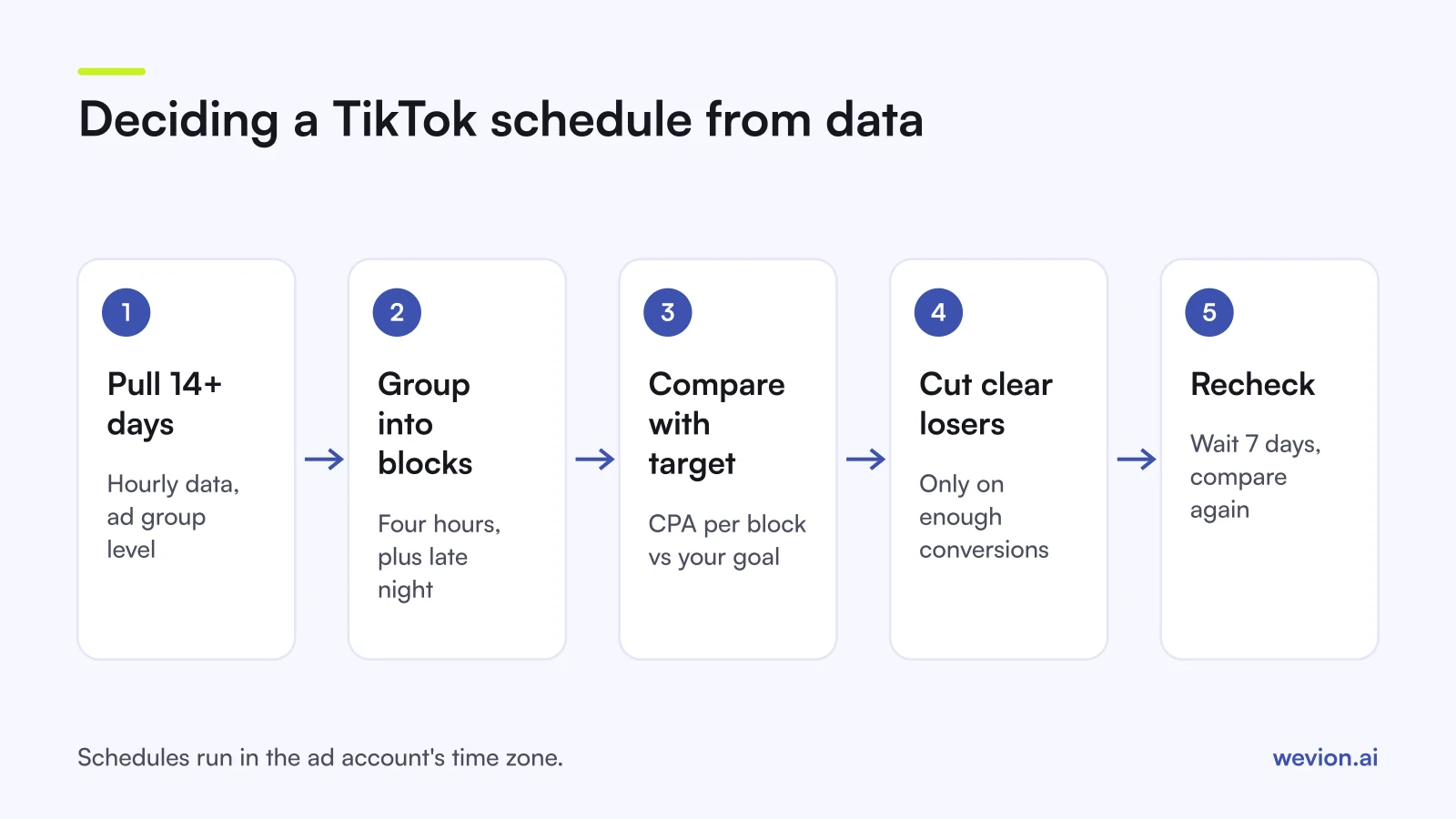
The only reliable dayparting decision comes from your own account, measured against your own target CPA, over long enough to separate a pattern from noise. Follow these steps:
- Pull at least 14 days. In TikTok Ads Manager, open Custom reports under the Analytics menu, as TikTok's custom reports page describes, and add an hourly time breakdown among the dimensions if your account offers it. Use the ad group level.
- Group hours into blocks. Single hours are too thin to read. Four-hour blocks, plus late night, work for most accounts.
- Compare each block's CPA with your target, not with the account average.
- Count conversions per block. A block with a handful of conversions is a hint, not proof.
- Check the store or CRM. Late-night clicks may convert the next morning, so compare with the orders or leads you actually received.
Worked example: reading two weeks of hourly data
A worked example shows how the steps turn into a decision. The account, figures and target here are hypothetical, chosen so the maths adds up, and none is a TikTok benchmark.
An ecommerce brand runs one TikTok ad group with a target CPA of $30. The account time zone matches its customers. Fourteen days of data, grouped into blocks:
| Block (account time) | Spend | Conversions | CPA |
|---|---|---|---|
| 00:00 to 06:00 | $420 | 8 | $52.50 |
| 06:00 to 10:00 | $560 | 19 | $29.47 |
| 10:00 to 14:00 | $840 | 30 | $28.00 |
| 14:00 to 18:00 | $910 | 33 | $27.58 |
| 18:00 to 22:00 | $1,190 | 40 | $29.75 |
| 22:00 to 24:00 | $480 | 12 | $40.00 |
| Total | $4,400 | 142 | $30.99 |
What the brand concludes:
- 00:00 to 06:00 is clearly above target at $52.50, but rests on only 8 conversions. Before cutting it, the brand checks orders and finds no late-night click converting the next morning. It decides to stop this block.
- 22:00 to 24:00 is above target at $40.00 on 12 conversions. That is not enough to act on, so the brand keeps it and rechecks in two weeks.
- 06:00 to 22:00 sits at or under target and stays.
Without the night block, the same two weeks would have cost $3,980 for 134 conversions, a CPA of $29.70, under target. The real result will differ, because the budget freed from night hours will be spent in other hours, often at a higher marginal cost. That is why the brand changes one thing, waits at least 7 days, and compares again.
How to automate TikTok dayparting
Automation helps once you know which schedule you want, because manual on and off switching across many ad groups is where mistakes creep in. TikTok offers three native tools for it.
- The ad group schedule. For fixed hours every week, the dayparting schedule itself is the automation: set it once and TikTok follows it.
- Automated rules. TikTok's automated rules page lists examples such as "Turn on specific campaigns certain days of the week", pausing a low-performing ad, raising budget or bid on conditions you set, and email notifications when spend reaches a threshold. Rules apply at campaign, ad group or ad level.
- Scheduled budget changes. Per the scheduled budget change page, a new daily budget takes effect at "approximately 12:00 AM the following day" in the account's time zone, and cannot be scheduled for the next day between 11:55 PM and midnight. Use it for weekday and weekend budget levels without editing mid-day.
Keep tracking consistent while you test schedules, so conversions by hour line up with the right ad group. Our guide to UTM parameters for TikTok ads shows a naming setup that holds up in analytics.
Where Wevion fits
Dayparting decisions get harder when the same budget also runs on Meta and Google, because each platform reports in its own time zone and its own columns.
Wevion connects TikTok, Meta, Google, Snapchat, Taboola and Outbrain ad accounts through each platform's official API, syncs data about every 15 minutes, and shows spend and results for every account in one view, so you can see whether a weak block on TikTok is weak everywhere.
Automated rules can pause or activate ad groups, change budgets by a percentage or just send an alert when cost per result crosses a threshold you set, with a cooldown and a daily cap on runs. Cross-platform rules are in beta. The dayparting schedule itself stays in TikTok Ads Manager. For spend watching across accounts, see our guide to ad spend alerts.
You can try it on your own ad accounts with a 14-day trial on the Pro plan. No card to start. We ask for one on day 7, or earlier if you use up the trial credits, and billing starts on day 14 only if you add it.
Key takeaways
- TikTok dayparting is an ad group setting in Budget and Schedule: specific times or ranges during the week.
- Schedules run in the ad account's time zone, which cannot be changed; use the Timezone Converter for other markets.
- Fewer delivery hours mean fewer results, so dayparting can keep an ad group in learning for longer.
- Decide from at least 14 days of your own hourly data, grouped into blocks and compared with your target CPA.
- Cut only blocks that are clearly above target on enough conversions, then wait at least 7 days before the next change.
- Automate with the schedule itself, TikTok's automated rules and scheduled budget changes.