
Facebook Collection Ads: How They Work, Setup, Templates and Specs
Priya Raghunathan
Responsable performance e-commerce
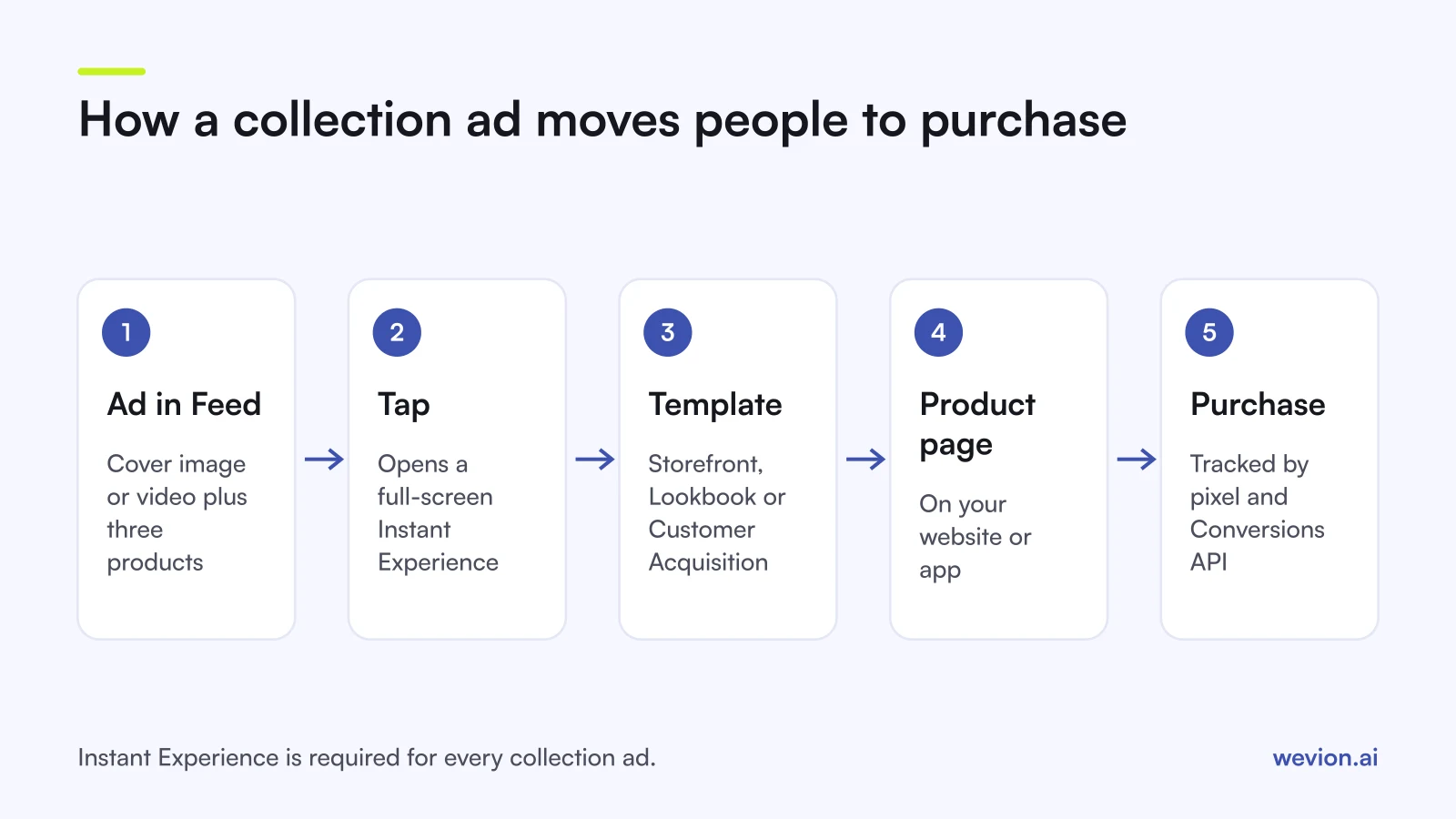
Facebook collection ads show a cover image or video with three products underneath, and a tap opens a full-screen Instant Experience where people can browse more of your range before they leave for your site. Meta's Ads Guide lists the format for Facebook and Instagram, with Storefront, Lookbook or Customer Acquisition templates or a custom layout behind the tap. This guide covers when the format beats a carousel or a catalogue ad, how to set it up, the specs and how to read the results.
Quick answer: A collection ad is a 1.91:1 to 1:1 cover (at least 1080 x 1080 px) above three product images. It always opens an Instant Experience. Use the Storefront template with a catalogue of at least four products to sell a range, Lookbook to show products in use, and Customer Acquisition to send people to one landing page. Primary text is 125 characters, the headline 40.
This article is about the format itself. If you want Meta to pick products from your feed for each person, start with our guide to Meta catalog ads, which covers the catalogue, pixel and product sets in depth.
What is a Facebook collection ad?
A Facebook collection ad is a mobile ad format that pairs one large cover with a row of products and opens a full-screen page on tap. Meta's Ads Guide describes it as "a cover image or video followed by three product images". The cover is also the first media in the Instant Experience, so the ad and the page behind it feel like one piece.
The Instant Experience is the part that makes collection different from other formats. Meta's developer documentation calls it "a full-screen, post-click ad destination that loads nearly instantaneously from ads in Feed". It used to be called Canvas, and you will still see the old name in some API fields. Meta's Ads Guide marks it as required for every collection ad.
From the Instant Experience, people tap through to a product page on your website or app to buy. Meta's collection format page frames the whole flow as moving people from discovery to purchase without leaving Facebook or Instagram until they choose a product.
When should you use collection ads over carousel or catalogue ads?
Collection ads suit a range of products you want people to browse, while carousels suit a short sequence and catalogue ads suit personalisation at scale. The three are easy to confuse because they overlap, so the table compares them on the points that decide the choice:
| Collection | Carousel | Catalogue ads | |
|---|---|---|---|
| What it is | Ad format | Ad format | Way of choosing products from a feed |
| In-feed layout | Cover plus three products | 2 to 10 swipeable cards | Shown as a single image, carousel or collection |
| After the tap | Instant Experience, then your site | Straight to each card's URL | Depends on the format shown |
| Products chosen | By you, or from a product set | By you | By Meta, per person, from a product set |
| Needs a catalogue | For Storefront and Lookbook | No | Yes |
Choose collection when:
- You want browsing before the click. A new range, a seasonal edit or a gift guide benefits from a full-screen grid, where a carousel shows only a few cards.
- The story matters. Lookbook shows products in use, which a plain product grid cannot do.
- Mobile is where your buyers are. The format and the Instant Experience are built for mobile Feed.
Choose a carousel when you have a handful of products or steps and want each card to link straight to its own page. Our guide to Facebook ad sizes has carousel specs: 2 to 10 cards at 1:1.
Choose catalogue ads when the range is large and you want each person to see the products most relevant to them, such as items they viewed. Catalogue ads can also be shown as a collection: our guide to creative templates for catalogue ads covers the setting that lets Meta choose between carousel and collection for each impression.
Which Instant Experience templates can you use?
Meta's Ads Guide names three templates for collection ads, Storefront, Lookbook and Customer Acquisition, plus the option of a custom Instant Experience. Each has a different job:
- Storefront. Meta's collection format page recommends it when you have a catalogue of at least four products. It shows products in a grid, can group them dynamically (for example by what is suggested or most viewed), and sends people to your website or app to buy.
- Lookbook. For showing products in use, turning a printed catalogue into a mobile one or telling a brand story while still selling. Products appear alongside lifestyle images rather than in a plain grid.
- Customer Acquisition. For a mobile landing page that drives one action on your site or app, with high-quality images or video of the offer.
- Custom. You build the Instant Experience from components such as photos, videos, text, buttons, carousels and product sets.
Two cautions apply. First, template names differ between tools: Meta's Marketing API lists templates such as "Sell Products: Grid Layout" and "Sell Products: Lifestyle Layout", which appear to correspond to Storefront and Lookbook in Ads Manager. Go by what the template picker shows you today. Second, Meta's Ads Guide pages for Instagram Feed and Instagram Stories name only the Storefront and Customer Acquisition templates, so if Instagram is a main placement, Lookbook may not be the right choice. Check it in the ad preview.
Meta's developer guide also notes that each template's layout is fixed, but you can replace the default images, videos, products, text and links.
How do you set up a collection ad with a catalogue?
Setting up a collection ad with a catalogue takes a few minutes once the catalogue and pixel are in place, and most problems come from those two rather than from the ad. The steps:
- Prepare the catalogue. Upload products to a Meta catalogue, with clean titles, prices and images. Our product feed optimisation guide covers the fields that matter.
- Connect the pixel and Conversions API to the catalogue, so purchases and product views are tied to product IDs. The Meta catalog ads guide shows how.
- Build a product set for the collection, such as one category or a new range. Meta's developer guide says a collection built on a product set needs at least four products or photos to rotate.
- Create the campaign. The Ads Guide lists Awareness, Traffic, Engagement, Leads and Sales as supported objectives. For a store, Sales is the usual choice.
- Choose placements in the ad set. Keep the mobile Feed, Reels and Stories placements that collection supports, covered in the next section.
- Pick the collection format in the ad, then choose a template, the cover image or video and the product set.
- Write the text. Meta recommends 125 characters of primary text and a 40-character headline, and a landing page URL is required.
- Preview every placement before publishing, including the Instant Experience itself, not only the in-feed unit.
If products do not appear or the ad is rejected, the cause is usually in the catalogue. Our catalogue ads troubleshooting guide lists the common errors.
Where do collection ads run?
Collection ads run on mobile Feed placements and some vertical ones, and Meta's sources list them slightly differently. Meta's collection ads developer guide lists four supported placements:
- Facebook Feed
- Facebook Reels
- Instagram Feed
- Instagram Stories
Meta's Ads Guide has collection spec pages for Facebook Feed, Instagram Feed and Instagram Stories. The Instant Experiences developer guide adds that ads using Instant Experiences are not supported in Facebook Stories. Ads Manager shows the eligible placements when you build the ad set, and that list is the one to trust on the day.
What are the collection ad specs?
Collection ad specs are the same across the three placements Meta's Ads Guide documents, apart from a minimum size listed only on the Instagram pages. All figures below were checked in November 2026:
| Spec | Facebook Feed | Instagram Feed | Instagram Stories |
|---|---|---|---|
| Image files | JPG or PNG, up to 30 MB | JPG or PNG, up to 30 MB | JPG or PNG, up to 30 MB |
| Video files | MP4, MOV or GIF, up to 4 GB | MP4, MOV or GIF, up to 4 GB | MP4, MOV or GIF, up to 4 GB |
| Cover ratio | 1.91:1 to 1:1 | 1.91:1 to 1:1 | 1.91:1 to 1:1 |
| Resolution | At least 1080 x 1080 px | At least 1080 x 1080 px | At least 1080 x 1080 px |
| Minimum width and height | Not listed | 500 px | 500 px |
| Primary text | 125 characters | 125 characters | 125 characters |
| Headline | 40 characters | 40 characters | Not listed |
| Instant Experience | Required | Required | Required |
Sources: Meta's Ads Guide pages for Facebook Feed, Instagram Feed and Instagram Stories collection ads.
For the cover, a square 1080 x 1080 px image or video fits both ends of the allowed range. Keep the product large in the frame, since the three product images below it take part of the screen.
How do you measure collection ads?
Collection ads are measured like any other Meta ad at the purchase level, with one extra layer: the Instant Experience between the ad and your site. Three things to track:
- Purchases on your site. Sales happen on your website or app, so the pixel and Conversions API carry the result. If those events are not tied to catalogue product IDs, Storefront and Lookbook ads lose much of their value.
- Engagement with the Instant Experience. Meta's Instant Experiences guide says you can build engagement audiences from people who opened the experience and people who clicked links inside it. Those audiences are a natural retargeting pool for people who browsed but did not buy. Our Facebook retargeting strategy guide covers how to use them.
- The drop between tap and site visit. Compare clicks into the Instant Experience with sessions on your site. A large gap usually means the template, the product selection or the onward links need work.
A hypothetical example: a collection ad gets 2,000 taps that open the Instant Experience, 600 of those people tap through to the site, and 30 buy. The tap-to-site rate is 30% and the site conversion rate is 5%. If a test template lifts tap-to-site to 40% with the same site conversion rate, the same 2,000 taps would give 800 visits and 40 purchases.
Compare collection with a carousel or catalogue ad on cost per purchase and revenue per purchase over the same period and audience, not on clicks, because a tap into the Instant Experience is not yet a visit to your store.
Where Wevion fits
Wevion is not where you build collection ads: the format, the template and the Instant Experience are all created in Meta Ads Manager. Wevion helps with what sits around the format.
Wevion connects Meta ad accounts through the official Marketing API with OAuth, plus Google, TikTok, Snapchat, Taboola and Outbrain through each platform's official API, and syncs data about every 15 minutes, so collection ads can be compared with carousels and catalogue ads on cost per purchase across every account in one view.
For Meta, Wevion's Product Catalogs feature shows Meta's own catalogue diagnostics and upload errors, and lets you build product sets from filter fields such as brand, price, category, availability or custom labels, which are the sets a Storefront collection draws from. Automated rules can pause an ad, change a budget or just notify you when cost per purchase crosses a threshold, with a cooldown and a daily cap on runs.
You can try it on your own ad accounts with a 14-day trial on the Pro plan. No card to start. We ask for one on day 7, or earlier if you use up the trial credits, and billing starts on day 14 only if you add it.
Key takeaways
- A collection ad is a cover image or video above three products, and it always opens an Instant Experience.
- Storefront suits catalogues of at least four products; Lookbook shows products in use; Customer Acquisition sends people to one page.
- Instagram Feed and Stories spec pages name only Storefront and Customer Acquisition, so check Lookbook before relying on Instagram.
- Specs: 1.91:1 to 1:1 cover at 1080 x 1080 px or more, 125 characters of primary text, a 40-character headline.
- Collection is a format; catalogue ads choose products per person and can be shown as a collection.
- Measure on purchases, and track the drop between taps into the Instant Experience and visits to your site.