
AI Ad Copy for Ecommerce: A Workflow That Scales
Priya Raghunathan
Responsable performance e-commerce
Generating AI ad copy for ecommerce takes seconds. Running it across a catalogue of hundreds of products without a wrong price, an off-brand line or a policy rejection is where most stores struggle. This guide is about that second part: a repeatable workflow from product feed to drafts, guardrails, human review, testing and retiring, so AI copy stays accurate as your range and prices change.
Quick answer: Scale AI ad copy for ecommerce in five steps. Start from the product feed so names and prices come from one source. Draft variants per collection, with product-level copy only for best sellers. Run every draft through a brand voice sheet and a claims library. Have a person review prices, claims and policy fit. Then test a few variants at a time and retire copy when it loses or its facts change.
This is not a tool roundup or a prompt list. For tools, see our AI ad copy generators compared. For ready prompts, use our ChatGPT prompts for ecommerce ads. For how to split budget and declare winners, read the AI ad copy testing framework. This guide connects those pieces into one process.
Why does AI ad copy break at ecommerce scale?
AI ad copy breaks at ecommerce scale because the copy depends on facts that change every week, and a model has no way to know they changed. A store with 400 products has 400 prices, stock levels and sets of attributes. Each one can make a line of copy wrong overnight.
The common failures are predictable:
- Price drift. The ad says €49, the page now says €55 because the sale ended.
- Attribute errors. The copy promises "waterproof" for a whole collection where only half the products are.
- Claim creep. A model turns "made with aloe vera" into "soothes irritated skin", a claim nobody approved.
- Voice drift. Each batch sounds a little less like the brand, until the account reads like five different shops.
- Zombie copy. "Black Friday ends tonight" still running in December.
Every step below exists to stop one of these.
Step 1: Start from the product feed
The product feed is the right starting point because it already holds the facts your copy depends on, in one structured file that updates when your store does. Titles, descriptions, product type, price, sale price, availability and custom labels are all there.
Export the fields you need and group products before you generate anything. Writing per product for the whole range wastes review time on items that sell a few units a month. A practical split:
- Best sellers get product-level copy. These carry most of the spend, so they earn bespoke variants.
- Everything else gets collection-level copy. One set of variants per collection or product type, written so it is true for every item in the group.
A worked example, with hypothetical numbers: a store has 400 products. Its 12 best sellers get 6 variants each, which is 72 drafts. The remaining products fall into 8 collections, which get 6 variants each, another 48 drafts. That is 120 drafts to review instead of 2,400. If review keeps one in three, 40 variants go into testing.
Clean feed data makes better copy. If titles are vague or attributes are missing, fix that first with our product feed optimisation guide. Custom labels help too: tag margin, season or best sellers in the feed and you can generate and later report by those groups. Our Meta catalogue ads guide explains how custom labels feed product sets.
Step 2: Set brand voice guardrails
Brand voice guardrails are the written limits that keep every batch of AI copy sounding like the same brand, whoever runs the prompt and whichever model writes it. Without them, voice drifts a little with each batch.
Keep the guardrails to one page so people actually paste them in:
| Guardrail | What it contains | Example |
|---|---|---|
| Tone | Three words | Warm, plain, confident |
| Always use | Brand terms and spellings | "Free returns within 30 days" |
| Never use | Words that are off-brand or risky | "Miracle", "guaranteed", "cure" |
| Reading level | A simple rule | Short sentences, no jargon |
| Examples | Five approved ads | Your best past performers |
Paste the sheet into every generation run, and give the model your approved examples as a style reference. When a draft breaks the sheet, fix the sheet or the prompt, not just the draft, so the same mistake does not come back next week.
Step 3: Check claims and platform ad policies
Claims and platform policies are where AI copy causes the most expensive problems, because a single unapproved sentence can lead to rejected ads, an unhappy legal team or a misled customer. Build a claims library: every claim you may make, the evidence behind it, and the products it applies to. The prompt then says "use only claims from this list".
Then check each draft against the rules that apply to ecommerce copy most often:
- Prices must match. Google Merchant Center requires the price in your product data to match the landing page and checkout (Google Merchant Center: price). Treat every price and discount in ad text the same way.
- No misleading offers or results. Google's misrepresentation policy covers dishonest pricing, unreliable claims, offers that are not available on the destination and promises of an improbable result.
- No personal attributes on Meta. Meta's personal attributes standard says ads must not assert or imply personal attributes, so copy should describe the product, not the reader's body, health or finances.
- Health, weight and beauty have extra rules. Both Meta and Google have separate, stricter policies for health-related products and claims, and these rules change. Check the current version on each platform before AI writes anything in these categories, and especially before you run weight or before-and-after angles.
- Shopping titles are not ad copy. Google asks you not to put promotional text such as price, sale dates or shipping in product titles (Google Merchant Center: title). Keep offers in the ad or promotion, not the feed title.
- No invented reviews. The US Federal Trade Commission's 2024 rule bans fake reviews and testimonials, explicitly including AI-generated ones (FTC announcement).
Step 4: Put a human review step in place
A human review step is the point where a named person signs off every variant before it spends money, checking the facts a model cannot see. AI can pre-check length and banned words, but only someone who knows the product, the current offer and the brand can approve the final line.
A review checklist that takes about a minute per variant:
- Every price and discount matches the live product page today.
- Every claim is in the claims library and applies to every product the copy covers.
- The voice sheet is respected, with no banned words.
- The copy describes the product, not the reader.
- Character limits fit the placement.
- The variant has a name that records its angle and an expiry condition.
Split the roles if you can: one person generates, another approves. At 120 drafts, a reviewer working at one minute each needs two hours, which is why Step 1 cuts the volume before anything is generated.
Step 5: Test and retire variants
Testing and retiring is the step that turns a pile of approved copy into knowledge about what sells, and it keeps old copy from running after its facts have changed. Launch a few clearly different variants at a time with equal budgets, set the decision rule before launch, and let the test finish.
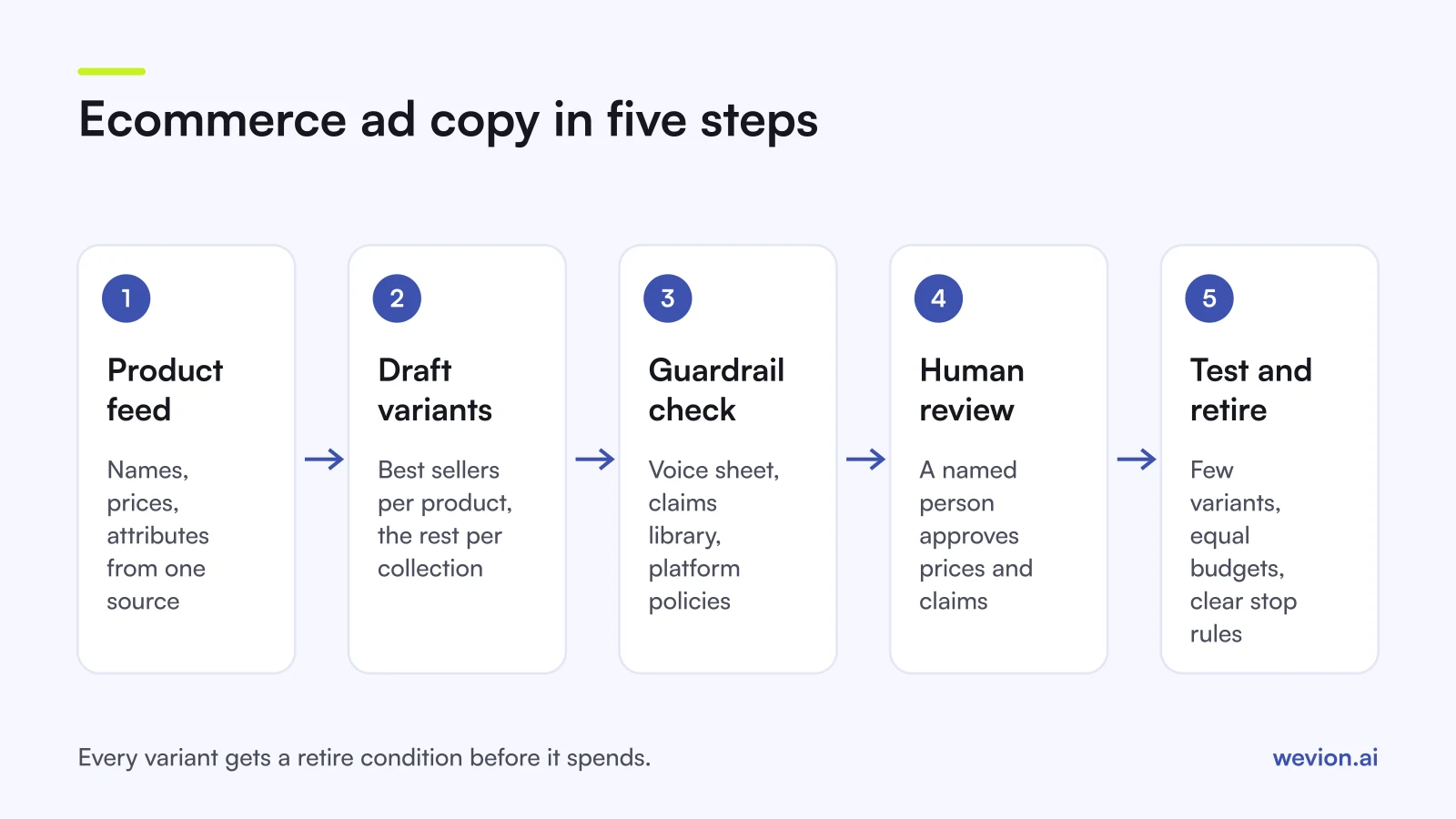
Name each variant so results can be read later, for example collection_angle_version, such as trail-shoes_comfort_v2. That lets you see which angles win across collections, not just which ad won once.
Give every variant at least one retire condition when you create it:
- It lost. It missed your decision rule, such as cost per purchase above target after an agreed spend.
- The product changed. It went out of stock, or the price or offer the copy mentions is no longer true.
- The date passed. Seasonal and deadline copy ends with its date.
- It wore out. Results fall steadily after a good start, which is a sign to refresh the angle.
Winning angles go back into the voice sheet as new approved examples, so the next batch starts from what worked. Feed issues that block catalogue ads are covered in our catalogue ads troubleshooting guide, and Shopping specifics in our Google Shopping ads guide.
Where Wevion fits
The workflow above has two steps that eat time at scale: launching dozens of variants across several platforms, and noticing when one should be retired. That is where account tools help more than another copy generator.
Wevion connects Meta, Google, TikTok, Snapchat, Taboola and Outbrain ad accounts through each platform's official API, syncs data about every 15 minutes, and shows every account in one view, so tested variants from every platform can be compared side by side.
You can launch reviewed variants in bulk with Bulk Launch, using templates so naming and settings stay consistent. Automated rules then act on your retire conditions: they can pause an ad, activate another, change a budget by a percentage or just send an alert, with a cooldown and a daily cap on runs. If you would rather ask about results in plain language, Wavo, the AI copilot, reads your synced data and proposes changes that go ahead only after you approve them.
You can try it on your own ad accounts with a 14-day trial on the Pro plan. No card to start. We ask for one on day 7, or earlier if you use up the trial credits, and billing starts on day 14 only if you add it.
Key takeaways
- Start from the product feed so prices and attributes come from one source.
- Write product-level copy for best sellers and collection-level copy for the rest.
- Keep a one-page voice sheet and a claims library, and paste both into every run.
- Check prices against the live page, and check claims against Meta and Google policies.
- A named person approves every variant before it spends.
- Give every variant a retire condition: lost, product changed, date passed or worn out.