
Shopify Markets Ads: Feeds, Prices and Tracking per Country
Priya Raghunathan
E-Commerce Performance Manager
Shopify markets ads are campaigns for a single Shopify store that sells in several countries through Shopify Markets, where each market can have its own domain or subfolder, currency, prices and language. The ads have to mirror that setup exactly: the right URL, the right price and the right catalogue for each country, or the platforms reject products and shoppers bounce at a price they did not expect.
Quick answer: For Shopify Markets ads, give each market its own URL (a subfolder like /fr-fr or a country domain), keep a price list per market, and feed each ad platform per country: country feeds in a Meta catalogue, the countries you sync to Google Merchant Center and a catalogue per country on TikTok. Then structure campaigns by market and tag every click with the market so results can be checked against store orders.
This guide is the store-side view. For the agency side of a multi-country client (ad accounts, billing, time zones), see managing client ads in multiple countries. For the creative side, see how to localize ad creatives for new markets.
What does Shopify Markets change for advertising?
Shopify Markets lets one store define groups of countries, each with its own URL, currency, prices and language, and every one of those settings has to line up with the ads that send traffic to that market.
From an ad buyer's point of view, a market decides four things:
| Market setting | What it controls | What the ads must match |
|---|---|---|
| Domain or subfolder | The URL a shopper from that market lands on | Ad links and catalogue product URLs |
| Currency | The currency shown, paid and refunded | Catalogue prices and conversion values |
| Prices | Converted, rounded, adjusted or fixed prices per country | Creative, feed and landing page |
| Language | The translated storefront | Ad copy and catalogue text |
Shopify's pricing page says prices are converted automatically at the current exchange rate by default, and that you can set exchange rates manually, round prices, apply percentage adjustments, or set product prices per country or region through catalogues. It also notes that full functionality needs Shopify Payments and one-page checkout. Ask the client which of these they use before you build any feed, because each one changes the price a market sees.
Which URL setup works best for Shopify Markets ads?
Each market needs a stable URL that always shows its own currency, price and language, because ad platforms check the landing page against the product data they hold.
Shopify's international domains page lists three options, which can be combined. For a French market, they look like this:
- Subfolder: example.com/fr-fr. On secondary markets, Shopify says subfolders must combine a language code with a country code.
- Subdomain: fr.example.com.
- Country domain: example.fr, one domain bought per market.
Shopify's international SEO page recommends subfolders for most stores, as the easiest to set up with hreflang connections handled automatically. It also says automatic redirection applies to customers but excludes search engine crawlers, which receive the content for the URL they requested.
For ads, the practical rule is simple: link every ad and catalogue item to the market URL, never to the home domain in the hope that redirection fixes it. A shopper redirected after the click may see a different price from the one in the ad, and the platform checks the product against whatever that URL shows.
How do local prices and currencies reach the ads?
Local prices reach the ads through two routes, the creative and the catalogue, and both must show what the market's landing page and checkout show.
For creatives, give the design team the final price list per market, after rounding and adjustments, rather than the home price converted by hand. Our guide to localizing ad creatives covers price, shipping and sale-date checks on the creative itself.
For catalogues, the rules are set by each platform:
- Google Merchant Center. Google's price attribute page asks for an amount and currency that match the landing page and checkout, and to show the price in the target country's currency prominently. With currency conversion, Google can show a converted price in ads, but the landing page, checkout and product data must still match.
- Meta. Meta's localized catalogue setup says price, sale price, unit price, base price, status and availability can only be set in a country feed, not a language feed.
- TikTok. TikTok's page on creating a catalogue says the selected currency must match the currency of the listed products.
How do you set up catalogues per country on each platform?
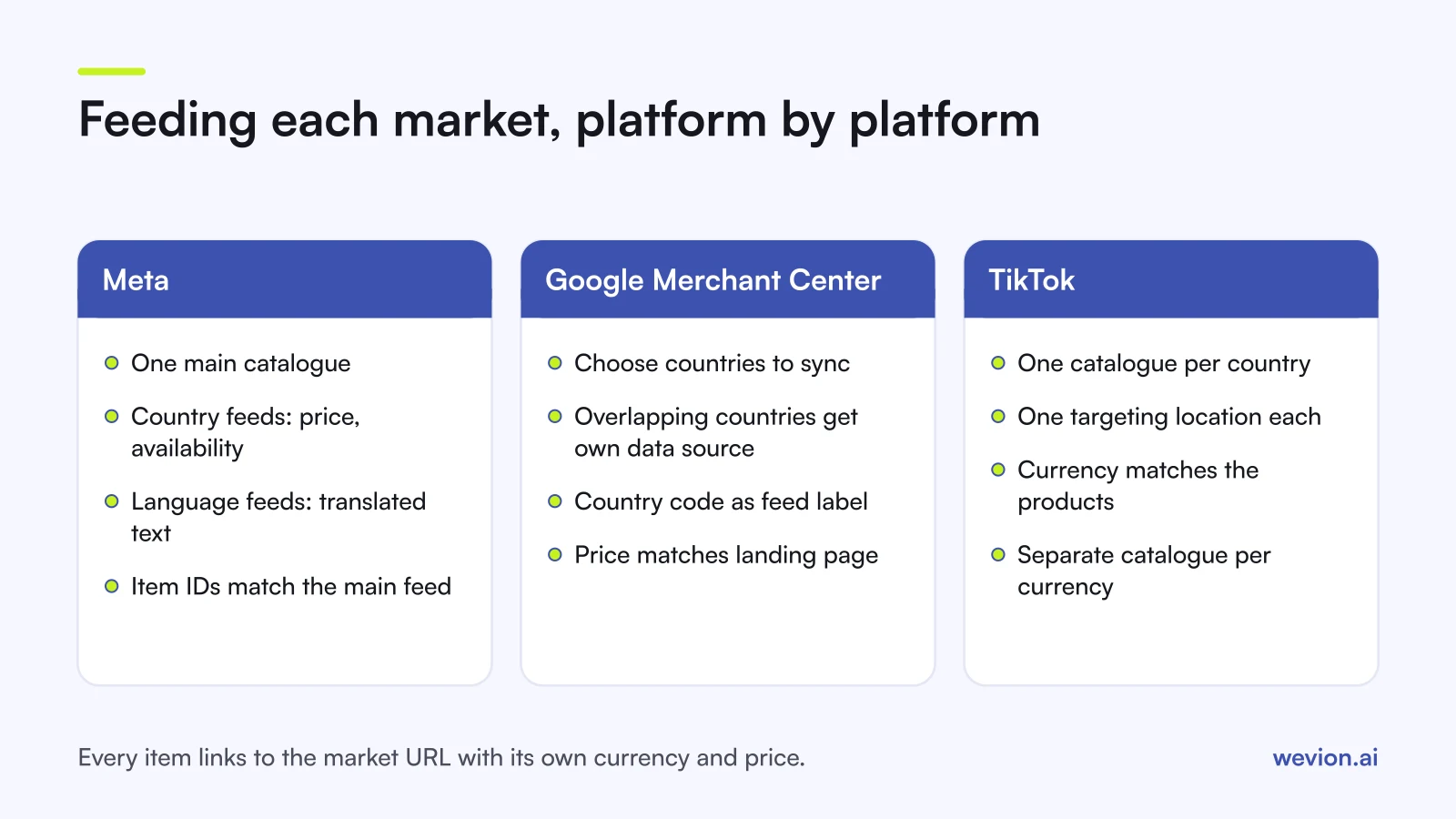
Each ad platform handles countries in its own way, so a store with three markets ends up with three different catalogue setups, one per platform, all fed from the same Shopify products.
Meta: one catalogue with country and language feeds
Meta's localized catalogues keep one main catalogue and add overrides. Its setup guide describes a country feed as containing "overrides for specified countries" and a language feed as containing "translations for specific fields". The ID of every item must match an ID in the main feed or the content ID from the pixel. Meta then picks localized values using the person's spoken languages and home country.
Shopify's Facebook & Instagram app keeps one Meta catalogue in step with the store, as our guide to Meta ads for Shopify stores explains. Its help pages do not spell out how each market's prices are sent, so open the catalogue in Commerce Manager, check a product's price for each target country, and add country feeds if they are missing. See Meta catalogue ads for the campaign side.
Google: countries synced to Merchant Center
Shopify's Google & YouTube app syncs products to Merchant Center. Google's help page for the Shopify integration says you select the countries to sync, recommends "Automatically Sync future countries", and asks that markets be enabled with general shipping rates configured. Where markets overlap, countries are placed in their own data source, labelled with the two-letter country code.
That relabelling matters to the ads: Google warns that campaigns filtering on an old label may stop picking up moved products, that attribute rules do not transfer to the new data sources, and that more data sources can raise your offer count. After any change, check the feed label filter in each Shopping and Performance Max campaign. Our guide to Google Shopping ads covers the campaign setup.
TikTok: one catalogue per targeting location
TikTok's catalogue guide says the catalogue's targeting location is the only location you can target with ads featuring its products. A store advertising in three currencies on TikTok therefore needs three catalogues, each in its own currency. Our TikTok catalogue ads guide covers the rest of the setup, including match rates.
How should you structure campaigns per market?
Campaigns for a multi-market store work best with one campaign per market, or per group of markets that share a currency and language, because budget, catalogue and landing page then belong to one country.
A worked example with hypothetical numbers: a client sells in the UK (GBP), France and Germany (EUR, separate languages) and the US (USD), with a monthly budget of €20,000.
| Market | Monthly budget | Meta | TikTok | |
|---|---|---|---|---|
| UK | €6,000 | Campaign targeting UK, GB country feed | Campaign on the GB feed label | UK catalogue in GBP |
| France | €4,000 | Campaign targeting France, FR feed and French language feed | Campaign on the FR feed label | France catalogue in EUR |
| Germany | €4,000 | Campaign targeting Germany, DE feed and German language feed | Campaign on the DE feed label | Germany catalogue in EUR |
| US | €6,000 | Campaign targeting US, US feed | Campaign on the US feed label | US catalogue in USD |
| Total | €20,000 |
Budgets add up to €20,000, and every row has one currency, one catalogue and one landing page. That makes the weekly question "is France working?" answerable without unpicking a shared campaign.
How do you track results per market?
Tracking per market means every click, conversion and order can be traced back to one country, so platform results can be checked against what the store actually sold there.
Four habits make that possible:
- Put the market in the campaign name and UTMs. A name like UK_Prospecting or a utm_campaign value with the country code lets you split results by market in GA4 and in your reports. See our UTM parameter guide.
- Send the paid currency with every purchase. Meta's pixel reference lists currency and value as required parameters for the Purchase event. Check that a French order reports EUR, not the store's base currency.
- Compare with store orders by country. Each week, set platform-reported purchases per market against Shopify orders shipped to that market. Expect a gap, and read our guide on why Meta and Shopify numbers don't match before trying to close it.
- Report in one currency. Convert every market to one display currency at each day's rate, and label it, so a weaker euro does not look like a weaker campaign.
Where Wevion fits
A Shopify store in four markets can mean a dozen ad accounts, catalogues and currencies to read every week, and comparing markets usually means exporting each one and converting it by hand.
Wevion connects Meta, Google, TikTok, Taboola, Snapchat and Outbrain ad accounts through each platform's official API, syncs data about every 15 minutes, and shows every market of a client in one view, with one workspace per client and team roles such as manager, media buyer, finance and viewer.
Wevion does not build feeds or send conversions to the platforms: that stays with Shopify's sales channels and each platform's tools. What it adds is the reading. Cross-channel analytics shows every market in one display currency at each day's exchange rate, and Profitability Analytics, in beta, syncs cost per item from Shopify and shows profit, margin and POAS next to spend.
You can try it on your own ad accounts with a 14-day trial on the Pro plan. No card to start. We ask for one on day 7, or earlier if you use up the trial credits, and billing starts on day 14 only if you add it.
Key takeaways
- Every Shopify market has its own URL, currency, prices and language, and the ads must match all four.
- Link ads and catalogue items to the market URL; do not rely on redirection after the click.
- Use the final price list per market, after rounding and adjustments, for creatives and feeds.
- Meta handles countries with country and language feeds, Google with the countries synced to Merchant Center, TikTok with a catalogue per targeting location.
- Run one campaign per market or per group sharing a currency and language.
- Tag every click with the market, send the paid currency with each purchase and report in one currency.