
UTM Parameters for TikTok Ads: Template, Macros and GA4 Checks
Priya Raghunathan
مدير أداء التجارة الإلكترونية
Getting UTM parameters for TikTok ads right decides whether TikTok shows up in Google Analytics as its own paid channel or disappears into "Paid Other", "Organic Social" or "(not set)". TikTok gives you two ways to tag: switch on auto-attach and let it fill the values, or paste your own string with TikTok's dynamic macros. This guide gives you a copy-paste template for both cases, explains what each macro returns and shows how to check the result in GA4.
Quick answer: Paste utm_source=tiktok&utm_medium=cpc&utm_campaign=__CAMPAIGN_NAME__&utm_term=__AID_NAME__&utm_content=__CID_NAME__&utm_id=__CAMPAIGN_ID__ into the URL parameters of each ad, or turn on Auto-attach and check what it adds. Keep source and medium fixed and lowercase, let TikTok fill the names and IDs, and use one method per ad, not both.
If you run Meta as well, our guide to UTM parameters for Meta ads covers the same ground with Meta's syntax. The differences are in the table further down.
What are the two ways to add UTM parameters on TikTok?
TikTok's help article on adding URL parameters in Ads Manager describes an automatic and a manual route. Both live at ad level, in the Ad details section of the ad creation page.
Automatic: Auto-attach. After you add a Destination URL, click Edit under Preview and toggle Auto-attach. TikTok says it will "auto-fill campaign source (TikTok), medium ("Paid"), ID, and name for you". Its best-practice page recommends enabling it so you never miss a parameter.
Manual: Build URL parameters. Under Preview, click Edit, then under URL click Build URL parameters. Enter values in the UTM parameters fields, add any extra ones under Custom parameters, check the Preview section and click Apply.
Two details from the same help page matter in daily work:
- You can add or edit URL parameters while the ad is in draft. After that, plan on getting it right first time.
- When you copy an ad, the URL and its parameters are copied too. A mistake in one template spreads to every duplicate.
There is also an Autodetect toggle. When it is on, TikTok scans your URL and shows how many parameters it found, and with catalogue ads the detected parameters are appended to your product links.
Which route to choose? Auto-attach is the safe default for a small account, because nothing gets forgotten. A manual string is better when you need your own medium, utm_term and utm_content values, or the same naming across TikTok, Meta and Google. Whichever you pick, use one per ad. TikTok's best-practice page warns that an analytics tool such as GA "may only consider the last set value for utm_source", so a URL carrying two sets of tags can report the wrong source.
The copy-paste template
This string works for standard TikTok campaigns and lands in GA4's Paid Social channel:
utm_source=tiktok&utm_medium=cpc&utm_campaign=__CAMPAIGN_NAME__&utm_term=__AID_NAME__&utm_content=__CID_NAME__&utm_id=__CAMPAIGN_ID__
| Parameter | Value | Why |
|---|---|---|
| utm_source | tiktok | Fixed, lowercase, on GA4's social source list |
| utm_medium | cpc | Fixed; any paid medium works, see the GA4 rules below |
| utm_campaign | __CAMPAIGN_NAME__ | Filled by TikTok, so it always matches Ads Manager |
| utm_term | __AID_NAME__ | Ad group name; a convention, since TikTok has no keywords |
| utm_content | __CID_NAME__ | Creative name, to separate creatives in a campaign |
| utm_id | __CAMPAIGN_ID__ | The ID stays the same if someone renames the campaign |
A click on a creative named ugc_hook-b, in an ad group named broad_18-44, in a campaign named pros_uk_winter-sale_2026-11, arrives at your landing page as:
https://example.com/coat?utm_source=tiktok&utm_medium=cpc&utm_campaign=pros_uk_winter-sale_2026-11&utm_term=broad_18-44&utm_content=ugc_hook-b&utm_id=<campaign ID>
If you prefer paid_social to cpc as the medium, use it, but use it everywhere. What matters is that every TikTok ad in every account sends the same two fixed values.
What do TikTok's dynamic macros return?
TikTok's UTM help page lists these macros, which TikTok replaces with the live value when someone clicks:
| Macro | Returns |
|---|---|
__CAMPAIGN_NAME__ / __CAMPAIGN_ID__ | Campaign name / campaign ID |
__AID_NAME__ / __AID__ | Ad group name / ad group ID |
__CID_NAME__ / __CID__ | Creative name / creative ID |
__ADID_V2_NAME__ / __ADID_V2__ | Ad name / ad ID, upgraded Smart+ campaigns only |
__PLACEMENT__ | Placement type, such as TikTok or TikTok Pangle |
Three practical notes:
- Smart+ is different. TikTok says upgraded Smart+ campaigns change some of the available macros, and the
__ADID_V2__pair exists only there, where an ad is a bundle of creative assets. If you run TikTok Smart+ campaigns, test the string on one ad and read the landing URL before you roll it out. - Names are only as clean as your naming. A campaign called
Winter Sale UKarrives with its capitals and spaces. Use lowercase names with underscores and hyphens, and the macros will carry them cleanly into GA4. - No
#in the URL. TikTok's best-practice page says non-standard characters such as#are not accepted, and everything after a#is dropped.
Keep __PLACEMENT__ out of utm_source. If you want the placement, send it as a custom parameter, for example &tt_placement=__PLACEMENT__, and keep the source fixed. GA4 does not report custom parameters by default, so you would need a custom dimension to read it.
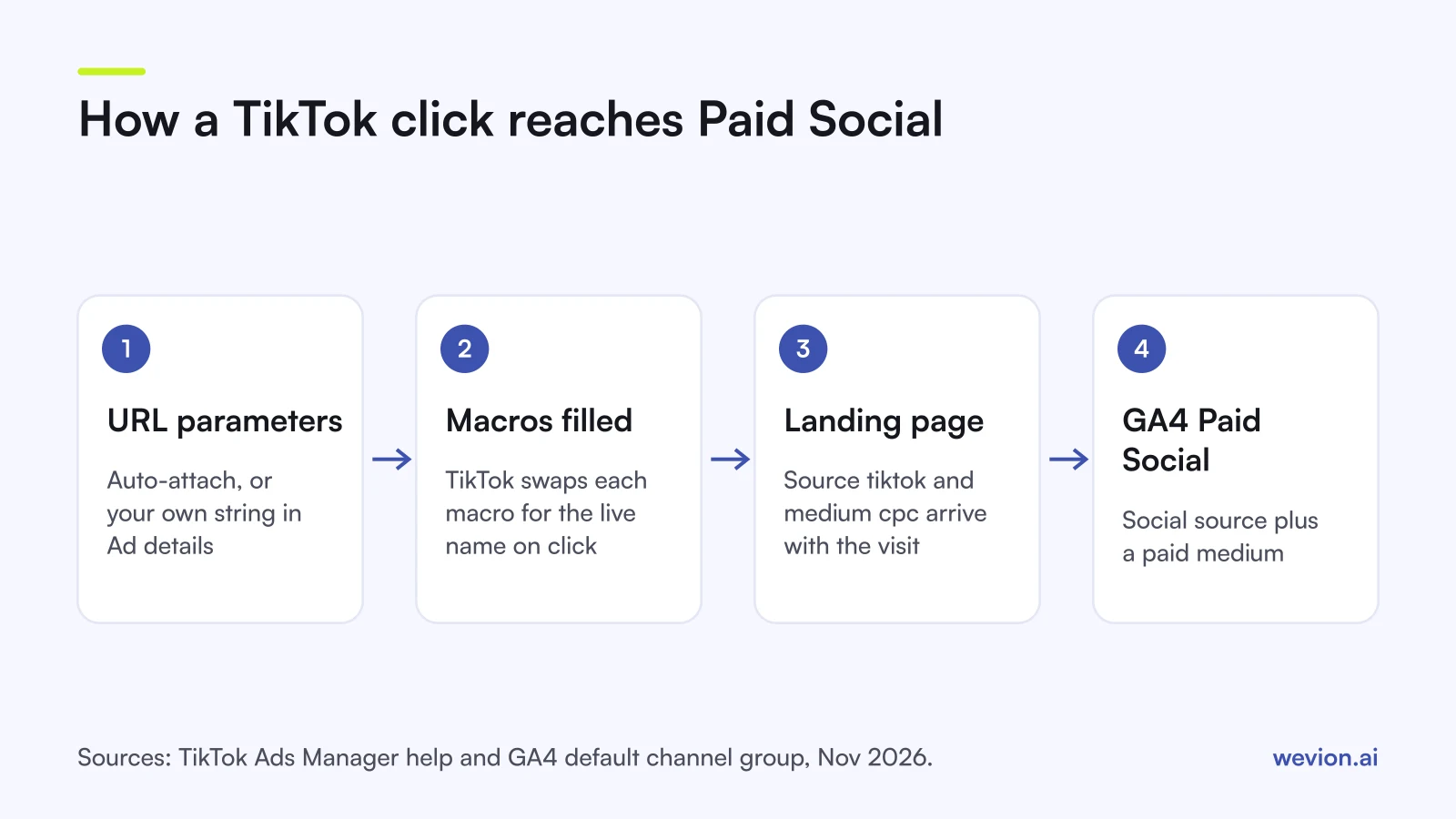
How does GA4 decide a TikTok click is Paid Social?
GA4 sorts each session into a default channel group. For Paid Social, both conditions must be true:
- Source matches GA4's list of social sites. Google's downloadable list of source categories includes
tiktokandtiktok.comas social sources. - Medium matches the regex
^(.*cp.*|ppc|retargeting|paid.*)$. Socpc,paid,paid_socialandpaid-socialall qualify.
The common ways it goes wrong:
| Source / medium | GA4 channel | Why |
|---|---|---|
tiktok / cpc | Paid Social | Social source, paid medium |
tiktok / social | Organic Social | Medium "social" marks it as unpaid |
An unlisted source / cpc | Paid Other | Paid medium, but the source is not on GA4's lists |
tiktok / (none) | Organic Social | Social source without a paid medium |
GA4's help page says channel definitions "aren't case sensitive", so TikTok / Paid from auto-attach still counts as Paid Social. Source values in reports are a different matter: TikTok's own best-practice page notes that UTM parameters are case sensitive, so TikTok and tiktok can appear as two rows. If some ads use auto-attach and others use your manual string, check the Preview and make sure the case matches.
How is the TikTok setup different from Meta?
The idea is the same on both platforms: fixed source and medium, macros for names and IDs, pasted at ad level. The syntax and a few details differ.
| TikTok | Meta | |
|---|---|---|
| Macro syntax | Double underscores: __CAMPAIGN_NAME__ | Double braces: {{campaign.name}} |
| Middle level | Ad group (__AID_NAME__) | Ad set ({{adset.name}}) |
| Ad or creative | __CID_NAME__, or __ADID_V2_NAME__ in upgraded Smart+ | {{ad.name}} |
| Source for GA4 | tiktok | facebook (not meta) |
| Platform click ID | ttclid, added to the landing URL on click | fbclid |
TikTok's help page on the TikTok Click ID describes ttclid as a tracking parameter appended to the landing page URL when someone clicks an ad. It sits next to your UTMs and does not replace them: it helps TikTok attribute conversions, while your UTMs tell GA4 where the session came from.
If you manage several platforms, set the shared rules once, as described in how to build a UTM tracking system for paid ads, and keep a short list of the UTM tagging mistakes your team should never repeat.
How do you check the tags work?
Run this before you spend, then once more after launch:
- Read the Preview. In Ad details, confirm the final URL has one
?, no stray spaces, no#, and every macro has two underscores on each side. - Test the landing page. Paste your URL plus the string, with sample values in place of the macros, into a browser. Confirm the page loads and the parameters survive any redirect or consent banner.
- Watch GA4's live view. With that test URL open, check that GA4's report of current visitors picks up the visit with
tiktokas the source. - Check the next day. In Traffic acquisition, filter Session source / medium to
tiktok / cpcand confirm the channel reads Paid Social, with real campaign names instead of__CAMPAIGN_NAME__. - Look for (not set). A rising share of "(not set)" campaigns from TikTok usually means some ads went live without parameters.
If a macro arrives unreplaced, the ad was probably built in a format that does not support it, such as an upgraded Smart+ campaign using older macros. Fix the template, then republish.
Why won't TikTok and GA4 ever match exactly?
Clean UTMs make GA4 accurate about the clicks that reach your site. They do not make GA4 agree with TikTok Ads Manager.
TikTok credits conversions using its own attribution window, set per ad group, which can include view-through conversions from people who watched an ad and bought later without clicking. No UTM ever reaches GA4 for those sales. GA4 then attributes the conversions it sees with its own model, which is a different question again, as our guide to first-touch vs last-touch attribution explains.
For purchases that start on TikTok without a click, such as someone who saw a creator video and searched for the brand a day later, a post-purchase survey is often the only way to see it.
Where Wevion fits
Wevion has a UTM builder with saved templates and suggested values for source and medium, so the same rules can be reused across ads rather than retyped.
Wevion connects TikTok, Meta, Google, Snapchat, Taboola and Outbrain ad accounts through each platform's official API and syncs data about every 15 minutes, so what each platform reports sits side by side in one dashboard. It does not change how TikTok or GA4 attribute conversions, send events or deduplicate them. Consistent tags are what make those numbers comparable with GA4.
You can try it on your own ad accounts with a 14-day trial on the Pro plan. No card to start. We ask for one on day 7, or earlier if you use up the trial credits, and billing starts on day 14 only if you add it.
Key takeaways
- TikTok offers two routes in Ad details: the Auto-attach toggle or Build URL parameters. Use one per ad.
- A solid manual string:
utm_source=tiktok&utm_medium=cpc&utm_campaign=__CAMPAIGN_NAME__&utm_term=__AID_NAME__&utm_content=__CID_NAME__&utm_id=__CAMPAIGN_ID__. tiktokis on GA4's social source list; any medium matching the paid rule, such ascpcorpaid, makes it Paid Social.- Upgraded Smart+ campaigns use different ad macros (
__ADID_V2_NAME__), so test before rolling a template out. - Keep names lowercase, avoid
#and spaces, and send the campaign ID as utm_id. - Clean tags fix GA4's view of clicks; they will not make GA4 match TikTok's attribution.