
Snapchat Dynamic Ads: Catalogue, Pixel Events, Templates and Audiences
Priya Raghunathan
مدير أداء التجارة الإلكترونية
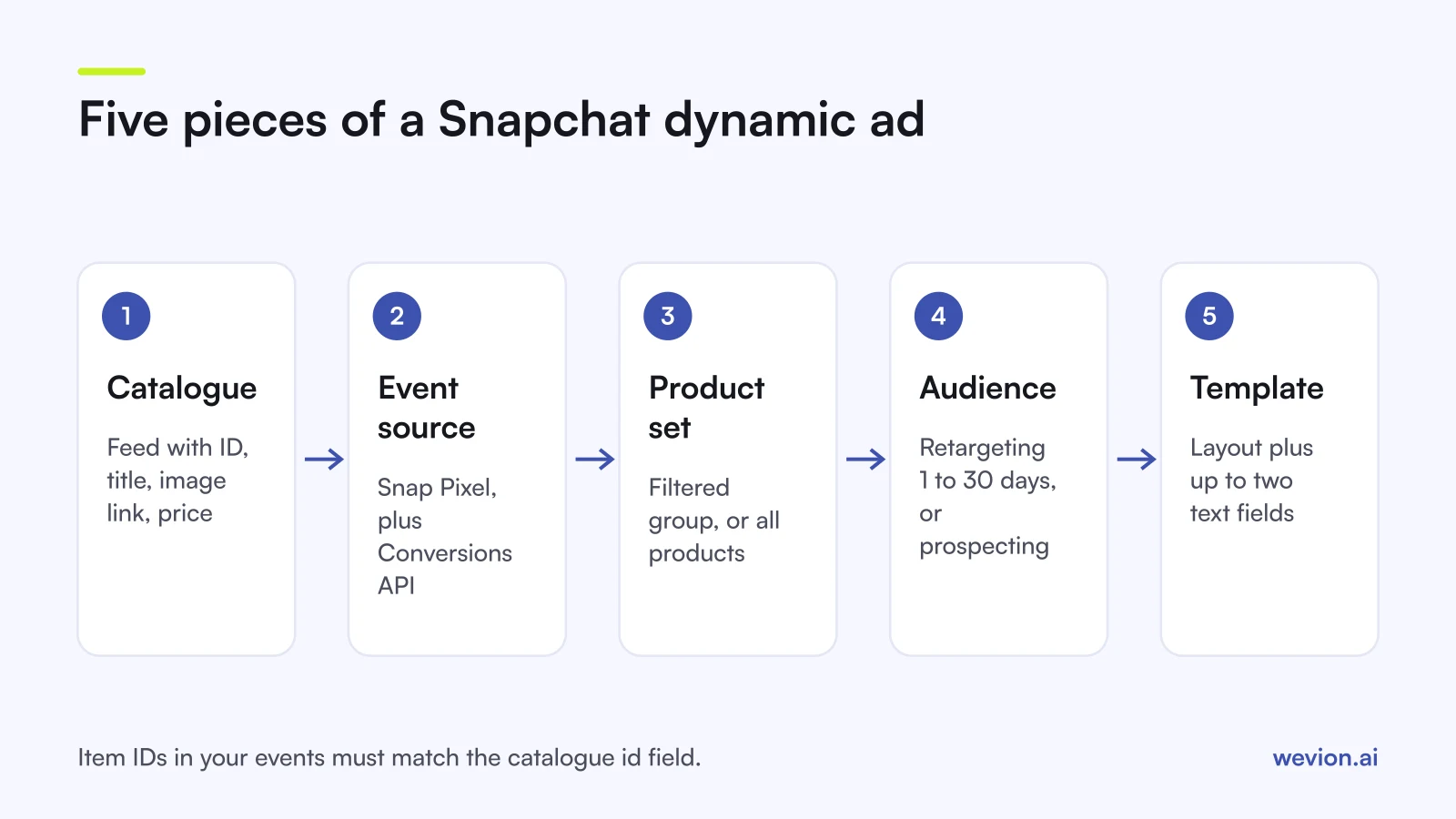
Snapchat dynamic ads turn a product catalogue into ads automatically: Snap picks products from your feed, drops them into a template and shows each person items that fit what they did on your site, or products new to them. They need three pieces working together: a catalogue, an event source (the Snap Pixel, plus the Conversions API if you use it) whose item IDs match that catalogue, and a product set. This guide covers each piece, the templates, retargeting and prospecting, the Shopify route and the problems that stop products from serving.
Quick answer: Upload a catalogue (ID, title, image link and price at minimum), link the Snap Pixel or app as its event source, and send PAGE_VIEW, VIEW_CONTENT, ADD_CART and PURCHASE with item IDs that match the catalogue's id field. Create a Sales campaign, choose a product set, then pick retargeting (1 to 30 days of past activity) or prospecting, and a template.
If you are new to tracking on Snapchat, start with our Snapchat pixel setup guide, because dynamic ads depend on it. For where catalogue campaigns sit in an account, see our guide to Snapchat ads campaign structure.
How do Snapchat dynamic ads work?
Snapchat dynamic ads, which Snap's API calls Dynamic Product Ads, build each ad from your catalogue at serving time rather than from a creative you upload. Snap's Dynamic Product Ads guide sets out the chain:
- Catalogue. Your products, loaded from a feed, with an event source attached.
- Product set. A filtered group of products from the catalogue, such as best sellers or items on sale. Every catalogue also has a default set containing all its products.
- Campaign. The guide recommends the Sales objective; the older Catalog Sales objective is listed as legacy.
- Ad set. Tied to one product set, with the Pixel or app as the tracking source, and an audience type.
- Creative and ad. A dynamic template that renders the products, tied to the same product set as the ad set.
The formats Snap documents are single dynamic product ads, Dynamic Collection Ads, Dynamic Story Ads and dynamic product video. Snap's launch post for Dynamic Ads, from September 2020, describes the idea plainly: one product image fills several pre-designed templates, and you customise text fields with details such as price or a promotion.
What does the catalogue need?
The catalogue is the base of every dynamic ad on Snapchat, and most delivery problems trace back to it. Snap's Ads API guide sets the main rules:
- Who can create it. Creating, updating or deleting a catalogue requires the Organization Admin permission.
- Verticals. Commerce, hotels, places or flights. Online stores use commerce.
- One feed per catalogue. The feed must contain the required product attributes, such as ID, title, image link and price, with a three-letter ISO 4217 currency code.
- Unique IDs. Duplicate product IDs are rejected with the error "Duplicate Product detected".
- Limits. Up to 10 million items per catalogue, 200 catalogues per organisation and 14 GB per feed file.
- Schedules. Feeds can be fetched on a schedule, daily or hourly, so prices and stock stay current.
Snap's guide points to a separate, detailed catalogue spec for the full list of fields and accepted file formats. Check it when you build the feed, since that is the version Snap keeps current.
Product sets have their own limits in the API guide: up to 50 product sets per catalogue and up to 10 filter rules per set. Start broad, with one or two sets, and split only when there is a reason such as different margins. The habits that keep a feed clean on any platform, such as short titles and accurate stock, are in our product feed optimisation guide.
Which Snap Pixel and Conversions API events do you need?
Dynamic ads need events that tell Snap which product each person looked at, added to cart or bought, and those events only help if their product IDs match the catalogue. Snap's Ads API accepts four events for product audiences: PAGE_VIEW, VIEW_CONTENT, ADD_CART and PURCHASE.
| Event | Fires on | What dynamic ads use it for |
|---|---|---|
| PAGE_VIEW | Pages viewed | People who visited, by product |
| VIEW_CONTENT | Product page | Products a person viewed |
| ADD_CART | Add to cart | Products left in a cart |
| PURCHASE | Order confirmation | Excluding or targeting buyers |
The catalogue must list the Pixel (or Snap App ID) as its event source; the API describes this field as the list of Pixel IDs or Snap App IDs that report events for that catalogue. Snap's 2020 launch post said the item ID passed on each event must be unique and must match the ID in your catalogue. The same post described a Pixel Diagnostic that rated a match rate above 80% as ready, 20% to 80% as ready with a low match rate, and below 20% as not ready. Check the diagnostics in your Ads Manager today, as the screen may have changed since then.
If you send events from your server too, Snap's Conversions API parameters list content_ids and contents under "Dynamic Ads Parameters" in the custom_data object, and value is required on PURCHASE. Snap's best practices recommend the Conversions API alongside the Pixel, with an event ID on every event so the two are deduplicated. Our Snapchat pixel setup guide walks through the deduplication rules.
A hypothetical check: your catalogue uses the SKU "TEE-BLK-M" as its id, but your Pixel sends the Shopify variant number "40211". Snap cannot link the view to the product, so the person never sees that T-shirt again in a retargeting ad. Use the same identifier in the feed, the Pixel and the Conversions API.
How do dynamic templates work?
Dynamic templates decide how each product looks in the ad, and Snap lets you use a default template or build your own. Snap's Ads API guide lists what a template controls:
- Layout. Options include automatic, fill width, fill height, fit, header and tilt. Carousel and slideshow layouts are only for Collection creatives.
- Text fields. A maximum of two text fields taken from catalogue attributes, such as title and price.
- Overlays. Image, frame or text overlays; a text overlay can be up to 34 characters.
- Preferred media. A template looks for preferred video tags, then preferred image tags, then falls back to the product's image link.
Because only two text fields are shown, the catalogue's titles and prices do most of the selling. Keep titles short enough to read on a phone, and make sure the price in the feed matches the price on the landing page.
If you run catalogue ads on other platforms too, our guide to TikTok catalog ads and our guide to Meta catalog ads cover the equivalent template and product set steps there.
Retargeting or prospecting: which audience should you use?
Snapchat dynamic ads offer two audience approaches, retargeting and prospecting, and they have different tracking requirements. Snap's Ads API guide sets them out:
| Retargeting | Prospecting | |
|---|---|---|
| Who sees it | People who interacted with products in the product set | People who have not interacted with your products |
| Events used | PAGE_VIEW, VIEW_CONTENT, ADD_CART, PURCHASE | Can exclude recent buyers or visitors |
| Lookback | 1 to 30 days | Exclusion windows, for example 14 days |
| Pixel | Must be activated and associated with the ad set | Not required at ad account level |
Each product audience can include or exclude people based on an event and a window. A common pair, shown here as a hypothetical structure, is:
- Retargeting: include ADD_CART in the last 14 days, exclude PURCHASE in the last 14 days. People who left a cart see the products they left.
- Prospecting: exclude PURCHASE in the last 30 days. New people see products Snap expects them to like, without spending on recent buyers.
Keep the two in separate ad sets so their costs per purchase can be read apart. The Ads API notes that Smart Budget cannot be combined with Dynamic Ads, so these ad sets keep their own budgets, as explained in our Snapchat campaign structure guide. For bid choices on each ad set, see our guide to Snapchat ads bidding.
How do you connect a Shopify store or a feed?
Snap documents two routes for getting products into a catalogue: Shopify's Snapchat Ads app, or a feed you provide. The launch post also mentioned manual upload.
Shopify. The Snapchat Ads app listing, published by Snap, says it installs the Snap Pixel "in one click" and syncs your product catalogue to create dynamic ads. Snap's Shopify page says you check a box during setup to create or connect your Pixel. Neither page mentions the Conversions API, so check inside the app which server-side options it offers before you rely on them.
Feed. For WooCommerce, a custom store or a feed tool, upload a feed file to the catalogue or schedule Snap to fetch it daily or hourly, as the Ads API guide describes. Keep the feed's id field identical to the product ID your Pixel sends.
Whichever route you use, review the catalogue after the first sync: count the products, open a few, and confirm prices, availability and images look right before you build product sets on top.
Why do Snapchat dynamic ads get rejected or stop serving?
Snapchat dynamic ads stop for three kinds of reason: the feed, the tracking and the ad review. The checks below come from Snap's documentation and policies, and the order matters, since a feed problem can look like an ad problem.
Feed problems
- Duplicate product IDs, which Snap rejects with "Duplicate Product detected".
- A feed file over 14 GB, which the API rejects.
- Missing required attributes, such as price, image link or a valid currency code.
- Stale stock or prices, when the feed schedule is too slow for how often your store changes.
Tracking problems
- Item IDs that do not match the catalogue, so retargeting audiences stay empty.
- No Pixel on the ad set, which retargeting requires.
- Pixel and Conversions API events counted twice, because no shared event ID was set.
Ad review problems
- Creative quality. Snap's ad review post from 2020 gives text cut off, blurred imagery and broken sound as examples of fixes Snap asks for. Low-resolution feed images and long titles cause the first two.
- Landing page and claims. Snap's advertising policies cover the landing page as well as the ad, ask advertisers to be honest about their products, and say Snap may require substantiation for claims. A price in the template that differs from the product page is the kind of mismatch to avoid.
- Restricted categories. Regulated goods, health and financial products have their own requirements in Snap's policies, so read those pages before including such products in a catalogue you advertise.
The same post says rejection reasons show in the Manage Ads table and in the Creative Library, so look there before changing anything.
Where Wevion fits
Wevion does not build Snapchat dynamic ads, catalogues or product sets: that work stays in Snapchat Ads Manager, and Wevion's catalogue tools work with Meta, not Snapchat.
Wevion connects Snapchat, Meta, Google, TikTok, Taboola and Outbrain ad accounts through each platform's official API and syncs data about every 15 minutes, so a Snapchat dynamic ad set's cost per purchase sits next to your Meta and TikTok catalogue campaigns in one cross-account view.
Automated rules can pause an ad set, change a budget or bid by a percentage, or just notify you when cost per purchase crosses a threshold, with a cooldown and a daily cap on runs. That catches a dynamic ad set whose costs climb after a feed or tracking change, within minutes of the next sync.
You can try it on your own ad accounts with a 14-day trial on the Pro plan. No card to start. We ask for one on day 7, or earlier if you use up the trial credits, and billing starts on day 14 only if you add it.
Key takeaways
- Snapchat dynamic ads need a catalogue, an event source with matching item IDs, and a product set; Snap recommends the Sales objective.
- Feeds need at least ID, title, image link and price with an ISO 4217 currency; IDs must be unique.
- PAGE_VIEW, VIEW_CONTENT, ADD_CART and PURCHASE drive product audiences; send the same IDs through the Pixel and Conversions API.
- Retargeting uses 1 to 30 day windows and needs the Pixel on the ad set; prospecting does not need it at account level.
- Templates show at most two catalogue text fields, so titles and prices do the selling.
- Most stoppages come from the feed or tracking, so check those before rewriting the ad.