
Meta Lead Ads CRM Integration: Every Option and What Breaks
Marta Kowalczyk
مسؤول عمليات الوكالة
A Meta lead ads CRM integration is the connection that moves each instant form lead from Meta into the CRM where sales works, ideally within minutes of the form being sent. Meta offers several ways to build it, from a file download to a custom webhook, and they differ in speed, cost and in how quietly they can break. Most lost leads are not lost in the ad account; they are lost between Meta and the CRM.
Quick answer: Use a CRM partner integration or a connector for most accounts, and a custom webhook with the Graph API when you need full control. Keep CSV downloads from Leads Center or Ads Manager as a backup only, because Meta keeps lead details for 90 days. Make sure the CRM keeps Page access and leads access, store Meta's lead ID on every record, and check lead counts against the CRM daily.
This guide covers the plumbing. For what to do with leads once they arrive, see our guides to speed to lead and lead quality tracking through the CRM. For the form itself, see Facebook lead ads best practices.
What are the ways to get Meta leads into a CRM?
Meta's help centre on CRM integrations for lead ads describes three automatic routes: a direct integration with your CRM, a third-party connector, or a custom integration built with webhooks and the Graph API. Add the manual downloads and there are five options in practice.
| Route | How leads arrive | Setup | Who maintains it | Best for |
|---|---|---|---|---|
| Leads Center or Ads Manager download | CSV or XLS file, by hand | None | Whoever remembers | Backups, one-off imports |
| CRM partner integration | CRM receives leads from Meta | Low, inside the CRM | CRM vendor | Teams on a CRM that partners with Meta |
| Third-party connector | Connector passes each lead on | Low, inside the connector | Connector account owner | CRMs without a native link, several destinations |
| Custom webhook and Graph API | Your server receives a ping and reads the lead | Developer work | Your developers | High volume, custom routing, in-house CRMs |
| Google Sheets or email via a connector | Row or message per lead | Low | Connector account owner | Very small teams, short tests |
Meta keeps a list of CRM partners in its help centre. Check whether the client's CRM is on it before paying for a connector.
How do Leads Center and CSV downloads work?
Leads Center in Meta Business Suite is where Meta stores and lists the leads from your instant forms, and it is the fallback when every automatic route fails. Meta's developer guide to lead ads lists it as a third way to retrieve leads, next to bulk reads and webhooks, and links to Meta's page on managing and downloading leads in Business Suite.
The limit that matters is time. Meta's help centre says you have 90 days from submission to download a lead's information. A sync that broke three months ago cannot be repaired by a download today.
Use downloads for two jobs only: a backfill when a sync was down for a few days, and a monthly reconciliation between Meta and the CRM. A lead downloaded the next morning has usually gone cold already, as our guide to speed to lead shows.
How do CRM partner integrations and connectors work?
CRM partner integrations and connectors work the same way from the outside: someone with access to the client's Facebook Page logs in from the CRM or connector, picks the Page and the forms, maps the form fields to CRM fields and switches the sync on. The differences sit in who runs the link and where it can fail.
A setup checklist that works for either:
- Log in with the right person. Use an account that has the needed access to the Page, not a freelancer who may leave. For agencies, agree with the client whose login it will be.
- Pick every form. Integrations usually watch specific forms. A new form launched next month will not sync until someone adds it.
- Map every field, including hidden ones. Map custom questions, the form name, the campaign and ad names, and Meta's lead ID. The lead ID is what lets you send CRM stages back later.
- Set the owner and source. Assign each new lead to a rep or a queue and tag the source, so routing does not depend on someone reading the record.
- Send a test lead. Meta offers a Lead Ads Testing Tool on its developer site for this; confirm the test reaches the CRM with every field filled in.
Connectors are convenient when the CRM has no native link or when each lead must go to several places, such as the CRM, a Slack channel and a spreadsheet. They add one more account, one more login and one more bill that can lapse.
How does a custom webhook integration work?
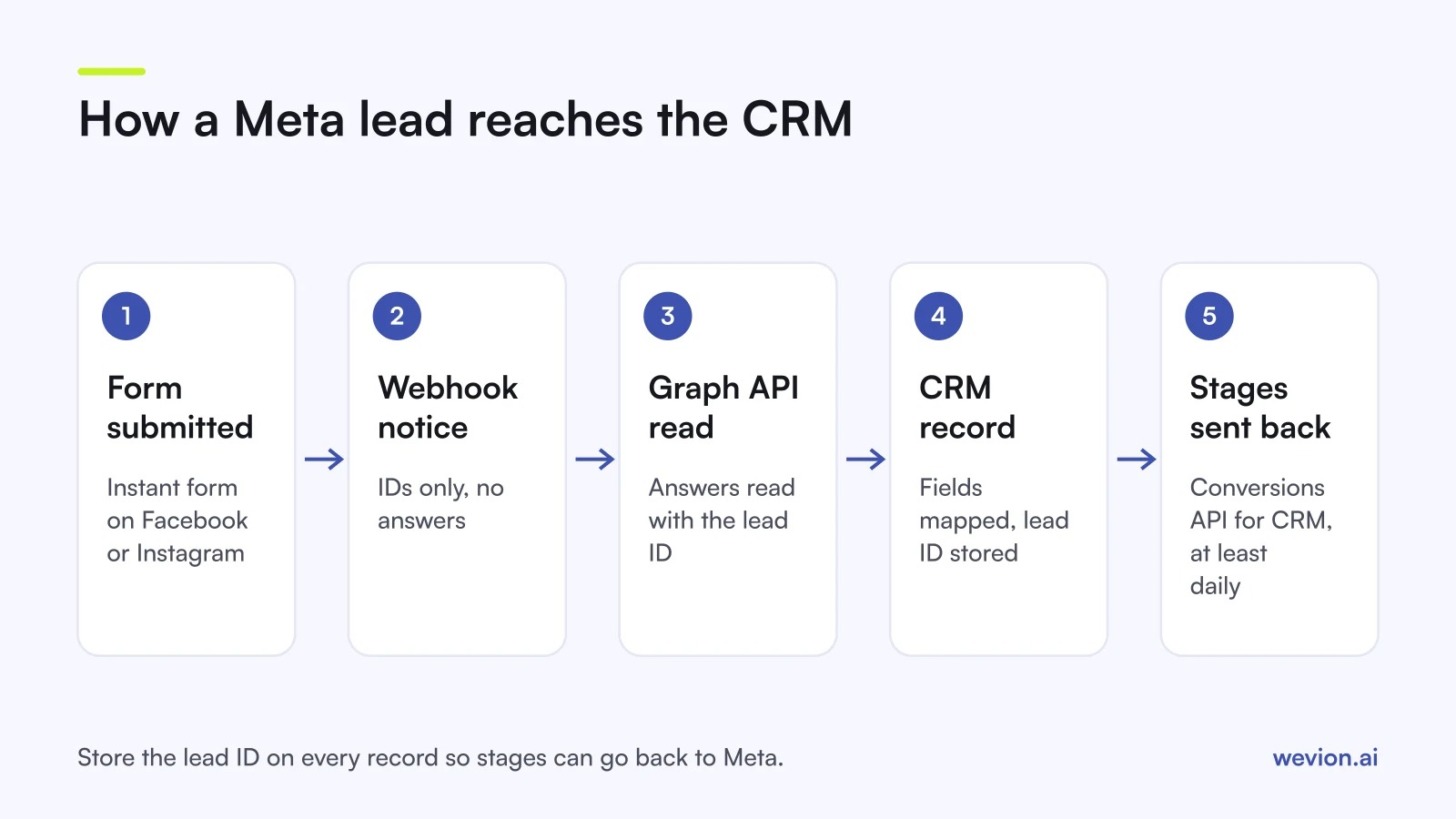
A custom webhook integration works in two steps: Meta sends your server a short notice that a lead exists, and your server then asks the Graph API for the lead's answers. Meta's guide to retrieving leads and its webhooks quickstart set out the pieces:
- The subscription. Your app adds the Webhooks product, subscribes to the leadgen field on the Page object and is installed on the Page through the Page's subscribed apps, with leadgen as the subscribed field.
- The notice. Each leadgen notification carries the lead ID, Page ID, form ID, ad ID and creation time. It does not carry the answers. Meta says notifications can arrive with a delay of up to a few minutes.
- The read. Your server reads the lead from the Graph API with that lead ID and gets the answers back as field data.
- The permissions. Meta lists ads_management, leads_retrieval, pages_show_list, pages_read_engagement and pages_manage_ads to read leads and ad data, plus pages_manage_metadata for webhooks.
- The token. It must come from a person who can advertise on the Page and the ad account. Meta recommends a single long-lived Page token so data fetching does not stop when a token expires.
Meta also documents a rate limit per Page of 200 multiplied by 24, multiplied by the number of leads the Page created in the past 90 days. Normal lead volumes stay far below it; a backfill script that loops over every form can hit it.
What breaks a Meta lead ads CRM integration?
A Meta lead ads CRM integration usually breaks because access changed, not because code changed, and Meta keeps collecting leads while the CRM receives nothing. The common causes:
- Page roles changed. The person whose login powers the integration lost their Page access or left the agency. Meta's documentation requires a token from someone who can advertise on the Page.
- Leads access was customised. Meta's retrieval guide says that if leads access has not been customised, all Page admins have it; once business admins customise it in Leads Access Manager, access depends on their settings. A CRM app that is not assigned there stops receiving leads.
- The app was removed or blocked. Meta sends webhook notifications only if the Page has installed the app, and not if the Page has turned off the app platform in its settings.
- The token expired or was revoked. A password change or removed permission can invalidate it.
- A new form is not mapped. The campaign runs on a form the integration never watched.
- Field mapping drifted. Someone edited a question, and the answer now lands in the wrong field or nowhere.
The defence is a daily check for the first two weeks of any new setup, then weekly: compare the leads Meta reports for each form with new CRM records from Meta for the same dates. Any gap larger than a handful of leads means something broke. The 90-day window gives you time to backfill, but only if you notice.
How do you send CRM stages back to Meta?
You send CRM stages back to Meta through the Conversions API for CRM, matching each stage to the original lead with the lead ID you stored at step 3. This is the second half of the integration, and it is what lets Meta optimise for leads that become customers rather than for form fills.
The setup is covered in detail elsewhere, so in short:
- Store the lead ID on every CRM record from the first day; without it, matching relies on hashed email or phone.
- Define the stages sales really uses, such as contacted, qualified, appointment and won.
- Send every stage change at least once a day.
- Switch the campaign to conversion leads once the data fits. Meta's criteria are about 200 leads a month and a stage reached by roughly 1% to 40% of leads within 28 days.
Our guide to conversion leads optimisation covers the payload, stage choice and how to judge results, and our guide to tracking lead quality through the CRM covers the reporting side. If you score leads before sales calls them, see lead scoring for paid ads.
What should agencies agree with clients first?
Agencies should agree who owns the Page, the forms and the CRM connection before launch, because an integration built on an agency employee's login breaks the day that person leaves or the client ends the contract.
A short agreement covers four points: whose account authorises the CRM link, who adds new forms to the sync, who checks the daily reconciliation, and what happens to the integration if the agency relationship ends. Write it into onboarding, next to ad account and Page access.
Where Wevion fits
Wevion is not part of the CRM path: it does not receive, store or route leads, and it does not send CRM stages to Meta. Leads move through Meta's own routes described above.
Wevion connects Meta with OAuth through the official Marketing API, and Google, TikTok, Taboola, Snapchat and Outbrain through each platform's official API, syncs data about every 15 minutes, and shows platform-reported leads, cost per lead and spend for every client in one view. That makes the daily reconciliation quicker: the Meta side of the comparison is already in one place for every client.
Automated rules can pause an ad set, change a budget or just send an alert when cost per lead crosses a threshold you set, with a cooldown and a daily cap on runs, so a campaign problem shows up within minutes rather than at the next weekly report.
You can try it on your own ad accounts with a 14-day trial on the Pro plan. No card to start. We ask for one on day 7, or earlier if you use up the trial credits, and billing starts on day 14 only if you add it.
Key takeaways
- Meta lists three automatic routes for a Meta lead ads CRM integration: a CRM partner integration, a third-party connector, or webhooks with the Graph API.
- Downloads from Leads Center or Ads Manager are a backup only; Meta keeps lead details for 90 days from submission.
- The leadgen webhook carries IDs only; the answers come from a Graph API read with a token from someone who can advertise on the Page.
- Most broken syncs come from changed Page roles, customised leads access, removed apps, expired tokens or unmapped new forms.
- Store the lead ID on every record and send CRM stages back to Meta for conversion leads optimisation.