
Event Match Quality on Meta: What It Measures and How to Raise It
Rafael Moreira
Senior Performance Marketer
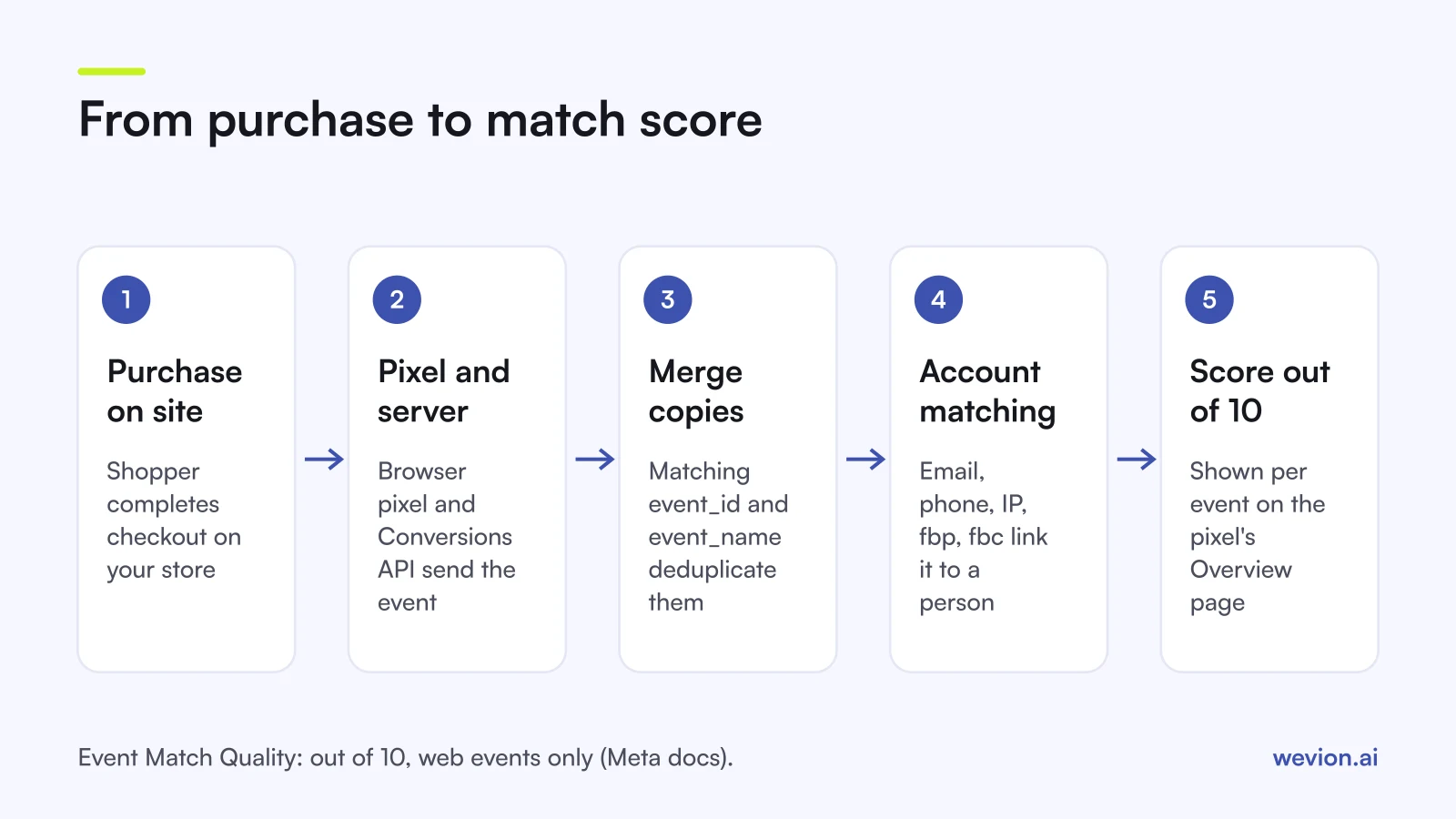
Event match quality is the score Meta gives each server event for how well the customer information you send with it can be matched to a Meta account. It sits on the Overview page of your pixel in Events Manager, it is scored out of 10, and it only applies to web events. A low score usually means Meta receives too few identifiers, or identifiers in the wrong format.
Quick answer: Meta's Event Match Quality (EMQ) is a score out of 10 for web events sent through the Conversions API. Find it in Events Manager on the pixel's Overview page and click it for details. Meta's developer guide says it typically recommends aiming for 6.0 or higher where possible. Raise it by sending more customer information parameters (email, phone, name, IP address, user agent, fbp, fbc, external_id), formatted and hashed as Meta specifies.
On a Shopify store, the Facebook & Instagram app sends these events for you at the Enhanced and Maximum data sharing levels; our guide to Meta ads for Shopify stores covers that setup and the basic duplicate pixel check. For the other ad platforms, see server-side tracking on Shopify.
What does Event Match Quality measure?
Event Match Quality measures how effective the customer information attached to a server event may be at matching that event to a Meta account. Meta's Dataset Quality API documentation describes it as "a score (out of 10)" that reflects three things: which customer information parameters Meta receives, their quality, and the share of events matched to a Meta account.
Three details matter when you read it:
- It is per event. Meta returns a separate score for each event name, such as Purchase or AddToCart, because each event can carry different data. Purchase usually has the most, since checkout collects email, phone and address.
- It is for web events only. Meta's best practices page says Event Match Quality "is currently available only for web events."
- It describes the match, not the result. A high score means Meta can connect more events to people. It does not mean the attribution in Ads Manager is complete, a point our article on why Meta and Shopify numbers don't match works through.
Meta's verification guide says a higher score can help lower your cost per action and that Meta typically recommends aiming for 6.0 or higher where possible. Those are the only figures Meta publishes. Labels or thresholds you see elsewhere are third-party conventions.
Where do you find Event Match Quality in Events Manager?
Event Match Quality appears in Events Manager on the Overview page of a pixel that receives Conversions API events. The route, following Meta's verification guide:
- Open Events Manager and select your pixel or dataset.
- Stay on Overview and find the event, for example Purchase.
- Click the Event Match Quality score to see which parameters arrive and Meta's recommendations.
- Click Event Details for the same event and open the Event Deduplication tab to see how browser and server copies are merged.
If you manage many pixels, Meta's Dataset Quality API returns the same score as composite_score, so you can track it without opening each dataset.
Which customer information parameters does Meta list?
Meta's customer information parameters page lists every identifier you can send with an event and whether it must be hashed. The ones most relevant to an ecommerce store:
| Parameter | Key | Hashed? | Note from Meta's docs |
|---|---|---|---|
em | Yes | Named as high quality in best practices | |
| Phone number | ph | Yes | Named as high quality |
| First and last name | fn, ln | Yes | Named as high quality |
| City, state, zip, country | ct, st, zp, country | Yes | Country helps match more accounts |
| External ID | external_id | Recommended | Your own customer ID; send on all events |
| Client IP address | client_ip_address | Never | Must be a valid IPv4 or IPv6 address |
| Client user agent | client_user_agent | No | Required for website events via the API |
| Click ID | fbc | No | From the _fbc cookie or the fbclid URL parameter |
| Browser ID | fbp | No | From the _fbp cookie |
The browser adds IP address and user agent to pixel events automatically, but for server events you have to pass them yourself. That is why a server-only setup built in a hurry often scores lower than the pixel alone.
How do you raise Event Match Quality?
Raising Event Match Quality comes down to sending more identifiers on each event, in the right format, as early as possible. Meta's own guidance gives a clear order of work:
- Send the high-quality identifiers. Meta's best practices name email, IP address, first and last name, and phone as examples. On Shopify, the Enhanced and Maximum data sharing levels share names, locations, emails and phone numbers, according to Shopify's data sharing page.
- Always pass fbp and fbc. Meta's fbp and fbc page recommends sending both cookie values when available and
fbcwith every event, and warns that the click ID is case sensitive and must not be modified. The best practices page adds that these cookies can change, so refresh them. - Add IP address and user agent to server events. Without them, website events miss two identifiers the pixel would have carried.
- Hash what must be hashed, and nothing else. Hash email, phone, names and address fields. Never hash the IP address. Meta's Business SDK hashes for you; if you do not use it, the best practices page says to implement hashing yourself.
- Send events promptly. Meta's Dataset Quality API defines data freshness as the delay between the event and Meta receiving it, and asks you to share events as close as possible to when they happen. Meta's best practices add that sharing events when they happen "can help your campaigns achieve the best results".
- Read the diagnostics. Meta flags issues with your integration under Event Match Quality diagnostics. As of September 2026 it reports six more issue types: Empty IP, Relay IP, IPv4, FBC coverage, Email placeholder and Phone placeholder. A placeholder email or phone sent on every order adds nothing to the match.
Next to the score, Meta reports event coverage, "the 7-day average percentage of Meta Pixel events that are covered by the Conversions API", and Additional Conversions Reported, an estimate of how many extra conversions the Conversions API brings in. If coverage is low, more of your purchases rely on the pixel alone.
How does deduplication affect what you see?
Deduplication decides whether a purchase sent by both the pixel and the server counts once or twice, and it uses the same events Event Match Quality scores. The basic rule, which our Meta for Shopify guide also covers, is that the pixel's eventID must match the Conversions API's event_id and the event names must match, within 48 hours. Meta's deduplication guide adds the details that trip stores up:
- Meta generally keeps the first copy it receives. With the event ID method, either side can arrive first.
- The fallback method is stricter. If you deduplicate with
event_nameplusfbporexternal_idinstead of event IDs, it generally works only when the browser event arrives first. Server events are not discarded if no browser event arrived in the previous 48 hours. - Single-source events are never deduplicated. An event sent only by the browser or only by the server stands alone.
The Event Deduplication tab shows two rates that are more useful than a single yes or no. Rate of events deduplicated is the share of events merged from each source; Meta says higher is better and warns when it is too low. Rate of deduplication key usage shows how often each source sends each key, and overlap shows how many events with a key arrive from both sources. Low overlap means the keys are not unique, or only one source sends them.
Meta's best practices ask you to include event_id and external_id on all events. Doing both helps deduplication and matching at the same time.
Where Wevion fits
Event Match Quality is fixed where the events are sent: in the pixel, the Conversions API and your store's app. A reporting layer cannot change it.
Wevion connects Meta ad accounts through the official API with OAuth, plus Google, TikTok, Snapchat, Taboola and Outbrain through each platform's official API, and syncs data about every 15 minutes. It shows the results each platform reports side by side, so a sudden fall in Meta purchases after a tracking change stands out next to your other channels.
Wevion does not send events, does not deduplicate them and does not change attribution. Automated rules can send an alert, pause ads or change budgets when a metric crosses your threshold, with a cooldown and a daily cap on runs; an alert on a sharp drop in reported purchases is a simple prompt to open Events Manager.
You can try it on your own ad accounts with a 14-day trial on the Pro plan. No card to start. We ask for one on day 7, or earlier if you use up the trial credits, and billing starts on day 14 only if you add it.
Key takeaways
- Event Match Quality is Meta's score out of 10 for how well a server event's customer information can be matched, for web events only.
- Find it on the pixel's Overview page in Events Manager; click it for parameters and recommendations.
- Meta typically recommends 6.0 or higher where possible; it publishes no other thresholds.
- Send email, phone, name, IP address, user agent, fbp, fbc and external_id, hashed where Meta requires it.
- Watch event coverage, data freshness and the diagnostics next to the score.
- Use matching
event_idandevent_nameon browser and server events, and check the Event Deduplication tab.