
Dentist Facebook Ads and Google Ads: Dental Lead Generation Guide
Marta Kowalczyk
Agency Operations Lead
Dentist Facebook ads, alongside Google Search and Local Services Ads, are how most practices fill new patient slots and sell higher-value treatments such as implants and clear aligners. The setup is local lead generation with two extra layers: healthcare ad policies that limit what copy, images and audiences can do, and a conversion that only counts when someone books and turns up. A practice that measures form leads instead of appointments usually buys the wrong leads.
Quick answer: Run Google Search for people already looking for a dentist and Meta for offers that create demand, such as a new patient exam or an implant consultation. Target a realistic radius around the practice, count booked appointments and qualified calls as conversions, and follow up within minutes. Check copy against Meta's personal attributes rule and keep before and after images free of negative self-perception, as Meta's health and wellness standards require.
This guide follows our other vertical guides, such as home services lead generation ads and law firm lead generation ads, and covers what changes for dental practices. It is not legal or regulatory advice: dental advertising is also governed by each country's dental regulator.
Which offers work for dental lead generation?
The offers that work for dental lead generation lower the first step for the patient, because a dental visit is something many people put off. A clear, true offer with a price or a time frame gives them a reason to book now.
| Offer | Who it is for | Best channel | Next step |
|---|---|---|---|
| New patient exam at a stated price | Newcomers to the area, people overdue a check-up | Meta, Search | Online booking |
| Emergency appointment this week | People in pain right now | Search, Local Services Ads | Phone call |
| Free implant consultation | People with missing teeth, often older adults | Meta, Search | Form or call |
| Clear aligner consultation | Adults wanting straighter teeth | Meta, Search | Form or booking |
| Hygiene visit or whitening | Existing and lapsed patients | Meta, email | Online booking |
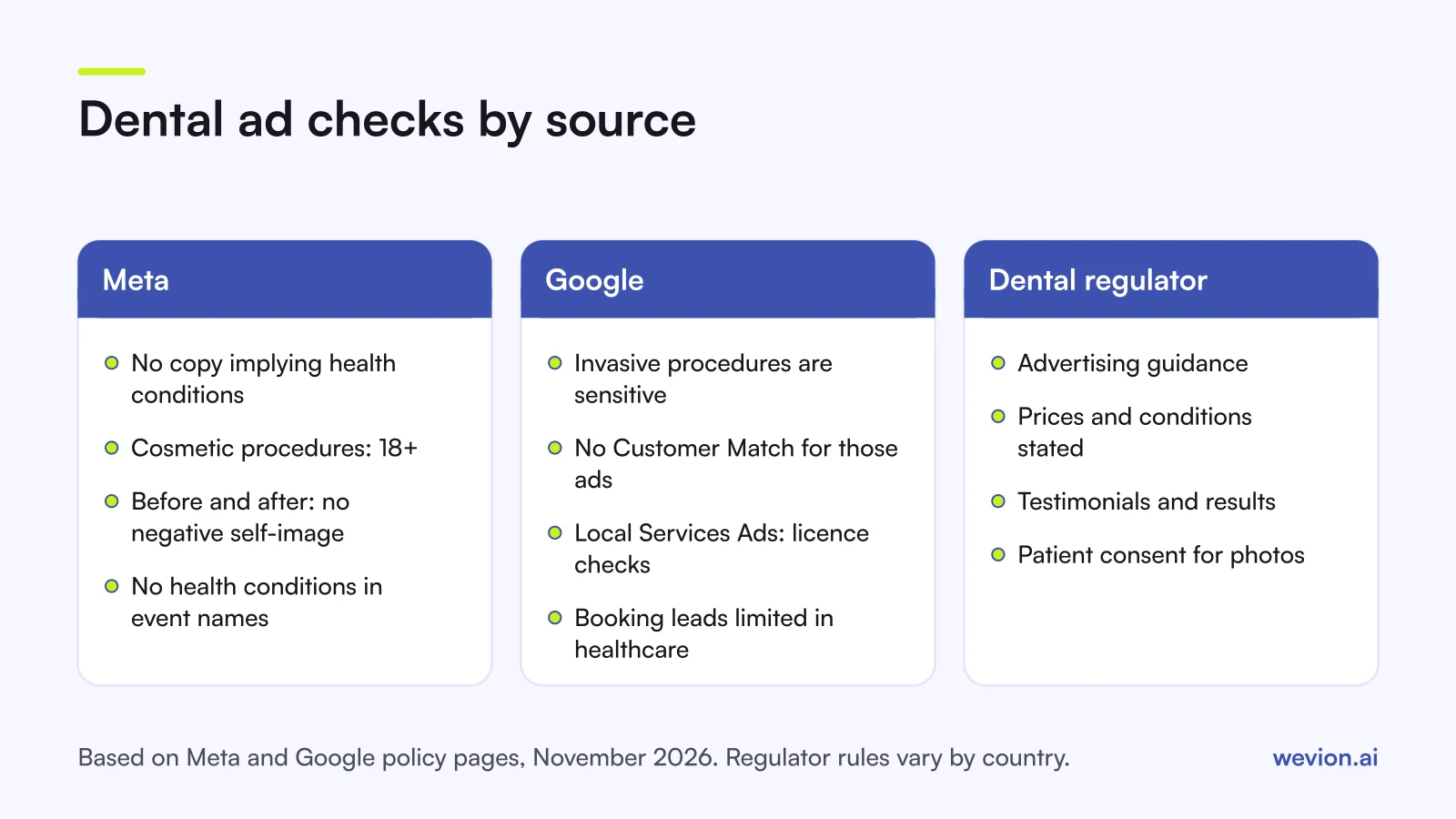
Use generic treatment names such as "clear aligners" in ads unless the practice is an authorised provider of a branded system and the brand's own rules allow its name. State prices and conditions plainly: if the exam price excludes X-rays, say so on the landing page. Dental regulators in many countries publish advertising guidance on prices, testimonials and titles, so check the practice's regulator before launch.
How should you set up Meta for a dental practice?
Meta works for dental practices when the ad shows the practice, names the area and offers a clear next step, because people scrolling Facebook or Instagram are not looking for a dentist. The offer and the creative do most of the targeting.
Campaign. A Leads campaign can send people to an instant form, the practice website, a message or a call. Instant forms bring more and cheaper leads; a website booking page brings fewer people who have already chosen a time. If the practice uses online booking, test a website conversion campaign against a form campaign and compare cost per booked appointment, not cost per lead. For practices that prefer chat, a click-to-WhatsApp ad opens a conversation instead.
Targeting. Target a radius around the practice that matches how far patients will really travel, which is often shorter in a city than in a rural area. Inside that radius, broad delivery with a clear offer usually beats stacked interests. Cosmetic treatment ads have an age rule, covered below.
Creative. Show the team, the treatment rooms and real patients who have given consent. Short videos of a dentist explaining what happens at a first visit answer the fear that stops many people booking.
Form. Keep it to three or four multiple choice questions: the treatment of interest, preferred days and times, whether they are a new or existing patient, and contact preference. Avoid questions about medical history or conditions; those belong at the appointment. Conditional logic in lead ads can give implants, aligners and check-ups their own follow-up question.
How should you set up Google for a dental practice?
Google fits dental practices because many patients start with a search: "emergency dentist near me", "dental implants cost" or a practice name. The intent is already there, so the job is to be visible and easy to call.
Search. Build campaigns by treatment: emergency, general dentistry, implants, aligners. Each gets its own ads, landing page and budget, so high-value treatments do not compete with check-ups for the same spend. Add a call asset and location asset, and schedule call-led ads for opening hours. Our guide to Google Ads dayparting covers scheduling.
Local Services Ads. Google's page on business screening and verification requirements lists Dentist and Orthodontist categories for the United States. The checks include practice and provider licences at state level where local law requires them, provider and practice background checks, and, for select users, general liability and malpractice insurance and National Provider Identifier verification. Google's Local Services overview adds that booking leads and some ad types have restrictions in healthcare verticals, and points other countries to an eligibility check by area.
Audiences. Google's health in personalised advertising policy treats invasive medical procedures, including cosmetic surgery, surgical procedures and injections, as a sensitive category. Ads in it cannot use Customer Match, your data segments, lookalike segments or audience expansion, while predefined Google audiences and location targeting stay available. Implant surgery may fall inside that definition, so check before building remarketing lists for implant campaigns.
What do Meta's healthcare policies mean for dental ads?
Meta's healthcare rules for dental ads come from two policies: personal attributes, which governs how copy speaks to the reader, and health and wellness, which governs cosmetic procedures and before and after images.
Personal attributes. Meta's personal attributes policy says ads must not assert or imply someone's physical or mental health, including medical conditions, and must not ask for personal attributes. Its example of a rejected ad is "Do you have diabetes?". For dental copy, that means describing the service rather than the reader: "Implant consultations in Leeds" rather than "Missing teeth?", "Same-week emergency appointments" rather than "Is your tooth hurting?".
Health and wellness. Meta's health and wellness standards, in the version dated 22 July 2026, set these points:
- Ads for cosmetic products, procedures or surgeries must target people aged 18 or over.
- Dental products, such as teeth whitening products, are exempt from that age rule.
- Before and after images of general cosmetic procedures are allowed, as long as they do not use negative self-perception.
- Ads must not imply or try to create negative self-perception, or contain messaging that could make people feel bad about how they look.
The policy does not say whether in-practice treatments such as veneers or professional whitening count as cosmetic procedures, so target cosmetic treatment ads to 18+ by default. Before and after images should show real, typical results, with the patient's written consent, and avoid captions that shame the "before".
Conversion events. Meta's conversion tracking documentation says that since 2 September 2025 custom conversions that suggest specific health conditions are flagged and blocked from running campaigns. Name events after the action, such as "Appointment booked", not after a condition or treatment need.
How do you count bookings and calls as conversions?
You count dental conversions at the point a patient commits to a visit, which is a booked appointment or a qualified call, because a form fill or a page view tells the platforms little about who becomes a patient. Set up both and give the booking the priority.
- Online bookings. Fire a conversion on the booking confirmation page or event, and use it as the optimisation event where volume allows.
- Calls. Google's call conversion tracking covers calls from ads, calls from website visits and calls imported by upload, and counts calls longer than a minimum duration you set. Agree the duration with the practice so short calls about opening hours do not count.
- Form leads. Mark each lead in the practice management system as booked, attended or lost, then send those stages back. Our guides to Meta conversion leads optimisation and Google Ads conversion tracking cover the setup.
A hypothetical example shows why. A practice spends £2,000 a month on Meta and Google and gets 80 leads at £25 each. Of those, 40 book and 25 attend: £80 per attended new patient. If a cheaper form doubles leads at the same spend but attended appointments stay at 25, cost per lead halves while cost per patient does not change.
Keep health details out of what is sent to the platforms. Send the stage and the contact match only, and check with the practice's compliance adviser before placing tracking on pages where patients enter health information.
How fast should a practice follow up dental leads?
A dental practice should call back new leads within minutes during opening hours, because people in pain call the next practice on the list and people pricing treatments often enquire at several. A lead from the evening needs a call first thing the next morning.
Three routines help a busy front desk:
- Confirm straight away. An automatic text or email thanks the person and says when the practice will call.
- Route by treatment. Implant and aligner enquiries go to the treatment coordinator; check-ups and emergencies go to reception.
- Run ads when someone answers. For call-led campaigns, schedule ads to opening hours. Our guide to Meta ads scheduling covers when that helps.
Our guide to speed to lead covers alerts, routing and a call cadence that a small team can keep.
Where Wevion fits
Wevion is not part of the booking or compliance path: it does not track calls, store patient data, check ads against healthcare policies or send conversions to the platforms. Bookings and attended appointments stay in the practice's own systems.
Wevion connects Meta, Google, TikTok, Snapchat, Taboola and Outbrain ad accounts through each platform's official API, syncs data about every 15 minutes, and shows platform-reported leads, cost per lead and spend for every practice in one view, so an agency can compare a practice's Meta and Google campaigns side by side.
Each practice gets its own workspace, with team roles that decide who can change what. Automated rules can pause an ad set, change a budget or just send an alert when cost per lead crosses a threshold you set, with a cooldown and a daily cap on runs, which helps when the diary is full and spend should slow.
You can try it on your own ad accounts with a 14-day trial on the Pro plan. No card to start. We ask for one on day 7, or earlier if you use up the trial credits, and billing starts on day 14 only if you add it.
Key takeaways
- Use Google Search and Local Services Ads for people already looking, and Meta for offers that create demand.
- Lead with clear, true offers such as a new patient exam or an implant consultation, and check them against the dental regulator's guidance.
- On Meta, describe the service rather than the reader's health, target cosmetic treatments to 18+, and keep before and after images free of negative self-perception.
- On Google, invasive procedures are a sensitive category: no Customer Match, own data segments or lookalikes for those ads.
- Count booked appointments and qualified calls, and judge campaigns on cost per attended patient.
- Follow up within minutes and route implant and aligner enquiries to the treatment coordinator.