
How to Connect Outbrain Amplify to BigQuery and Google Sheets
Rafael Moreira
Senior Performance Marketer
To connect Outbrain Amplify to BigQuery, you need a pipeline that Google and Outbrain do not provide out of the box: BigQuery Data Transfer Service has no Outbrain source, and Amplify has no warehouse export. Three routes work: the Amplify API with your own script, scheduled reports, or a third-party connector. Google Sheets follows the same logic, with one extra option: reading BigQuery from Sheets.
Quick answer: For a few accounts and a weekly view, schedule Amplify reports and paste them into Google Sheets. For a daily warehouse, use a connector that documents an Outbrain Amplify source and a BigQuery destination, such as Fivetran, Airbyte, Supermetrics, Coupler.io or Windsor.ai. If you have API access and a developer, write your own loader. In every case, reload the last few days on each run, because Outbrain data arrives with a delay.
If your end goal is a dashboard, our guide to connecting Outbrain and Taboola to Looker Studio compares the dashboard routes. This article goes one layer down: how to get Amplify data into a warehouse table you can trust, and how to read it in Sheets. Platform facts come from Outbrain's, Google's and each vendor's own pages, checked on 13 November 2026.
Which Outbrain product are you connecting?
Outbrain sells through more than one buying platform, and connectors treat them as different data sources, so the first step is naming the right one. Amplify is the native advertising platform most direct-response and DTC teams use. The Outbrain DSP announcement says that "from August 6, 2024, Zemanta will officially rebrand as Outbrain DSP", with the same functionality under the new name.
That is why searches such as "outbrain dsp (zemanta) to google sheets" exist. Supermetrics, for example, documents Outbrain Amplify and Outbrain DSP (Zemanta) as two separate connectors, each with its own fields and warehouse tables. Outbrain itself now operates under the Teads brand: its Amplify API page refers to "the new Teads". The rest of this guide covers Amplify.
Route 1: the Amplify API and your own loader
The Amplify API gives you full control over fields and timing, and it is the only route with no vendor in between, but it needs approval and a developer. Outbrain's Amplify API page says the API is "available for a select number of partners by request" and is in beta.
The practical limits, all from that page:
| Limit | Value |
|---|---|
| Token lifetime | 30 days, then it stops working |
| Token header | OB-TOKEN-V1 on every request |
/login endpoint | 2 requests per hour per user |
| One token, whole API | 30 requests per second |
| Performance reporting | 10 requests per minute per marketer |
| Over the limit | HTTP 429 with a rate-limit-msec-left header |
Build the loader around those numbers. Ten reporting calls per minute per marketer is plenty for one daily pull per report type, but not for one call per campaign per day. Pull daily rows for all campaigns in one request where the API allows it, store the token securely and set a reminder to renew it before day 30. Questions go to Outbrain's API Google group, and the help page asks you to include the AMPLIFY-REQUEST-ID response header.
Where the code runs is your choice: a Cloud Run job, a scheduled Cloud Function, or a Google Apps Script project if the target is a sheet. Apps Script's UrlFetchApp can send custom headers, which plain IMPORTDATA formulas cannot, and time-driven triggers can run it each morning.
Route 2: scheduled Amplify reports
Scheduled reports are the no-code route, and they are good enough when someone can spend ten minutes a week moving a file. Outbrain's performance reporting page describes what they can do:
- Recipients and volume: up to 10 recipients per report, and up to 10 active scheduled reports at a time.
- Date range: up to one year.
- Breakdowns: campaign, content, carousel card, time, publisher or section, geo, platform, OS, browser and interest.
- Multi-dimension data: "only available when you schedule a report", as campaign by date or content by date.
- Timing: reports arrive by 7am EST with the previous day's data.
For BigQuery, the file still has to be loaded, by hand or with a small script that reads the mailbox. For Google Sheets, pasting the campaign-by-date report into a raw tab each week is the simplest setup there is. Keep the column order fixed so formulas on other tabs do not break.
Route 3: third-party ETL connectors
ETL connectors are what most people mean by an "outbrain amplify connector": a vendor handles authentication, API changes and scheduling, and you pick a destination. As of November 2026, each of the vendors below shows an Outbrain source on its own site:
| Vendor | Destinations shown | How it syncs |
|---|---|---|
| Fivetran | Warehouses, including BigQuery | Outbrain API v0.1; a daily rollback sync over a 30-day window |
| Airbyte | Warehouses, including BigQuery | 17 streams; full refresh only; access token or username and password |
| Supermetrics | Google Sheets, Looker Studio, BigQuery and others | Separate Amplify and DSP (Zemanta) connectors |
| Coupler.io | BigQuery, Google Sheets and others | Refresh intervals from monthly down to 15 minutes, as the plan allows |
| Windsor.ai | BigQuery, Google Sheets and others | Separate pages for each destination |
Three questions separate them in practice:
- How do they reach your account? Outbrain's API is by request, so ask what credentials the vendor needs from you.
- Do they reload recent days? Late conversions change yesterday's numbers. Fivetran's 30-day rollback handles that; a full-refresh connector reloads everything, which is simple but grows with history.
- Which conversion date do they use? Airbyte's source exposes a
conversion_countsetting, by conversion time or by click or view time. Pick one and keep it, or daily totals will shift between loads.
How should the BigQuery table look?
A good Outbrain table in BigQuery has one row per day per campaign, a fixed set of columns shared with your other channels, and a load method that can overwrite recent days safely. Here is a schema that works whether the rows come from your script, a scheduled report or a connector:
CREATE TABLE ads.outbrain_daily (
  report_date      DATE NOT NULL,
  marketer_id      STRING NOT NULL,
  campaign_id      STRING NOT NULL,
  campaign_name    STRING,
  impressions      INT64,
  clicks           INT64,
  spend            NUMERIC,
  conversions      INT64,
  conversion_value NUMERIC,
  currency         STRING,
  loaded_at        TIMESTAMP
)
PARTITION BY report_date
CLUSTER BY marketer_id, campaign_id;
Partitioning by date means a dashboard that reads the last 30 days scans only those partitions; Google explains the mechanics on its partitioned tables page. Map whatever field names the API or connector returns to these columns in a staging step, so a vendor change touches one query, not every report.
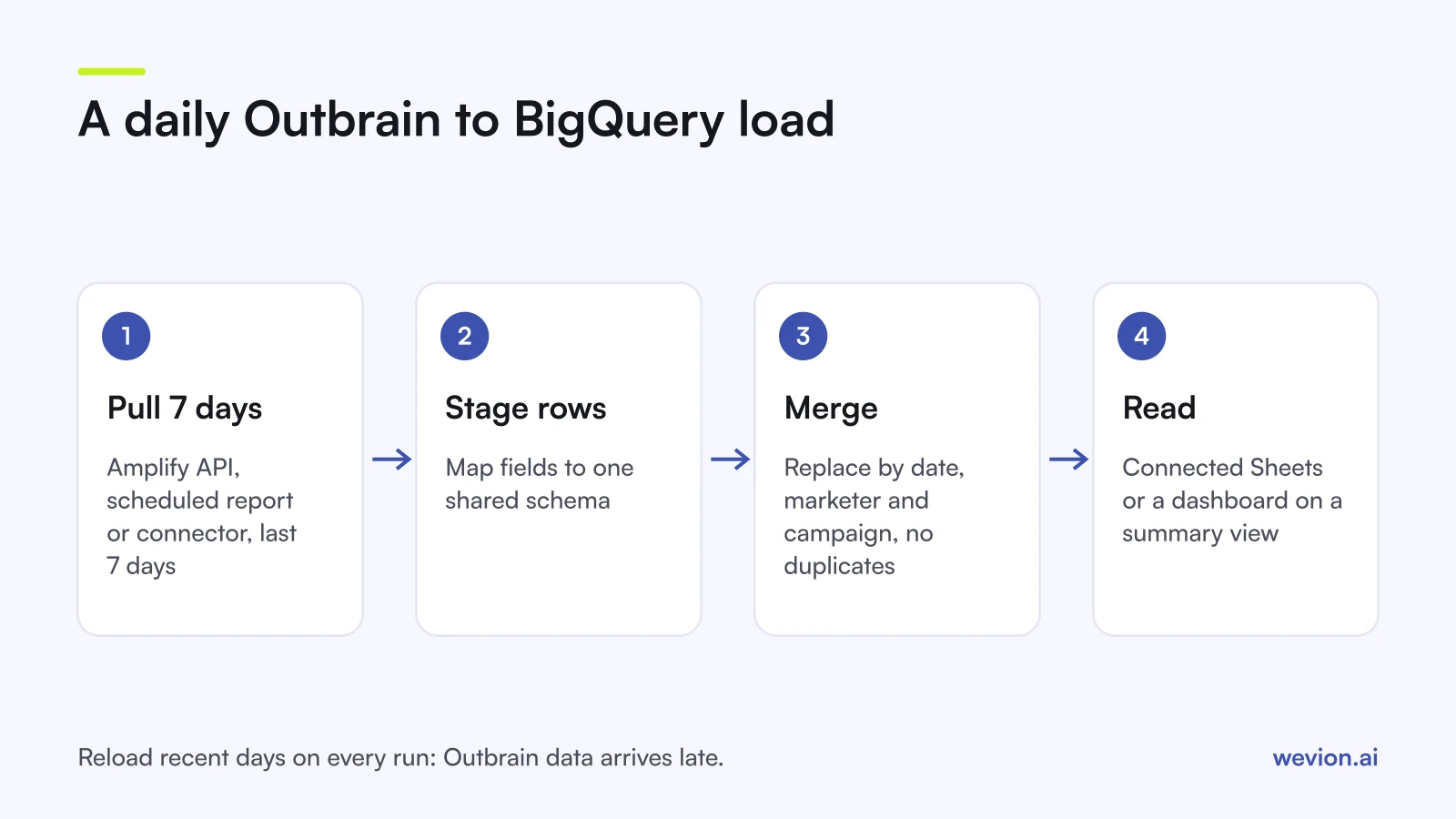
Load each run into a staging table, then use a MERGE on report_date, marketer_id and campaign_id to replace matching rows and insert new ones. Rerunning the same day never creates duplicates.
How many days should each load refresh?
Each daily load should rewrite a window of recent days, not just yesterday, because Outbrain figures keep moving after the day ends. Outbrain's reporting page says performance data such as spend and clicks is "subject to a 2-4 hour reporting delay", and conversions can land days after the click, depending on your attribution window.
Worked example (hypothetical numbers). A team loads yesterday only. On Tuesday morning, Monday shows $1,240 spend, 3,100 clicks and 28 conversions: a CPC of $0.40 and a CPA of about $44.29. By Friday, Amplify shows 31 conversions for Monday, a CPA of $40. The warehouse still says $44.29, so the native channel looks worse than it is. Reloading the last seven days on every run fixes that. Set the window to match your longest conversion window, and fix older days with a monthly full reload.
A second trap is the time zone. Outbrain sends scheduled reports by 7am US Eastern time, so check which zone your rows use, record it in the table and align it with your other channels before blending. Our guide to building a cross-channel reporting dashboard covers shared metric definitions, and our article on platforms double counting conversions explains why Outbrain's conversions will not match your store's orders.
How do you read the data in Google Sheets?
Google Sheets works best as the reading layer, not the storage layer, once Outbrain data lives in BigQuery. Google's Connected Sheets lets you query BigQuery tables from a sheet, on request or on a schedule. Data extracts of up to 50,000 rows have no cell limit, and pulls above 500,000 rows are not supported, so point the sheet at a small summary view rather than the raw table.
A summary view for a weekly sheet might hold one row per week per campaign with spend, clicks, conversions, CPC and CPA. Scheduled refreshes need a user with BigQuery access, not just access to the sheet.
If you do not use BigQuery at all, a direct Sheets connector from the table above, or the weekly pasted report from Route 2, is simpler. Choose by who maintains it: a connector needs a budget line, a script needs a developer, a pasted report needs a calendar reminder.
Which route should you pick?
The right route depends on refresh needs, budget and who will fix it when it breaks. Use this as a starting point:
| Situation | Route |
|---|---|
| One account, weekly review | Scheduled report pasted into Sheets |
| Several accounts, daily dashboard | Connector into BigQuery, Sheets or Looker Studio on top |
| Many marketers, custom fields, in-house data team | Amplify API with your own loader |
| Outbrain DSP (Zemanta) campaigns | A connector that lists Outbrain DSP as its own source |
Whatever you choose, document the token owner and renewal date, the reload window and the conversion-date setting.
Where Wevion fits
Many teams build an Outbrain warehouse only to see native spend next to Meta, Google and TikTok, and that part does not need a warehouse.
Wevion connects Outbrain through an API token you paste, next to Meta, Google, TikTok, Taboola and Snapchat through each platform's official API, syncs data about every 15 minutes and maps Outbrain's eCPM to CPM, so all six platforms sit side by side in one cross-channel view without a pipeline to maintain.
The Help Center guide Connect Outbrain Amplify shows where to create the token in Amplify and notes that it lasts 30 days and must be renewed. Wevion has no BigQuery export: in cross-channel analytics you can download the active view's daily data as CSV or Excel and load that file wherever you need it. To ask an AI assistant about native and social spend together, see our guide to the Taboola and Outbrain MCP options.
Start a 14-day trial with no card. We ask for one on day 7, or earlier if you use up the trial credits, and billing starts on day 14 only if you add it.
Key takeaways
- BigQuery has no built-in Outbrain source, so you need the Amplify API, a scheduled report or a third-party connector.
- The Amplify API is by request, tokens last 30 days, and reporting allows 10 requests per minute per marketer.
- Fivetran, Airbyte, Supermetrics, Coupler.io and Windsor.ai document Outbrain sources with BigQuery as a destination.
- Use one row per day per campaign, partition by date and merge on date plus campaign.
- Reload the last several days on every run, because Outbrain data arrives late.
- Outbrain DSP is the former Zemanta, a different data source from Amplify.
- Read BigQuery in Google Sheets through Connected Sheets, from a small summary view.