
How to Bulk Launch TikTok Ads: Import, Duplicate, Smart+
Yuki Tanabe
Creative AI Strategist
To bulk launch TikTok ads, you have four native options in TikTok Ads Manager: Bulk Import & Export, which builds ads from a CSV or Excel file; duplication of ad groups and ads; Bulk Edit, which changes up to 200 items at once; and Smart+, where one ad can hold many creatives. Each has limits that decide which one fits your launch.
Quick answer: Use Bulk Import & Export when you have dozens of ads with different creatives, texts or settings: up to 500 rows and 2MB per file. Use bulk duplicate for a handful of copies of a proven ad group. Use Smart+ when you would rather give TikTok many creatives and let it choose. Check the active ad group quota before any large import.
This guide stays inside TikTok. If you launch the same campaigns on several platforms, our walkthrough on bulk launching campaigns across platforms covers that workflow, and the TikTok ads campaign structure guide explains how campaigns, ad groups and ads fit together.
Which native tools can create TikTok ads in bulk?
TikTok Ads Manager offers four native tools for creating or changing many ads at once, and they solve different problems. The table sums them up, with limits taken from TikTok's help centre as of November 2026.
| Tool | What it does | Limit TikTok documents |
|---|---|---|
| Bulk Import & Export | Creates or edits ads from a CSV or Excel file | 2MB and 500 rows per file |
| Bulk duplicate | Copies ad groups or ads as drafts | Up to 20 ad groups or 50 ads selected |
| Bulk Edit | Changes status, name, budget, bid, schedule and more | Up to 200 campaigns, ad groups or ads |
| Smart+ ads | Puts many creatives into one ad | 30 ads per ad group, 50 creatives and 5 texts per ad |
Two account-wide limits sit above all of them. TikTok's ad account limits page lists 5,000 campaigns per ad account, 999 ad groups per campaign and 50 ads per ad group. It also sets a quota of active ad groups based on monthly spend: 50 below $1,500, 200 from $1,500 to under $150,000, and 1,000 from $150,000. Ad groups in review count as active.
How does Bulk Import & Export work?
Bulk Import & Export is TikTok's spreadsheet route for building ads, and it is the closest thing to a true bulk launcher inside Ads Manager. TikTok's help page says it can create many ads at once, edit settings such as budget, bidding and audience across many ad groups, copy a campaign or ad group with new settings, and add new creatives to existing ads.
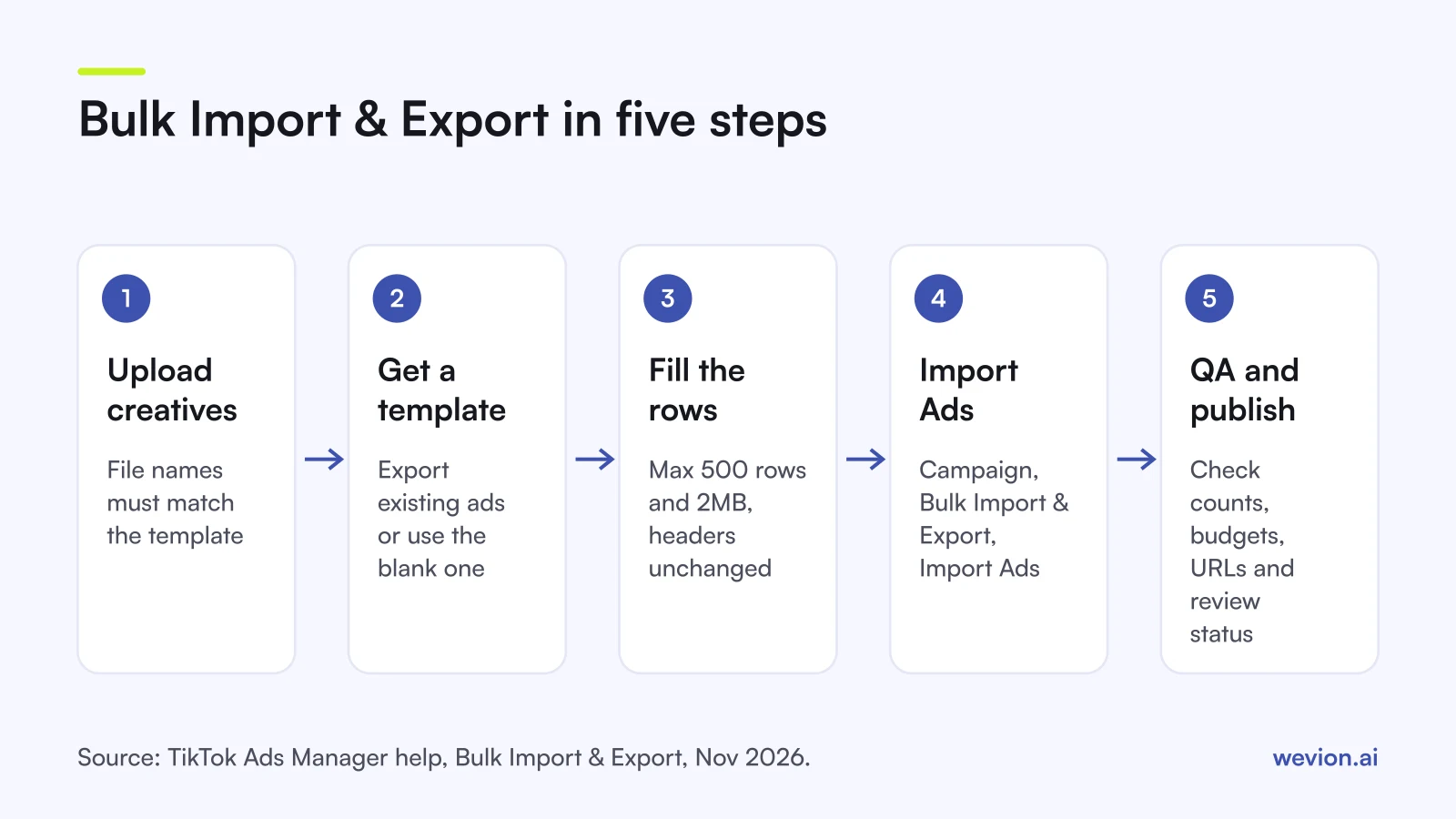
The steps, from TikTok's guide to creating ads with bulk import:
- Get a template. Either export existing ads (select them, then Bulk Import & Export, then Export) or start from TikTok's blank template.
- Clear the IDs for new ads. To create new ads from an export, remove the Campaign, Ad Group and Ad IDs. To edit existing ads, keep them: the IDs are how TikTok finds the ads.
- Upload creatives first. TikTok's bulk import articles say the creative's file name in the template must match its name in your assets, so upload before you import.
- Fill the rows. TikTok's page says non-ACO ads use one ad per row, while ACO ads, where TikTok combines your creatives automatically, use one ad group per row.
- Import. Go to Campaign, click Bulk Import & Export, then Import Ads, and upload the file.
The gotchas are mechanical. The file must stay under 2MB and 500 rows. TikTok warns that the file will fail to import if the column headers are changed, so never rename or reorder them. TikTok's Smart+ bulk import page says the feature also supports Smart+ campaigns.
When should you duplicate instead of import?
Duplication suits launches where most settings stay the same and only one thing changes, such as the audience or the budget. TikTok's bulk duplicate guide lets you select up to 20 ad groups or 50 ads, choose how many copies you want, and click Duplicate. The copies appear as drafts, so you can edit them and then click Publish all.
The limits worth knowing before you plan around duplication:
- Bulk duplicate works on ad groups and ads only. Campaign-level duplication is not supported there, and you cannot copy ad groups and their ads in one go.
- A single ad group can be copied up to 20 times at a time, and only ad groups that passed ad review can be copied.
- Campaigns with more than 20 ad groups cannot be duplicated, and a split test is dropped from the copy.
- Copied ads go into review again, and an ad group still cannot go above 50 ads.
TikTok's duplication pages say nothing about learning carrying over. Treat each copy as a new ad group that starts from zero, which matters for budgets: our guide to the TikTok ads learning phase explains why.
How do Smart+ ads change bulk launching?
Smart+ changes the job from building many ads to feeding one campaign many creatives and letting TikTok decide what to show. TikTok's Smart+ ads page says you can have up to 30 unique ads per ad group, and each ad supports up to 50 creatives and 5 texts. TikTok's update notes describe each ad as working like an asset group, with its own destination URL, product set and creatives.
In practice that means a test of 40 videos needs only one Smart+ ad, where a standard campaign would need 40 ads spread over at least one ad group. The trade-off is control: you see results by creative, but TikTok picks the delivery. Our Smart+ campaigns guide covers when that trade-off is worth it.
To get creatives in place before any bulk launch, use the Creative Library, TikTok's hub for videos, images, playable ads and Spark Ads posts. TikTok's upload guide says you can upload one or more creatives at once. Check them against the TikTok ad specs first, since a rejected video stops every row that uses it.
What does a bulk launch look like with real numbers?
A worked example makes the limits concrete. The numbers below are hypothetical and chosen to add up.
You want to test 6 videos with 2 ad texts each across 4 audiences. With standard ads, that is 6 × 2 = 12 ads per ad group and 4 ad groups, so 48 ads in total.
| Check | Number | Limit | Fits? |
|---|---|---|---|
| Rows in the import file | 48 | 500 | Yes |
| Ads per ad group | 12 | 50 | Yes |
| New active ad groups | 4 | 50 at the lowest spend tier | Yes, if fewer than 46 are already active |
If you add 10 more audiences, the file grows to 168 rows and 14 ad groups, still well inside the row limit. The quota is what usually bites: an account spending under $1,500 a month with 40 ad groups already active has room for 10 more, so the import would hit the quota partway through. Pause or delete old ad groups before you import, not after.
How should you name bulk-launched TikTok ads?
A naming pattern is what keeps a bulk launch readable a week later, when you have to decide which of 48 ads to keep. TikTok allows campaign names up to 512 characters, and the same length applies to ads, so length is not the problem. Consistency is.
A pattern that sorts well in Ads Manager and in reports:
- Campaign:
TT_[objective]_[market]_[test or scale]_[YYYYMMDD] - Ad group:
[audience]_[placement or optimisation event]_[budget type] - Ad:
[creative ID]_[hook]_[text version]
Keep the creative ID identical to the creative's file name in your assets, since the import file has to match that name anyway. Add matching UTM parameters at the same time: our guide to UTM parameters for TikTok ads lists the macros TikTok supports.
How do you QA a bulk launch on TikTok?
A bulk launch multiplies mistakes as easily as it multiplies ads, so QA should happen before anything spends. Our ad launch checklist has the full list; the TikTok-specific checks are:
- Review before you publish. Bulk duplicate creates drafts you publish with Publish all; for imports, open a sample of rows across every ad group straight after the upload.
- Check the totals. Ads per ad group and ad groups per campaign should match your plan exactly.
- Check budgets and schedules with Bulk Edit, which shows many ad groups side by side.
- Open three or four landing URLs with their UTM parameters attached.
- Watch review. Copied and imported ads both go through review, and a rejected creative needs fixing in every row that used it.
- Set guardrails before launch. TikTok's Automated Rules can pause low performers or change budgets; our TikTok automated rules guide shows rule setups.
Where does a multi-platform tool fit?
TikTok's native tools are enough when TikTok is the only platform you launch on. They stop helping when the same test has to go out on Meta and Google too, because each platform has its own template, its own limits and its own naming.
Wevion connects TikTok, Meta, Google, Snapchat, Taboola and Outbrain ad accounts through each platform's official API, syncs data about every 15 minutes and shows spend and results for every account in one view, so a test launched on three platforms can be read side by side.
Bulk Launch builds campaigns from one grid and marks errors on the row that caused them before anything reaches the platform. You can turn on Launch as paused so nothing spends until you switch it on, and templates keep tested structures. Automated rules can then pause, activate, change a budget or bid by a percentage, or just send an alert, with a cooldown and a daily cap on runs. One workspace per client and team roles such as manager, media buyer, finance and viewer keep agency accounts apart. For scaling the winners afterwards, see how to scale TikTok ads.
You can try it on your own ad accounts with a 14-day trial on the Pro plan. No card to start. We ask for one on day 7, or earlier if you use up the trial credits, and billing starts on day 14 only if you add it.
Key takeaways
- Bulk Import & Export is TikTok's spreadsheet route: CSV or Excel, up to 2MB and 500 rows, headers unchanged.
- Bulk duplicate copies up to 20 ad groups or 50 ads as drafts; campaigns with more than 20 ad groups cannot be duplicated.
- Bulk Edit changes up to 200 campaigns, ad groups or ads at once.
- Smart+ allows up to 30 ads per ad group, each with up to 50 creatives and 5 texts.
- The active ad group quota (50, 200 or 1,000 by monthly spend) is the limit most bulk launches hit first.
- Name every level with one pattern, and QA before anything spends.