
Shopify Apps for Ads: The Stack a DTC Brand Needs
Priya Raghunathan
E-Commerce Performance Manager
The Shopify apps for ads you install decide what Meta, Google and TikTok know about your sales, which products they can show and how you judge whether the spend paid off. Most DTC brands need fewer apps than the App Store suggests: one official channel app per ad platform, then one tool each for feeds, profit, reviews and customer surveys.
Quick answer: Install the official sales channel apps first: Facebook & Instagram (Meta), Google & YouTube (Google) and TikTok (TikTok). They sync your catalogue and set up conversion tracking. Then add only what fills a gap: a feed app for custom rules, a profit tracker for margin and POAS, a reviews app for social proof and creative, and a post-purchase survey to check attribution.
This is a category guide, not a ranking. App names and descriptions below come from each app's own Shopify App Store listing as of November 2026, and we have left out ratings and prices because both change often. For the Meta setup in depth, read our guide to Meta ads for Shopify stores.
Which app categories does a Shopify brand need for paid ads?
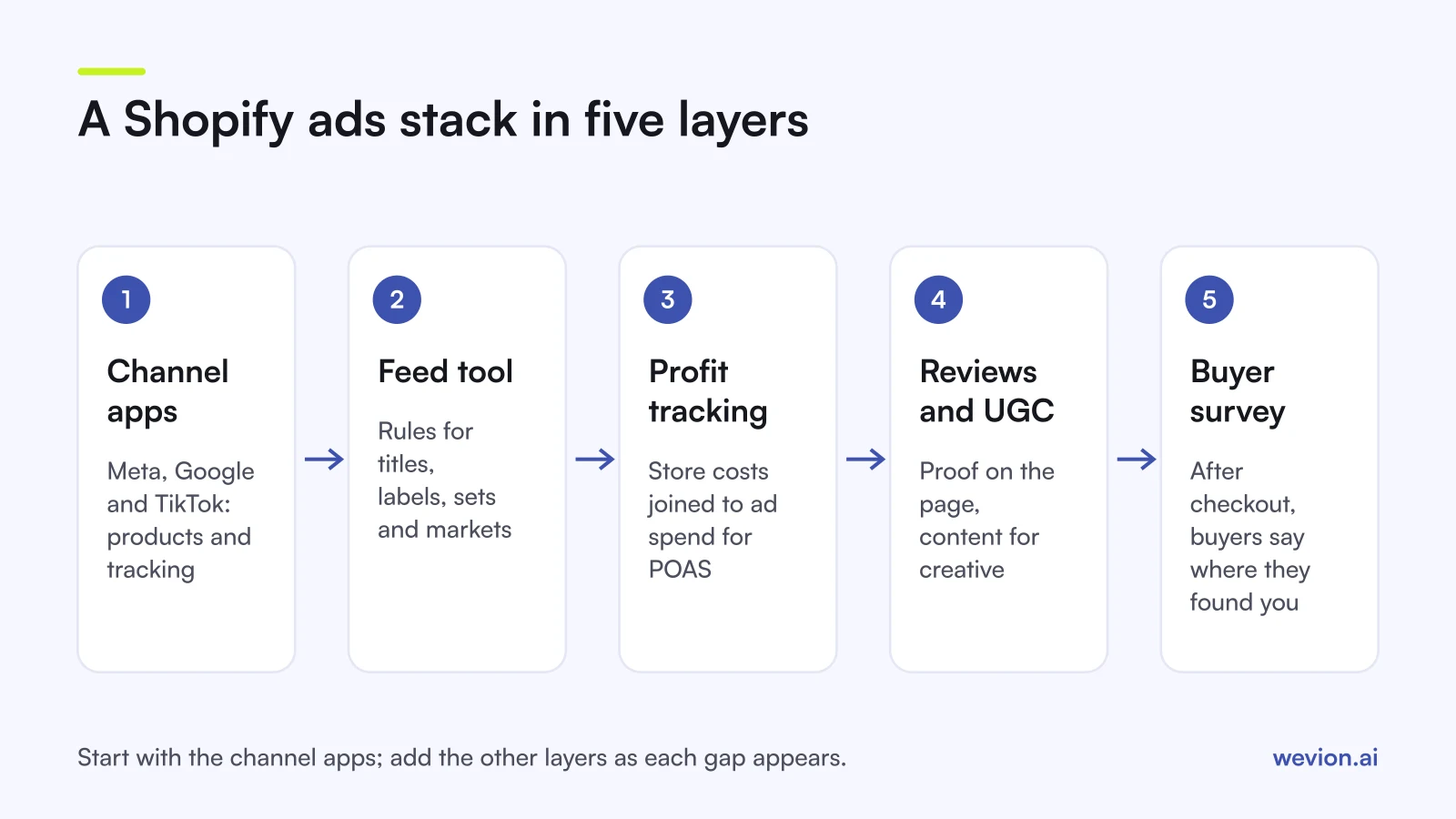
Each category answers a different question, so it helps to see them as layers.
| Category | Question it answers | When you need it |
|---|---|---|
| Sales channel apps | Can the platform see my products and my sales? | From the first ad |
| Feed management | Are my product titles, labels and sets good enough to sell? | When the default sync limits you |
| Profit and attribution tracking | Did the ads make money, not just revenue? | Once you spend across more than one platform |
| Reviews and UGC | Do I have proof and real customer content for creative? | From launch, it compounds over time |
| Post-purchase surveys | Where do buyers say they found us? | When platform numbers stop adding up |
Which sales channel apps should you install first?
The official channel apps are free to install, connect your store to each ad platform and bill ad spend to your own ad account. They are the base layer, because without them the platform cannot see your catalogue or your purchases.
Facebook & Instagram, by Meta. The listing calls it "the official app from Meta". It syncs eligible products to your Facebook and Instagram shop and sets up the pixel for ad tracking. It is also where you choose the data sharing level, covered in the next section.
Google & YouTube, by Google. The listing says it syncs "your products, deals, and shipping to Merchant Center" and runs ads across Google properties such as Search and YouTube. Shopify's setup guide says to connect your Google Ads account "to get conversion measurements for your ads", and the connected Google account must be an administrator on that Google Ads account. For campaign setup, see our guide to Google Shopping ads.
TikTok, by TikTok. The listing offers a one-click TikTok Pixel integration, product sync from Shopify to TikTok and TikTok Shop order management in Shopify admin. TikTok's help page adds that the app installs the Pixel and the Events API with no website code changes, and notes it is not available in all markets. For catalogue campaigns, see TikTok catalogue ads.
Install one app per platform and remove any older pixel pasted into the theme. Two pixels for the same platform is a common cause of double-counted purchases.
What do the channel apps send to each platform?
The channel apps differ most in how much customer data they share, and that decides how many purchases the platform can match to its users.
Meta. Shopify's data sharing page describes three levels:
| Level | Technology | Data shared |
|---|---|---|
| Standard | Meta pixel | Browsing behaviour in the store |
| Enhanced | Conversions API plus pixel | Adds name, location, email and phone |
| Maximum | Conversions API plus pixel | Same data, "updated with Facebook's latest advertising technology" |
Shopify notes that data sent server to server "can't be blocked by browser-based ad blockers", which is why Enhanced and Maximum can capture purchases that Standard misses. You change the level under Sales channels > Facebook & Instagram > Settings > Data sharing settings.
TikTok. In a 2023 announcement, TikTok described three levels in its Shopify app: Standard uses the TikTok Pixel; Enhanced adds the Events API and Advanced Matching; Maximum adds Shopify APIs on top. Check the current options in the app, as TikTok's help page does not list the levels by name.
Google. Shopify's help centre describes conversion measurement through the connected Google Ads account, but does not set out sharing levels like Meta's, so check what the app shows when you connect.
Data also flows the other way. Shopify's marketing app data page says advertising apps including TikTok, Pinterest, Snapchat Ads and Google & YouTube (in early access) can send ad cost and impressions into Shopify. And whatever level you pick, Shopify says that if a customer opts out of data collection, their data isn't processed. Agree the level with whoever owns your privacy policy.
Do you need a feed management app?
The channel apps sync products, but they sync them as they are. A feed app earns its place when you need to change how products appear in ads without changing your storefront. Our product feed optimisation guide covers what to fix first.
- Simprosys Google Shopping Feed (listing). Submits product feeds to Google Shopping, Microsoft and Meta, among other channels, with automated feed rules, bulk editing, metafield mapping and multi-country, currency and language support.
- Flexify: Facebook Product Feed (listing). Customises the Meta product feed and builds enhanced catalogues. It works alongside Shopify's Facebook & Instagram channel or as the main integration, and creates Meta product sets from Shopify tags and collections.
If your titles are clean and you sell in one country, you may not need either. Add one when you start writing rules in a spreadsheet every week.
Which apps track profit and attribution?
Every ad platform reports its own revenue, and none of them knows your product costs. Profit trackers join store costs and ad spend, so you can judge campaigns on profit. Our guide to POAS vs ROAS explains why that matters.
- BeProfit, Profit Analytics (listing). Calculates profit after product costs, ad spend, shipping, transaction fees and refunds, per order and per product, and shows POAS next to ROAS. Its listing names integrations including Facebook Ads, Google Ads and Amazon.
- TP: True Profit Analytics (listing). Tracks COGS, shipping, transaction fees, taxes and custom costs, with product-level and ad-level profit, and lists ad spend sync from Facebook, Google, TikTok, Bing, Snapchat and Amazon.
Some well-known attribution tools are not installable from the App Store today; Triple Whale's listing, for example, says it "is not currently available on the Shopify App Store". Check availability before you plan around a tool.
Which apps help with reviews and UGC for creative?
Reviews do two jobs for ads: they build trust on the product page, and customer photos and videos become raw material for creative. Ask for permission before you use a customer's content in an ad.
- Judge.me Product Reviews App (listing). Collects photo and video reviews with automated requests after fulfilment or delivery. On its paid plan, the listing mentions star ratings in Google Shopping and syncing reviews with Meta and TikTok Shop.
- Okendo: Reviews & Loyalty (listing). Covers reviews, loyalty, surveys, quizzes and referrals, with photo and video reviews collected by email, SMS and forms.
Why add a post-purchase survey?
Pixels only see clicks and views on their own platform. A survey on the thank-you page asks the buyer directly, which catches creators, podcasts and word of mouth that no pixel tracks. Read our comparison of first-touch and last-touch attribution for why the numbers disagree.
- Fairing Post Purchase Surveys (listing). Runs surveys on the thank-you and order status pages to show which marketing channels drive sales, and reads answers against order and lifetime value data.
- KNO Post Purchase Surveys (listing). Post-purchase surveys "to gain attribution insights from customers", with templates, audience targeting and attribution models.
Keep the survey to one or two questions. A long survey on the thank-you page gets fewer answers.
How should you build the stack, step by step?
Install in this order, and add the next layer only when you feel the gap:
- Channel apps for each platform you advertise on, with one pixel per platform.
- Data sharing set to the level your privacy policy supports.
- Reviews app, so proof and customer content start building early.
- Feed app, once the default feed limits titles, labels or markets.
- Profit tracker, once you spend on two or more platforms.
- Post-purchase survey, once platform totals stop matching store orders.
A hypothetical example: a store spending €15,000 a month sees €48,000 of purchase value reported by Meta, Google and TikTok combined, but €40,000 of net sales in Shopify. A gap like that €8,000 usually means platforms are claiming some of the same orders, and that is the moment to add a profit tracker and a survey rather than another channel.
Where Wevion fits
Wevion is not a Shopify App Store app and does not send conversions to Meta: that stays with the Facebook & Instagram app and the Conversions API. It sits in the profit and reporting layer.
Wevion connects Meta, Google, TikTok, Snapchat, Taboola and Outbrain ad accounts through each platform's official API, with OAuth for Meta, and syncs data about every 15 minutes. Profitability Analytics, in beta, connects your Shopify store, syncs cost per item and shows profit, margin and POAS next to spend from every platform, with margin per SKU. Our guide to Shopify profit tracking from ROAS to POAS walks through the costs to set up.
Start a 14-day trial with no card. We ask for one on day 7, or earlier if you use up the trial credits, and billing starts on day 14 only if you add it.
Key takeaways
- Start with the official channel apps: Facebook & Instagram, Google & YouTube and TikTok.
- On Meta, the data sharing level decides whether purchases also travel through the Conversions API; Enhanced and Maximum add it.
- Keep one pixel per platform and remove old theme code.
- Add a feed app only when you need rules the default sync cannot do.
- Use a profit tracker to judge ads on margin and POAS, not platform revenue.
- Reviews feed creative, and a post-purchase survey checks attribution the pixels miss.