
Speed to Lead: Get Paid Ad Leads to Sales in Minutes
Marta Kowalczyk
Agency Operations Lead
Speed to lead is the time between someone submitting a form from your ad and the first real contact from the business. For paid ads it decides how much of your cost per lead turns into conversations, because a person who tapped a Meta, TikTok or Google form on their phone is easiest to reach while they still remember the ad.
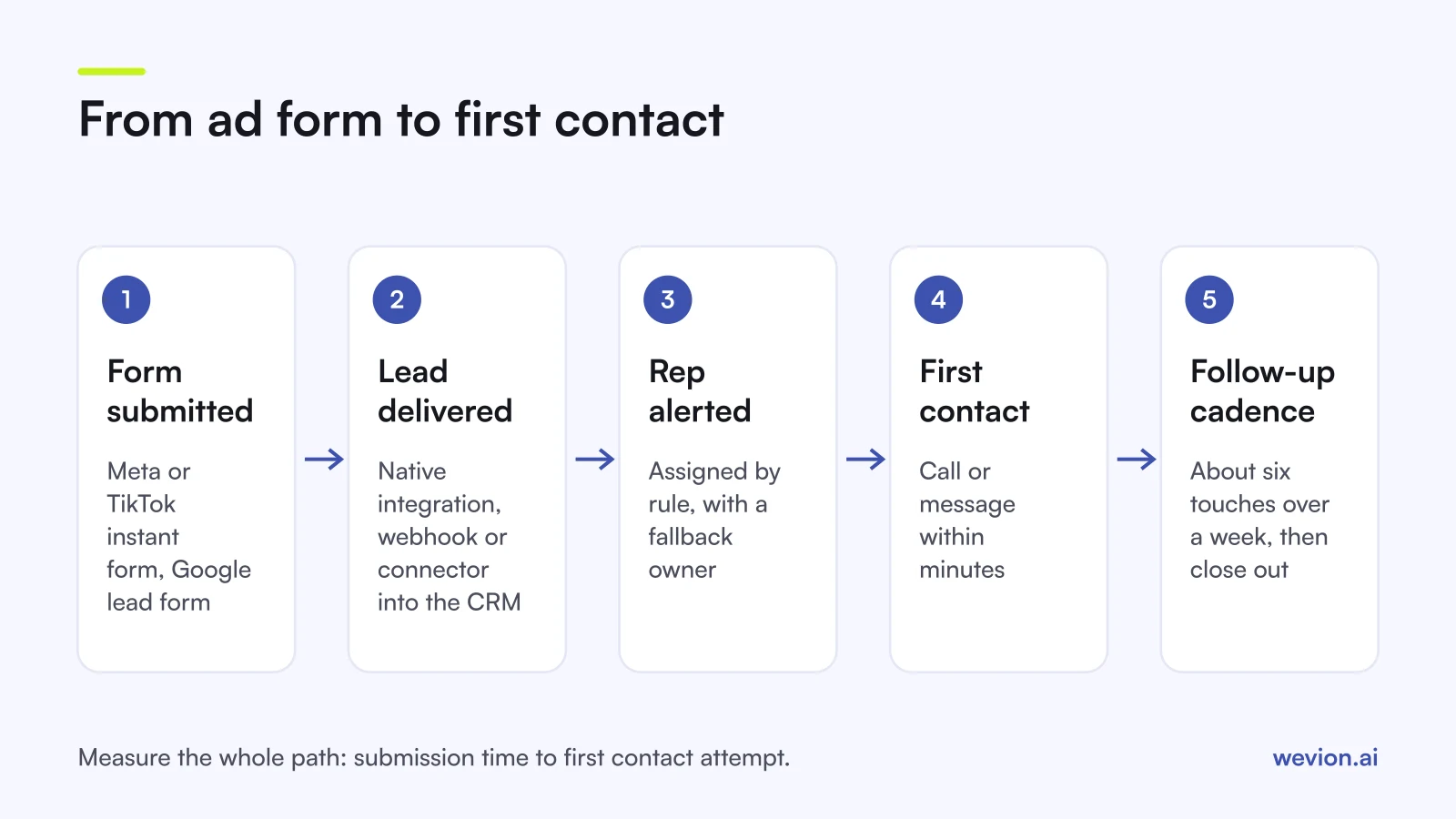
Quick answer: Connect every lead form to the CRM with a native integration or a webhook, never a manual CSV. Store the platform and campaign on each lead, assign it automatically to a named rep with a fallback owner, alert that rep at once, and make the first contact within minutes in working hours. Then follow a fixed cadence for leads you do not reach, and measure median time to first contact weekly.
This guide is about the minutes after the form. For the form itself, see Facebook lead ads best practices, our guide to Google Ads lead form assets and our guide to TikTok lead generation ads. For what happens weeks later in the CRM, see tracking lead quality through your CRM.
Why does speed to lead matter more for ad leads?
Speed to lead matters more for paid ad leads because a form inside an app takes seconds to complete and is easy to forget. Nobody searched for the business, opened a website and read a pricing page. They saw an ad, tapped, and the form filled most of its fields for them. Interest is real but shallow, and it fades with every hour.
The problem is old and well documented. Research published in Harvard Business Review in March 2011, by James Oldroyd, Kristina McElheran and David Elkington, found that most companies are not responding to online leads nearly fast enough. Instant forms have only made the gap wider, since they generate more leads with less intent than a website form.
For an agency, slow follow-up also distorts the numbers you report. If half the leads are never called, the client's cost per qualified lead doubles, and the campaign gets blamed for a sales problem. Our guide on lead ads vs landing pages explains why instant forms only pay off when follow-up is fast.
How do you measure speed to lead?
Speed to lead is measured as the time from form submission to the first real contact attempt, taken from timestamps in the CRM, not from memory. You need two fields on every lead: when it was created (the submission time the platform sends) and when the first call, message or email went out.
Track three numbers each week per client:
| Metric | How to calculate | Why it matters |
|---|---|---|
| Median time to first contact | Middle value of (first contact time minus submission time) | One slow lead cannot hide a fast team, or the reverse |
| Share contacted within target | Leads contacted within the agreed minutes, divided by all leads | Shows how often the promise holds |
| Never contacted | Leads with no contact attempt after 48 hours | The most expensive leak |
A worked example with hypothetical numbers: a client gets 200 instant form leads in a week. 120 are contacted within 15 minutes, 50 later the same day, 18 the next day and 12 never. The share within target is 120 / 200 = 60%, and 12 / 200 = 6% of paid leads were wasted outright. If the client paid €25 per lead, those 12 leads cost €300 for nothing.
Split the numbers by hour of day as well. Most teams are fast at 11:00 on a Tuesday and slow at 19:00 on a Friday, which is when many instant form leads arrive.
How do leads get from each platform to the CRM?
Leads get from the ad platform to the CRM through one of four routes: a native CRM integration, a webhook, a connector such as Zapier, or a manual download. Only the first three are fast enough for speed to lead. Each platform documents its own options:
| Platform | Automatic routes | Manual route | What to know |
|---|---|---|---|
| Meta instant forms | CRM integrations, connectors, webhooks through the Graph API | Download from Ads Manager | Meta's lead retrieval guide says webhooks can arrive with a delay of up to a few minutes |
| TikTok instant forms | Connect to CRM, with Zapier, LeadsBridge or Google Sheets; API | CSV from Ads Manager | Leads Center filters by status, label, form and assignee and can sync to a CRM |
| Google lead form assets | Webhook, Zapier, Google Ads API | CSV, which covers the last 30 days | Google stores leads for 60 days and offers an email notification per lead |
Google's lead form best practices page recommends a webhook integration for speed. The same logic applies on Meta and TikTok: pick the route that sends each lead on its own, as it comes in.
Three setup rules save most of the trouble later:
- Test with a real submission before launch, on every form, and check the lead lands in the right pipeline.
- Pass the source. Map the platform, campaign, ad and form name into CRM fields. On TikTok, the form's tracking parameters carry them; Meta's lead webhook includes the ad ID, form ID and creation time.
- Watch for failures. A webhook that stops working fails silently. Compare the leads count in each ad platform with new CRM records daily for the first two weeks.
If a client has no CRM, an email notification per lead plus a shared sheet is a temporary fix, not a system. Push for a CRM before you scale spend.
How should you route and alert on new leads?
Routing decides who owns each lead the moment it arrives in the CRM, and alerting makes sure that person knows. A lead assigned to a queue that nobody watches is no faster than a CSV.
Set up routing with the CRM's own assignment rules:
- By territory or language, when reps cover different regions.
- By product or offer, when the form asks which service the person wants.
- By rotation, when reps are interchangeable, so the load stays even.
- A fallback owner, for leads that match no rule or arrive when the owner is away.
Then alert the owner where they already look: a mobile push from the CRM app, a team chat message or an SMS. Email works only for teams that live in their inbox. Each alert should carry the name, the phone number, the answers to the form's questions and the ad it came from, so the rep can call without opening three tabs.
Outside working hours, send an automatic acknowledgement by email or message that says when the person will hear from you, and queue the call for the first slot of the next morning. Check the consent the form collected before you text or call: rules on calls, SMS and messaging differ by country and channel.
What follow-up cadence works for ad leads?
A follow-up cadence is a fixed sequence of contact attempts for leads you do not reach the first time, so nobody decides case by case when to give up. A simple one an agency can hand to a client:
| When | Action | Channel |
|---|---|---|
| Within minutes | First call, or a message if the form asked for one | Phone or messaging |
| Same day | Second call at a different time | Phone |
| Same day | Short email with a booking link | |
| Day 2 | Third call and a text | Phone, SMS |
| Day 4 | Value message: a guide, a price range, a case | |
| Day 7 | Last attempt, then mark as not reached | Phone or email |
Six touches over a week is a starting point, not a rule. A high-value offer such as a kitchen renovation can justify more. A low-value offer may need fewer, with the rest moving to email.
Log every attempt in the CRM. "Not reached" is a valid stage, and it is the one you need when you later check whether a campaign brings leads who never answer. That stage data feeds Meta's conversion leads goal, covered in our guide to conversion leads optimization.
If the person would rather chat than talk, a click-to-WhatsApp ad moves the first contact into a conversation they started, which changes the speed problem from calling back to replying.
How do agencies make speed to lead stick with clients?
Agencies make speed to lead stick by writing it into the onboarding and the weekly report, because most of the work happens on the client's side. You control the ads and the form. The client controls the phone.
Agree three things before launch: the target time to first contact, who owns leads at night and at weekends, and the cadence above. Then report median time to first contact next to cost per lead every week. When a client sees that leads called within the target became meetings far more often than leads called the next day, in their own CRM data, the conversation moves from "the leads are bad" to "the follow-up is slow".
Speed also changes how you read cost. Our breakdown of cost per qualified lead across six platforms shows why the same cost per lead can hide very different results.
Where Wevion fits
Wevion is not part of the lead delivery path: it does not store, score or route leads, has no CRM and does not send events or offline conversions to the platforms.
Wevion connects Meta, Google, TikTok, Taboola, Snapchat and Outbrain ad accounts through each platform's official API, syncs data about every 15 minutes, and shows platform-reported leads, cost per lead and spend for every client in one view, so you can see quickly when lead volume drops or costs jump.
Each client gets its own workspace, and automation rules can pause ad sets, change budgets or just send an alert when cost per lead crosses a threshold you set. A sudden drop in leads next to steady spend is also a useful clue that a form or an integration has broken.
You can try it on your own ad accounts with a 14-day trial on the Pro plan. No card to start. We ask for one on day 7, or earlier if you use up the trial credits, and billing starts on day 14 only if you add it.
Key takeaways
- Speed to lead is the time from form submission to first real contact, measured from CRM timestamps.
- Track median time to first contact, share contacted within target and leads never contacted, per client, each week.
- Use a native integration, webhook or connector on every platform; never rely on manual CSV downloads.
- Route by rule with a fallback owner, alert the rep with the lead's answers, and acknowledge leads automatically outside working hours.
- Follow a fixed cadence of about six touches over a week, and log "not reached" as a stage.